
Guide to Secure Meta Ads Data Storage
Secure Meta Ads data with server-side tagging, AES-256/TLS encryption, strict access controls, and regular audits.
Meta ads data is critical for targeting and performance but comes with high risks if mishandled. Data breaches can cost businesses millions and destroy customer trust. Legal penalties under GDPR and CCPA can be severe, and poor security can tank ad performance, leading to higher acquisition costs and lower ROAS.
Here’s how you can protect your Meta ads data:
Use Server-Side Tagging with Meta's Conversions API: Control what data is sent, hash sensitive info, and ensure proper encryption.
Encrypt Data: Use AES-256 for storage and TLS 1.2+ for transfers.
Limit Access: Implement role-based permissions and admin roles, enforce multi-factor authentication, and review access quarterly.
Monitor and Audit Regularly: Use activity logs and automated tools to detect anomalies and ensure compliance.
Remove Sensitive Data: Avoid storing or transmitting unnecessary data and automate data retention policies. You can also use governance tools for data retention to ensure long-term compliance.
Investing in data security protects your business from fines, maintains customer trust, and ensures smooth ad operations.
What Data Meta Ads Collects and Where It's Vulnerable
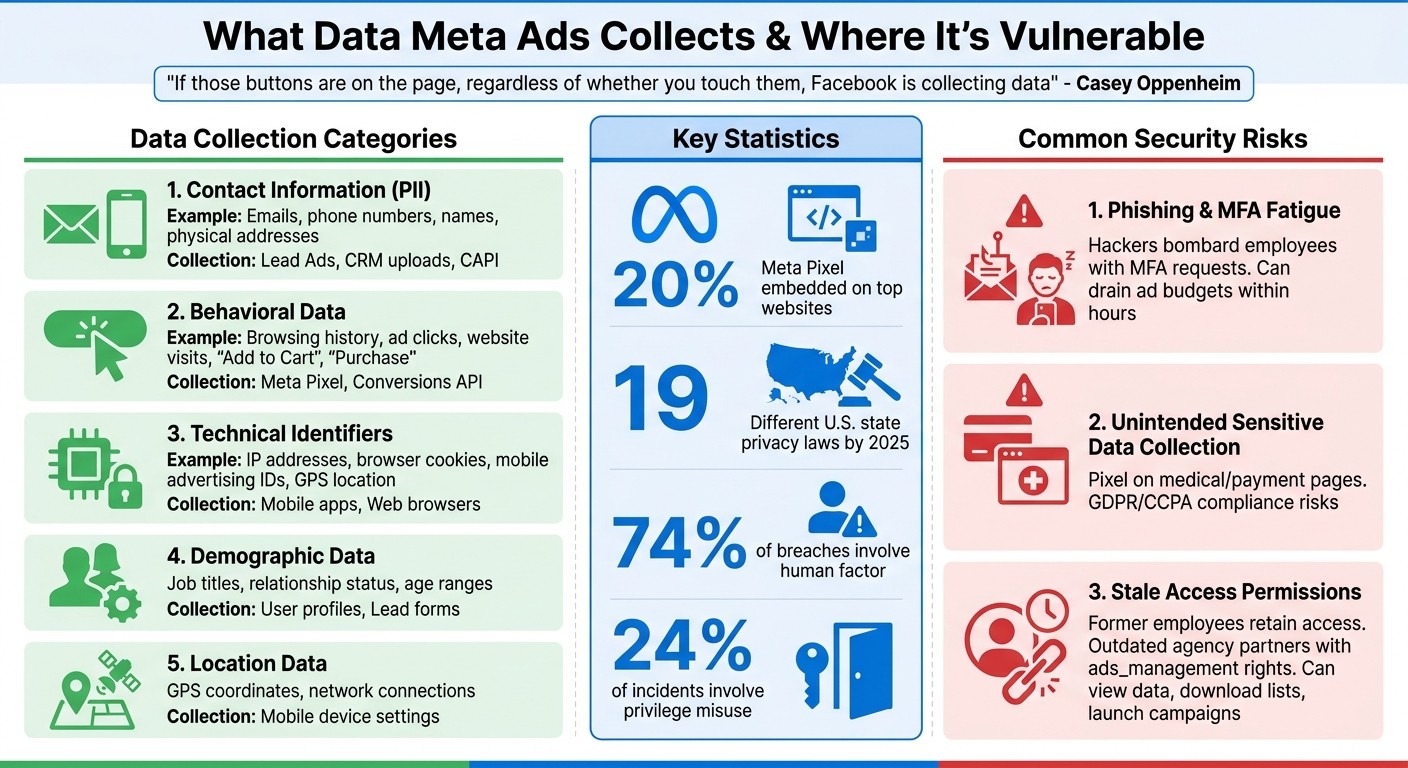
Meta Ads Data Collection Types and Security Vulnerabilities
Understanding the types of data Meta Ads collects and the potential risks tied to it is the first step toward ensuring better data security.
Types of Data Collected in Meta Ads
Meta’s advertising platform gathers data in five key categories, each with its own security considerations. Given that the Meta Pixel is embedded on approximately 20% of top websites, the scale of data collection is enormous.
The first major category is contact information. This includes personal details like email addresses, phone numbers, names, and physical addresses. Such data is often collected via lead forms or uploaded directly from your CRM. Next is behavioral data, which tracks user actions - such as browsing habits, ad clicks, website visits, and specific events like "Add to Cart" or "Purchase." Technical identifiers are another category, covering IP addresses, browser cookies, mobile advertising IDs, and even GPS location data. Demographic information, sourced from user profiles, includes details like job titles, relationship status, and age ranges. Finally, location data is collected through mobile device settings, capturing GPS coordinates and network connections.
Meta Pixels can also inadvertently capture sensitive financial or medical data if placed on checkout pages or health-related portals.
"If those buttons are on the page, regardless of whether you touch them, Facebook is collecting data" - Casey Oppenheim, Co-founder, Disconnect
Here’s a breakdown of how data is collected:
Data Category | Examples of Data Collected | Collection Method |
|---|---|---|
Contact Information (PII) | Emails, phone numbers, names | Lead Ads, CRM uploads, CAPI |
Behavioral Data | Browsing history, ad clicks, "likes" | Meta Pixel, Conversions API |
Technical Identifiers | IP addresses, Advertising IDs, Cookies | Mobile apps, Web browsers |
Demographic Data | Job titles, relationship status, age | User profiles, Lead forms |
Location Data | GPS coordinates, network connection | Mobile device settings |
While this data is essential for precise ad targeting, it also creates multiple vulnerabilities that need attention.
Common Security Risks in Ad Data Storage
The greatest risks often stem from how businesses handle and store data locally, rather than from Meta’s servers. One major threat is phishing attacks targeting Business Manager credentials. Hackers frequently use tactics like "MFA fatigue", where they bombard employees with repeated multi-factor authentication requests until one is mistakenly approved. Once inside, attackers can drain ad budgets or steal customer data within hours, which are clear signs your ad account is compromised.
Another risk arises when the Meta Pixel is triggered on sensitive pages, such as medical intake forms or payment confirmation screens. This can lead to the unintended collection of sensitive data, creating compliance risks under regulations like GDPR or CCPA. By 2025, 19 different U.S. state privacy laws will be in place, each with varying consent requirements.
Stale access permissions are another overlooked vulnerability. Former employees, outdated agency partners, or contractors with lingering [ads_management](https://www.adamigo.ai/blog/meta-ad-account-roles-and-permissions-explained) access can still view performance data, download customer lists, or even launch unauthorized campaigns. If left unchecked, a single inactive account could jeopardize your entire ad operation. Regular access audits are essential to minimize these risks.
How to Secure Your Meta Ads Data
Protecting your Meta Ads data requires a solid approach to security, from data collection all the way to storage. Here’s how to do it effectively.
Use Server-Side Tagging with Meta's Conversions API
Server-side tracking through Meta's Conversions API (CAPI) shifts the handling of data from the user's browser to your server. This gives you more control, allowing you to decide exactly what information gets sent to Meta. Unlike the Pixel, which operates in the browser and might capture unnecessary data, CAPI lets you filter and sanitize data before it leaves your systems.
To ensure clean and secure data inputs, follow these guidelines:
Hash personal information like emails, phone numbers, and names using SHA256.
Standardize email formatting by lowercasing and trimming whitespace before hashing.
Use proper currency codes like "USD" (ISO 4217) instead of symbols like "$".
Avoid double-counting by assigning unique event IDs to each conversion when using both the Pixel and CAPI.
Control data access with IP allowlisting in Meta Business Manager. Regularly update the list to remove outdated IPs from old hosting providers or development environments.
Encrypt data in transit by enforcing TLS 1.2 or higher.
Here’s a quick summary of key requirements:
Requirement | Implementation Detail |
|---|---|
Hashing Algorithm | SHA256 for sensitive data |
Email Formatting | Lowercase and trim before hashing |
Currency Standards | Use ISO 4217 codes (e.g., "USD") |
Deduplication | Assign unique event IDs |
Access Control | Use IP allowlisting in Meta Business Manager |
Security Protocol | Enforce TLS 1.2 or higher |
Make it a habit to inventory your data monthly and test your CAPI setup annually to catch any configuration drift or security gaps.
Encrypt Data During Storage and Transfer
To protect sensitive data, encryption is a must - not just during transfer but also while it’s stored. Use TLS 1.2+ for data in transit and AES-256 encryption for stored data, such as customer lists, conversion records, or CRM exports. Store encryption keys securely in Hardware Security Modules (HSMs), which are tamper-resistant devices designed to block unauthorized access. Never hardcode keys in your applications or store them in plain text.
Remove or Anonymize Personally Identifiable Information (PII)
For better privacy and security, scale personalization without privacy risks by stripping or hashing any data that could identify an individual. Automate data retention and deletion processes to ensure personal information isn’t kept longer than necessary.
If users decline tracking consent, adjust your data practices accordingly. Meta’s Consent Mode allows you to rely on privacy-friendly statistical modeling instead of transmitting personal identifiers. This way, your campaigns can still function while respecting user preferences.
Automated compliance tools like AdAmigo.ai can simplify real-time consent tracking and ensure ongoing data minimization. These tools reduce the risk of human error in managing records and monitoring data usage.
Next, we’ll dive into advanced tools and strategies for maintaining these security practices over time.
Tools for Secure Meta Ads Data Storage
When it comes to safeguarding your Meta ads data, specialized tools play a key role in enhancing security and compliance.
Security Tools Overview
Several platforms are designed to automate and streamline the security of Meta ads data. For example, AdAmigo.ai, a Meta Business Technology Partner, provides centralized AI-driven monitoring across multiple ad accounts. This tool tracks consent management, flags accounts lacking two-factor authentication, and issues real-time alerts for suspicious activity.
Consent Management Platforms (CMPs) work seamlessly with automation tools to manage user permissions in real time. They maintain centralized compliance logs, making it easier to prepare for regulatory audits without the hassle of manual spreadsheet tracking.
To protect API credentials, tools like AWS Secrets Manager, Azure Key Vault, and HashiCorp Vault securely store API keys and tokens. These services help prevent accidental exposure in source code and support automated key rotation every 30 to 180 days. Additionally, password managers such as LastPass and 1Password rely on AES-256 encryption to create, store, and monitor complex passwords effectively.
Here’s a breakdown of how these tools differ in automation, performance protection, and integration with Meta's systems.
Feature Comparison
The level of automation and functionality varies across tools. AdAmigo.ai, for instance, excels with real-time monitoring for consent tracking and AI-powered compliance scanning. Unlike manual audits that can take hours, AdAmigo.ai reviews creatives instantly. It also offers continuous data minimization and automated alerts for regulatory changes, saving time compared to manual quarterly audits.
For performance protection, AdAmigo.ai provides impressive features, such as an AI quarantine system that maintains 73% performance during security breaches, with recovery times averaging 2.1 hours. Its automated budget protection limits wasted ad spend to 12%, with recovery in just 15 minutes. Additionally, backup campaign deployment helps preserve approximately 82% of the original ROAS within an hour.
When it comes to server-side synchronization, tools supporting Meta's Conversions API ensure secure data transmission without relying on browser-based tracking. These tools reduce the chances of collecting unintended personal information and include features like deduplication for accurate conversion tracking. IP whitelisting further enhances security by restricting API token usage to trusted addresses, effectively blocking unauthorized access.
Ongoing Management and Monitoring of Ad Data Storage
Keeping ad data secure demands constant attention, especially as cyber threats continue to evolve. IBM's 2023 Cost of a Data Breach Report highlights a key benefit of proactive management: organizations with continuous monitoring cut breach costs by 31% on average, which underscores the financial advantage of staying ahead of potential risks. For Meta ad data - containing sensitive details like customer emails, purchase histories, and behavioral insights - this level of vigilance is non-negotiable. Below, we explore how access controls and regular audits can help safeguard this data.
Access Controls and Activity Logs
Limiting access to ad data is one of the most effective ways to prevent security breaches. Verizon's 2023 Data Breach Investigations Report reveals that 74% of breaches involve a human factor, with misuse of privileges accounting for 24% of incidents. Role-based access control (RBAC) is a practical solution, ensuring team members only access what they need. For instance, analysts can be restricted to read-only views of aggregated reports, while developers handle only anonymized datasets.
Meta's Business Manager simplifies this process with predefined roles like Admin, Advertiser, and Analyst, each offering specific permission levels. It's a good practice to review these role assignments every quarter, removing access for inactive employees. Additionally, enforce multi-factor authentication (MFA) using authenticator apps instead of SMS codes, which are vulnerable to SIM-swapping attacks.
Activity logs provide another layer of security by recording every access event. Tools like AWS CloudTrail and Google Cloud Audit Logs can capture these events, and platforms like Splunk or Datadog help monitor them. Automated alerts can flag unusual activity, such as repeated failed login attempts, logins from unexpected IP addresses, or large data downloads during off-hours (e.g., a sudden spike at 2 AM). These logs not only help identify anomalies in real time but also complement quarterly audits.
One Meta advertiser using Snowflake uncovered a rogue employee attempting to download 500,000 user records through activity log monitoring. This quick detection helped them avoid a potential $500,000 GDPR fine.
Regular Security Audits
While access controls are vital, regular security audits ensure your defenses remain strong. Quarterly audits can uncover vulnerabilities before they become major issues. These assessments should cover key areas like encryption protocols, access permissions, API token usage, and compliance with global privacy rules such as GDPR or CCPA. For example, a U.S. eCommerce company auditing their Meta data stored in BigQuery discovered that 20% of their IAM roles had excessive permissions - a risk they resolved within 48 hours.
To streamline this process, tools like AWS Config can perform continuous compliance checks, while Nessus can scan for vulnerabilities. Encryption settings should also be tested regularly to confirm that AES-256 is protecting data both at rest and in transit. Don’t forget to review third-party integrations to ensure they meet privacy standards. Documenting each audit, along with remediation plans, is crucial for regulatory compliance, and maintaining logs for at least 12 months ensures you're prepared for any reviews.
Automation tools, such as AdAmigo.ai's Protect feature, can make this process much more efficient. By continuously monitoring for anomalies, these tools can reduce manual effort by up to 70%, according to Gartner's 2025 research, all while maintaining the vigilance necessary to protect sensitive customer data (https://adamigo.ai).
Conclusion
Safeguarding Meta ads data is no longer just a best practice - it's a necessity. With 82% of organizations experiencing breaches in cloud-stored marketing data and average costs reaching $4.45 million per incident, taking action is critical. Adopting strategies like server-side tagging through the Conversions API, encrypting data both at rest and in transit, anonymizing personally identifiable information (PII), implementing role-based access controls, and conducting regular security audits creates a strong defense while aligning with GDPR, CCPA, and other privacy regulations. These measures not only protect sensitive data but also support the smooth operation of ad campaigns.
As outlined, each layer of protection - from secure tagging to routine audits - strengthens both data security and campaign performance. The challenge lies in finding the right balance between safeguarding customer data and maintaining operational efficiency. Fortunately, server-side solutions help minimize data exposure without compromising ad performance, and automated compliance workflows reduce the need for manual intervention. For example, AdAmigo.ai combines optimization and compliance by continuously monitoring account health and automating performance improvements (https://adamigo.ai).
Taking a proactive approach to data protection can cut regulatory fines by 40-60% and help maintain customer trust. Focus on reducing data collection to what's absolutely necessary, applying strong encryption, and monitoring access continuously - steps that address up to 60-70% of breaches caused by weak controls.
FAQs
What Meta ads data should I store vs delete?
To handle Meta ads data responsibly, focus on storing only the information you need for tasks like campaign optimization, performance tracking, and meeting legal requirements. This might include ad metrics, audience insights, and conversion data. Be sure to delete outdated or unnecessary data - especially sensitive information like personally identifiable information (PII) - to minimize privacy risks. Conduct regular audits to stay compliant with privacy laws such as GDPR and CCPA, ensuring your data management practices remain secure and accountable.
How do I set up Conversions API securely?
To set up the Conversions API securely for your Meta ad account, it's crucial to handle API key permissions and security settings with care. Here’s how:
Limit Permissions: Assign only the permissions that are absolutely necessary for the API keys to function.
Store Keys Safely: Use secure methods like environment variables to store your API keys.
Regular Audits: Keep an eye on API activity to detect any unusual behavior.
Additionally, take advantage of security features and protocols to safeguard your account:
Enable Meta Protect: This feature provides an extra layer of security for your account.
Review User Roles: Regularly check and update user roles to ensure only authorized individuals have access.
Use Strong Authentication: Implement measures like two-factor authentication (2FA) for added protection.
Revoke Unused Keys: Remove any API keys that are no longer in use to minimize risk.
By combining these measures, you can reduce the chances of unauthorized access and keep your account secure.
How often should I audit Meta account access?
Make it a habit to review your Meta account access on a regular basis - ideally every quarter, when there are team changes, or if something seems off, like unusual activity. This practice helps keep your account secure and ensures that permissions are up to date. Regular check-ins can safeguard your account from unauthorized access and keep everything running smoothly.