
Meta Consent Mode vs Privacy Tools: Key Differences
Compare Meta Consent Mode and third-party CMPs: scope, integration, compliance logs, and when to use each.
Meta Consent Mode and third-party privacy tools are both essential for managing user consent and privacy in online advertising, but they serve different purposes. Here's the quick breakdown:
Meta Consent Mode: Specifically designed for Meta's ecosystem (e.g., Pixel and Conversions API). It modifies data collection based on user consent. If consent is denied, it sends cookieless signals for conversion modeling, maintaining over 80% accuracy without violating privacy.
Third-Party Privacy Tools: Broader in scope. These tools (like OneTrust or Cookiebot) manage consent across multiple platforms, block scripts until consent is granted, store consent logs, and ensure compliance with privacy laws like GDPR and CCPA.
Quick Comparison
Feature | Meta Consent Mode | Third-Party Privacy Tools |
|---|---|---|
Primary Function | Adjusts Meta tracking signals | Manages consent across platforms |
Platform Dependency | Meta-only | Multi-platform |
Integration | Website-level (e.g., GTM) | API-level |
Compliance Logs | Manual | Automated |
Scope | Meta Pixel + CAPI | All vendor scripts |
Key takeaway: Use Meta Consent Mode if you're focused on Meta ads and need simple consent-based tracking. For broader compliance across multiple platforms and jurisdictions, third-party privacy tools are essential. Combining both ensures better ad performance and legal compliance.
Using Meta Ads with Consent Mode in GTM
What Is Meta Consent Mode?
Meta Consent Mode is a tool specifically designed by Meta to adjust how the Meta Pixel and Conversions API handle data collection. Its behavior depends on the level of consent given by individual users, ensuring compliance with privacy preferences while maintaining functionality.
Purpose and Key Features
Meta Consent Mode is designed to keep conversion tracking operational even when users opt out of cookies. Here's how it works:
When users grant consent, the Meta Pixel collects data using both first- and third-party cookies, enabling full tracking capabilities.
If users deny consent, cookies are disabled, and only minimal, cookieless signals are sent. These signals are then used in Meta's AI-powered conversion modeling, which estimates conversions that would otherwise be missed. Impressively, this modeling achieves over 80% accuracy, ensuring campaigns still receive optimization signals without breaching privacy.
The key advantage? Once implemented, Meta Consent Mode dynamically adjusts to user preferences without requiring manual intervention.
User Action | Data Collection Method | Cookie Usage | Impact on Measurement |
|---|---|---|---|
Consent Granted | Full Tracking | First & third-party cookies enabled | Complete data capture |
Consent Denied | Cookieless Pings | No cookies set | Conversion modeling (80%+ accuracy) |
Technical Requirements
To set up Meta Consent Mode, you'll need two essential components:
Meta Pixel: This must already be installed on your website.
Consent Banner: This should be connected to a Consent Management Platform (CMP) to capture and relay user preferences.
Most teams rely on Google Tag Manager (GTM) to automate the process, enabling or disabling tracking scripts based on consent. Parameters like ad_storage must also be configured to control what data is processed under different consent scenarios. Before launching, thoroughly test signal firing for both consent states to ensure everything works as expected.
These technical steps are crucial for understanding Meta Ads data privacy and consent mechanisms compared to other tools.
What Are Third-Party Privacy Tools?
While Meta Consent Mode adapts Meta's tracking based on user consent, third-party privacy tools, often referred to as Consent Management Platforms (CMPs), take things a step further. These tools manage all tracking permissions on your site from a central hub. Essentially, CMPs handle consent collection, storage, and enforcement, ensuring that non-essential scripts remain inactive until users explicitly grant permission.
Scope and Functionality
Third-party privacy tools focus on three main tasks: gathering consent, storing it securely, and blocking scripts until appropriate consent is provided. When someone visits your site, the CMP displays a cookie banner, logs their preferences, and prevents non-essential scripts from running until consent is granted.
What sets CMPs apart is their ability to handle consent across multiple vendors simultaneously. Tools like OneTrust and Cookiebot streamline this process by offering features such as automatic cookie scanning, which identifies all trackers on your site for complete oversight.
These platforms also simplify compliance with privacy laws like GDPR and CCPA/CPRA. Using geo-detection, CMPs display region-specific consent banners and maintain detailed consent logs. These logs include timestamps, the version of the consent notice shown, the visitor's region, and their specific choices - critical documentation for regulatory audits.
This centralized approach is especially important for websites relying on various tracking systems, ensuring all tools align with user consent preferences.
Common Use Cases
The advantages of CMPs become clear when managing complex tracking setups.
For instance, websites running multiple tracking tools - like Meta Pixel and GA4, Klaviyo, Hotjar, and live chat software - need a unified solution to enforce consent rules across all scripts. Without this, individual platform controls can’t ensure proper coordination. Similarly, publishers juggling numerous ad partners or businesses operating in multiple regions (each with unique consent requirements) benefit greatly from CMPs.
Integrating CMPs with tools like Google Tag Manager can also streamline operations. Consent status directly controls tag firing, ensuring no tracker activates before consent is properly recorded. This prevents common Meta Pixel issues like duplicate events or browser blocking. This keeps implementation smooth and minimizes compliance risks.
Key Differences Between Meta Consent Mode and Privacy Tools
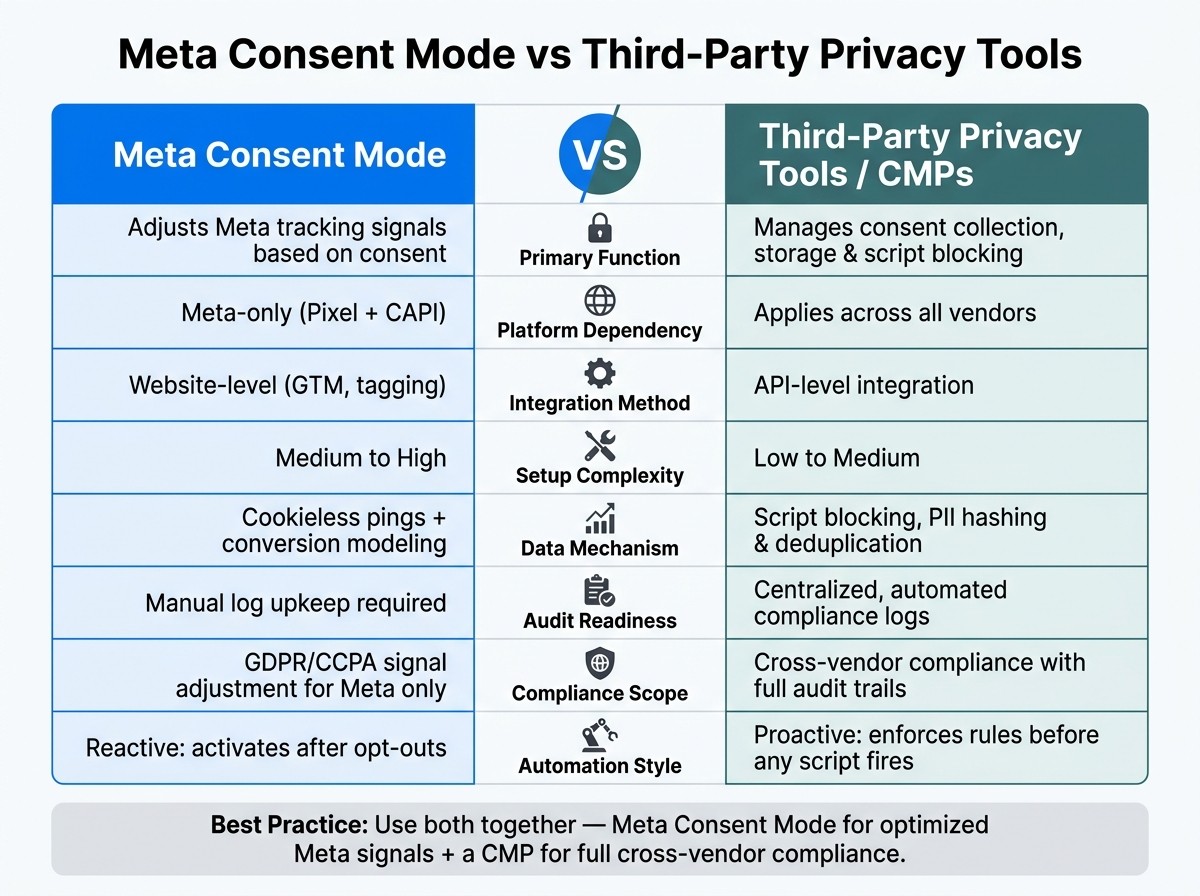
Meta Consent Mode vs Third-Party Privacy Tools: Feature Comparison
Meta Consent Mode and third-party privacy tools serve different purposes in managing user consent and data tracking. Meta Consent Mode focuses on adjusting the data signals sent to Meta's systems (like Pixel and Conversions API) based on user consent. On the other hand, third-party privacy tools - often referred to as Consent Management Platforms (CMPs) - manage consent at a broader level. They control which tracking scripts run on your site, store consent records, and enforce compliance rules across multiple vendors.
A major distinction lies in platform dependency. Meta Consent Mode is designed exclusively for use within Meta's ecosystem and requires integration through tools like Google Tag Manager (GTM) and a CMP. In contrast, third-party privacy tools are more versatile. They connect via API, are often quicker to set up, and support multiple platforms beyond Meta, making them a more comprehensive solution.
Audit readiness is another area where these tools differ. Meta Consent Mode doesn't automatically maintain compliance logs, leaving you to handle this manually. CMPs such as OneTrust or Cookiebot simplify this process by automatically generating detailed, timestamped logs of consent activity, which can be invaluable during regulatory audits.
Comparison Table
Feature | Meta Consent Mode | Third-Party Privacy Tools (e.g., CMPs) |
|---|---|---|
Primary Function | Adjusts tracking signals based on consent | Manages consent collection, storage, and script blocking |
Platform Dependency | Meta-only (Pixel + CAPI) | Applies across vendors |
Integration Method | Website-level (GTM, tagging) | API-level integration |
Setup Complexity | Medium to High | Low to Medium |
Data Mechanism | Cookieless pings and conversion modeling | Script blocking, PII hashing, and deduplication |
Audit Readiness | Manual log upkeep required | Centralized, automated compliance logs |
Compliance Scope | GDPR/CCPA compliance for Meta signal adjustment | Cross-vendor compliance with detailed audit trails |
Automation | Reactive: only activates after opt-outs | Proactive (enforces rules before any script fires) |
For advertisers spending more than $5,000 per month on Meta ads, relying on just one of these tools isn't ideal. Meta Consent Mode ensures data signals are optimized for Meta, while a CMP prevents any tracking activity until proper consent is recorded. Together, they form a well-rounded approach to managing consent and compliance effectively.
Setup and Integration
Implementation Workflow
Getting the setup sequence right is essential. Start by deploying your third-party privacy tool, also known as a Consent Management Platform (CMP). This tool is the backbone for capturing and storing user consent. Once the CMP is in place, configure Meta Consent Mode to adjust how Meta Pixel behaves based on user preferences.
Here’s how to proceed: Install the CMP script across all pages of your site. Define clear consent categories such as necessary, analytics, and marketing. Then, use a tag manager to ensure the Meta Pixel only fires after a consent-granted event. This step is critical because firing the Pixel prematurely could violate Meta's Business Tools Terms and even lead to legal issues.
For eCommerce websites, the process works like this: The CMP communicates the user’s cookie preferences. If marketing cookies are accepted, Meta Consent Mode enables events like ViewContent, AddToCart, and Purchase. If the user declines, the CMP blocks those tags, and Meta Consent Mode ensures no unauthorized data processing occurs.
Once you’ve nailed down the sequence, there are a few technical details to keep in mind to make everything run smoothly.
Technical Considerations
Meta Consent Mode is designed specifically for Meta’s tracking tools, such as the Meta Pixel and Conversions API. However, if your site also uses tools like Google Analytics, heatmaps, or other ad pixels, you’ll need the CMP to manage a broader range of tags.
Some common challenges include conflicts in the order tags fire and mismatched consent category mappings. If the CMP and Meta Consent Mode don’t sync their consent states, you might run into issues. To avoid this, test different scenarios - like when no consent is given, full consent is granted, partial consent is selected, or preferences are updated. Use Meta’s Test Events tool to confirm that Pixel events fire only after consent is granted and that the correct parameters are included.
For server-side tracking with Meta's Conversions API, make sure the CMP passes the user’s consent status to the backend before any events are sent. This ensures compliance and accuracy in your data processing.
When to Use Meta Consent Mode vs. Privacy Tools
When Meta Consent Mode Is Enough
Meta Consent Mode works well if your advertising is limited to Meta platforms. For instance, direct-to-consumer eCommerce brands or local businesses that rely solely on Meta Pixel and Conversions API can avoid the complexity of full CMP integration with GA4 (Consent Management Platform) integration. It’s also a good fit for smaller teams or individual marketers looking to keep costs down and who can handle consent with cookie banners or tag managers. If your legal team confirms that your privacy requirements are straightforward - such as operating in a single U.S. market with minimal traffic from the EU or California - Meta Consent Mode can handle consent-aware measurement effectively without the need for a more advanced solution.
However, if your advertising strategy spans multiple platforms, you’ll need tools that can manage consent across all of them.
When Privacy Tools Are the Better Fit
As your marketing efforts grow, Meta Consent Mode alone may not suffice. It only manages Meta’s tags, leaving other platforms’ scripts outside its control. A CMP, on the other hand, provides a centralized consent layer that governs all vendor scripts.
If your site attracts significant global traffic, you’ll likely need a more comprehensive consent solution. According to IAB Europe, over 75% of publishers and advertisers in Europe use more than 10 third-party vendors on their sites. For businesses receiving visitors from regions like the EU, UK, California, or Brazil, compliance with regulations such as GDPR, ePrivacy, CPRA, and LGPD becomes critical. Third-party privacy tools can handle complex requirements like jurisdiction-specific banner logic, opt-in versus opt-out defaults, and consent record-keeping - features that Meta Consent Mode simply doesn’t offer.
Agencies managing multiple client accounts have even more reason to adopt a CMP. Compliance tasks like maintaining consent logs, audit trails, versioned notices, and handling data subject requests are far easier with a centralized platform than with manual record-keeping for each client. For advertisers using advanced Meta features, a hybrid approach might be best: the CMP manages script loading and consent records, while Meta Consent Mode fine-tunes data collection. This combination ensures both compliance and accurate measurement, aligning with earlier discussions about platform reliance and integration complexity.
Conclusion
Meta Consent Mode specifically tailors Meta Pixel and Conversions API signals based on user consent, while third-party privacy tools handle consent across multiple vendors, applying jurisdiction-specific rules and maintaining audit logs.
To put it simply: if Meta is your only advertising platform and your audience is mostly domestic, Meta Consent Mode might suffice. But when you add more platforms, reach users in regulated regions like the EU or California, or need detailed consent records, a dedicated privacy tool becomes essential. In such cases, Meta Consent Mode becomes just one part of a broader, more comprehensive setup.
According to the 2024 IAPP & EY privacy governance report, over 70% of large organizations already rely on dedicated privacy management or consent platforms to meet multi-jurisdictional compliance needs. This shift reflects the growing complexity of privacy regulations across U.S. states and worldwide, making vendor-specific solutions alone insufficient.
For advertisers focusing heavily on Meta, there’s another consideration. Once your consent framework is in place and Meta Consent Mode is properly configured, your conversion signals improve significantly. Tools like AdAmigo.ai can then use compliant data to fine-tune budgets, test ad creatives, and optimize campaigns through Meta's API, turning better signals into stronger campaign performance.
Ultimately, your choice should depend on your regulatory obligations, the range of platforms you use, and your legal needs. Answering these questions will help determine the best path forward.
FAQs
Do I still need a CMP if I use Meta Consent Mode?
Yes, a Consent Management Platform (CMP) is still necessary when using Meta Consent Mode. While Meta Consent Mode adapts data collection based on user preferences and automates compliance through "cookieless pings", it relies on a CMP to collect and share consent signals with Meta’s tools. For smoother operations, platforms like AdAmigo.ai can help automate campaign management while staying compliant with Meta’s guidelines.
How do I pass consent to Conversions API (server-side)?
To ensure consent is passed to Meta's Conversions API (CAPI), include user consent signals in the event data you send. Meta Consent Mode simplifies this process by automatically toggling between full tracking and cookieless pings, depending on the user's consent choices. Tools like AdAmigo.ai make staying compliant easier by handling audits and updates using Meta's official API. This way, your campaign optimizations stay aligned with the latest privacy preferences.
Will Meta modeling work if users reject marketing cookies?
Meta modeling remains effective even when users decline marketing cookies. Meta Consent Mode halts tracking scripts and blocks cookie storage for those who opt out. Instead, it relies on cookieless pings to collect essential technical data for measurement purposes. Using AI-powered estimation, Meta bridges data gaps and retrieves conversions. Many businesses have reported accuracy rates surpassing 80%, ensuring campaigns remain impactful while adhering to privacy laws.