
Guide to Threat Detection for Meta Ads
Protect your Meta ad account from hacks, invalid clicks, and policy violations. Monitor key metrics, set automated rules, enable 2FA, and use AI monitoring.
Protecting your Meta ad account is crucial for avoiding wasted ad spend, distorted metrics, and account suspensions. Threats like account hacks, invalid clicks, and policy violations can disrupt campaigns and harm your advertising privileges. Here's how to safeguard your account effectively:
Common Risks: Hacks, bot activity, and policy violations can drain your budget and impact performance.
Key Metrics to Watch: Monitor CPA, CTR, CPM, frequency, and Quality Ranking to detect unusual activity.
Immediate Actions: Secure accounts with two-factor authentication, review activity logs, and address policy violations quickly.
Automated Rules: Use Meta Ads Manager to pause campaigns or send alerts based on performance thresholds.
Advanced Tools: AI-driven platforms like AdAmigo.ai offer 24/7 monitoring and anomaly detection for enhanced security.
The Truth About Meta Ads Scams (And How to Protect Yourself)

Common Threats in Meta Ad Accounts
Meta ad accounts face a variety of risks that can disrupt performance and even jeopardize your ability to advertise. Identifying these threats early is key to protecting your budget and maintaining compliance with Meta's guidelines.
Account Hacks and Fraudulent Activities
Unauthorized access to your ad account can have serious consequences. Hackers may take over your campaigns, misuse your budget, and violate Meta's policies. These activities often involve networks of fake accounts, Pages, and Groups designed to manipulate the system. While Meta's global review team works to combat such threats, the damage to your account can be significant.
When fraud occurs, you might see your budget drained on unauthorized campaigns. Worse, your Account Quality score could take a hit, making it harder to regain normal operations once you regain control.
Unusual Performance Metrics
Unexpected changes in performance metrics can signal deeper problems. Meta identifies two main types of invalid clicks: those from users with no real interest (like accidental or repetitive clicks) and those generated by prohibited methods, such as bots or scrapers. Both types inflate your metrics and waste ad spend.
For example, a sudden spike in cost-per-click (CPC) without any changes to your targeting or creative could point to click fraud or bot activity. Meta’s systems also keep an eye out for browser add-ons and scrapers that manipulate metrics.
Additionally, if your budget increases by more than 20–30% within 48–72 hours, it may trigger Meta’s security alerts. While this might simply reflect scaling Meta ads, automated systems could interpret it as suspicious behavior, resulting in frozen accounts or paused campaigns.
Metric/Signal | Potential Threat | What It Means |
|---|---|---|
Sudden CPC Spike | Bot activity or invalid clicks | Check billing for "Invalid Clicks" credits |
Rapid Spend Increase (>20–30%) | Security flag trigger | Scale gradually to avoid automated freezes |
Repetitive/Accidental Clicks | Users with no real interest | Inflated metrics; Meta may review manually |
If left unchecked, these irregularities can escalate into compliance problems.
Policy Violations and Account Suspensions
Meta enforces strict advertising policies, and even small missteps can lead to ad rejections or account suspensions. Common violations include posting prohibited content, making misleading claims, or using inconsistent messaging. Even unintentional errors can negatively affect your Account Quality score, which Meta uses to evaluate your advertising privileges. Understanding the Meta ad review process can help you anticipate these checks and avoid common pitfalls.
The consequences can escalate quickly. A single violation might result in an ad rejection, but repeated offenses could lead to daily spend limits, restrictions on certain ad formats, or even a complete ban on running ads. In extreme cases, Meta might remove the offending account and any associated Pages.
To avoid these issues, regularly review Meta’s advertising policies and keep an eye on your approval workflows and account setup. Addressing policy violations as soon as they occur minimizes the impact on your account and helps maintain your standing as an advertiser.
Key Metrics and Baselines for Threat Detection
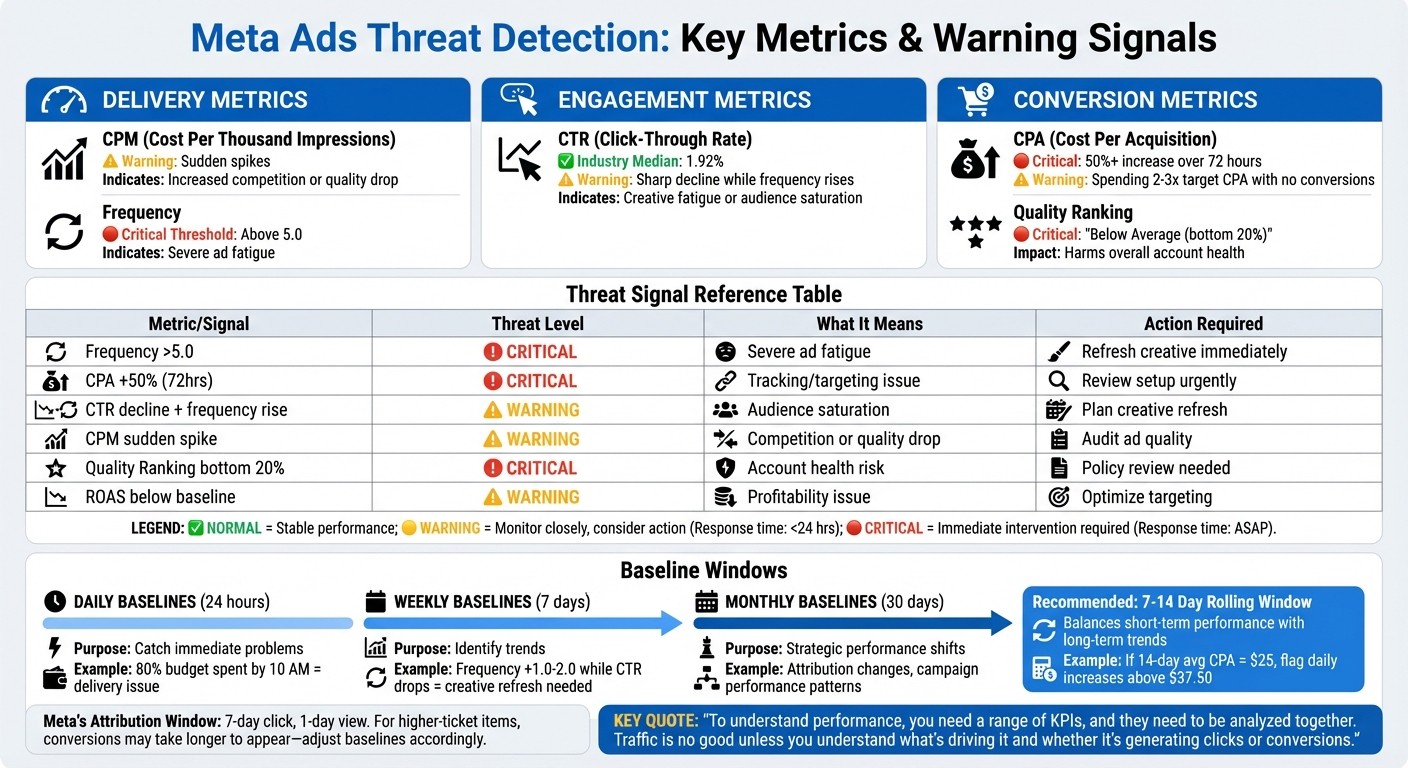
Meta Ads Threat Detection: Key Metrics and Warning Signals Guide
Without clear data points, it’s impossible to tell if fluctuations in performance are just normal variations or signs of a real issue.
Metrics to Monitor
Focus on three main categories: delivery, engagement, and conversion.
Delivery metrics track whether your ads are reaching the right audience at a reasonable cost. For example:
CPM (cost per thousand impressions): Sudden spikes might mean increased competition or a drop in ad quality.
Frequency: If your frequency goes above 5.0, it’s a sign of ad fatigue.
Engagement metrics measure how your audience is responding. The median CTR (click-through rate) across industries is 1.92%. You can compare this to industry CTR benchmarks to see where you stand. A significant drop below this, especially when frequency is climbing, often indicates creative fatigue or audience saturation.
Conversion metrics reveal if your campaign is profitable. Warning signs include:
A CPA (cost per acquisition) increase of 50% or more over three consecutive days.
Spending 2–3 times your target CPA without a single conversion. In such cases, either tracking, targeting, or your creative assets need immediate attention.
A poor Quality Ranking in Meta Ads Manager (e.g., "Below Average (bottom 20%)") could harm your account’s overall health.
Metric Category | Key Metric | Threat Signal |
|---|---|---|
Delivery | Frequency | Above 5.0 (indicates severe ad fatigue) |
Delivery | CPM | Sudden spikes (competition or quality drop) |
Engagement | CTR | Sharp decline while frequency rises |
Conversion | CPA | 50%+ increase over 72 hours |
Conversion | ROAS | Drop below historical baseline |
Quality | Quality Ranking | "Below Average (bottom 20%)" |
To effectively identify anomalies, translate these metrics into historical baselines.
Setting Historical Baselines
Baselines are essential for separating routine performance shifts from genuine issues.
Daily baselines: These help you catch immediate problems, such as spend pacing. For instance, if a campaign burns through 80% of its budget by 10:00 AM, it’s a clear delivery issue.
Weekly baselines: These highlight trends like rising frequency or declining CTR. If frequency increases by 1.0–2.0 in a week while CTR drops, it’s time for a creative refresh.
Monthly baselines: These reveal broader strategic changes, like shifts in attribution or campaign performance.
A 7–14 day rolling window is a great way to calculate baselines. This approach balances short-term performance with long-term trends. For example, if your 14-day average CPA is $25, flag any daily increase above $37.50 as a potential problem.
Keep in mind Meta’s default attribution window (7-day click, 1-day view). For higher-ticket items, conversions may take longer to appear, so your baseline might be stronger than what’s reflected in your dashboard. Adjust for these delays to separate actual performance drops from reporting lags.
"To understand performance, you need a range of KPIs, and they need to be analyzed together. For example, traffic is no good unless you understand what's driving it and whether it's generating clicks or conversions".
Setting Up Automated Threat Detection Systems
Once you’ve established your baselines, the next step is to implement systems that monitor for metric deviations and send alerts when necessary.
Configuring Meta Ads Manager Alerts
Meta Ads Manager offers a built-in Automated Rules feature that allows you to set up "if-then" triggers. To get started, head to the Automated Rules section in Ads Manager and configure conditions based on metrics like spend limits, cost per result, or ROAS. For instance, you could:
Pause a campaign if the CPA exceeds a specific threshold for multiple days in a row.
Set up an email alert when daily spending hits a certain percentage of your total budget.
Additionally, go to Business Settings > Notifications to enable real-time alerts for important updates like Ad Review, Account Quality, or Policy Changes. These alerts can help you catch unauthorized changes or potential policy violations before they escalate. For added security, activate two-factor authentication or require co-worker approval for high-risk actions, such as accessing credit lines or changing admin roles.
Meta has also taken significant steps to combat threats. As of March 2023, they’ve blocked and shared over 1,000 malicious links across their platforms to disrupt malware operations.
"Two-factor authentication is one of the most effective tools for combating account compromise attempts." - Meta Newsroom
To further secure your account, you can restrict admin additions to trusted email domains using Admin Domain Restrictions. This ensures that only verified team members can gain admin-level access.
Third-Party Tools and AI Systems
While Meta’s native tools provide essential safeguards, third-party solutions powered by AI can offer more advanced, adaptive monitoring. For example, AdAmigo.ai uses machine learning to continuously analyze your account’s performance and adapt to changes. Unlike static rules that might pause a campaign immediately after a CPA spike, AdAmigo’s AI Autopilot can distinguish between temporary fluctuations and genuine underperformance. It monitors metrics like delivery, engagement, and conversions 24/7, flagging anomalies such as sudden spending surges or engagement drops that could signal bot activity or account compromise.
Another layer of protection comes from AdAmigo Protect, which automatically identifies unusual behavior or delivery issues early. This is particularly useful for agencies managing multiple clients, as it allows a single media buyer to oversee significantly more accounts while the AI handles routine monitoring. The scale of these threats is enormous - Meta reported removing over 159 million scam ads and disabling more than 150,000 accounts tied to scam networks in 2025.
Feature | Meta Ads Manager (Native) | AdAmigo.ai (Third-Party) |
|---|---|---|
Logic Type | "If-then" conditional logic | AI-driven, adaptive machine learning |
Monitoring | Manual setup of specific rules | 24/7 autonomous anomaly detection |
Learning Phase | Can be disrupted by static rules | Distinguishes between optimization and underperformance |
Scope | Single account focus | Cross-account and cross-platform insights |
Action Execution | Manual or rule-based triggers | Autopilot or optional user approval |
Alert Configuration Best Practices
To avoid unnecessary interruptions, set thresholds at 2–3× your target CPA. This helps prevent false alarms during the campaign’s stabilization period. Use "AND" logic for stricter controls (e.g., pause only if both CPA is high and engagement is low) and "OR" logic for broader safety measures (e.g., pause if either spend spikes or CTR drops significantly).
Protect your campaign’s learning phase by avoiding automated triggers within the first 24–48 hours, or even up to 7 days for campaigns with longer sales cycles. This allows Meta’s algorithm to stabilize without interference and avoids resetting campaign progress. Following these practices will help you stay ahead of potential threats while maintaining campaign performance.
Responding to Threats and Prevention Strategies
Taking swift and effective action is essential when dealing with threats to your Meta ad account. Alongside immediate responses, implementing strong preventive measures can help safeguard your account's integrity.
Immediate Response Steps During a Threat
If you notice unusual activity in your Meta ad account, act fast. Start by reviewing your activity log for anything out of the ordinary - like logins from unfamiliar locations, unexpected campaign launches, or sudden changes to your budget. If your account has been restricted, head to the Account Quality section and file a concise appeal backed by evidence.
Next, secure your account. Follow best practices for password security and remove any unauthorized admin roles or permissions. Keep in mind that sudden budget increases can trigger Meta's automated fraud detection. To avoid unnecessary flags, limit budget increases to 20–30% every 48–72 hours.
Once the immediate threat is managed, focus on strengthening your defenses with the strategies outlined below.
Account Security Prevention Methods
Start by enabling two-factor authentication (2FA) on all accounts - it’s a simple yet effective way to add an extra layer of security. Schedule monthly health checks to review your business details, payment methods, and team permissions. This ensures your account aligns with Meta’s latest policies.
Educating your team on Meta ad policies is just as important. Scammers often impersonate Meta support or create fake login pages to steal credentials. In 2025 alone, Meta removed over 159 million scam ads and deactivated 10.9 million accounts tied to fraudulent activity. Train your team to recognize phishing attempts, avoid clicking suspicious links, and always verify URLs before logging in.
Pair these efforts with advanced tools for ongoing, proactive threat detection.
AI-Driven Fraud Detection and Prevention
AI-powered tools can elevate your security by analyzing multiple signals at once. For example, AdAmigo.ai monitors your account around the clock, detecting anomalies like sudden spending spikes, unusual click patterns, or sharp drops in engagement - signs that could indicate bot activity or a potential breach. By using both real-time and historical data, the AI can distinguish between temporary fluctuations and actual threats.
AdAmigo Protect adds another layer of security by scanning ad creatives and landing pages for policy violations, such as misleading claims or prohibited content, before they lead to account suspensions. Meta is also pushing for verified advertisers to contribute 90% of ad revenue by the end of 2026, up from 70% earlier that year. AI tools can help you stay compliant with Meta’s policies, especially in regulated industries like housing, employment, and credit, by flagging potential issues before they escalate.
Comparison of Threat Detection Tools
When selecting a threat detection tool, factors like account size, budget, and the level of control you want play a big role. Protecting your ad account is essential - not just to safeguard your budget but also to maintain data integrity. native Meta alerts offer a free and straightforward solution within Ads Manager, but they rely on rigid "if-then" logic. On the other hand, third-party AI tools, such as AdAmigo.ai, use machine learning to detect complex anomalies in spending, clicks, and creative performance. These tools provide 24/7 monitoring across multiple accounts, offering a more advanced layer of protection.
Here's a quick breakdown of how different detection methods compare:
Detection Methods and Tools Comparison Table
Method | Pros | Cons | Ideal Use Case |
|---|---|---|---|
Statistical (Native Rules) | Free; transparent; native integration. | Rigid; lacks historical context; manual setup. | Simple budget caps and basic CPA guardrails. |
Machine Learning | Detects complex anomalies; adapts to new threats. | Can feel like a "black box"; needs high data volume. | Fraud detection and invalid click prevention. |
Hybrid (ML + Human) | High accuracy for sensitive content; nuanced. | High latency (24–48h); resource-intensive. | Regulated industries (Finance, Health, Politics). |
AdAmigo Protect (AI Agent) | 24/7 autonomous monitoring; bulk actions. | Requires a third-party subscription. |
Each method has its strengths and limitations. For example, native automation requires manual setup, which can become unmanageable if you're overseeing multiple accounts or campaigns. AdAmigo.ai simplifies this by automating bulk management and providing cross-account insights. This allows a single media buyer to handle far more clients without needing additional resources. Its AI adapts over time, learning from your results and fine-tuning its approach - something static rules simply can't do.
Another key difference lies in how these systems handle Meta's learning phase. Native rules might pause ads prematurely during optimization, disrupting the algorithm before it gathers enough data. AI-driven tools, however, dynamically adjust thresholds to prevent such interruptions, ensuring campaigns run smoothly.
Meta itself employs over 15,000 reviewers worldwide to manually identify suspicious activity. In 2025 alone, the platform disabled 10.9 million accounts linked to scams. While Meta's detection systems are effective at catching large-scale fraud, third-party AI tools provide an extra layer of protection. They monitor your specific account for issues like spending spikes, broken links, and policy violations - intervening before these problems escalate to account suspension.
For agencies and brands experiencing rapid growth, this added security can make a huge difference. It ensures smoother scaling and helps avoid costly disruptions. Choosing the right detection tool is essential not just for monitoring but also for aligning with your overall security strategy.
Conclusion: Building a Secure Meta Ad Environment
Following Meta ad account security best practices demands constant attention and the right tools. Issues like account hacks, policy violations, and fraudulent activities can drain your budget and harm your brand’s reputation. But with effective detection systems, you can address problems before they spiral out of control.
Meta’s built-in tools are a great starting point. Regularly check Account Quality and pay attention to Meta's alerts to catch potential issues early. You can also set up automated rules to pause campaigns when performance metrics deviate from acceptable levels. This approach is especially helpful if you’re managing a smaller number of accounts, as it provides a solid layer of protection.
For advertisers handling a high volume of accounts, AI-driven solutions like AdAmigo.ai can take security to the next level. These tools monitor campaigns in real time, flagging unusual activity and adapting to your account’s data. This allows a single media buyer to oversee multiple clients without sacrificing security.
To stay ahead, conduct weekly audits for ad rejections, review campaigns monthly, and schedule quarterly compliance checks. Maintain internal logs with details like Ad IDs, rejection reasons, and resolution dates to spot recurring issues. If you’re in a regulated industry like finance, healthcare, or housing, ensure your targeting aligns with Meta's Special Ad Categories and that your Pixel events comply with GDPR and CCPA privacy regulations.
FAQs
How do I tell a normal performance swing from click fraud?
To tell the difference between a normal performance swing and potential click fraud, keep an eye out for sudden, unexplained jumps in click volume or ad spend that don’t come with a matching rise in conversions. Tools like anomaly detection systems or machine learning platforms can help you analyze patterns and spot suspicious activity. These approaches ensure you can catch irregularities linked to possible fraud without mistaking them for normal changes.
What rule thresholds should I set without harming the learning phase?
When managing campaigns, it’s important to avoid being too aggressive with automatic adjustments during the learning phase. Overly strict thresholds for metrics like CPA (Cost Per Acquisition) or ROAS (Return on Ad Spend) can lead to campaigns being paused or altered prematurely, which can disrupt their performance.
Instead, allow some flexibility. Use combined metrics and time-based rules to ensure campaigns have enough time to collect meaningful data. This approach helps maintain stability and ensures automated actions are based on well-rounded insights rather than incomplete information.
What should I do first if my Meta ad account is hacked or restricted?
If your Meta ad account has been hacked or restricted, it’s crucial to act fast to fix the problem. Start by checking for any suspicious activity and, if necessary, reduce admin access to limit potential damage. Make sure your account complies with Meta’s ad policies and address any violations you identify. Respond quickly to any alerts or warnings from Meta to resolve issues and get your account back up and running. Taking steps to secure your account details and reviewing compliance regularly can help avoid future problems.