Avoiding Illegal Products in Meta Ads: Checklist
Step-by-step checklist to keep your Meta ads compliant: review creatives, landing pages, targeting, and use AI tools to prevent banned or restricted content.
Meta enforces strict ad policies to ensure compliance with laws and platform standards. Violating these rules - whether by promoting illegal products like drugs, weapons, or tobacco, or by failing to follow guidelines for restricted items like alcohol or CBD - can lead to ad rejection, account suspension, or even permanent bans. To avoid these setbacks and financial losses, follow this compliance checklist for teams:
Ad Copy & Images: Avoid references to illegal products, discriminatory language, or misleading claims. Keep visuals clean and professional.
Landing Pages: Ensure alignment with ad content, avoid broken links, and include legal disclaimers for restricted products.
Targeting Settings: Comply with age and location restrictions for items like alcohol or gambling, and avoid targeting based on personal attributes while ensuring you secure audience data.
Monitor Campaigns: Regularly review active ads for compliance, as Meta's policies are continuously updated.
Use Tools: Platforms like AdAmigo.ai can help identify and fix compliance issues before submission.
[FULL COURSE] - Facebook Ad Policies
Checklist Overview
A well-structured review process is your first line of defense against policy violations. Meta meticulously examines every aspect of a campaign - images, videos, text, targeting, and landing pages ]. To avoid issues, it's crucial to have a repeatable system in place to catch potential problems before they escalate.
This checklist highlights the key areas to review - ad copy, visuals, targeting, and landing pages - so you can thoroughly audit your campaign using a Meta ad account setup checklist before hitting "launch." Using an ad copy generator can help ensure your text remains within safe parameters.
Let’s start by understanding what Meta classifies as illegal products and what that means for advertisers.
What Counts as Illegal Products on Meta

Meta has strict rules against promoting certain items. Ads for illegal drugs, recreational drugs, tobacco products, weapons, ammunition, explosives, and human body parts are strictly prohibited. Running ads for these products will result in immediate rejection and could lead to account suspension.
Some products fall under the "restricted" category - such as online gambling, alcohol, prescription medications, and CBD. These require special approval before advertising. To promote restricted items, you’ll need prior written permission and certifications like LegitScript. If you’re unsure whether your product is prohibited or restricted, it’s best to consult Meta’s guidelines before launching your campaign.
Knowing which products are off-limits reinforces the importance of staying compliant with Meta’s policies.
Why Following the Rules Matters
Breaking the rules can have serious consequences for your Business Account. Following Business Manager setup best practices can help you maintain a secure and compliant environment. To prevent unauthorized access and potential policy flags, ensure you have 2FA for Business Manager enabled. Meta can restrict your ad account, Facebook Page, and even your personal account. With over 15,000 reviewers worldwide and automated systems actively flagging content in real time, compliance is closely monitored. If your account is flagged, future ads will face heightened scrutiny, and repeated violations could result in a permanent ban. If this happens, you'll need to know how to appeal a disabled Meta ad account to restore your presence.
Non-compliant ads also hurt performance. Meta penalizes violations by reducing your ad reach and increasing costs. Worse, ads may be pulled after launch, wasting your budget and damaging your brand’s reputation. Keeping your advertising record clean ensures your campaigns remain effective, predictable, and cost-efficient in the long run.
Pre-Launch Compliance Checklist
Before submitting any campaign, use a Meta ad policy checker and go through these checkpoints. Each one addresses areas where policy violations commonly occur.
Check Your Ad Copy and Images
Carefully review all ad text and images to ensure there are no direct or implied references to illegal drugs, paraphernalia, weapons, ammunition, explosives, or tobacco products. Even if the product isn’t explicitly named, images such as bongs, rolling papers, or vape devices can lead to rejection.
Meta’s review system also flags ads that suggest or imply personal characteristics like race, religion, age, sexual orientation, medical conditions, or criminal history. Keep your visuals clean - this means no fake play buttons, false notification icons, or shocking imagery. Don’t forget about grammar: profanity, excessive capitalization, or attempts to bypass filters will also get your ad rejected.
"Our policies require all advertisers to comply with data privacy laws and local regulations, not engage in discriminatory practices, and not sell illegal or unsafe substances." – Meta Advertising Standards
Review Your Landing Page
Meta doesn’t just review your ad - they’ll also check your landing page. Make sure the landing page matches the ad’s offer, has no broken links, and avoids obstructive pop-ups. The product, price, or offer mentioned in your ad should be the primary focus of the landing page, not hidden in dropdowns or buried behind multiple clicks.
Double-check the page for mentions of illicit drugs, unsafe supplements, or drug-related paraphernalia. If you’re advertising prescription drugs or CBD, you’ll need LegitScript certification and visible legal disclaimers. Meta will reject ads if the landing page contradicts the ad’s message or is overloaded with ads instead of meaningful content.
Once your landing page is fully compliant, move on to setting guardrails for your targeting and verifying your settings.
Verify Your Targeting Settings
After polishing your ad creative and landing page, make sure your audience targeting complies with Meta’s policies. For ads promoting alcohol, dating services, weight loss, cosmetic products, financial services, insurance, gambling, or drug-related items, the minimum target age must be set to 18. If you’re advertising housing, employment, or credit in regions like the US, Canada, or parts of Europe, you’ll need to enable Special Ad Categories to ensure targeting options remain compliant and non-discriminatory.
"Advertisers must not use targeting options to discriminate against, harass, provoke or disparage people or to engage in predatory advertising practices." – Meta Advertising Standards
Avoid targeting based on personal attributes such as race, religion, sexual orientation, medical conditions, or financial vulnerabilities. If your product is only legal in specific locations - like CBD, which is restricted to the United States - limit your geographic targeting accordingly.
Remove Misleading or Vague Language
Finally, review all campaign elements to eliminate misleading or vague language. Avoid exaggerated promises, unrealistic claims, or language that suggests get-rich-quick schemes. Phrases like "lose 20 pounds in one week" or "guaranteed income with no effort" will result in rejection. Be clear about what you’re offering - vague wording can unintentionally suggest illegal products or unregulated substances.
Ensure your ad copy aligns perfectly with your landing page. If your ad mentions a discount, the landing page must clearly display the same discount. Any inconsistencies between the two will lead to policy violations and wasted ad spend.
Prohibited vs. Restricted Content
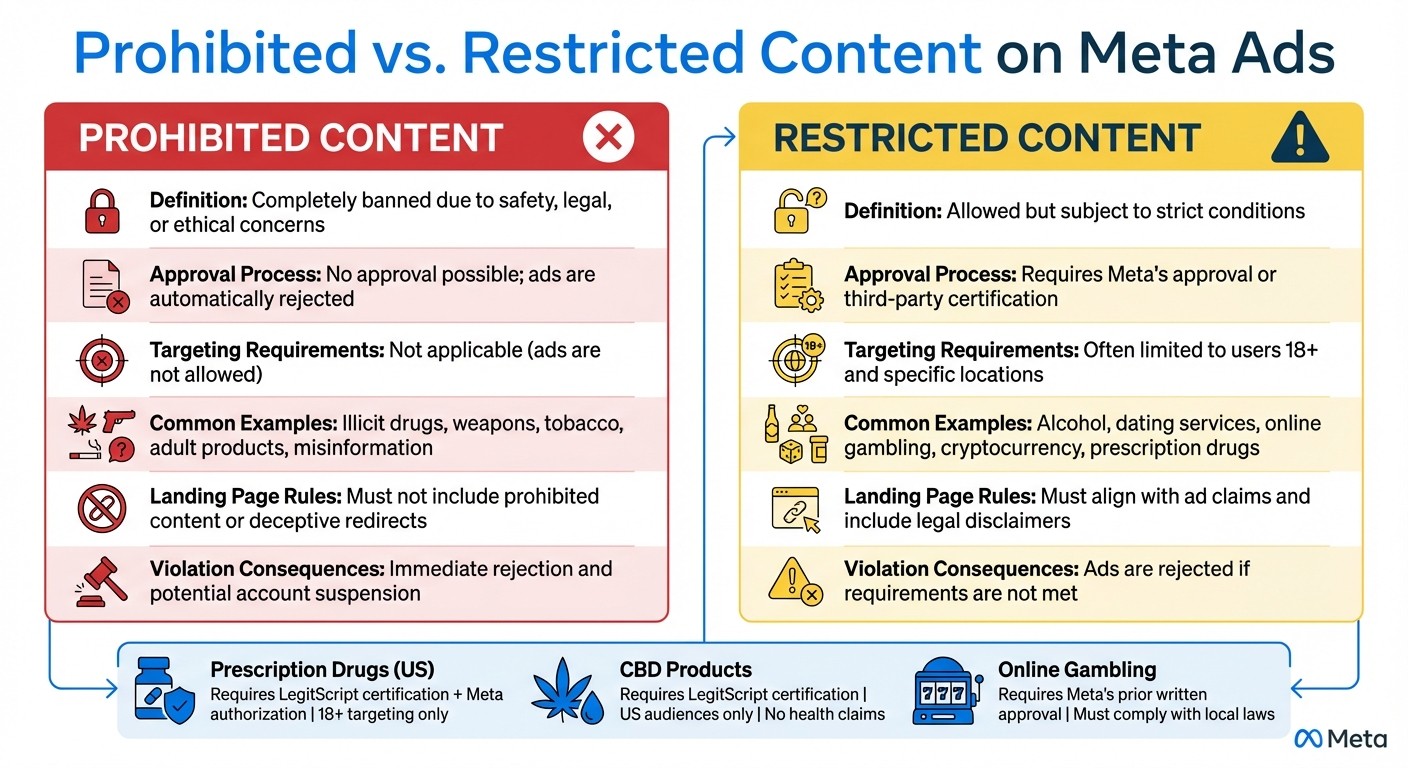
Prohibited vs Restricted Content on Meta Ads: Key Differences
Before launching your ad campaigns, it’s essential to understand the difference between prohibited and restricted content. This distinction plays a key role in ensuring your ads align with Meta's policies and avoid unnecessary setbacks. Using an AI agent to monitor your ad accounts can help catch these issues before they escalate.
Policy violations vary in severity. Prohibited content - such as illicit drugs, weapons, tobacco, and adult products - is completely banned from Meta’s platform. Ads featuring such content are immediately rejected, and repeated violations can result in account suspension.
On the other hand, restricted content can be advertised, but only if specific conditions are met. This category includes products like alcohol, prescription drugs, CBD, online gambling, and cryptocurrency. To run these ads, you’ll often need prior written approval from Meta, third-party certifications (like LegitScript), or strict compliance with age and location targeting guidelines.
Comparison Table
Feature | Prohibited Content | Restricted Content |
|---|---|---|
Definition | Completely banned due to safety, legal, or ethical concerns. | Allowed but subject to strict conditions. |
Approval Process | No approval possible; ads are automatically rejected. | Requires Meta's approval or third-party certification. |
Targeting Requirements | Not applicable (ads are not allowed). | Often limited to users 18+ and specific locations. |
Common Examples | Illicit drugs, weapons, tobacco, adult products, misinformation. | Alcohol, dating services, online gambling, cryptocurrency, prescription drugs. |
Landing Page Rules | Must not include prohibited content or deceptive redirects. | Must align with ad claims and include legal disclaimers. |
Violation Consequences | Immediate rejection and potential account suspension. | Ads are rejected if requirements are not met. |
For example, prescription drugs in the U.S. require both LegitScript certification and Meta authorization, with targeting restricted to users 18 and older. Similarly, CBD products must also have LegitScript certification, can only target U.S. audiences, and cannot make health or medical claims. For online gambling, you’ll need Meta’s prior written approval and full compliance with local laws.
Monitor Your Ads After Launch
Getting your ad approved is just the beginning. Meta doesn’t stop there - it continuously reviews ads, meaning a campaign that initially passes could later face rejection for violating policies. Ads are always under scrutiny, so keeping a close eye on your campaigns is essential to ensure they remain compliant.
Watch for Policy Warnings
Make it a habit to check your Account Quality dashboard daily. Even if your ad clears the first automated review, it might still be flagged later during deeper AI checks or after user feedback. Warnings like "Learning Limited" status or sudden drops in reach can be early signs of compliance issues or Meta Ads anomalies.
To stay ahead, enable real-time notifications in Meta Business Suite. This way, you’ll know immediately if an ad gets disapproved, giving you the chance to address problems before they escalate. Since your account quality score updates daily - and directly impacts ad delivery and costs - monitoring it should be a top priority. Many advertisers now use AI compliance tools to automate this oversight.
Beyond dashboard alerts, perform regular audits to catch less obvious shifts in compliance standards.
Review All Active Campaigns Regularly
Set aside time each week to audit your active campaigns. Meta’s policies change frequently, so an ad that was fine last month might not align with updated guidelines today. During these reviews, make sure to optimize your landing pages and avoid using disruptive elements like intrusive pop-ups.
Keep an eye on your ad approval rate. If you notice a sudden increase in rejections, it could signal that Meta is paying closer attention to your account. To stay prepared, maintain a compliance log where you document policy changes, specific violations, and the actions you’ve taken to resolve them. This record can help your team spot trends and address issues before they grow into larger problems.
Lastly, stay informed about local product recalls. Ads promoting recalled items could lead to global removals, so keeping track of this information is critical.
Using AI Tools for Compliance
Staying compliant in the world of digital advertising can be tricky, especially when relying solely on manual checks. Manual processes take time and are prone to errors, which can lead to compliance issues slipping through the cracks. That’s where AI tools come in, offering a faster, more reliable way to catch potential problems before Meta’s reviewers do. By using AI, you can avoid the hassle of account penalties and keep your campaigns running smoothly.
How AdAmigo.ai Helps You Stay Compliant
AdAmigo.ai’s AI Ads Agent takes the guesswork out of compliance. It scans your ad creatives and copy for prohibited content, flagging risky elements like "before-and-after" images or unverified health claims. On top of that, it suggests compliant alternatives, saving you the trouble of reworking ads from scratch. If you need quick answers about policy rules, the AI Chat Agent is there to provide instant guidance before you submit anything.
The AI Actions feature goes a step further by offering daily compliance recommendations. It pinpoints problematic targeting parameters - like discriminatory audience settings in housing or employment ads - and flags them for correction. When you're using Bulk Ad Launch to avoid common bulk testing mistakes while creating hundreds of ads simultaneously, the system ensures every ad undergoes the same rigorous compliance checks, helping you avoid costly mistakes.
"It's like having an extra set of super-smart hands helping me hit my KPIs." - Sherwin S., G2 Review
As an official Meta Business Technology Partner, AdAmigo.ai stays up to date with policy changes, including the upcoming 2025 rules for labeling AI-generated content. You can either approve recommendations manually or let the system handle them automatically - either way, you’ll catch violations before they become a problem.
And it doesn’t stop at compliance. AdAmigo.ai also simplifies broader campaign management, making it a valuable tool for advertisers.
Other Ways AdAmigo.ai Helps Advertisers
AdAmigo.ai doesn’t just keep your ads compliant - it also helps improve performance. By analyzing real campaign data, the platform continuously adjusts targeting, bids, and budgets to maximize results. Users have found that text- or voice-activated campaign tools save time while improving budget efficiency and return on ad spend (ROAS).
For agencies, AdAmigo.ai has been a game-changer. With the platform handling execution, one media buyer can manage 4–8× more clients, allowing senior team members to focus on strategy. In-house teams, on the other hand, can reduce hiring costs by relying on an AI media buyer that works around the clock and gets smarter over time. Best of all, connecting AdAmigo.ai to your Meta ad account takes just five minutes, so you can start reviewing daily optimization tips right away.
Conclusion
Sticking to this checklist helps shield your ad account and avoid Meta ad rejections and performance setbacks. Meta’s automated systems and global review teams are constantly monitoring ads, which means your campaigns could be re-evaluated at any time. Ads that skirt the line of low quality may suffer from limited reach and diminished performance.
Following these rules doesn’t just protect ad performance - it also keeps your business on the right side of the law. Meta enforces its policies based on local regulations, court orders, and reports from both governmental and non-governmental organizations. Staying compliant helps avoid legal headaches while ensuring your campaigns continue to run smoothly in the long term.
Using AI tools for Meta ad account analysis can take your safeguards a step further. Platforms like AdAmigo.ai streamline compliance checks, reducing ad management time to under five minutes per week. This is a key benefit of Meta ads automation for busy advertisers. These tools flag potential issues - like discriminatory targeting or banned health claims - well before Meta’s typical 24-hour review process kicks in. This highlights the value of having proactive measures to keep your campaigns in check.
FAQs
What happens if I violate Meta's ad policies?
If you break Meta's ad policies, your ad might be taken down, and your account could face tough penalties. These can range from limits on advertising to temporary suspensions or even permanent bans on your Business Account and related assets.
To steer clear of these problems, make sure your ads stick to Meta’s rules, particularly those about banned or illegal products and services. Following the guidelines not only keeps your account safe but also builds trust with your audience.
How can I make sure my Meta ad targeting follows the rules?
To ensure your Meta ad targeting stays within the platform's guidelines, here are some essential steps to follow:
Understand Meta's policies: Take the time to review Meta's Advertising Standards and Community Guidelines. This will help you confirm that your product, service, and messaging align with their rules.
Confirm local legality: Double-check that the product or service you're advertising is legal in your target country. For instance, promoting illegal substances, unlicensed weapons, or restricted goods could result in your ad being removed worldwide.
Set appropriate age restrictions: If you're advertising sensitive categories like health, weight loss, or cosmetic procedures, make sure to restrict your audience to users 18 years or older, if required.
Avoid targeting sensitive attributes: Stay away from targeting based on protected characteristics like race, religion, sexual orientation, or health conditions - unless Meta explicitly allows it.
Use AI tools for compliance checks: Tools like AdAmigo.ai can help you scan your targeting settings to identify potential compliance issues. While optional, these tools can save you time and reduce risks.
Once your ads are live, keep an eye on their performance. If an ad gets rejected, review Meta's feedback, make the necessary adjustments, and request a review. Taking these steps will help you stay compliant and reduce the chances of account restrictions.
How can I ensure my Meta ads comply with policies on illegal products?
To ensure your Meta ads stay within the platform's rules, start by taking advantage of Meta's built-in tools and resources. They provide an advertising policy checklist that outlines important guidelines for ad content, landing pages, and prohibited categories - such as illegal substances or regionally restricted products. Additionally, Meta's Transparency Center offers detailed insights into policies for restricted goods and services. If your ad gets rejected, the Account Quality tool in Business Manager identifies the issue and allows you to request a review if necessary.
For a smoother compliance process, consider using AdAmigo.ai. This AI-powered tool scans your ads for potential policy violations, flags problematic elements, and even suggests adjustments to keep everything in line with Meta’s standards. Features like a daily compliance to-do list and an AI assistant to answer your questions make it easier to focus on your campaign strategy while ensuring your ads meet the latest requirements.