
Cross-Platform Retargeting: Aligning Facebook and Instagram
Align Facebook and Instagram retargeting with unified tracking, audience segmentation, tailored creatives, and AI to increase conversions.
Most advertisers miss out on sales by treating Facebook and Instagram as separate platforms. Here's why you shouldn't:
96-98% of website visitors don’t buy on their first visit. Retargeting them across both platforms is key to converting them.
Linked accounts see 28% higher engagement-to-conversion rates, and shoppable posts perform 1.7x better.
Instagram excels at discovery (Reels, Stories), while Facebook is better at closing sales (detailed posts, reviews).
To succeed, align your strategy by:
Setting up unified tracking with Meta Pixel and Conversions API.
Segmenting custom audiences by behavior and funnel stage to avoid overlap.
Using tailored creatives for each platform’s strengths.
Automating optimizations with tools like AdAmigo.ai for better results.
Retargeting warm audiences can deliver 3-5x higher conversion rates than targeting new prospects. Don’t let disconnected campaigns leave revenue on the table.
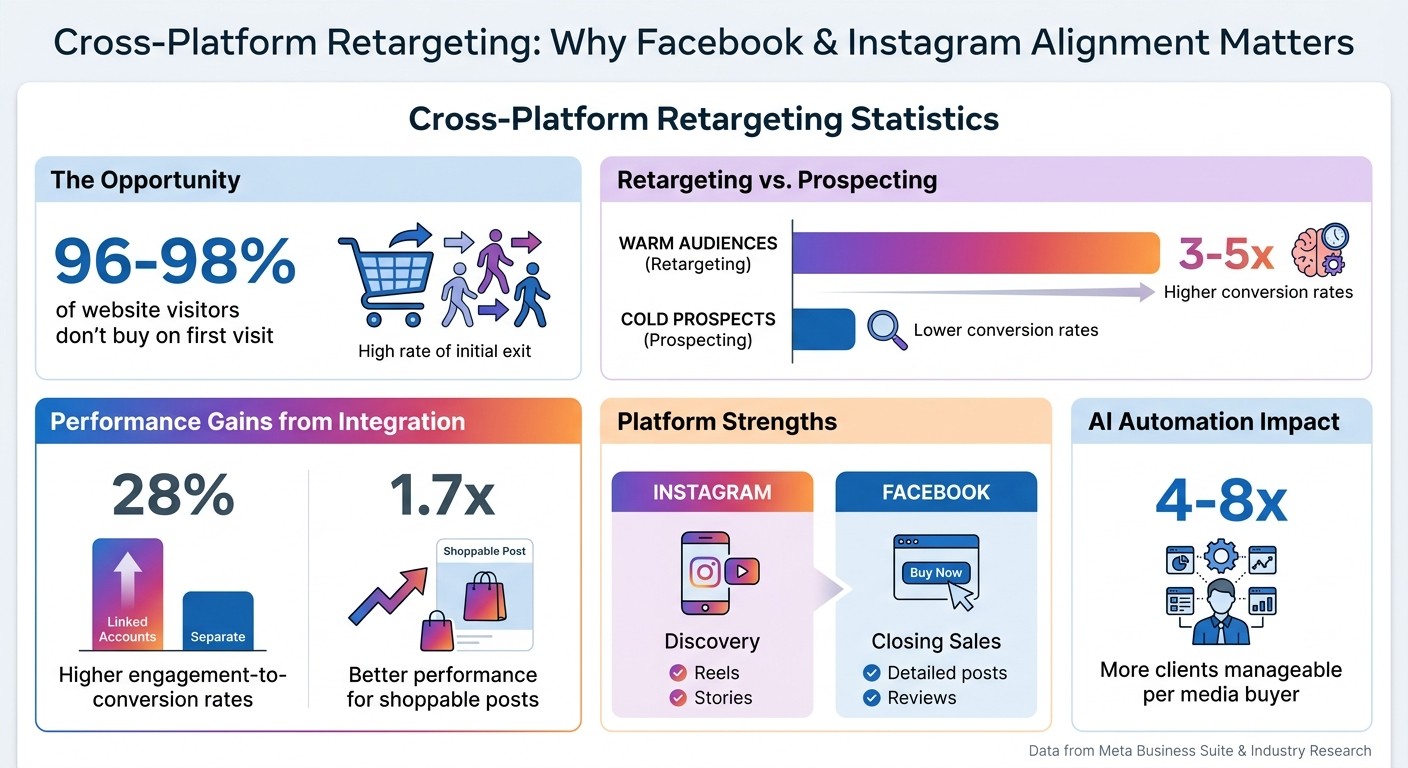
Cross-Platform Retargeting Statistics: Facebook and Instagram Performance Metrics
Stop Wasting Ad Spend: Facebook & Instagram Retargeting (Step-by-Step) #adsstrategy
Building Your Foundation: Tracking and Audience Setup
To retarget effectively on Facebook and Instagram, you need a unified system for tracking and audience data. This goes beyond just installing a pixel - it's about creating a centralized setup that captures key user interactions. Since Facebook and Instagram share the same ad infrastructure through Meta Business Suite, you can manage campaigns for both platforms in one place, simplifying your workflow and ensuring consistency across channels.
To start, link your accounts. Make sure your Instagram account is set to Professional status (either Business or Creator) and connected to your Facebook Page via Meta Accounts Center or Meta Business Suite. Then, assign your Instagram account to your Ad Account in Business Settings (navigate to Accounts > Instagram Accounts > Add Assets). This step ensures seamless cross-platform integration for your ads. As AdStellar puts it:
By unifying these platforms, you move from managing separate channels to orchestrating a single, data-rich paid social media strategy.
Setting Up Meta Pixel and Event Tracking
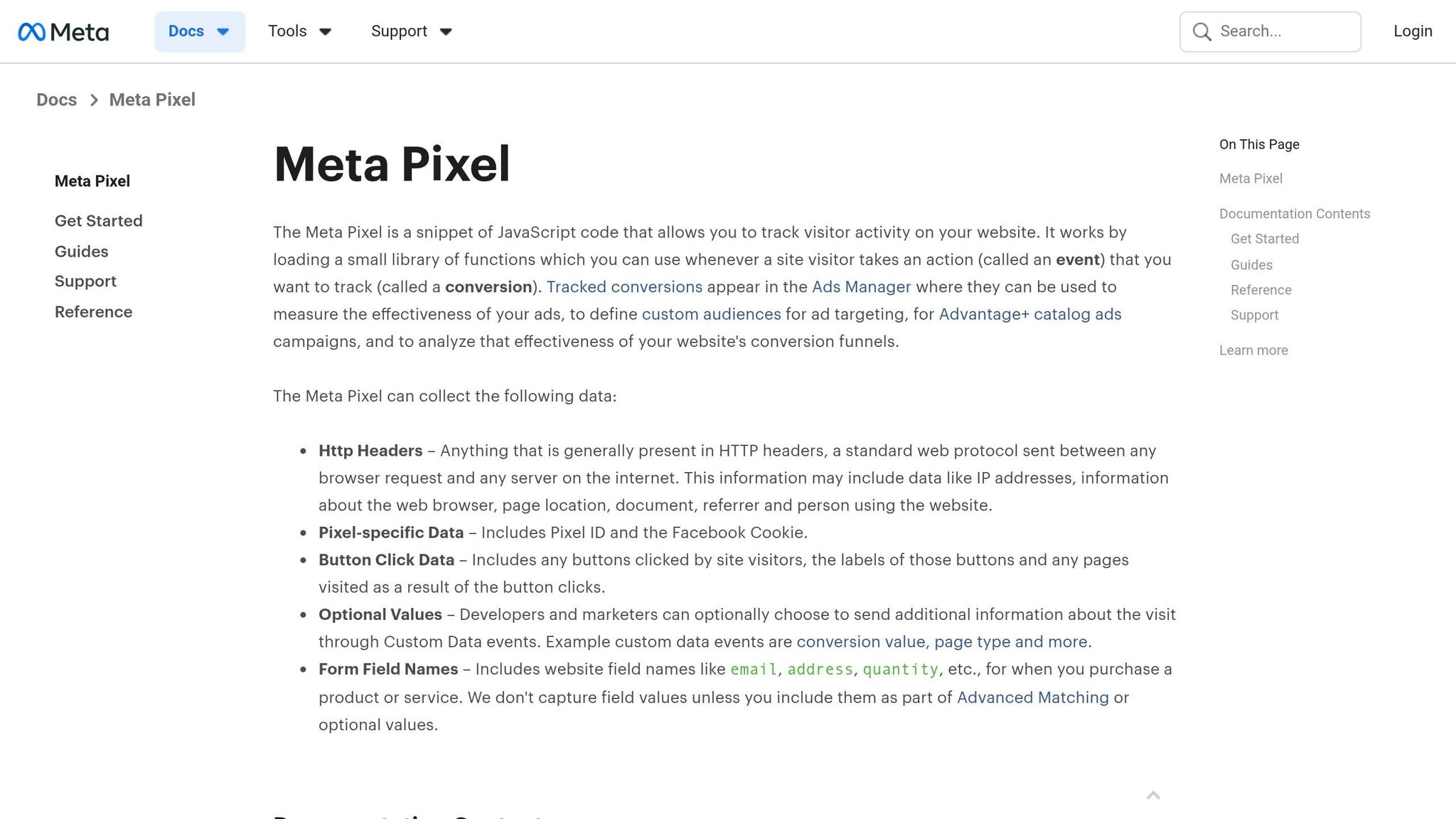
The Meta Pixel is your go-to tool for monitoring website activity. However, since iOS privacy changes introduced opt-outs and ad blockers, data tracking has become more challenging. To address this, pair the Pixel with the Conversions API (CAPI) for more reliable event tracking.
When formatting customer data for event tracking, Meta has strict requirements. For example:
Emails must be lowercase, with no spaces, and hashed using SHA-256.
Phone numbers should follow the E.164 format (country code and digits only, no symbols).
States must use 2-character ANSI abbreviations in lowercase (e.g., "ca" for California).
Countries should use 2-letter ISO codes (e.g., "us").
Accurate formatting can significantly improve match rates - from 40–60% to over 75% - especially when you include multiple identifiers like phone numbers, names, and cities.
Building and Sharing Custom Audiences
With tracking in place, you can create custom audiences based on user engagement across both platforms. This includes people who have watched a large portion (75% or 95%) of your videos, visited specific pages on your website, or interacted with your Instagram profile or Facebook Page.
To maximize effectiveness, use tiered retention windows tailored to user behavior. For example:
A 1–3 day window for users who abandoned their cart (high purchase intent).
A 30-day window for users in the consideration phase.
A 180-day window for brand awareness and lookalike audience creation.
Custom audiences you create in your shared Ad Account are ready to use with Advantage+ Placements vs Manual Placements. This feature allows Meta to allocate your budget to the platform delivering the best results. Before launching campaigns, use Meta's Audience Overlap tool to avoid bidding against yourself. This prevents your different funnel stages from competing in the same auction and driving up costs.
With your audience foundation set, you're ready to move on to structuring campaigns that make the most of these insights.
Structuring Campaigns for Both Platforms
When designing campaigns for Facebook and Instagram, it's important to take advantage of their shared ad infrastructure while recognizing the differences in user behavior. Facebook users typically engage with longer captions and informational content, whereas Instagram users make decisions quickly and prefer visual-first formats like Reels and Stories. By using AI vs manual audience creation strategies to unify data, you can align your campaign structure with your tracking foundation, maximizing efficiency.
Let Meta's system handle placement decisions while you focus on tailoring creative assets. For example, in March 2023, LeadEnforce synchronized ads across both platforms using this approach. The result? A 25% boost in engagement and a 30% decrease in cost per acquisition. This highlights how automated placements can streamline delivery and improve performance.
Advantage+ Placements: Automatic Delivery
Meta's Advantage+ Placements automatically distribute ads across Facebook, Instagram, Messenger, and the Audience Network, targeting the most effective placements. This system tests and reallocates your budget in real time, prioritizing areas with the highest engagement. It's especially helpful for retargeting campaigns, where audience size is often limited.
For example, if you're running ads only on the Facebook Feed, you could miss potential customers who primarily use Instagram Stories or Reels. Advantage+ Placements ensures you're reaching your audience wherever they're most active. You can track performance in Ads Manager using the Opportunity Score, which identifies underutilized placements and suggests adjustments.
As the algorithm optimizes your budget, your job is to refine creatives using dynamic creative optimization best practices to align with how users interact on each platform, or lower creative testing costs by focusing on high-impact concepts.
Adapting Creatives for Facebook and Instagram
The key to success is adapting your core message to each platform's strengths. Facebook users tend to be older and more interested in detailed, community-driven content, making them more likely to engage with longer captions or full product demos. Instagram users, on the other hand, are younger and trend-focused, responding quickly to visually appealing content.
For instance, a product launch video might appear as a full-length demo with detailed narration on Facebook Feed, while the same campaign could feature a fast-paced 15-second Reel with text overlays and trending audio on Instagram. The branding remains consistent - same colors, logos, and tone - but the format and pacing adjust for each audience.
Here's a quick breakdown of how to tailor creatives for different placements:
Placement | Format | Messaging Style | Best Practices |
|---|---|---|---|
Facebook Feed | Static images, carousels, longer videos | Informational, detailed | Include Messenger CTAs; emphasize product benefits and social proof |
Instagram Feed | High-quality visuals, lifestyle imagery | Visual-first, aspirational | Use square or vertical formats; keep captions short |
Instagram Stories/Reels | Vertical video (9:16) | Quick, engaging, native | Add stickers, polls, and trending audio; grab attention immediately |
For retargeting, keep your creatives fresh by rotating them every 5–7 days. If your ad frequency exceeds 4–5 impressions per person per week, it’s a sign your audience is too small for your budget, and ad fatigue may set in. To avoid this, prepare 3–4 creative variations and swap them regularly to maintain interest.
Avoiding Audience Overlap and Ad Fatigue
Once you've unified your audience data, the next step is to fine-tune your campaigns to avoid overlapping audiences and reduce ad fatigue. A common issue in retargeting campaigns on platforms like Facebook and Instagram is showing users duplicate ads. This often happens when audience segments overlap - for instance, targeting someone who abandoned their cart while also running a general "Website Visitor" campaign. The result? Wasted ad spend and weaker campaign performance.
To tackle this, use exclusion rules to remove users who have already moved further along the funnel from earlier campaigns. For example, if someone abandoned their cart, exclude them from the general website visitor audience. That way, they’ll only see ads with messaging tailored to their higher intent. Similarly, exclude recent buyers from retargeting campaigns to avoid showing ads to people who’ve already converted.
Meta’s Audience Overlap Tool is another valuable resource. You can also leverage AI audience profiling to identify distinct segments and minimize overlap from the start. By using this tool in Ads Manager, you can see how much your audience segments intersect. If two audiences share more than 20–30% of users, you could unintentionally be competing against yourself.
Ad fatigue is another challenge to watch for, and frequency is a strong indicator of performance. When someone sees an ad more than 4–5 times a week, its effectiveness tends to drop. To combat this, you can expand your audience window - for example, increasing it from 7 days to 14 days - or adjust your budget accordingly.
Another smart approach is to use sequential messaging. Instead of bombarding users with the same ad, create a sequence: start with a product reminder, follow up with testimonials, and then present a discount offer. This layered strategy keeps your ads relevant, reduces fatigue, and encourages users to take action without feeling overwhelmed. It’s a thoughtful way to guide users toward conversion while keeping your campaigns fresh.
Using AI Tools for Optimization and Scaling
Managing cross-platform retargeting manually can be a daunting task. It requires constant adjustments to budgets, creatives, and audience settings across platforms like Facebook and Instagram. AI tools take over these repetitive tasks, running 24/7 to optimize performance. This frees you up to focus on strategy while the AI handles the nitty-gritty details. Instead of spending hours in Ads Manager, AI platforms monitor your account, identify opportunities, and make adjustments in real time - all without you lifting a finger.
The standout benefit? Real-time responsiveness. AI can instantly reallocate budgets, update audience lists, and fine-tune campaigns to avoid wasted spending. This level of constant optimization is nearly impossible to achieve manually, especially when juggling multiple campaigns across platforms.
Automating Campaign Management with AdAmigo.ai

A great example of AI-driven campaign management is AdAmigo.ai. This platform acts as an autonomous media buyer for Meta ads, taking over time-consuming tasks that usually eat up hours every week. With its AI Autopilot, AdAmigo.ai handles performance audits, budget reallocations, testing, pausing underperforming ads, and bid adjustments - all automatically.
For cross-platform retargeting, AdAmigo.ai ensures smooth coordination by managing exclusion rules and frequency caps across Facebook and Instagram. This helps minimize ad fatigue and ensures your budget is spent wisely. Its AdAmigo Protect feature monitors delivery issues and spending anomalies in real time, catching problems before they snowball into major budget drains. This is achieved by setting effective guardrails that control costs automatically.
One standout feature is the AI Chat Agent, which lets you manage campaigns through simple conversations. Want to know why your Instagram retargeting ROAS dropped yesterday? Just ask. Need to launch a new campaign? Tell the AI what you want, and it will not only analyze the data but also execute the changes directly from the chat. For agencies, this means a single media buyer can manage three to five times as many accounts by automating much of the operational workload.
Building Retargeting Funnels by Platform
AI automation is powerful, but combining it with platform-specific retargeting strategies takes things to the next level. Each platform has its strengths - Instagram excels at visual storytelling and awareness, while Facebook is better for detailed product information and driving conversions. Structuring your retargeting funnel to play to these strengths can significantly boost performance.
Funnel Stage | Facebook Strategy | Instagram Strategy | Primary Goal |
|---|---|---|---|
Awareness | Long-form video ads highlighting product benefits and community content | High-impact Reels and Stories with influencer content and trending audio | Build Brand Credibility |
Consideration | Carousel ads showcasing features and customer reviews | Interactive Stories with polls, stickers, and swipe-up case studies | Educate and Nurture Leads |
Conversion | Dynamic Product Ads targeting cart abandoners with detailed info | Retargeting with shoppable posts and exclusive discount codes | Drive Purchases |
Retention | Loyalty rewards and announcements for new arrivals | Lifestyle content featuring repeat buyers | Encourage Cross-sells and Upsells |
AI tools like AdAmigo.ai ensure your creative and messaging adapt seamlessly as users move through these stages. For example, AdAmigo’s Ad Factory analyzes your top-performing ads and generates fresh variations optimized for each platform. This prevents creative fatigue while keeping your messaging consistent. The Bulk Ad Launcher takes it further by deploying hundreds of optimized ads across platforms in minutes, automatically generating copy, structuring campaigns, and publishing ads.
When Facebook and Instagram accounts are linked and use unified retargeting strategies, engagement-to-conversion rates can jump by up to 28%. Additionally, shoppable posts see 1.7× higher conversion rates when accounts are properly synchronized. By combining AI-driven automation with platform-specific strategies, you can achieve a seamless and efficient retargeting system that continuously improves performance.
Conclusion
Building a cohesive retargeting strategy across Facebook and Instagram hinges on four key elements: unified tracking, tailored creatives for each platform, smart audience segmentation, and automation. Begin by setting up the Meta Pixel and sharing Custom Audiences to ensure seamless data flow between the platforms. Then, segment audiences based on their position in the funnel and use exclusion rules to avoid showing purchase ads to recent customers.
When Facebook and Instagram accounts are linked, businesses can see up to 28% higher engagement-to-conversion rates compared to keeping them separate. Additionally, shoppable posts drive conversions 1.7× higher than static ads. Retargeting warm audiences - those already familiar with your brand - can yield 3-5× higher conversion rates than prospecting campaigns aimed at cold audiences. Considering that 96-98% of website visitors leave without converting on their first visit, retargeting becomes a must-have strategy.
"Retargeting converts 3-5x better than prospecting because you're reaching people who already know your brand - make it a core part of your strategy." - Gaultier D'Acunto, Co-founder, Benly
To take your results further, AI-powered retargeting tools are game-changers. Platforms like AdAmigo.ai simplify the process by syncing audiences in real time, adjusting budgets, running tests, and prioritizing ad sets to manage ad fatigue with frequency caps and anomaly detection. These tools empower a single media buyer to handle 4-8× more clients without compromising campaign performance. By optimizing creatives, audiences, and budgets as one interconnected system, automation ensures campaigns keep improving over time.
FAQs
How can I tell if my Facebook and Instagram audiences overlap too much?
To identify if there's too much overlap between your Facebook and Instagram audiences, leverage Meta's audience tools. These tools allow you to compare audience lists and evaluate how similar they are.
Keep your audience data fresh by regularly syncing and updating it. Standardizing identifiers like email addresses and automating updates using Meta’s API can streamline this process. Additionally, keep an eye on audience sizes and match rates - these metrics can highlight potential overlap.
If you find a significant overlap, consider refining your targeting criteria or breaking your audience into smaller, more specific segments. This approach can help make your ad campaigns more efficient.
What events should I track first with Meta Pixel and Conversions API for retargeting?
To get started, track key engagement events such as page views, content interactions, and actions like add to cart or purchases using the Meta Pixel. For a more complete picture, integrate the Conversions API to log server-side events like purchases and sign-ups. This combination ensures you gather detailed data, which is essential for effective retargeting efforts.
How should I split my retargeting budget between Facebook and Instagram?
To divide your retargeting budget effectively, focus on your audience's preferences and your campaign objectives. If your target audience is younger and enjoys visual content, it makes sense to allocate a larger share to Instagram. On the other hand, for an older demographic that values detailed captions and community-focused interactions, Facebook should take priority.
Leverage tools like Meta Pixel and Conversions API to sync your audience data, allowing for real-time adjustments based on performance. Experiment with different budget splits and closely monitor the results to fine-tune your approach over time.