
Third-Party Data Sharing Risks in Meta Ads
Prevent unauthorized Meta ad data flows: consent-gate Pixel/SDKs, trim payloads, audit vendors, and favor API-based setups.
If you run Meta ads, the biggest risk is simple: data may leave your site, app, or CRM before you have clear permission to send it.
I’d boil this article down to four points:
Meta Pixel, CAPI, mobile SDKs, CRM uploads, Lead Ads, and Advanced Matching all send user data in different ways.
The main problems are weak consent, too much data sharing, cross-border transfers, security gaps, and old vendor contracts.
Under GDPR and Meta’s own rules, I need to match each setup to the right legal basis, explain it in my privacy notice, and limit what gets sent.
The lower-risk path is to block tracking until consent, trim payloads, audit vendors, update contracts, and cut extra handoffs.
A few facts stand out. One Meta setup can involve 4 common data routes alone: browser tracking, server-side events, app data, and customer-list uploads. And the article compares 3 setup models: browser-side only, hybrid Pixel + CAPI setup, and API-first. The pattern is clear: more handoffs usually mean more risk.
Quick comparison
Setup model | Risk | Control | Best fit |
|---|---|---|---|
Browser-side only | High | Low | Setups with little filtering |
Hybrid (Pixel + CAPI) | Medium | Medium | SMBs focused on ad performance |
API-first / consolidated | Low | High | Teams that want tighter data control |
If I want fewer compliance problems, I’d keep the setup simple, send less data, and know exactly which vendors receive it.
The Main Risks of Third-Party Data Sharing in Meta Ads
Weak Consent, Unlawful Collection, and Hidden Tracking
Every data path - Pixel, CAPI, SDK, or CRM upload - comes with its own failure point. The issue that shows up most often is simple: the Meta Pixel or ad SDKs fire before consent is given. When that happens, personal data may be collected and shared without a valid signal.
This is where teams get tripped up. Hidden trackers can slip through normal campaign work and sit unnoticed in the background. The fix is direct: block Pixel and SDK initialization until consent is granted.
Sending Too Much Data to Too Many Vendors
Server-side setups like Conversions API can also create risk when advertisers send more data than they need. A broad pixel or event payload may include personal information that serves no clear purpose, which can create data minimization problems.
And it doesn’t stop there. Each extra analytics or marketing vendor becomes another destination for user data, another handoff, and another system that needs review. That can snowball fast.
Security, Cross-Border Transfers, and Contract Gaps
Third-party data sharing can also cause security and compliance problems when data moves between your systems and outside vendors. Cross-border transfers add another layer of risk, and stale vendor contracts make things worse.
A lot of this gets missed because it doesn’t live inside Ads Manager. It sits in your tags, vendor agreements, and data flows. That’s where blind spots start to build:
Outdated vendor lists
Old or unclear data flows
Contracts that no longer match how data is shared
These operational failures become legal issues under GDPR and Meta rules.
How GDPR and Meta Rules Apply to These Risks
Lawful Basis, Consent, and Transparency Requirements
Once you know where the risk sits, the next move is simple: tie each workflow to the GDPR and Meta rules that apply. In practice, those risks line up with three GDPR controls: lawful basis, transparency, and data minimization. The job is to match the workflow to the right control, then fix the exact point where things break.
For Pixel-style event tracking, use consent and block scripts until the user has opted in. Then comes transparency. Your privacy notice should name each Meta integration, explain what data is shared, and state why it is shared. People should have enough context to understand who gets their data before they agree.
Use the workflow, not the tool name, to decide which control applies.
Data Source | Main compliance control |
|---|---|
Meta Pixel | Block until consent |
Conversions API | Send only consented identifiers |
Lead Ads | Link privacy policy in-form |
CRM Uploads | Documented proof of a lawful basis for upload |
Advanced Matching | Use only where identifiers are consented and disclosed |
Data Minimization, Purpose Limits, and User Rights
Collect and share only the data the campaign needs. That applies to event tracking, audience uploads, and vendor handoffs. If data was collected for one purpose, you can't turn around and use it for another unless you have a lawful basis for that use. And when a user makes a rights request, that request has to cover every vendor that received the data.
GDPR isn't the only limit here. Meta can also cap what your setup is allowed to send. In Events Manager, Meta may restrict parameters, lower-funnel events, or even all event sharing from the domain.
Meta Conversion API & GDPR Consent Setup
How to Reduce Third-Party Data Sharing Risk
Once the legal rules are clear, the next step is simple: cut down the number of places your data can travel.
Use a Consent Management Platform and Control Your Tags
Run the Meta Pixel and SDKs through consent status in Tag Manager, and keep them blocked until a user opts in. That way, data doesn't start flowing before permission is in place.
It also helps to use server-side tagging so you can filter event fields before sending anything to Meta. Think of it like a checkpoint: instead of passing every field straight through, you decide what should move on and what should stop there.
After tag control is in place, look closely at every vendor getting the same event data.
Audit Vendors, Limit Shared Data, and Update Contracts
For each tool that receives or handles user data, document two things: what data it gets and where that data is processed.
When you review event payloads, remove sensitive or unnecessary fields before events reach Meta.
This kind of audit can be eye-opening. In a lot of setups, the same event gets copied across multiple tools with no clear reason. If a field doesn't need to be there, cut it.
Consolidate Tools and Use API-Based Workflows
If you have overlapping tools, trim them down. Fewer tools usually means fewer data handoffs, and fewer handoffs mean less room for trouble.
It's also smart to favor systems that run through Meta's official API instead of loose browser scripts. Browser-side tracking can get messy fast. API-based setups give you more control over what gets sent and how.
Use the setup model with the fewest data handoffs that still meets performance needs.
Setup Model | Risk Level | Control Level | Best For |
|---|---|---|---|
Browser-Side Only | High | Low | Highest risk in GDPR-regulated setups |
Hybrid (Pixel + CAPI) | Medium | Medium | Standard performance-focused SMBs |
API-First / Consolidated | Low | High | Compliance-conscious SMBs and agencies |
Tools that run through Meta's official API naturally cut down the number of uncontrolled data flows in your setup.
Safer Data Sharing Patterns and Key Takeaways
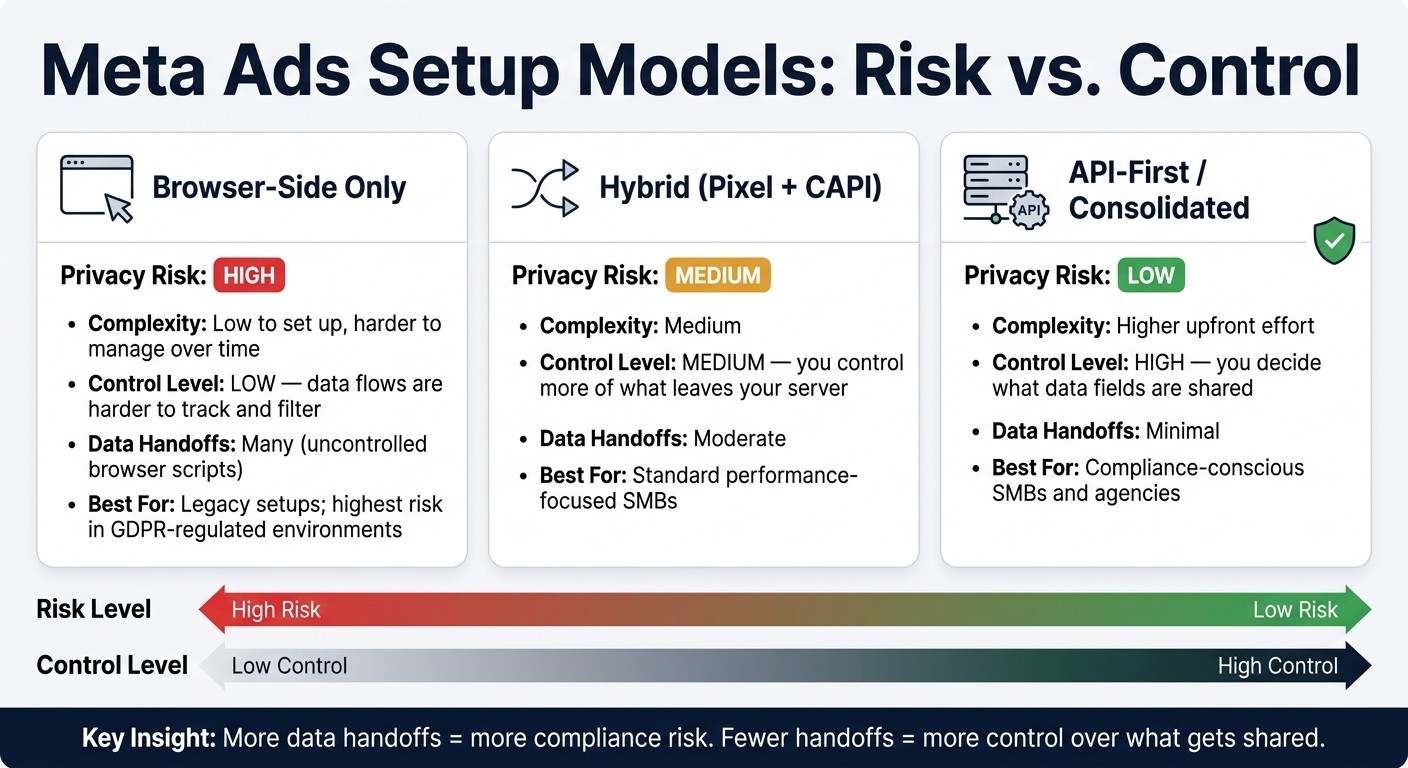
Meta Ads Data Sharing: 3 Setup Models Compared by Risk & Control
3 Setup Models Compared by Risk and Control
After tag cleanup and vendor audits, pick the simplest setup that still hits your performance goals. The basic tradeoff is pretty clear: more data handoffs usually mean more risk, while fewer handoffs give you more say over what gets shared.
Setup Model | Privacy Risk | Complexity | Level of Control |
|---|---|---|---|
Meta Pixel vs. Conversions API setups often start with a browser pixel and multiple third-party tags | High | Low to set up, harder to manage over time | Low - data flows are harder to track and filter |
Server-side routing with Meta's Conversions API and limited vendors | Medium | Medium | Medium - you control more of what leaves your server |
Consolidated first-party workflow with direct API-based integrations | Low | Higher upfront effort | High - you decide what data fields are shared |
With API-based workflows, you get tighter control over which fields leave your server. That matters when you're trying to keep data sharing lean instead of letting extra details slip through by default.
Key Takeaways for SMB Advertisers and Media Buyers
Use the model above to figure out how much control you want over shared data.
A few ground rules go a long way:
Share only the data you need, and only with vendors you’ve checked under documented terms.
Put ad SDKs behind consent checks, list every data recipient in your privacy policy, and remove unneeded fields before events reach Meta or other platforms.
Vendor audits, data processing agreements, and regular reviews of your tag setup should be part of your regular process, not a one-and-done job. Cleaner data flows lower compliance risk and often lead to more reliable signals.
FAQs
Do I need consent before Meta Pixel or SDKs fire?
Yes. In many cases, you need user consent before Meta Pixel or SDKs fire. It depends on where the user is and which laws apply.
Under GDPR, tracking has to wait until the user gives explicit opt-in consent. No consent, no tracking.
Under CCPA/CPRA, basic data collection may be allowed by default. But you still need to give users a clear way to opt out.
Use a CMP to block tracking scripts until the right consent choice is in place. And don’t stop at browser-side tracking. Apply that same consent logic to server-side data sharing too, including the Conversions API.
What data should I avoid sending to Meta?
Avoid sending sensitive personal data to Meta through the Meta Pixel, Conversions API, or Lead Ads. That includes government IDs, financial account numbers, criminal records, and protected health information, unless Meta has given explicit written approval.
You should also avoid sharing behavioral data, like browsing history or content preferences, unless the user has clearly agreed to it. For CRM uploads and website events, make sure you have explicit opt-in consent and that your privacy policy clearly states what data you collect and how you use it.
Which Meta ad setup has the lowest compliance risk?
The lowest-risk Meta ad setup starts with a first-party data strategy built around collecting less data and getting clear user consent.
Use a Consent Management Platform so the Meta Pixel and Conversions API stay off until the user gives valid consent. On the server side, check the user’s current consent status before each API call goes out.