
Meta Ad Spending Limits: What You Need to Know
Set a $100 daily budget and Meta spent $175? Learn why Meta overspends, what the '2x rule' means, how the $50 Meta-enforced limit works, and what to do.
Meta ad spending limits are tools to help you control your advertising budget on Meta platforms. They prevent overspending by pausing ads once a set limit is reached. Here’s a quick breakdown:
Daily Budget: Sets how much a campaign can spend per day. Spending may exceed slightly on high-traffic days but balances out weekly.
Lifetime Budget: Caps spending over the entire campaign duration, ideal for time-bound promotions.
Campaign Spending Limit: Applies to a single campaign, pausing it once the limit is hit.
Ad Account Spending Limit: Affects all campaigns in your account, stopping all ads when reached.
While these limits are great for budget control, they can disrupt ad performance if set too low, especially during high-conversion periods. To avoid interruptions, monitor limits regularly and calculate your budget as needed.
For advanced management, AI tools like AdAmigo.ai can automate budget scaling rules, helping you maximize returns while minimizing manual effort. Starting at $99/month, it offers features like 24/7 performance monitoring and dynamic budget scaling.
Key Takeaway: Spending limits are financial safeguards, not optimization tools. Use them wisely alongside performance-based strategies for better results.
How to Set Ad Spending Limit in Facebook Ad Account [Updated Tutorial]
The Main Types of Meta Ad Spending Limits
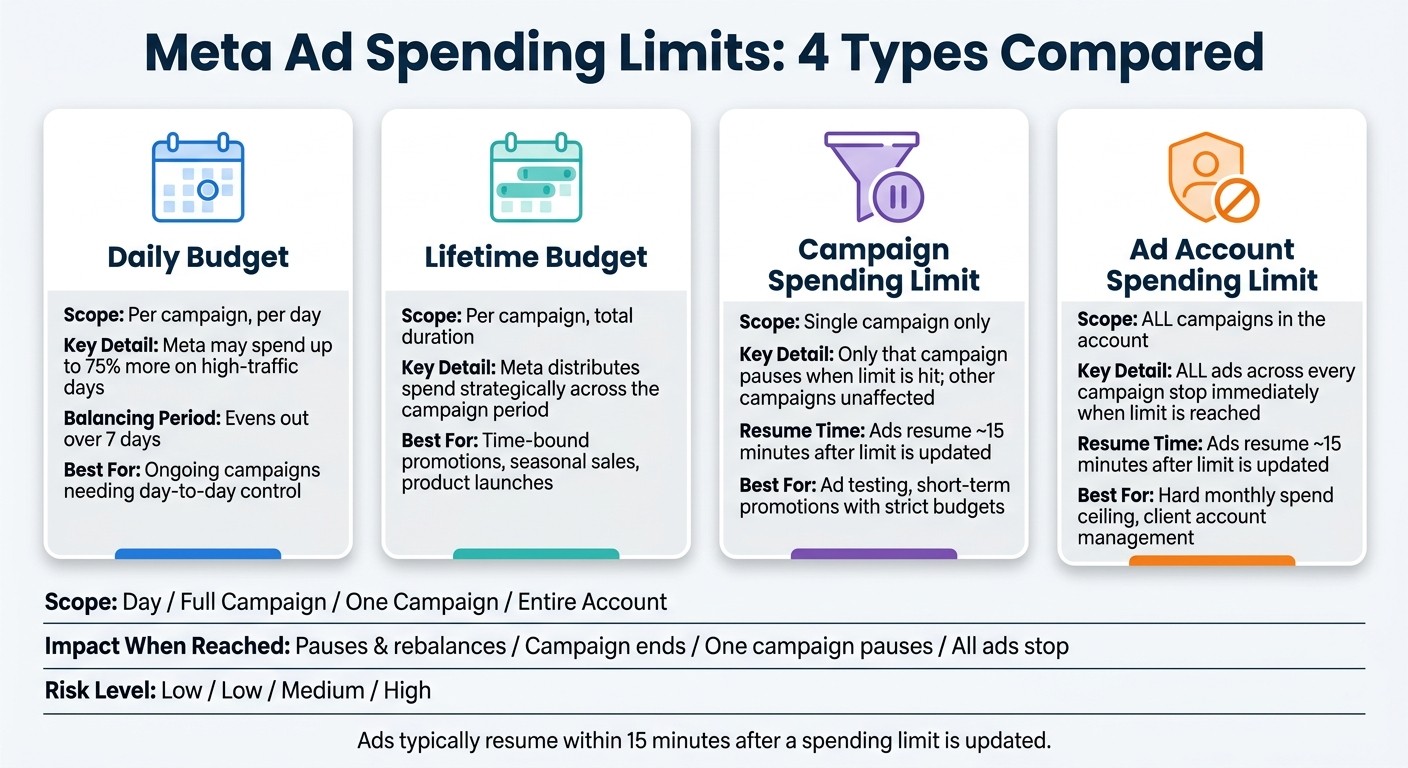
Meta Ad Spending Limits: 4 Types Compared
Campaign Budgets: Daily vs. Lifetime
When creating campaigns in Meta Ads Manager, you can choose between two budget types: daily or lifetime.
A daily budget sets the maximum amount you're willing to spend each day. On high-traffic days, Meta might spend up to 75% more than your daily limit — this is what many advertisers call the "2x rule," though the accurate figure is 175% of your daily budget, not 200%. Either way, it balances out over a 7-day period (Sunday through Saturday), and if Meta ever exceeds 175% in a single day or 7× your daily budget in a week, you can request a refund for the excess.
A lifetime budget, on the other hand, specifies the total amount you want to spend over the entire campaign. Meta distributes this budget strategically, focusing on periods when your audience is most likely to take action. This option is ideal for campaigns with a clear start and end date, such as seasonal sales or product launches. Using a Meta Ads budget planner can help you estimate these costs beforehand.
Beyond these basic budget types, there are broader spending controls you can use.
Campaign Spending Limits vs. Ad Account Spending Limits
Meta provides two additional ways to control spending: campaign spending limits and ad account spending limits. Each serves a distinct purpose.
A campaign spending limit sets a maximum amount for a single campaign. Once this limit is reached, the campaign automatically pauses, but other campaigns in your account remain unaffected. This is particularly useful for testing new ad variables or running short-term promotions with strict financial boundaries.
An ad account spending limit, however, applies to your entire account. When this limit is hit, all active ads across every campaign stop running immediately. This tool is designed to help manage overall spending and prevent overspending at the account level.
Here’s a quick comparison to clarify how these limits work:
Feature | Campaign Spending Limit | Ad Account Spending Limit |
|---|---|---|
Scope | Single campaign only | Every campaign in the account |
Primary purpose | Capping costs for a specific promotion or test | Global safety net for total account spend |
Impact when reached | Only that campaign pauses | All ads in the account pause immediately |
Ideal for | A fixed budget for one goal | A hard monthly spend ceiling for a client |
If you update a spending limit after it’s been reached, ads typically resume within 15 minutes. Keep this in mind when managing time-sensitive campaigns to avoid unnecessary delays.
Next, we’ll explore how to set and adjust these limits in Meta Ads Manager.
How to Set and Adjust Spending Limits in Meta Ads Manager

Setting Campaign Budgets and Spending Limits
When creating a campaign, start by selecting your objective, then decide between a daily budget or a lifetime budget, and enter the desired amount. If you want to cap the total spend for the campaign, fill in the optional "Campaign Spending Limit" field.
To adjust the spending limit for an existing campaign, head to the Campaigns tab, select the campaign, click Edit, and navigate to the budget section.
For instance, if you’re running a $500 test, setting the campaign spending limit to exactly $500 ensures you won’t exceed that amount.
Once your campaign budget is set, it’s a good idea to establish an overall ad account spending limit to keep your total expenditure in check.
Configuring Ad Account Spending Limits
Go to Payment Settings in Meta Ads Manager and find the "Account Spending Limit" section. Here, you can set a new limit, increase or decrease an existing one, or remove it altogether. If you’re using a prepaid account, Meta ensures that your spending limit can’t exceed your available balance.
When you update the limit, ads typically resume within about 15 minutes. This is important to remember for time-sensitive campaigns where you might need to raise the limit quickly to maintain delivery.
A word of caution: if your account hits its spending limit during the day and you don’t notice until later, you could lose several hours of ad delivery. To avoid this, make it a habit to check your spending limits regularly, particularly at the start of a new billing cycle. This simple step can prevent unnecessary interruptions. For more severe issues, having a structured incident response plan can help minimize losses.
How Spending Limits Affect Ad Delivery and Performance
What Happens When a Spending Limit Is Reached
When you set spending limits for your campaigns, it’s important to understand how they influence ad delivery and overall performance. Once your campaign or account hits its spending limit, Meta stops delivering ads immediately. This can create challenges, especially if your budget runs out during prime hours. For instance, evening hours are known to convert 2.3 times better compared to earlier parts of the day, making strategic ad scheduling vital. Missing these high-converting periods can severely impact your campaign's success. To avoid this, it's essential to set limits that manage costs while still allowing your ads to perform effectively.
Adding to the challenge, many advertisers don’t realize when their budget cap has been reached. On average, it takes marketers 11 days to identify issues like hitting a budget cap or noticing a decline in ROAS. By the time the problem is discovered, valuable ad delivery time and critical learning opportunities may already be lost.
Balancing Spending Limits Without Hurting Performance
While spending caps can help control costs, overly strict limits can harm your campaign's performance. Without some flexibility, Meta’s algorithm may allocate funds inefficiently, spending on low-quality opportunities instead of waiting for better ones. This phenomenon, often referred to as "garbage burn", results in wasted ad spend.
Meta’s algorithm thrives on consistency to deliver optimal results. Frequent pauses caused by hitting spending limits can push your campaign back into the learning phase, which requires 50 optimization events to stabilize again. To avoid this, consider using performance-based metrics like CPA or ROAS targets instead of rigid budget caps. These guardrails help maintain efficiency without disrupting delivery.
Additionally, combining this approach with anomaly detection and monitoring can help you catch issues early - whether it’s a broken landing page link, a disabled ad, or any other problem that could quietly drain your budget. This proactive strategy ensures your campaigns stay on track while minimizing unnecessary losses.
Using Custom Guardrails and Automation to Manage Budget Overspend
How to Design Custom Spending Guardrails
Native spending limits are helpful, but they often fall short when it comes to catching inefficiencies before hitting the cap. This is where custom guardrails come into play. These are designed to act based on performance metrics, not just raw spending numbers, ensuring your budget is allocated more effectively.
For example, you can set up KPI-based triggers alongside standard spend caps. Imagine configuring a rule that automatically pauses any ad if the CPA (cost per acquisition) exceeds $15. Or, you could scale up a budget by 20% when a campaign maintains a ROAS (return on ad spend) above 3x for three consecutive days with over $100 in spend. These rules help direct your budget toward high-performing campaigns while cutting off underperformers - without requiring you to manually check Ads Manager.
Another critical tool is anomaly alerts. These notifications can flag sudden spend spikes, broken landing page links, or disabled ads, allowing you to address issues before they snowball. Without these alerts, common problems might go unnoticed for days, causing unnecessary losses.
If you're new to automated rules, it’s a good idea to start with a review-and-approve mode. This lets you review each recommendation before the system takes action. Once you’re confident in the logic and results, you can switch to full automation for faster, hands-free adjustments.
For those looking for even more advanced control, consider exploring AI-driven solutions for continuous optimization.
Using AdAmigo.ai to Automate Budget Optimization
Building on the concept of custom guardrails, AI tools like AdAmigo.ai take budget management to the next level. By leveraging real-time data, AdAmigo automates budget adjustments, scales winning campaigns, and pauses underperformers - all while offering the flexibility to act automatically or with your approval.
One standout feature is Autopilot, which monitors performance metrics 24/7. It ensures budgets are dynamically adjusted to maximize returns while minimizing wasted spend. Another layer of protection comes with AdAmigo Protect, which constantly scans your account for anomalies like runaway spend, delivery errors, or setup issues. For instance, an EU-based agency using AdAmigo was able to catch four separate incidents where a client’s website went offline while ads were still running - saving them from significant losses.
The impact of using AdAmigo can be substantial. A skincare brand, for example, improved its ROAS from 2.4 to 4.3 in just one month while saving 12 hours a week on manual management. Agencies using the platform report an average 34% performance improvement within the first month.
"Our budgets are controlled, our spend is being smartly allocated and our ROAS is up massively. Agencies charging 7 times the cost of AdAmigo have been put to shame quite frankly!" - Rochelle D., Verified User
AdAmigo offers tiered pricing based on account spending:
$99/month for accounts spending up to $2,500
$249/month for accounts spending $2,500–$10,000 (includes Autopilot mode)
$295/month for accounts spending over $10,000, with unlimited AI actions
Agencies managing multiple accounts (4 or more) benefit from a 30% discount.
Conclusion: Key Points for Managing Meta Ad Spending Limits
Managing Meta ad spending limits requires a thoughtful approach, as the system is more intricate than it might appear. Daily budgets, campaign spending limits, and account spending limits each serve distinct purposes, and misunderstanding or misusing them can quietly disrupt ad delivery. For instance, relying too heavily on account-wide caps can cause intermittent delivery issues, even when Ads Manager shows an "Active" status for paused campaigns.
It's important to recognize that hard caps are financial safeguards, not optimization tools. Overusing them - especially at the account level - can interfere with Meta's learning phase and disrupt the flow of conversion signals. For accounts focused on scaling, pacing systems and performance-based strategies tend to deliver more consistent results than rigid spending ceilings.
To avoid costly interruptions, set spending limits to reset automatically each month and ensure a backup admin can update them if needed. Additionally, implementing 24/7 anomaly monitoring can help catch issues like runaway spending or broken links, which can happen at any time. Monitoring these anomalies is also crucial for identifying creative fatigue before costs spike.
For advertisers looking to move beyond manual adjustments, AI-driven tools like AdAmigo.ai offer a predictive approach to budget management. These tools adjust spending based on anticipated ROAS changes, rather than simply pausing campaigns when limits are hit. Starting at $99/month, AdAmigo.ai provides a scalable solution for both individual brands and agencies managing multiple accounts.
Ultimately, treat spending limits as one component of a larger strategy - not your sole line of defense. This layered approach ensures smoother performance and better results over time.
FAQs
Which spending limit should I use: daily, lifetime, campaign, or ad account?
When managing ad budgets, you have a few key tools at your disposal:
A campaign spending limit lets you cap the total amount spent across all ad sets within a single campaign. This helps you stay within budget for specific campaigns.
For more flexibility, especially on days with higher opportunities, use a daily spending limit. This sets a maximum spend per day, giving you control while allowing adjustments based on performance.
An ad account spending limit is ideal for controlling the total spend across all your campaigns. This approach focuses on overall cost management rather than fine-tuning individual campaign performance.
These options allow you to tailor spending controls based on your goals and needs.
Why did my ads stop even though my campaign still shows as Active?
Your ads might stop running even if the campaign appears active in Ads Manager. This often happens when your account hits its spending limit. In such cases, Meta pauses all campaigns on the account until you adjust the limit.
How can I prevent overspending without hurting performance or learning?
To keep spending under control without sacrificing performance, use automated rules to manage your ad campaigns. For instance, you can set rules to pause campaigns if daily spending surpasses a specific limit or if the return on ad spend (ROAS) falls below a certain level. Meanwhile, let AI tools handle the optimization of your top-performing ads, ensuring they scale effectively while staying within your budget.