
Ultimate Guide to Copyright Compliance in Meta Ads
Avoid ad rejections and bans: use original or licensed assets, secure UGC rights, monitor Account Quality, and resolve disputes quickly.
Running Meta ads without following copyright rules can lead to ad rejections, wasted budgets, and even permanent bans. Meta’s automated systems, which flagged 92% of scam ads in 2025, rigorously check ads for violations. Repeated issues hurt your account's health score, limiting ad performance and risking account suspension. To maintain health, many advertisers use full-funnel AI optimization to monitor and scale safely. Legal consequences, like lawsuits and penalties, add to the risks.
Here’s how to stay compliant:
Use original or properly licensed content for all ad elements (images, music, text, etc.).
Avoid common violations, such as using unlicensed stock media or competitor logos.
Secure explicit permission for user-generated content (UGC) before using it in ads.
Leverage tools like Meta’s Sound Collection for pre-approved music.
Monitor your account regularly via Meta’s Account Quality dashboard to address issues quickly.
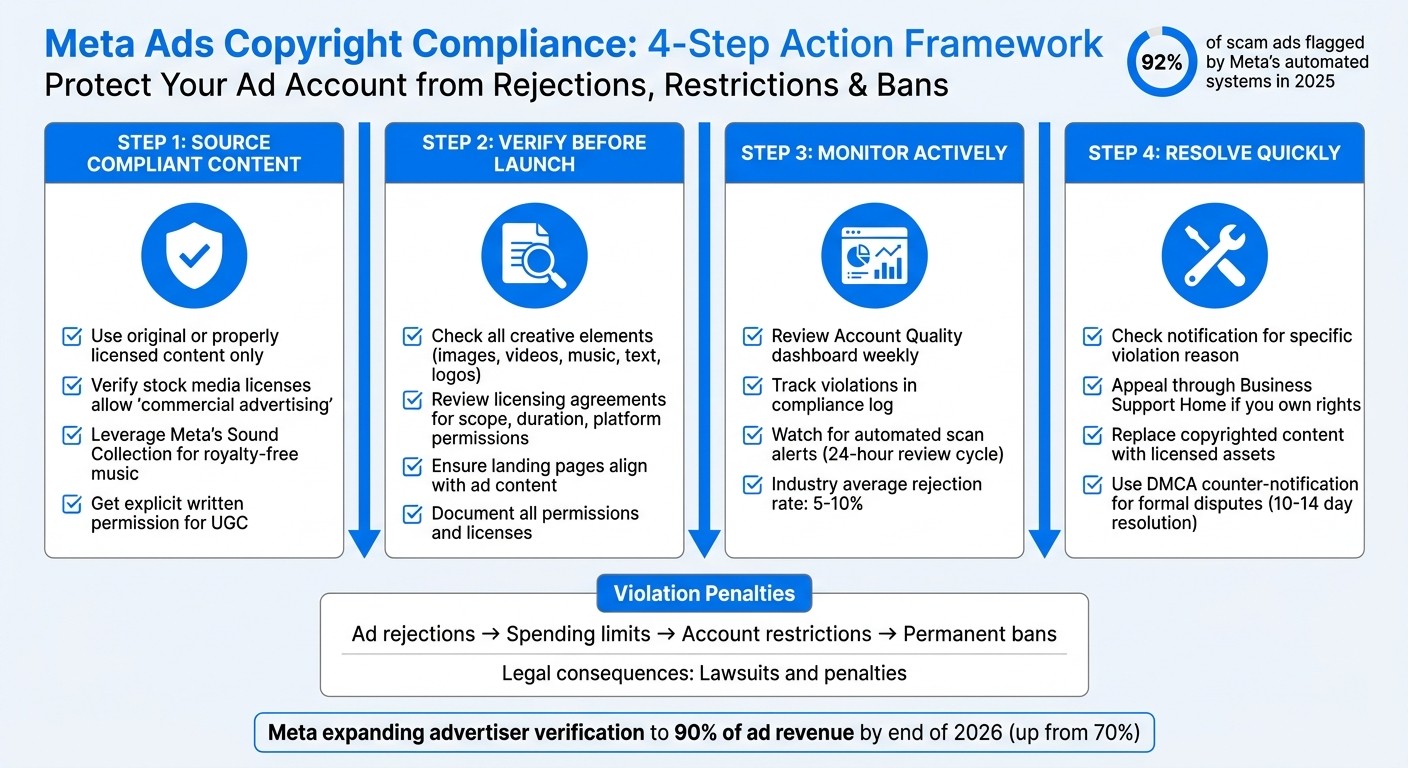
Meta Ads Copyright Compliance: 4-Step Action Framework
COPYRIGHT INFRINGEMENT ON FACEBOOK | How to avoid it? | LAWYER MARCELLA
For organizations managing multiple accounts, implementing Meta ad policy training can help teams stay compliant and avoid common pitfalls by following compliance monitoring best practices.
Meta's Copyright Policies Explained
Meta has clear rules when it comes to intellectual property: every creative element in your ads must either be something you created yourself or something you’ve properly licensed. This applies to everything - images, videos, music, text, logos, and design elements - across Facebook and Instagram. If you don’t follow these rules, expect strict enforcement.
Main Rules and Prohibited Content
If you don’t own or have a license for the content, you can’t include it in paid ads. Copyright laws protect original works like photos and videos, while trademark laws prevent the use of another brand's name or logo in ways that could mislead viewers about sponsorship or affiliation.
Some common violations include:
Using images pulled from Google without permission
Including unlicensed music clips
Copying competitor slogans or using their logos
Failing to secure commercial licenses for stock media
Stock content deserves special attention. Many royalty-free platforms limit how their media can be used, often excluding paid advertising. To stay on the safe side, make sure your license explicitly allows for "commercial advertising" use. Alternatively, Meta’s Sound Collection offers royalty-free music tracks pre-approved for use in ads on Facebook and Instagram.
How Meta Enforces Copyright Rules
Meta takes enforcement seriously, using a mix of automated tools and manual reviews to ensure compliance and check for policy issues. Automated systems scan for issues through image hashing and keyword detection, while Rights Manager checks uploaded content against a database of copyrighted materials. For more complex cases, human reviewers step in.
In Meta’s 2025 transparency report, they emphasized:
"Ads remain subject to review and re-review at all times, and may be rejected or restricted for violating our policies at any time"
This means even if your ad gets approved initially, it could still be removed later if a secondary review or a report from a rights holder flags a problem.
Penalties can range from ad rejections to spending limits, temporary restrictions, or even recover deactivated accounts. Larger brands often benefit from faster resolutions through Brand Rights Protection, while smaller advertisers may face longer delays in resolving disputes.
This enforcement system highlights the importance of sourcing content correctly to avoid issues with your campaigns.
How to Source Copyright-Compliant Content
The safest way to avoid copyright issues is to use content you've created yourself. As Meta's Help Center advises:
"The best way to help make sure that what you post to Meta platforms... doesn't violate copyright law is to only post content that you've created yourself."
If you produce photos, videos, or written content in-house, you typically own the rights - provided the work wasn't created by independent contractors or freelancers who retain their own copyrights.
Original Content vs. Licensed Content
Original content gives you full control over the rights. When employees create content as part of their job, the employer is usually considered the legal "author" and owns the copyright. However, contractors and freelancers often keep ownership unless a written agreement transfers those rights to your company.
Licensed content comes with specific conditions. If you're using stock media, make sure the license explicitly allows commercial advertising. Many royalty-free licenses don’t include paid ads. For video ads featuring music, you’ll need a sync license unless you use Meta's Sound Collection, which offers royalty-free tracks pre-cleared for commercial use on Facebook and Instagram.
Keep in mind that even content you create yourself can unintentionally include copyrighted elements, like background music, which could lead to compliance issues.
Following a Meta ads compliance checklist can help you stay ahead of these requirements. Next, let’s look at how to scale Meta ads with multi-format creatives and handle user-generated content.
Getting Rights for User-Generated Content
User-generated content (UGC) comes with its own set of rules. You need explicit written permission to use UGC in paid ads, even if the creator tagged your brand in their original post. Just because someone allows you to repost their content organically doesn’t mean you can use it in advertisements. Marketing strategist Kelsi McKee from Fable Heart Media emphasizes:
"You must obtain explicit permission from the creator before featuring UGC in paid ads, even if it was originally posted on your brand's social media."
When securing rights for UGC, check for potential copyright conflicts. Background music, visible brand logos, or recognizable artwork might need separate licenses. To stay compliant, use signed agreements that include both copyright and right-of-publicity permissions and keep these on file for future audits.
Licensing Agreement Checklist
Whether you’re using licensed or user-generated content, clear agreements are critical. A proper licensing agreement should outline:
Scope of use: Specify if it covers commercial advertising rights.
Duration: Define how long you can use the content.
Platform permissions: List where the content can be used (e.g., Meta, Google).
Compensation: Detail payment terms, if applicable.
For UGC, the agreement should also include copyright transfer, right-of-publicity clauses, and exclusivity terms if needed. Written agreements not only protect both parties but also serve as documentation in case Meta’s compliance systems flag your ad.
Using AI Tools for Copyright Compliance
Manually ensuring copyright compliance across multiple ads can be a daunting task, prone to errors. With Meta's strict copyright policies, AI tools have become essential for identifying and resolving potential compliance issues before ads are published. These tools proactively scan ad content, flagging anything that might violate Meta’s guidelines even before the platform reviews your ad.
How AdAmigo.ai Monitors Compliance

AdAmigo.ai offers features like AI Autopilot and AdAmigo Protect to keep a constant watch over your ad account. These tools work around the clock, adapting to policy changes and auditing campaigns for risky elements such as problematic language, suspicious targeting behaviors, broken links, or unusual delivery drops that could indicate policy violations.
When an ad gets flagged, the AI Chat Agent steps in to analyze the rejection reasons. It provides clear explanations for why Meta disapproved the content and offers tailored suggestions to fix the issue. Instead of guessing what went wrong, you’ll receive actionable steps to address the problem based on Meta’s feedback. This streamlines troubleshooting and incident response to help avoid repeat violations.
By automating these checks, AdAmigo not only minimizes compliance issues but also makes ad creation smoother by ensuring all assets are pre-approved. You can also follow a compliance checklist to ensure your creatives and landing pages meet all standards.
Automated Ad Creation with Rights Verification
The Bulk Ad Launcher simplifies the process of managing creative rights during large-scale uploads. It verifies that your assets comply with Meta’s rules before publishing. The process is straightforward: upload your creatives to Google Drive, provide a brief, and the system handles the rest. It generates ad copy, organizes campaigns, and launches ads - all while ensuring compliance with copyright standards. This eliminates hours of manual review and reduces the risk of using unlicensed content.
Using AI Creative Generation, AdAmigo takes your top-performing ads and competitor examples to inspire new concepts. The system applies a "reference-and-swap" method: it keeps the structural elements or pacing of successful ads but swaps out copyrighted materials - like images, videos, and text - with your own verified assets. This approach allows you to replicate effective strategies without infringing on protected content. As clarified by U.S. copyright law:
"In no case does copyright protection for an original work of authorship extend to any idea, procedure, process, system, method of operation, concept, principle, or discovery"
. This means while the creative execution is protected, the structure and concept remain open for use. By leveraging this principle, AdAmigo ensures you can legally build on proven ideas while staying fully compliant.
Resolving Copyright Disputes and Violations
Even with careful content planning and sourcing, copyright issues can still arise. If Meta removes or rejects your ad, start by checking the notification in your Account Quality dashboard or Business Support Home. This notification will explain why your content was flagged - whether it’s due to music, an image, text, or a third-party report - and will reference the specific policy involved. This step is essential for understanding the issue and preparing to address it.
If you hold the rights to the content or it qualifies under fair use, you can appeal the decision through the Business Support Home. For copyright-specific issues, Meta offers a formal DMCA counter-notification process under 17 U.S.C. § 512(g). This process requires you to provide a statement under penalty of perjury and agree to jurisdiction. If the original claimant does not pursue legal action within 10–14 business days of your counter-notification, Meta generally restores the content.
If the violation is valid, the best course of action is to replace the copyrighted material with original or properly licensed assets before resubmitting the ad. Avoid resubmitting unmodified ads that were previously rejected, as this could lead to account restrictions or permanent bans.
Filing Reports and Counter-Notifications
When Meta removes content due to copyright concerns, you’ll receive a notification via email. This email includes the rights owner’s name, their contact information, and detailed instructions for filing an appeal. You can also use the Account Quality dashboard to request a review and submit supporting documentation, such as licensing agreements or proof of fair use.
Meta provides the reporter’s contact details, allowing you to reach out directly to resolve the issue or request that they withdraw the report. If your appeal is successful and content is restored, Meta considers this under its Repeat Infringer policy. However, submitting fraudulent appeals is risky - under DMCA Section 512(f), false counter-notifications could result in liability for damages, as well as account termination.
Action Type | Platform Tool | Primary Trigger |
|---|---|---|
Initial Review | Account Quality Dashboard | Automated scan of text, images, and music |
Policy Appeal | Business Support Home | Incorrect policy application or "Fair Use" |
Legal Dispute | DMCA Counter-Notification | Formal copyright infringement claim |
Content Fix | Valid violation (e.g., unlicensed music) |
Timely resolution of disputes helps reduce future risks and ensures smoother ad compliance moving forward.
Preventing Future Violations
To stay ahead of potential issues, review the Account Quality dashboard weekly and maintain a log of any violations. Use this log to create an internal compliance guide. Keep all licensing agreements and permissions well-documented so you can present them quickly if needed during an appeal.
Before launching any ad, follow a pre-flight checklist. This should include checking the product category, reviewing creative elements for personal attribute claims, and ensuring the landing page aligns with the ad’s promises. Remember, even if your ad complies, a non-compliant landing page can still result in violations.
Tools like AdAmigo.ai can be a huge help here. Its AdAmigo Protect feature monitors account performance, flags unusual behavior, and detects delivery issues early. This automated system acts as an extra layer of protection, catching potential problems before they escalate. While the industry average for ad rejection rates is between 5% and 10%, consistent monitoring and thorough documentation can help you stay well below that range.
Key Takeaways
Staying on top of copyright compliance is critical for protecting your ad account from restrictions, spending limits, or even bans. Meta's automated review system usually completes its checks within 24 hours, but violations can pile up quickly. Since your ads are subject to strict automated reviews, maintaining compliance isn’t just a one-time task - it’s an ongoing effort.
The cornerstone of compliance? Use only original or properly licensed content. This means steering clear of unlicensed music, stock images without commercial rights, or user-generated content unless you have explicit written permission. Even if a user tags your brand in a post, you still need formal consent before using it in paid ads. To avoid copyright issues, you can rely on resources like Meta's Sound Collection or other royalty-free libraries, which provide safe options that won’t trigger copyright violations. Building this solid foundation ensures smoother automation and quicker resolution of disputes during your campaigns.
Technology can make compliance easier. Tools like AdAmigo.ai help reduce risks while improving your ad performance. For example, AdAmigo Protect works around the clock to monitor your account, catching delivery problems or unusual activity before they escalate into violations. On the other hand, the Bulk Ad Launcher minimizes manual errors that might trigger policy flags, helping you keep your rejection rate well below the industry average of 5–10%.
If a violation occurs, act quickly. Check the Account Quality dashboard, document the issue, and either file an appeal with evidence or update the content before resubmitting. Keeping your licensing organized and conducting regular reviews can help prevent repeat problems.
Compliance is becoming even more important as verification standards evolve. Meta plans to expand its advertiser verification program to cover 90% of ad revenue by the end of 2026, up from 70%. At the same time, platforms are tightening their policies and ramping up enforcement to stay ahead of global regulations. Staying compliant today ensures your campaigns keep running tomorrow - and automation tools make that process faster, safer, and easier to scale.
FAQs
Do I need written permission to use UGC in Meta ads?
Yes, you need to obtain explicit permission from the content creator before using user-generated content (UGC) in Meta ads. Even if the content is publicly available, the creator still owns it, and you must secure the proper usage rights to avoid any copyright violations. Skipping this step can result in copyright infringement claims or even penalties on your account.
What proof should I keep to show Meta I have the rights?
Ensure you keep records that confirm your legal right to use the content featured in your ads. This could include licenses, permissions, or proof of ownership. Having these documents on hand not only aligns with Meta's copyright policies but also simplifies addressing any disputes that may arise.
Can an approved Meta ad be removed later for copyright?
Yes, even if a Meta ad is initially approved, it can still be removed later. This might happen if the ad is reported or found to violate copyright laws. Meta investigates such cases for potential intellectual property infringements and may take appropriate action.