

Meta Ads Compliance Monitoring: Best Practices
Framework for monitoring Meta ad compliance with tools, audits, automated alerts, GDPR/CCPA logs, and AI checks to reduce rejections and account risk.
Running Meta ads without ensuring compliance can lead to ad rejections, account suspensions, and wasted resources. Meta’s policies safeguard users from misleading claims, prohibited content, and data privacy violations. Industries like healthcare, finance, and cryptocurrency face stricter scrutiny, requiring extra vigilance. Missteps, like unverified claims or improper data handling, can derail campaigns and damage reputations.
To avoid these pitfalls, here’s what you need to know:
Meta Ads Manager provides real-time updates on ad status and policy violations.
Compliance tracking spreadsheets help log, audit, and identify recurring issues like ad rejections.
Regular audits - weekly, monthly, and quarterly - ensure ongoing compliance.
Meta Business Manager alerts notify you of policy violations instantly.
Automated tools like AdAmigo.ai streamline monitoring and flag potential issues.
GDPR and CCPA compliance requires tracking user consent and data usage logs.
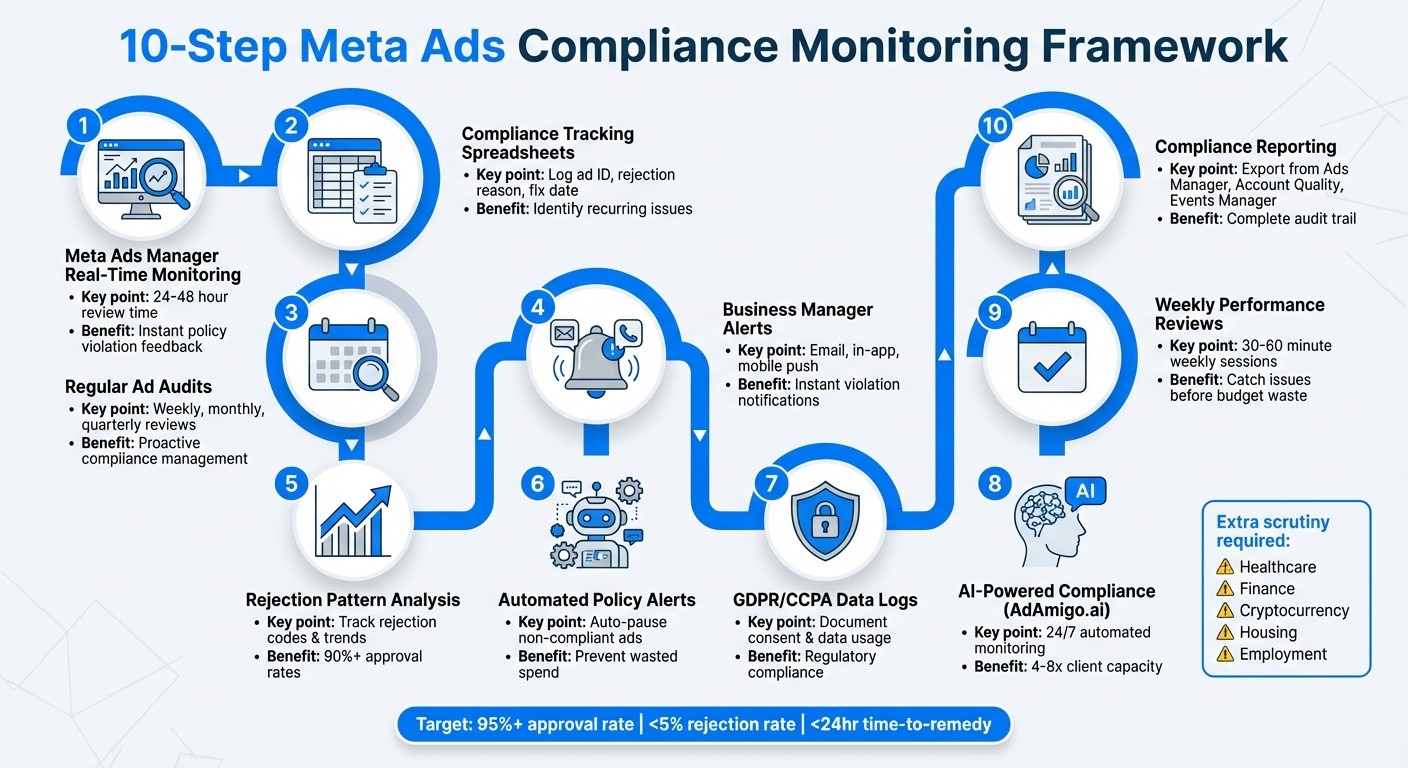
10-Step Meta Ads Compliance Monitoring Framework
Facebook Ads Policies Finally EXPLAINED (Avoid red flags 🚩)
1. Use Meta Ads Manager for Real-Time Monitoring
Meta Ads Manager helps you stay ahead of compliance issues by offering real-time notifications. If an ad gets disapproved or flagged, you’ll receive detailed feedback - like “misleading claims” or “prohibited content” - right in your account quality dashboard. This allows you to quickly address problems and keep your campaigns running smoothly.
How It Spots Compliance Issues
Meta Ads Manager provides clear status updates for every ad, such as “In Review,” “Disapproved,” or “Active.” Most reviews are completed within 24 hours, though manual reviews can take up to 48 hours. If an ad is flagged, the feedback specifies the violation, whether it’s exaggerated claims, prohibited items like tobacco, or poor-quality creatives. You can filter by delivery status to identify broader trends. For example, if multiple ads in a skincare campaign are flagged for unverified claims, you’ll notice the pattern quickly and can adjust your messaging before scaling up.
Integration Across the Meta Ecosystem
Meta Ads Manager works seamlessly with other Meta Business tools, giving you a centralized view of ad performance, audience insights, and policy compliance across Facebook, Instagram, and Audience Network. This integration means you can track pixel-verified conversions and monitor compliance issues all in one place, eliminating the need to switch between platforms.
Automation Tools for Monitoring and Reporting
You can automate alerts to notify you via email if rejection rates exceed a certain threshold, like 10%, or use the “Account Quality” tab for an instant overview of violations. The platform also allows bulk editing or pausing of non-compliant ads. For ongoing tracking, you can schedule weekly performance reports that include reasons for disapprovals. Need a deeper dive? Export CSV reports to conduct regular audits, and check the “Ad Review” tab daily to maintain approval rates above 95%.
Compliance with Data Privacy Regulations (GDPR, CCPA)
Meta Ads Manager doesn’t just monitor ad content - it also helps ensure data privacy compliance. Through Business Manager, you can access Custom Audience controls and data usage logs to audit audience lists for GDPR and CCPA compliance. Non-compliant data can be deleted, and you can enable “Limited Data Use” for California users to restrict data sharing. These logs are exportable for regulatory audits, helping you meet privacy requirements while still tracking pixel events and conversions.
2. Create Compliance Tracking Spreadsheets
Using a dedicated spreadsheet can provide an internal audit trail that goes beyond what Meta Ads Manager offers. In this spreadsheet, you can log key details such as ad ID, campaign name, submission date, approval status, rejection reason, violated policy, fix date, and re-submission date. This approach helps identify recurring issues, like repeated misleading claims in skincare ads or warnings about restricted content in sensitive industries.
How It Identifies Compliance Issues
This method complements real-time monitoring by leveraging historical data to pinpoint actionable insights. For example, conditional formatting can highlight rejected ads (e.g., marking them in red), while formulas like =COUNTIF(Rejection_Reason, "Prohibited Content") can tally specific violations. If a rejection rate surpasses 5%, it’s a signal to audit your creative templates.
Here’s a practical example: a pet food advertiser discovered their ads were being flagged for unsubstantiated health claims. By revising the copy to focus on "general benefits", they successfully re-submitted the ad after an appeal. Categorizing rejection reasons - such as exaggerated claims, unverifiable testimonials, or restricted targeting - helps your team refine messaging before scaling campaigns.
Integration with the Meta Ads Ecosystem
Exporting ad data as a CSV file allows you to integrate it with tools like Google Apps Script or Excel Power Query for real-time updates via API. You can also link your spreadsheet with Meta Pixel data and URL parameters to track conversions effectively. Agencies often manage multiple clients by maintaining separate tabs for each ad account, providing a portfolio-level view of high-risk industries like health, finance, and housing.
Automation Features for Monitoring and Reporting
To streamline compliance tracking, automate daily data syncs and set up conditional alerts using tools like Zapier or Google Sheets notifications. For instance, you can receive an email alert if the rejection rate exceeds 10%. Dashboards featuring pivot tables and charts can help you track key metrics, such as approval rates (aim for over 95%), average approval time, and cost per compliant ad. Weekly summary reports can highlight recurring issues, like frequent restricted content violations in finance ads. Scheduling these reports for Monday mornings ensures your team starts the week with a clear understanding of compliance trends.
Support for Data Privacy Regulations (GDPR, CCPA)
You can enhance your compliance tracking spreadsheet by adding columns for Audience Targeting, Data Usage Logs (including opt-in dates and geo-restrictions), and Compliance Status. Formulas can verify that no prohibited personal attributes - like health status or financial details - are used in targeting without the appropriate disclaimers. For campaigns in California, flag ads requiring "Limited Data Use" and log consent dates for custom audiences built from uploaded customer lists. These detailed, exportable logs simplify regulatory audits and ensure your Meta campaigns align with both platform policies and data privacy laws. By integrating these insights into your broader compliance workflow, you can create a seamless and effective monitoring system.
3. Schedule Regular Ad Audits and Reviews
Setting up a consistent audit schedule helps shift from reactive problem-solving to a more proactive approach in managing compliance. Plan weekly quick audits for new or updated ads, monthly in-depth reviews for all active campaigns, and quarterly strategic evaluations involving leadership and legal teams - especially critical for industries like health, finance, housing, and employment, which are highly regulated. Weekly audits should focus on issues like disapprovals, limited delivery labels, and ads that may be skirting policy boundaries. Monthly reviews, ideally led by a senior media buyer or compliance lead, should thoroughly examine ad sets, creatives, and landing pages to ensure they align with Meta's policies. These audits, combined with real-time monitoring and detailed tracking via spreadsheets, provide a comprehensive compliance framework.
How It Identifies Compliance Issues
During each audit, use the Account Quality section to filter ads by delivery status, such as "Rejected", "Limited", or "Limited Delivery", to uncover potential compliance problems. Your checklist should include:
Ad text: Look for claims or language that might violate policies, such as prohibited content or exaggerated promises.
Creative elements: Check for problematic imagery, including before/after comparisons.
Targeting: Ensure there’s no discrimination or use of personal attributes like health status or religion.
Destination URLs: Verify that landing pages are consistent with ad content and maintain transparency.
Common pitfalls include misleading claims (e.g., "guaranteed results" in health or finance ads), improper targeting based on personal attributes, and landing pages that fail to match the ad's promises. By tracking rejection reasons and mapping them to specific ad elements, teams can identify recurring issues - like certain phrases in financial ads or specific image types - that often lead to disapprovals. This allows for the creation of internal guidelines to minimize future violations.
Integration with Meta Ads Ecosystem
Audits should extend beyond creative content to include technical configurations. For instance:
Confirm that Pixel and Conversions API events only track permitted data types and are labeled in line with Meta's and US privacy standards.
For lead ads, ensure all questions are necessary, non-discriminatory, and paired with clear links to a US-compliant privacy policy and terms.
At the account level, verify proper setup for special ad categories, domain verification, and accurate business details in Business Manager to ensure ad delivery and data usage comply with Meta's ecosystem requirements.
Automation Features for Monitoring and Reporting
Leverage automation tools like AdAmigo.ai to flag ads with potentially risky language or patterns automatically. This lets human reviewers focus on edge cases and strategic decisions. AI can generate daily or weekly compliance watchlists (e.g., "ads with aggressive claims" or "ads in restricted categories") and auto-tag ads needing manual legal review, significantly cutting down manual effort for high-volume US accounts.
Key metrics to track include:
Ad rejection rate: The percentage of total ads launched that get rejected.
Time-to-remedy: Average time (in hours) from rejection to compliance fixes.
Account-level warnings or restrictions: The number of such events per quarter.
Keep a detailed log of each audit, including the date, accounts reviewed, types of issues found, and corrective actions taken. This not only helps improve processes over time but also demonstrates a commitment to compliance.
Support for Data Privacy Regulations (GDPR, CCPA)
Audits should also verify adherence to GDPR/CCPA regulations. For example:
Ensure consent records and data use are properly logged for lead forms and Pixel events.
For campaigns targeting California or EU users, confirm compliance with CCPA's "Limited Data Use" requirements.
Check that custom audiences built from uploaded customer lists include logged consent dates.
Maintain an archive of problematic ads, corrected versions, Meta's rejection reasons, and appeal outcomes. This creates a documented history of compliance efforts. If Meta escalates enforcement, these records can demonstrate your adherence to platform policies and applicable US laws, showcasing a good-faith effort to meet all requirements.
4. Turn On Meta Business Manager Alerts
Meta Business Manager, now part of Meta Business Suite, comes with a handy notification system that keeps you updated in real time about ad policy violations, disapprovals, or account restrictions. To activate these alerts, head to Business Settings > Notifications and enable updates for categories like Ad Review, Account Quality, and Policy Updates. You can choose how you want to receive these notifications - via email, in-app messages, or mobile push alerts - so you’re always in the loop when issues like misleading claims or restricted content arise. This feature works seamlessly with your compliance review process, which we’ll dive into later.
How It Identifies Compliance Issues
These alerts kick in the moment Meta’s review system spots a violation. For instance, if an ad for skincare products is flagged for making exaggerated claims, you’ll get a notification explaining the issue. This allows you to quickly adjust the ad - replacing phrases like "miracle cure" with something more grounded, such as "clinically proven to moisturize effectively", backed by data. This proactive approach saves you from waiting 24–48 hours to uncover a rejection manually. The system is particularly vigilant in areas with stricter compliance rules, such as healthcare, finance, housing, employment, and gambling.
Integration with the Meta Ads Ecosystem
Meta Business Manager alerts work hand-in-hand with Ads Manager and Meta Pixel, bringing all compliance tracking under one roof. When you receive an alert about a rejected ad, it includes a direct link to the ad in Ads Manager, allowing you to edit and resubmit it with just one click. This integration not only simplifies the process but also helps identify whether the issue stems from non-compliant targeting or Pixel tracking errors, cutting down on approval delays.
Automation Features for Monitoring and Reporting
To stay on top of recurring issues, you can set up weekly email summaries that compile all policy violations into a single report. These summaries make it easier to spot trends and share findings with your team. Additionally, you can integrate alerts with Ads Manager’s automated rules to pause non-compliant ads before they rack up unnecessary costs. All alerts and corrective actions are logged, creating a clear audit trail for compliance purposes.
Support for Data Privacy Regulations (GDPR, CCPA)
Meta Business Manager also helps you stay aligned with privacy laws like GDPR and CCPA. Data Usage notifications warn you if audience targeting or Pixel tracking practices might breach these regulations. For example, you’ll get alerts if custom audience uploads lack proper consent records or if tracking methods don’t meet compliance standards. These notifications also help you maintain the documentation needed for regulatory reviews, ensuring your campaigns remain above board.
5. Review Ad Rejection Patterns and Feedback
When Meta disapproves an ad, it provides specific reason codes, such as "Misleading Claims" or "Prohibited Personal Attributes", to explain the rejection. Keeping track of these rejections in a spreadsheet can help pinpoint recurring problems. For instance, if many of your weight-loss ads are flagged for "unrealistic guarantees", you might need to replace phrases like "Lose 10 pounds in a week" with more credible alternatives, such as "Support a healthier lifestyle" backed by evidence. This step sets the stage for a deeper analysis of patterns, which we'll explore further.
How It Identifies Compliance Issues
Tracking rejection patterns goes beyond fixing individual ads - it sheds light on broader messaging issues. By analyzing rejections across campaigns, objectives, creative formats, and policy categories, you might uncover trends, like a specific product line or copywriter being the source of most disapprovals. You could also find that certain elements, like before-and-after images, frequently trigger flags for misleading content. Meta's feedback system categorizes violations, such as "Misleading Content" or "Prohibited Financial Products", enabling you to create checklists to avoid similar pitfalls in the future. Regularly reviewing these patterns helps your team stay aligned with policy updates and improve approval rates, potentially exceeding 90%.
Integration with Meta Ads Ecosystem
Using these insights within Meta's tools can make the remediation process more efficient. Ads Manager allows you to filter rejected ads and export data for comparison with performance metrics, reducing the need for manual reviews. The "Account Quality" tab and automated notifications in Business Manager provide direct links to rejected ads, making it easier to edit and resubmit them quickly.
Automation Features for Monitoring and Reporting
Leverage automation to stay on top of rejections. For example, set up alerts for when more than 5% of your ads are disapproved in a week. Meta's Ads Reporting API can also pull rejection data into your dashboards, offering categorized summaries - like 40% content-related and 30% targeting-related issues - on a weekly basis. These automated reports can cut manual review time in half, while also highlighting trends for faster action.
Support for Data Privacy Regulations (GDPR, CCPA)
Rejection feedback can be a valuable tool for spotting privacy violations, such as using sensitive attributes without proper consent, which might breach regulations like GDPR or CCPA. By auditing these patterns weekly, you can ensure that your targeting logs are compliant with consent requirements and that necessary disclaimers are included in your ads. This proactive approach not only helps reduce rejections but also ensures you have proper documentation if regulators or Meta request proof of compliance.
6. Set Up Automated Policy Violation Alerts
Relying solely on manual checks can mean missing critical, real-time issues that may disrupt your campaigns. Meta's alert system steps in by providing instant email or in-app notifications when an ad is rejected, flagged for limited delivery, or experiences a drop in quality. To enable these alerts, head to Account Quality > Notifications in Meta Business Manager and activate notifications for ad disapprovals, policy updates, and account warnings.
How It Spots Compliance Issues
Once set up, these alerts quickly identify specific compliance problems. Meta's automated review process scans ads within 24 hours of submission, flagging content that violates policies - like misleading claims, restricted categories (e.g., tobacco or adult content), or deceptive practices. Violations are categorized (e.g., "Misleading Content" or "Prohibited Financial Products"), and alerts include direct links to the rejected ad in Ads Manager. You can also use Automated Rules to pause or flag ads if their status changes to "Rejected" or "Limited."
Seamless Integration with Meta Ads Tools
Meta's alert system works hand-in-hand with Ads Manager and Business Manager, allowing you to customize alerts for specific campaigns or ad sets. For teams managing multiple accounts, integrating these alerts with the Meta Marketing API can streamline notifications through platforms like Slack, Teams, or SMS, ensuring nothing gets lost in a cluttered inbox.
Automation for Monitoring and Reporting
Take advantage of automated tools to stay ahead of potential issues. Schedule reports and set up rules to trigger alerts if approval rates drop or if more than 5% of your ads are disapproved in a week. Tools like AdAmigo.ai can help by scanning ad creatives, copy, and targeting for compliance before launch. Its AI-driven daily task list flags potential violations, such as misleading claims or risky targeting for sensitive ad categories, and provides actionable suggestions to fix them. AdAmigo.ai also monitors your campaigns 24/7, ensuring adherence to budget, pacing, and placement rules, while keeping detailed logs for future audits. These tools work alongside manual audits to maintain continuous compliance.
Staying Aligned with Data Privacy Regulations (GDPR, CCPA)
Automated alerts go beyond ad content - they also help monitor data usage and permissions. Meta Business Manager can flag unauthorized use of personal data, improper custom audience setups, or pixel events collecting sensitive information. By enabling alerts for pixel changes, custom audiences, and lead forms, you can catch issues like new audiences lacking proper consent language or pixel events that may violate GDPR or CCPA. Keeping logs of these alerts serves as proof of compliance, should regulators or Meta request documentation.
7. Track GDPR and CCPA Data Usage Logs
If you're running Meta ads targeting users in the EU or California, you’re required to maintain detailed records of how you collect, use, and share data. Both the General Data Protection Regulation (GDPR) in Europe and the California Consumer Privacy Act (CCPA) in the U.S. mandate this transparency. This includes documenting activities like Meta Pixel tracking, custom audience uploads, lead forms, and Conversions API events. Without these logs, you could face regulatory fines, account suspensions, or user complaints.
How It Identifies Compliance Issues
Keeping a thorough data log helps you catch compliance issues before they escalate. For instance, you might find ad sets targeting users without documented consent, Pixel events firing on pages where users opted out of tracking, or custom audiences exceeding their retention limits. Another red flag could be inconsistencies between your privacy policy and your actual data practices. For example, if your policy states that data won’t be shared for advertising but your logs show CRM uploads being used for lookalike audiences, you’ve got a problem. By maintaining a central register that tracks data fields, lawful bases, and user notices, you can identify and address these gaps during routine reviews. These logs are essential for both internal audits and regulatory inspections.
Integration with Meta Ads Ecosystem
Meta offers tools to simplify logging and compliance. Use Events Manager to monitor Pixel and API events, domains, and parameters. Cross-check this data with your consent management platform (CMP) to ensure only consented traffic is tracked. Export audience sizes and update dates from Ads Manager to compare them with your internal records. For campaigns targeting California users, document any Limited Data Use (LDU) flags and retain copies of the Data Processing Terms or Controller–Controller Addenda you’ve accepted in Meta Business Manager. These steps help keep your compliance records organized and ready for audits.
Automation Features for Monitoring and Reporting
Manual logging is important, but automation can take your compliance efforts to the next level. Use your CMP to control Meta Pixel and Conversions API calls based on user consent or opt-out preferences. Schedule regular exports from Events Manager and Ads Manager to feed into a central dashboard. Scripts can help flag audiences that exceed retention periods or events sent from unapproved domains. Additionally, log automated actions like creating new audiences or launching creative tests with timestamps and reasons. Linking these logs to your broader data usage register ensures you have a clear, auditable trail of all compliance-related activities.
Support for Data Privacy Regulations (GDPR, CCPA)
When using lead ads, collect only the data you absolutely need and include clear privacy notices. For GDPR, offer granular consent options, and for CCPA, provide opt-out links. Keep records of form IDs, collected data fields, notice text, legal bases, opt-out frameworks, and the systems receiving the data (like CRM or CDP).
If a user submits a rights request - whether it's for data access, deletion, or opting out - verify their identity, locate their data across your systems, and remove or hash-exclude it from relevant Meta audiences. Document the request’s details, including the date, scope, actions taken, and completion date. These logs serve as proof to regulators that you honor user rights consistently and reliably.
8. Use AdAmigo.ai for AI-Powered Compliance Checks
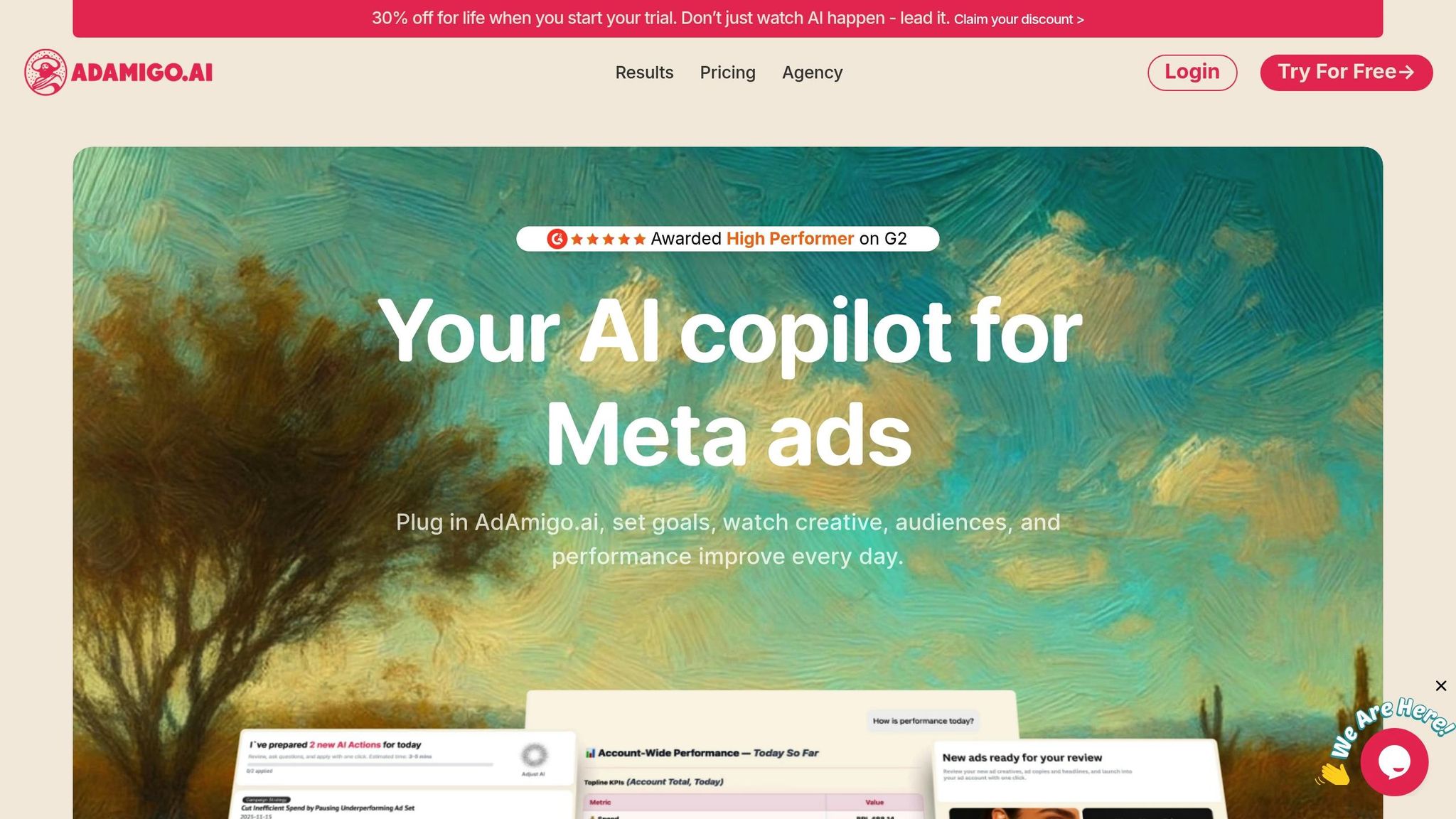
Running multiple Meta ad campaigns means you’re constantly keeping an eye on compliance. That’s where AdAmigo.ai steps in. This AI tool monitors your ads around the clock, flagging any policy violations and even applying fixes automatically. No more tedious manual checks - just smarter compliance management. Let’s take a closer look at how it works.
How It Identifies Compliance Issues
AdAmigo.ai uses a smart learning system to analyze everything - your ad creatives, copy, targeting, and landing pages - for potential policy violations. It’s designed to spot patterns in ad rejections, like exaggerated claims, overly dramatic visuals, or restricted content categories (think tobacco or adult products). For instance, if your skincare ad says something like "Lose 10 pounds in a week!" the AI flags it as misleading and suggests a compliant alternative, such as "Support a healthier lifestyle." Plus, the built-in AI Chat Agent provides insights by comparing your ads to successful competitor campaigns, helping you stay both compliant and competitive.
Integration with the Meta Ads Ecosystem
Getting started with AdAmigo.ai is quick - just five minutes to connect your Meta ad account, define your KPIs, and brief the AI on your goals (e.g., "Increase spend by 30% while maintaining a 3× ROAS"). Once set up, the platform lets you launch fully designed ad creatives directly into your account with a single click. It respects your budget, pacing, geo-targeting, and placement rules, and even supports bulk ad uploads via Google Drive. By syncing seamlessly with Meta Ads Manager, AdAmigo.ai centralizes compliance oversight, saving you the hassle of switching between tools or exporting data.
Automation Features for Monitoring and Reporting
AdAmigo.ai offers a daily to-do list called AI Actions, which prioritizes high-impact tweaks across your campaigns. This includes flagging compliance issues alongside suggestions for creatives, audience targeting, budgets, and bids. Its AI agents work nonstop, scanning for anomalies like setup errors, unusual spending patterns, broken links, disabled ads, and suspicious activity. You can either approve these changes manually or let the autopilot handle them for you.
"The AI actions are spot-on, so I can make adjustments fast and see results right away. It's like having an extra set of super-smart hands helping me hit my KPIs".
This level of automation cuts down on manual audits, making it possible for agencies to handle four to eight times more clients without compromising compliance.
Support for Data Privacy Regulations (GDPR, CCPA)
AdAmigo.ai goes beyond ad compliance by ensuring your campaigns meet data privacy standards like GDPR and CCPA. It follows strict rules on geo-targeting, data usage, and pacing to avoid discriminatory or personal attribute targeting. For example, it ensures ads don’t target users based on sensitive attributes like health conditions. Every optimization is logged transparently through the AI Chat Agent, aligning with Meta’s transparency requirements. As an official Meta Business Technology Partner, AdAmigo.ai integrates securely with your Meta ad accounts, giving you peace of mind that your campaigns are both compliant and scalable.
9. Run Weekly Performance and Policy Reviews
Taking time each week to review your Meta ads can help you stay compliant while keeping your campaigns profitable. Set aside 30–60 minutes to spot patterns in ad rejections, tweak creatives before they waste budget, and ensure your data-privacy practices are on point. This routine acts as a bridge between automated alerts and manual audits, reinforcing the compliance measures you've already set up.
Start by pulling an ad-level report from Meta Ads Manager. Include key metrics like delivery status, ROAS, CTR, CPC, and approval status. Filter for disapproved or limited ads, and carefully review Meta’s feedback to understand why they were flagged.
Keep a weekly log that tracks the number of disapproved ads, the reasons for rejection, the corrective actions taken, and the outcomes of any appeals. This log can help you identify recurring issues. For example, if skincare ads often get flagged for exaggerated claims, you may need to tighten your copy approval process before launching new campaigns. Adjusting the copy to focus on general benefits instead of unverified claims can help resolve repeated disapprovals.
This weekly review is also the perfect time to ensure your Meta Pixel and Conversions API practices align with your privacy policy, especially for traffic from regions like the EU and California. Double-check that consent banners are functioning correctly and that no sensitive personal attributes are being targeted. For industries like health, finance, housing, credit, and employment - where Meta enforces stricter rules - frequent manual reviews are even more critical.
Leverage Meta ads automation to make your review process more efficient. For instance, AdAmigo.ai provides AI-powered insights to flag high-impact changes during your weekly check. Its AI Actions feature offers compliance adjustments along with creative, audience, and budget recommendations. Plus, the AI Chat Agent can help answer questions about ad rejections. With these tools, agencies can handle significantly more clients without compromising on compliance oversight.
Here’s a handy checklist to guide your weekly review:
Weekly Review Area | What to Check | Compliance Angle |
|---|---|---|
Disapproved / Limited Ads | Count, reasons, affected campaigns | Spot recurring violations; refine copy, creative, and targeting |
Top-Spend Ads | ROAS, CPA, CTR, copy & claims | Ensure top performers avoid risky language or targeting |
Sensitive Verticals | Targeting, disclaimers, landing pages | Verify adherence to special rules (e.g., health, finance, housing) |
Tracking & Privacy | Pixel/Conversions API, consent UI, data-sharing text | Confirm alignment with GDPR/CCPA and your privacy policy |
Policy Updates | New or changed rules from Meta | Adjust evergreen ads and templates to prevent future disapprovals |
10. Create Compliance Reports with Meta Tools
Formal compliance reports are a great way to complement your real-time alerts and audits. These reports bring together key insights for ongoing review, helping your team maintain accountability and ensure your account remains in good standing. Meta's native tools - Ads Manager, Account Quality, and Events Manager - offer everything you need to consolidate compliance data into a report that's easy to audit.
How It Identifies Compliance Issues
Each of Meta's tools plays a distinct role in flagging compliance problems:
Ads Manager: Filters out disapproved ads and lets you export CSV files containing delivery statuses and rejection reasons.
Account Quality: Centralizes all policy violations in one place for quick review.
Events Manager: Highlights tracking and consent issues, helping you pinpoint potential privacy concerns.
By pulling reports from these tools, you can spot patterns. For instance, if many of your ads are rejected for misleading claims, it’s a clear sign to refine your creative approval process.
Integration with the Meta Ads Ecosystem
Because these tools are part of Business Manager, compliance data seamlessly connects to specific ad accounts, pages, and even individual team members. This integration makes it simple to assign responsibilities and track progress on fixes. For privacy-related compliance, Events Manager links directly to your Meta Pixel and Conversions API setup. This means your reports can reference the same asset IDs and event names used in your campaigns, ensuring consistency.
This tight connection eliminates the need for manual reconciliation. Your compliance report can clearly show which campaigns triggered violations, which business assets were impacted, and what tracking events need adjustments - all in one place.
Automation Features for Monitoring and Reporting
Meta's tools also allow for automation to keep compliance manageable:
Schedule automatic ad-status reports to stay updated on approvals and disapprovals.
Use automated rules to flag or pause ads that repeatedly violate policies.
For high-volume accounts, third-party tools like AdAmigo.ai can scan for risky language, flag issues, and even suggest fixes, saving you time and effort.
Support for Data Privacy Regulations (GDPR, CCPA)
To address data privacy regulations like GDPR and CCPA, include a dedicated section in your compliance report. This should cover:
active pixels and real-time consent mechanisms.
Custom audience sources.
Aggregated Event Measurement and Limited Data Use flags from Events Manager.
Additionally, keep an internal log of event details, legal bases, and retention periods. This documentation ensures you're prepared to respond to privacy inquiries quickly and effectively. By combining Meta's tools with your own records, you can maintain a complete audit trail that covers both ad content and data handling practices. This approach supports continuous compliance across all your campaigns.
Conclusion
A well-structured compliance workflow is essential for keeping your campaigns running smoothly and achieving better results. By actively monitoring compliance, you can protect your account, maintain campaign momentum, and improve your return on ad spend (ROAS). Every rejected ad, account warning, or policy update serves as a signal. Spotting these signals early - through tools like Meta Ads Manager, alerts in Business Manager, and regular audits - helps you avoid costly setbacks like paused campaigns, wasted spend, and lost learning data. Advertisers who make compliance a daily habit, rather than a last-minute scramble, experience fewer disruptions, more consistent ad delivery, and lower costs in the long run.
Start with Meta's built-in tools to establish a solid foundation. Use Ads Manager to review disapproved ads and understand rejection reasons. Turn on email and in-app alerts for policy violations, and generate weekly compliance reports from Account Quality and Events Manager. Keep track of recurring rejection patterns in a simple spreadsheet, noting the ad ID, policy reason, applied fix, and date. This approach helps pinpoint root causes and refine your approval process. U.S. advertisers should also stay mindful of CCPA and GDPR requirements, particularly for California residents or EU traffic. Maintain records of tracked events, audience-building methods, and data retention durations to meet these obligations.
If you’re managing multiple accounts or running large-scale operations, tools like AdAmigo.ai can streamline compliance checks and free up time for strategic planning. These tools complement Meta's native controls, enabling you to handle higher ad volumes while optimizing creatives more efficiently. With automation handling execution, media buyers can focus on strategy and compliance oversight, managing significantly more clients without sacrificing quality.
To reinforce your compliance framework, integrate these steps into your routine:
Regularly review disapproved ads and the reasons behind them.
Fine-tune Business Manager alerts for policy violations.
Update your compliance tracking spreadsheet.
Schedule weekly review sessions to assess and adjust processes.
Consider connecting tools like AdAmigo.ai to your Meta ad account for automated compliance checks and daily recommendations.
Understanding Meta's policies and learning from past violations can actually expand your testing capabilities. By identifying which approaches, claims, and formats pass review, you can confidently experiment while maintaining strong click-through and conversion rates.
Treat every policy update as a chance to refine your compliance processes. With consistent monitoring, clear workflows, and the right tools - like Meta’s dashboards and AdAmigo.ai - you can turn compliance into a manageable, predictable part of scaling your Meta ads. Build a simple workflow this week, and you’ll spend less time fixing issues and more time uncovering your next winning campaign.
FAQs
How can I ensure my Meta ads comply with platform policies?
Meta Ads Manager provides a suite of tools to help ensure your ads align with platform policies. You can manually review aspects like content, targeting, and placements. Additionally, you can set up automated alerts to flag any potential issues before your ads are published.
For a smoother compliance process, AI tools such as AdAmigo.ai can be a game-changer. These tools not only fine-tune your creatives, targeting, and budgets but also ensure they meet your compliance standards - letting you maintain performance without breaking a sweat.
How do GDPR and CCPA regulations impact Meta ad campaigns?
The General Data Protection Regulation (GDPR) and the California Consumer Privacy Act (CCPA) are major data privacy laws that directly influence how businesses run Meta ad campaigns. These laws set strict rules around collecting, processing, and using personal data. For instance, businesses must get explicit consent from users before handling their personal information, only use data for necessary purposes, and be upfront about how that data is managed.
For advertisers, this means adopting clear and transparent practices. You need to explain how you handle user data, offer straightforward opt-out options, and honor users' privacy preferences. Ignoring these regulations isn’t just risky - it could lead to substantial fines. Incorporating these legal requirements into your ad campaigns and regularly reviewing your processes is crucial to staying on the right side of the law.
How can tools like AdAmigo.ai help ensure compliance in Meta ads?
Automation tools like AdAmigo.ai simplify staying compliant with Meta ads by keeping a close eye on campaigns. They monitor essential aspects like budget caps, pacing, geographic targeting, and placement settings. Plus, they provide real-time updates and proactive alerts so you can tackle potential issues before they become bigger problems.
AdAmigo.ai also offers features like daily optimization suggestions and automated tweaks to keep your ads running smoothly while meeting compliance standards. This means you can spend less time on manual checks and more time focusing on strategy and scaling your campaigns.