
Meta Ad Authentication: Privacy FAQs
Explains what data Meta collects for ad verification, how it's stored, account security options, and privacy-safe automation.
Meta ad authentication ensures advertisers are verified and compliant with global privacy standards. This involves identity checks, data source disclosures, and adherence to strict data handling rules. Here's what you need to know:
Verification Requirements: Submit government-issued IDs, business documents, and verify phone numbers. Two-factor authentication (2FA) is mandatory for added security.
Data Source Declarations: Advertisers must disclose how audience data is collected and confirm user consent compliance. Meta rejects audience data older than 180 days.
Privacy Safeguards: Sensitive data like biometric details is processed locally on devices. Meta stores only essential data fragments, adhering to regulatory standards like GDPR and CCPA.
Account Security Tools: Use 2FA, session duration settings, and role-based access permissions to protect accounts.
Automation Integration: Tools like AdAmigo.ai optimize campaigns securely by analyzing aggregated data without accessing personal identifiers.
Meta's approach prioritizes secure, transparent advertising while meeting privacy regulations.
What Data Does Meta Collect During Ad Account Verification?

Meta gathers several types of data to confirm the legitimacy of advertisers and verify business authorization. To start, you'll need to provide business documentation. This includes your company's legal name, physical address, phone number, email, and Tax ID. Additionally, you'll need to submit supporting materials like a business license or a utility bill to confirm your business operates at the stated location.
On the personal side, Meta requires a government-issued ID to verify individual identity. For new ad accounts, you'll also need to verify your phone number before running your first ad. To enhance security, Meta enforces two-factor authentication (2FA) for anyone with access to your business portfolio, reducing the risk of unauthorized logins.
Asset connection verification ensures you're authorized to manage a business's digital assets. This step may involve verifying your domain or proving legitimate access to associated assets, such as a Facebook Page or Instagram account.
Since 2026, Meta has required Data Source Declarations for custom audiences. Advertisers must disclose how they collect audience data - whether through website pixels, CRM uploads, or SDKs. You must also confirm a legal consent basis for using this data and ensure the data is current, as Meta rejects audience data older than 180 days. This policy emphasizes transparency and regular updates to data practices during the verification process, aligning with Meta ad policy compliance strategies.
For advertisers in Housing, Employment, and Credit (HEC) categories, Meta uses multimodal AI to scan ads and landing pages for specific signals like salary ranges, mortgage rates, NMLS numbers, or floor plans. This ensures compliance with anti-discrimination laws. Even if you're not targeting HEC categories, using stock images of offices or homes could trigger false positives, so it's wise to audit your creative assets carefully.
Meta uses all this information to prevent fraud and protect accounts. They monitor for violations of advertising standards and may initiate additional verification if unusual activity or potential risks are detected. For political or social issue ads, identity verification also promotes transparency, allowing users to see who funded the ad. Next, we’ll dive into how Meta stores and safeguards this data.
How Meta Stores and Protects Your Verification Data
Meta takes a careful approach to handling sensitive verification data, such as biometric details from hand, eye, and facial tracking. This data is processed directly on your device, meaning raw image data remains on your phone or headset and is not sent to central servers. This approach reduces the risk of data exposure during transmission.
For any sensitive data that does reach Meta's infrastructure, only essential fragments are stored. For example, credit card numbers are truncated during processing to enhance security. While automated systems handle most routine tasks, manual reviews are occasionally conducted to detect unusual activity or verify the legitimacy of advertisers.
Retention periods for verification documents depend on specific use cases. Meta considers legal obligations, such as tax laws or compliance requirements, alongside the need to prevent fraud or investigate policy violations. For managed accounts, Meta may share account status and approximate location with the managing entity to comply with local regulations and promote safety. Additionally, diagnostic logs may include details like IDs and IP addresses, but these are used strictly for troubleshooting purposes.
Meta's global infrastructure facilitates cross-border data transfers while adhering to regulatory standards. For instance, under the Digital Markets Act (DMA), EU users now have the option to choose between fully personalized ads, which involve sharing more data, or a less personalized experience with limited data sharing. This shift highlights increasing regulatory efforts to give users greater control over how Meta handles data privacy and transparency.
Privacy Controls Available During Ad Authentication
Meta offers several security tools to help safeguard your ad account during and after authentication. One of the most essential protections is two-factor authentication (2FA). Activating 2FA significantly enhances account security. Without it, you might face additional verifications or even restrictions. There are three 2FA options to choose from:
SMS codes: These provide basic security but can be vulnerable to SIM-swapping attacks.
Authenticator apps: A stronger choice for most businesses, offering better protection.
Physical security keys: The most robust option, ideal for high-value accounts.
Another useful feature is session duration settings, which let you manage how long your account stays logged in before requiring re-authentication. For shared workstations, a 15-minute timeout is recommended, while a 30-minute duration works well for personal devices.
Access permissions are another critical layer of protection. You can assign specific roles to team members to limit their level of control:
Admins: Full access, including settings, billing, and user management.
Advertisers: Can create and manage campaigns but cannot modify account settings.
Analysts: View-only access to performance data and reports.
By assigning only the necessary permissions, you lower the risk of unauthorized changes or mistakes.
Meta also uses background monitoring, like tracking mouse movements and app activity, to distinguish human users from bots. While this process is invisible, it explains why you might be asked for extra verification when logging in from a new device or location.
For advertisers in the EU, there’s an additional layer of control thanks to the Digital Markets Act. You can now choose between fully personalized ads or a more limited level of personalization based on updated data-sharing settings. This gives you greater control over how your verification and behavioral data are used.
How AdAmigo.ai Works Within Meta's Privacy Framework

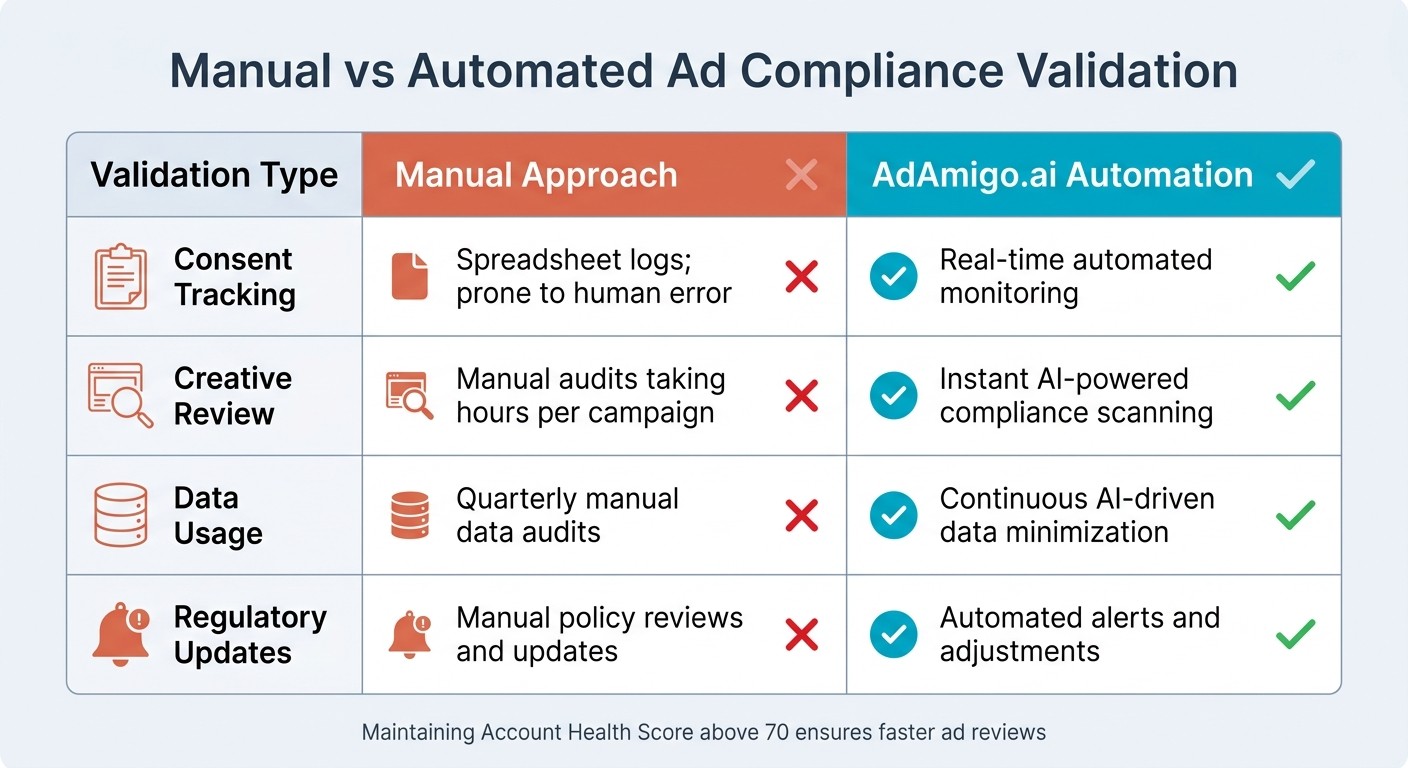
Manual vs Automated Ad Compliance: AdAmigo.ai Comparison
AdAmigo.ai integrates directly with Meta's official API, operating fully within Meta's permissions, rate limits, and privacy guidelines.
The platform doesn't need access to sensitive personal information to enhance your campaigns. Instead, it works by analyzing aggregated data like click-through rates, conversion metrics, and cost per result. This allows AdAmigo.ai to make optimization decisions securely while respecting user privacy. This seamless integration enables a safe and automated approach to campaign management.
AdAmigo.ai's Approach to Data Security
AdAmigo.ai relies on Meta's Conversions API (CAPI) for secure, server-to-server data transmission. By avoiding browser-based tracking, it reduces the risk of unintentionally collecting user data. To further protect privacy, the platform hashes personally identifiable information (like email addresses and phone numbers) using SHA256 before any transmission, ensuring that raw data remains inaccessible.
Robust security measures are in place, including IP whitelisting for API access and mandatory two-factor authentication (2FA) for accounts. Compliance is monitored through centralized, automated logs that track consent collection and data usage - critical for meeting regulatory requirements. The platform also enforces strict data retention policies, automatically deleting personal data when it’s no longer needed for advertising. Event deduplication using unique IDs ensures clean, reliable data without exposing individual information. These practices align with Meta's privacy framework while supporting strong campaign performance.
How Automation Works Without Compromising Privacy
AdAmigo.ai uses advanced automation to optimize campaigns while prioritizing privacy. Features like AI Autopilot and Ad Factory focus on performance trends and creative effectiveness rather than personal identifiers. For example, when creating ad variations or refining targeting, the system draws insights from creative performance patterns and audience signals provided by Meta's API.
The AdAmigo Protect feature continuously scans for policy violations, broken landing page links, and undisclosed AI-generated content - 24/7. This ensures ads meet Meta's standards before they go live, helping maintain an Account Health Score above 70. A high health score is essential for avoiding slower review times and delivery restrictions.
Here’s a quick look at how AdAmigo.ai’s automation stacks up against manual processes:
Validation | Manual Approach | AdAmigo.ai Automation |
|---|---|---|
Consent Tracking | Spreadsheet logs; prone to human error | Real-time automated monitoring |
Creative Review | Manual audits taking hours per campaign | Instant AI-powered compliance scanning |
Data Usage | Quarterly manual data audits | Continuous AI-driven data minimization |
Regulatory Updates | Manual policy reviews and updates | Automated alerts and adjustments |
Daily AI Actions suggest budgets and audience tweaks only after verifying compliance with Meta's privacy standards. Whether you choose full autopilot or prefer to approve each change manually, every adjustment stays within Meta’s guidelines.
Conclusion
Meta ad authentication and privacy compliance play a key role in improving advertising efficiency. Understanding what Meta collects, how that data is safeguarded, and which tools ensure compliance can help you achieve better results. By using automation platforms integrated with Meta's API, you can scale campaigns effectively without sacrificing user privacy or risking account penalties. These automated tools take the complexity out of managing privacy and compliance.
Maintaining a strong Account Health Score - ideally above 70 - ensures faster ad reviews and smoother delivery, outperforming manual processes prone to errors. Automated systems also help by identifying and resolving issues before they disrupt your campaigns, all while keeping privacy controls firmly in place.
AdAmigo.ai provides a great example of this approach. Its end-to-end automation enhances performance without accessing sensitive user data. By working with aggregated performance data, the platform optimizes campaigns while respecting privacy. Features like AdAmigo Protect continuously monitor for anomalies, delivery problems, and compliance risks, ensuring your Account Health Score stays above 70 and your ads meet compliance standards before launch.
Whether you prefer full automation or manual approval, the right tools let you focus on strategy while AI handles the execution. Privacy-first automation isn't just about avoiding penalties - it’s about creating advertising systems that deliver better results over time while safeguarding user data at every stage.
FAQs
How long does Meta keep my verification documents?
Meta holds onto your verification documents for as long as necessary to comply with legal obligations and its own policies. However, their privacy policy and advertiser guidelines don't specify exact timeframes for this retention.
What can cause additional verification or account restrictions?
If your website doesn't have a clear privacy policy, fails to disclose tracking tools (like the Facebook Pixel), or doesn't follow Meta's privacy and advertising guidelines, you could face additional verification steps or account restrictions. This becomes even more likely if your landing pages fall short of Meta's expectations for data collection and user privacy transparency.
Will using AdAmigo.ai require access to personal user data?
AdAmigo.ai is designed with privacy in mind. It doesn't need access to any personally identifiable user data. It works strictly within Meta's official API and adheres to their compliance framework. Plus, the platform's privacy policy ensures that your ad account data is never used to train the AI.