
Ultimate Guide to Meta CTA Compliance
Clear rules and practical steps to pick approved Meta CTAs, avoid rejections, and keep ads compliant across placements.
Meta ads require strict adherence to their Call-to-Action (CTA) policies to ensure clarity, relevance, and alignment with ad objectives. Using the wrong CTA can lead to ad rejections, wasted budget, and harm to your account's reputation. Here's what you need to know:
Approved CTAs Only: Meta allows specific CTA buttons like "Learn More", "Shop Now", "Sign Up", "Get Quote", "Buy Now", and "Install Now." Any deviation risks rejection.
Consistency is Key: Your CTA must match the ad copy, visuals, and landing page experience. Misleading or mismatched CTAs are top rejection reasons.
Ad Placement Matters: CTAs behave differently across formats like News Feed, Stories, and Reels. Optimize text length and button visibility for each placement.
Common Compliance Issues: Avoid health claims, financial guarantees, exaggerated urgency, or discriminatory language. These are frequent rejection triggers.
Fixing Rejections: Address flagged elements specifically to avoid restarting the learning phase. Repeated violations can damage account performance.
To stay compliant, stick to Meta’s guidelines, maintain transparency, and monitor ad performance closely. Tools like AI-based compliance filters can help catch issues before submission.
Do NOT use this CTA in your Meta Ads
Meta CTA Rules at a Glance
Meta has strict rules when it comes to Call-to-Action (CTA) buttons. Every CTA must be accurate, relevant, and consistent with your ad’s overall messaging. This includes the headline, creative, and the landing page users visit after clicking.
Core Principles of CTA Compliance
CTA compliance boils down to three key factors: accuracy, alignment, and consistency. Your CTA should clearly and truthfully reflect what users can expect after clicking. For instance, using a "Get Quote" button that leads to a page without a quote form is a surefire way to get your ad rejected.
CTAs also need to align with your Meta ad campaign objectives. For example, a Shop Now button on an awareness campaign can create confusion, leading to both compliance and performance issues. A good rule of thumb? Match your CTA to the user’s position in the sales funnel.
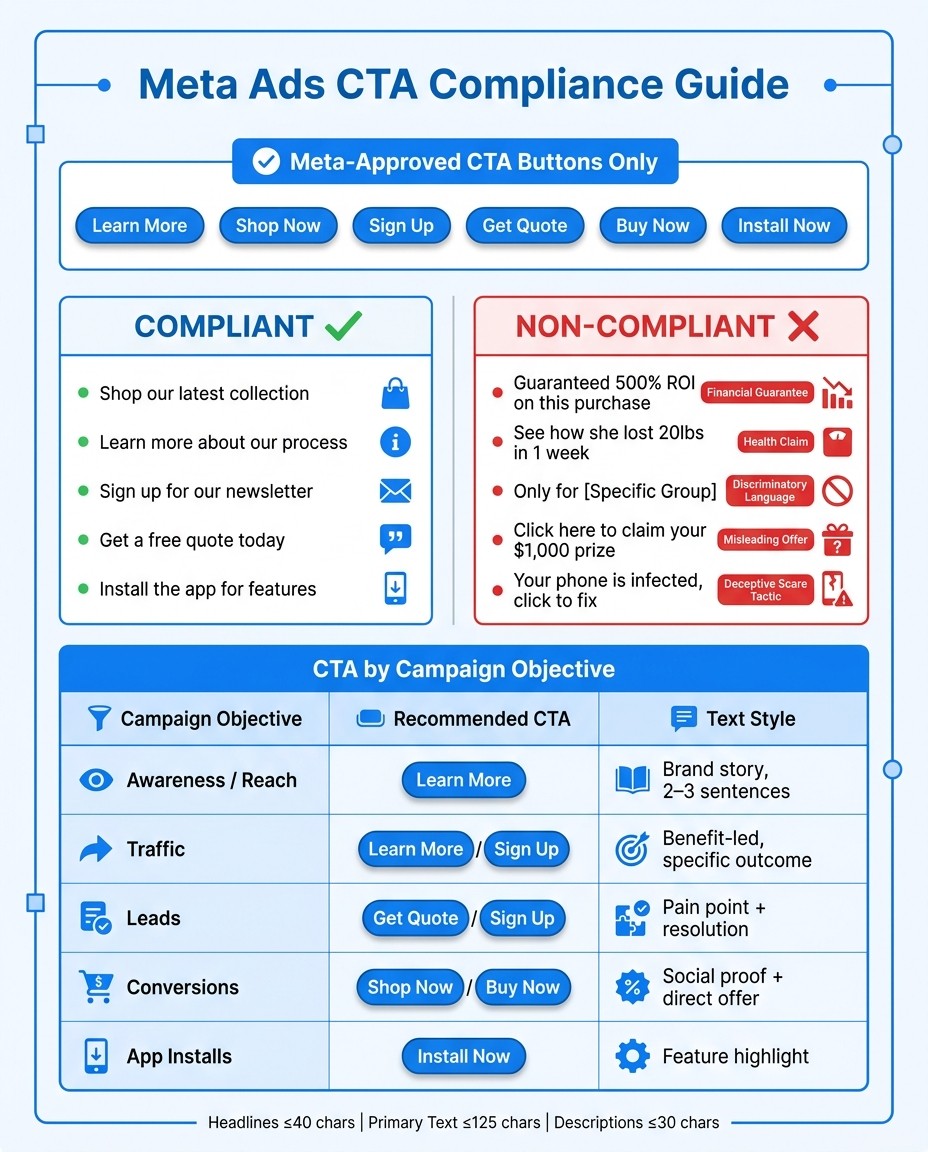
Campaign Objective | Recommended CTA | Primary Text Style |
|---|---|---|
Awareness / Reach | Learn More | Brand story, 2–3 sentences |
Traffic | Learn More / Sign Up | Benefit-led, specific outcome |
Leads | Get Quote / Sign Up | Pain point + resolution |
Conversions | Shop Now / Buy Now | Social proof + direct offer |
App Installs | Install Now | Feature highlight |
Meta also enforces character limits to keep ads clear and concise. Headlines must be 40 characters or fewer, primary text is capped at 125 characters, and descriptions should stay under 30 characters. Exceeding these limits can lead to truncated text, making your CTA less effective and harder to understand.
How CTA Compliance Fits Into Ad Reviews
Meta doesn’t evaluate your CTA in isolation. Its automated review system examines the entire ad experience - including the button, ad copy, creative visuals, and the landing page. This means even a compliant CTA can be rejected if it clashes with other ad elements.
Meta’s ad retrieval system, Andromeda, also comes into play when Advantage+ creative enhancements are enabled. This system adjusts how CTAs are rendered and delivered across placements, emphasizing the need for your CTA to accurately reflect the offer. Andromeda optimizes delivery based on the overall creative context, not just the button label.
Keep in mind, changing your CTA during a campaign restarts the Meta ads learning phase. This process requires about 50 conversions per week for each ad set to regain momentum.
Next, we’ll dive into the specific language allowed for CTAs to help you align your campaigns effectively.
Allowed CTA Language
Meta Ads CTA Compliance: Approved vs. Rejected Language & Placement Guide
Meta has specific rules when it comes to Call-to-Action (CTA) buttons, and sticking to these is crucial for ad approval. The platform only allows certain button texts, such as "Learn More", "Shop Now", "Sign Up", "Get Quote", "Buy Now," and "Install Now". These aren't just recommendations - Meta's system is designed to recognize these exact phrases. Using anything outside of these options could lead to your ad being rejected before it even reaches your audience. Below, you'll find examples that clarify the distinction between compliant and non-compliant CTA language.
Examples of Compliant vs. Non-Compliant CTA Wording
The words you use around your CTA button are just as important as the button itself. Ads that include absolute claims, guaranteed outcomes, or scare tactics are likely to be flagged - often immediately.
Compliant / Safe Wording | Risky / Non-Compliant Wording | Why It's Risky |
|---|---|---|
"Shop our latest collection" | "Guaranteed 500% ROI on this purchase" | Financial guarantees are not allowed |
"Learn more about our process" | "See how she lost 20lbs in 1 week" | Health claims like this are prohibited |
"Sign up for our newsletter" | "Only for [Specific Protected Group]" | Discriminatory language is flagged |
"Get a free quote today" | "Click here to claim your $1,000 prize" | Misleading offers are not permitted |
"Install the app for features" | "Your phone is infected, click to fix" | Deceptive scare tactics trigger rejection |
The key difference? Compliant CTAs focus on actions, while non-compliant ones make promises, exaggerate outcomes, or create false urgency. For instance, phrases like "guaranteed results" or "lose weight fast" are immediate red flags.
Matching CTAs to Campaign Objectives
Choosing the right CTA isn't just about following the rules - it also impacts how well your ad performs. A CTA that doesn't align with your campaign's goal can confuse users and even trigger Meta's review system if the experience feels inconsistent.
To avoid this, think about where your audience is in their decision-making process. For example, a "Buy Now" button isn't the best choice for someone who's just learning about your brand. Instead, opt for CTAs like "Learn More" or "Sign Up" to build trust and guide them naturally through the journey. Matching your CTA to the user's readiness not only improves compliance but can also make your ads more effective.
Restricted CTA Claims
When crafting CTA (Call-to-Action) language, it's crucial to align with Meta's guidelines to avoid compliance issues. Even if the button itself seems fine, misleading or exaggerated copy can lead to rejections. Meta's review system is designed to spot problematic patterns, and many violations stem from attempts to make ads appear more enticing.
Common Misleading CTA Patterns
Four main categories often lead to ad rejections: health claims, financial guarantees, discriminatory language, and exaggerated urgency.
Claim Type | Non-Compliant Example | Why It Gets Flagged |
|---|---|---|
Health/Beauty | "Drop 30 lbs in 2 weeks - start today" | Specific health outcomes and before/after comparisons are prohibited |
Financial | "Guaranteed 300% ROI - click to start" | Promises of specific financial returns violate Meta's ad policies |
Discriminatory | "Exclusively for [specific group]" | Ads cannot target or exclude based on personal attributes |
False Urgency | "Act now or lose your spot forever" | Unsupported, high-pressure urgency claims go against quality guidelines |
To reduce the risk of rejection, maintain a list of forbidden phrases like "guaranteed", "before/after", and "risk-free returns." This can be especially helpful when producing large volumes of ad copy. Always ensure that your CTAs are truthful and align with the content on the landing page.
Avoiding Misrepresentation in CTAs
Meta prioritizes transparency in ad experiences, so your landing page must deliver exactly what your CTA promises. For example:
If your CTA says "Get Your Free Gift", users shouldn’t be directed to a page requiring a purchase.
A CTA like "Get a Free Quote" must lead to a page with a quote form.
A "Shop Now" button should take users directly to a product or collection page, not a generic homepage.
CTA Requirements by Ad Placement
When it comes to CTAs, ad placement plays a massive role in shaping their effectiveness. Beyond crafting the right message, where your ad appears can dictate how well your CTA performs. Placement determines how the CTA looks, how much text is visible, and even if users can clearly spot the button. Missteps here can lead to poor performance - or worse, a rejected ad.
How Ad Placement Affects CTA Behavior
Every ad placement comes with its own set of layout rules. For example, in News Feed, Stories, and Reels, text truncation is a common challenge. In Stories and Reels, the CTA button often competes with platform elements like swipe indicators, reaction icons, and profile handles. If your creative doesn’t account for these, your button might get lost in the clutter.
Meta's Advantage+ Creative helps by automatically adjusting ad displays across formats. However, it’s not a catch-all solution. If your headline is too long or your CTA button doesn’t align with your campaign’s objective, these issues won’t magically resolve themselves.
Reels, in particular, present unique challenges. With users scrolling quickly, you have only a few seconds to grab their attention. If your hook doesn’t work, your CTA might never even get noticed. Murat Bock, Founder & Fullstack Developer, sums it up perfectly:
"The 666 rule applies here: if your hook doesn't stop the scroll in 6 words, the rest of your copy is irrelevant."
This underscores why optimizing for each format is non-negotiable.
Tips for Keeping CTAs Clear Across Formats
To ensure your CTAs stay effective across different placements, follow these practical tips:
Stick to character limits: Avoid text truncation by keeping headlines under 40 characters, primary text under 125, and descriptions under 30.
Use Meta-approved buttons: Align your CTA button with your campaign’s goal. Here’s a quick guide:
Objective | Recommended CTA |
|---|---|
Awareness / Reach | Learn More |
Traffic | Learn More / Sign Up |
Leads | Get Quote / Sign Up |
Conversions | Shop Now / Buy Now |
App Installs | Install Now |
Run a visibility check: Before launching ads on Reels and Stories, conduct a vision audit. AI vision tools can evaluate how well your CTA stands out across multiple factors, like mobile optimization and overlap with interface elements. This can save you money and help maintain performance.
How Meta Reviews and Enforces CTA Compliance
How Meta's Review Process Works
Meta uses an automated system to review ads, ensuring every call-to-action (CTA) follows its guidelines, matches the campaign’s objective, and displays correctly across all formats. This includes Andromeda, a tool that checks proper CTA rendering across placements. During the review, your CTA is evaluated against Ad Copy Quality guidelines, flagging issues like misleading offers, before/after health claims, discriminatory language, or financial promises.
How to Fix CTA Compliance Issues
If your ad gets rejected, focus on identifying the specific violation category and revising only the flagged element. This targeted approach avoids restarting the learning phase. Common rejection reasons include restricted health or financial claims, misleading language in offers, or mismatches between the CTA button and campaign goals. To streamline this process, consider maintaining a "forbidden phrases" list in your ad creation workflow. This proactive measure helps filter out restricted terms before the ad reaches Meta’s review queue.
It’s also important to understand how repeated compliance issues can impact your account’s overall performance.
How Repeated Violations Affect Your Ad Account
Resolving compliance issues quickly is essential, as repeated violations can harm your account’s performance. Each revision resets the learning phase, and frequent issues can restrict your account’s reach. Additionally, generic AI-generated ad copy without proper safeguards fails brand and policy reviews approximately 40% of the time on the first attempt. To avoid this, run all ad batches through a compliance filter before submission. This approach helps maintain account health and ensures smooth campaign performance. Tools like AdAmigo Protect can monitor your account health continuously, flagging potential problems early before they escalate into larger compliance challenges.
Conclusion: Keeping Your CTAs Compliant Over Time
Ensuring CTA compliance isn’t a one-and-done task - it’s a continuous effort. Advertisers who proactively address potential rejections and inefficiencies develop habits that prevent issues before they arise. Using a Meta ad policy checker can help identify these risks early. Simple practices, like maintaining a list of "forbidden phrases" and enforcing strict character limits for each placement, act as safeguards that help keep your campaigns consistent and effective.
Beyond these basic measures, ongoing feedback plays a key role in improving ad performance. By regularly analyzing performance and policy data through the Meta Marketing API, you can fine-tune your ad copy with each campaign. This cycle of creating, testing, measuring, and refining ensures your ads not only comply with policies but also perform better over time. Combining this process with automated monitoring helps maintain compliance in the long run.
For advertisers managing campaigns at scale, round-the-clock monitoring is essential. Tools like AdAmigo Protect provide 24/7 account oversight, identifying anomalies or delivery issues before they escalate into bigger problems. Early detection and reliable monitoring systems are the backbone of long-term compliance and campaign success.
FAQs
Which CTA button should I choose for my campaign objective?
To make sure your campaign stays compliant and encourages the right action, choose a CTA button from Meta’s list of pre-approved options that fits your campaign goals. Tools like AdAmigo.ai can simplify this process. AdAmigo reviews your account, spots areas for improvement, and oversees your ad strategy to ensure your CTAs and ad copy align with Meta’s rules while boosting overall performance.
What landing page issues could cause my CTA to be rejected?
If your Meta CTA isn't approved, it could be due to issues with your landing page. Common culprits include broken links, setup errors, or failure to meet Meta's platform guidelines. Additionally, tools like AdAmigo Protect may flag your page for suspicious behavior, which can also lead to problems.
To avoid rejection, make sure your destination URL is fully functional and that your landing page content matches the offer or service promoted in your ad. Consistency and proper functionality are key to staying compliant.
How do I fix a CTA rejection without resetting learning?
To address a CTA rejection without restarting the learning phase, stick to A/B or multivariate testing within the same ad set rather than launching new campaigns. This approach keeps the ad set’s data intact and lets Meta manage your budget more efficiently. Tools such as AdAmigo.ai can simplify the process by automating creative adjustments, including CTAs, while ensuring they meet Meta’s compliance standards.