
Meta Webhooks: How They Work for Ad Accounts
Real-time Meta webhook guide for ad accounts: setup, security, payloads, automation, and maintenance best practices.
Meta webhooks are a tool within the Meta Graph API that sends real-time updates to a specified URL whenever key events occur in your ad account. These updates can inform you about ad disapprovals, budget limits, or campaign status changes, allowing for instant responses. By setting up webhooks, you can automate routine tasks and streamline ad management.
Key Points:
What They Do: Send instant notifications for ad account events (e.g., campaign changes, budget issues).
Setup Requirements: A verified Meta Business Manager account,
ads_managementpermissions, a system user token, and a secure HTTPS endpoint.How They Work: Webhooks notify your system via HTTP POST requests containing event details, which can be used to trigger automated actions.
Automation Potential: AI tools like AdAmigo can use webhook data to pause ads, adjust budgets, and optimize campaigns in real time.
Maintenance Tips: Regularly refresh tokens, monitor for delivery issues, and stay updated with Meta API changes.
Meta webhooks save time, reduce manual effort, and improve responsiveness in managing ad accounts, especially when paired with automation tools.
How to Set Up Meta Webhooks for Ad Accounts
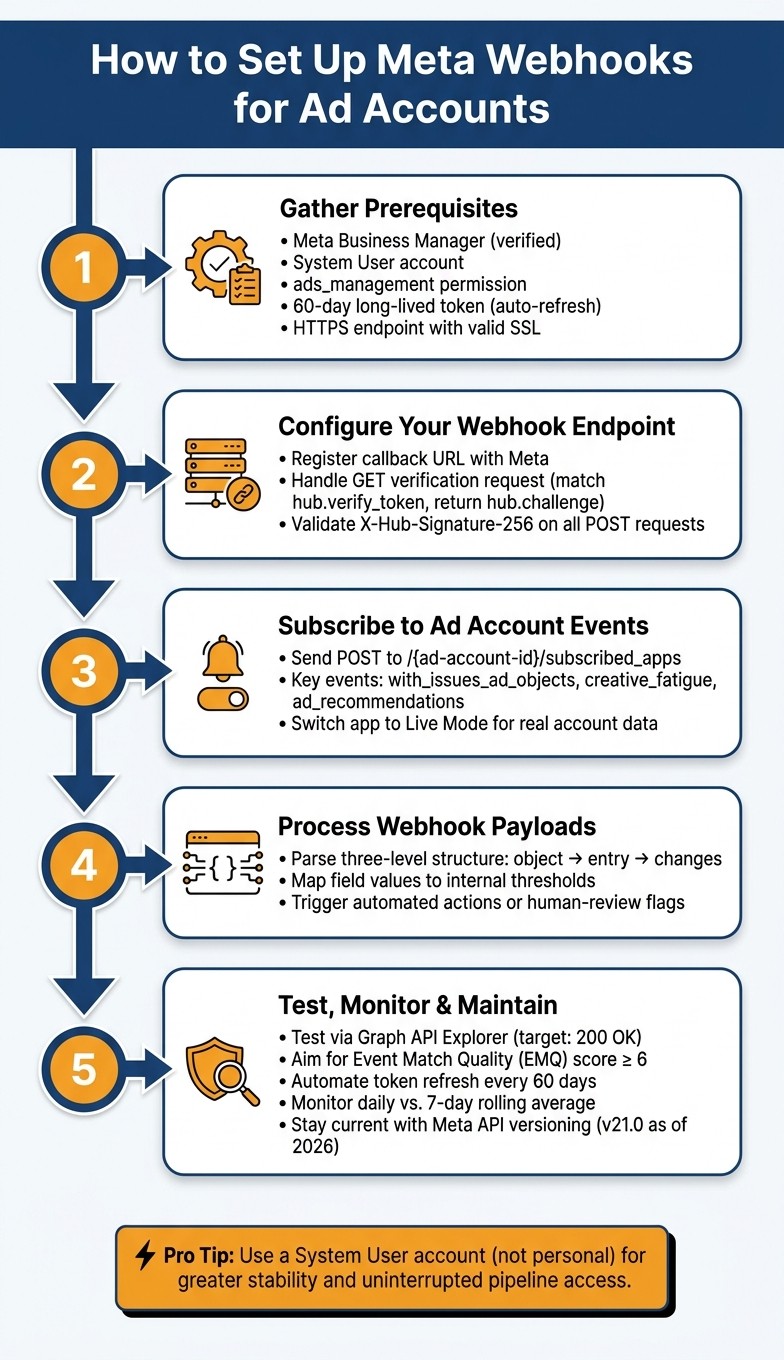
How to Set Up Meta Webhooks for Ad Accounts: Step-by-Step
What You Need Before Setting Up Webhooks
Before diving into the setup, make sure you have all the essentials in place.
As ForgeFlows, an AI Automation Specialist, explains:
"The Meta Marketing API requires a Business Manager account, an app with the
ads_managementpermission, and a system user token with the right access level. Budget a week for setup before you write a single line of automation logic."
Here’s a quick rundown of what you’ll need:
Component | Requirement | Purpose |
|---|---|---|
Account Type | Meta Business Manager (verified) | Central hub for managing assets and users |
User Type | Dedicated System User | Handles API and webhook interactions without tying to a personal account |
Primary Permission |
| Grants the app authority to manage and monitor ad events |
Token Duration | 60-day long-lived token (automate refresh to avoid failures) | Ensures uninterrupted API access |
Role Assignment |
| Provides the necessary access to specific ad accounts |
Endpoint | HTTPS URL with valid SSL certificate | Receives and validates POST notifications from Meta |
A word of caution from Murat Bock, Founder & Fullstack Developer at AdLibrary:
"Long-lived tokens expire after 60 days. Build a token refresh step into your pipeline scheduler; otherwise your automated pipeline silently fails when the token expires and nobody notices for a week."
And don’t forget: store your access tokens securely in a secrets manager. Avoid using local .env files, especially in production environments.
How to Configure Webhook Endpoints
Once your prerequisites are ready, the next step is registering your webhook's callback URL with Meta. This involves two key stages: verification and handling notifications.
Verification Process
Meta will send a GET request to your callback URL with a hub.verify_token (a string you define) and a hub.challenge value. Your job is to ensure the verify_token matches what you’ve set up and then respond with the hub.challenge to complete the handshake. Make sure your verify_token is strong and unique to prevent unauthorized access.
Notification Handling
After verification, Meta sends POST requests containing JSON payloads with updates like campaign status changes, creative performance data, or budget alerts. To protect your endpoint, validate the X-Hub-Signature-256 header on every incoming POST request. This signature is generated using your App Secret and the request body, ensuring the request is legitimate. Skipping this step could leave your endpoint vulnerable to spoofing.
Once your endpoint is verified, you can move on to subscribing your app to specific ad events.
How to Subscribe Your App to Ad Account Events
After successfully verifying your endpoint, you can subscribe your app to ad account events via the Meta Developer Dashboard or the Graph API. To do this programmatically, send a POST request to /{ad-account-id}/subscribed_apps.
For testing or smaller-scale setups, you can also use the Graph API Explorer. Run the query act_<AD_ACCOUNT_ID>/subscribed_apps with your target app selected. However, for larger operations, the API approach is more efficient.
Here are some event fields you might want to subscribe to right away:
with_issues_ad_objects: Notifies you when a campaign, ad set, or ad changes toWITH_ISSUESstatus.creative_fatigue: Alerts you when an ad’s fatigue level shifts (Low, Medium, or High).ad_recommendations: Triggers when Meta generates new recommendations for your ads.
Keep in mind: apps in Development Mode only send notifications to admins, developers, or testers. To access live data from actual ad accounts, your app must undergo Meta's App Review process and switch to Live Mode.
How to Process and Use Ad Account Webhook Events
Once your webhook setup is complete, the next step is processing these events effectively. This step is essential for streamlining automation and making informed choices.
Breaking Down Webhook Event Payloads
Meta's webhook payloads follow a three-level structure: object, entry, and changes. The object field specifies the resource type, such as "ad_account". The entry array includes records tied to a specific account ID and timestamp. Inside each entry, the changes array provides details about the field (e.g., creative_fatigue) and its updated value. Here's a simplified example:
You can map these key fields to internal thresholds, allowing your system to trigger the appropriate actions.
Practical Uses for Webhook Data
Once you understand the payload structure, you can use this data to automate workflows and create intelligent alerts. Webhook data typically supports three main use cases: automated adjustments, team notifications, and human intervention for critical decisions.
Automated Adjustments
Routine tasks can be automated to save time. For instance, if a creative_fatigue event shows an ad set's frequency exceeds a threshold (e.g., 2.5), your system can automatically rotate ad creatives. ForgeFlows, an AI automation company, implemented a four-stage pipeline to handle this process. This reduced weekly manual work from about four hours to almost zero for routine tasks, while still keeping humans involved for major decisions.
"The system I built is designed to reduce the decisions I make, not eliminate my involvement entirely. Budget changes above a certain threshold... all require my sign-off." - ForgeFlows
Human Oversight for High-Stakes Events
Not every task should be automated. While simpler actions, like pausing an underperforming ad, can run automatically, more significant decisions - like reallocating a large budget - should involve human approval.
Real-Time Anomaly Detection
Webhook data can also support real-time monitoring. For example, you can track spend spikes, broken links, or disapproved ads as they happen. Catching these issues early prevents wasted spend and ensures account health. Tools like AdAmigo Protect specialize in this kind of around-the-clock monitoring, flagging problems before they escalate.
Using Webhooks with AI Tools for Campaign Optimization
AI platforms like AdAmigo.ai take real-time webhook integrations to the next level by transforming raw data into actionable insights. Instead of relying on static rules that trigger one-off responses, these platforms analyze multiple signals, incorporate historical performance data, and determine the best course of action - all within seconds.
How AI Platforms Process Webhook Data
AdAmigo.ai doesn't just react to webhook events - it interprets them in context. For example, when it detects a [creative_fatigue](https://www.adamigo.ai/blog/how-to-spot-and-fix-ad-fatigue-on-meta) signal, the platform compares the current click-through rate (CTR) and ad frequency against a seven-day baseline. This approach helps decide whether to rotate the creative or flag it for review. A single day's drop in CTR might be normal, but a consistent decline over several days signals a more serious issue that requires attention. This level of analysis leads to smarter decisions and measurable improvements in campaign performance.
"AdAmigo moves beyond simple rules (e.g., pausing an ad set when ROAS drops). It's three agents - Action (money), Ads (creative), Chat (ops UI) - aimed at people who want suggestions + execution without clicking twelve tabs." - AdAmigo Review 2026
The platform's three-agent system streamlines the optimization process:
Action Agent: Handles budget shifts, bid changes, and pausing underperforming ads.
Ads Agent: Creates new creative variants when fatigue signals arise.
Chat Agent: Lets users query performance data or make changes using plain-language commands, skipping the need to navigate through Ads Manager.
Benefits of Automated Campaign Optimization
AdAmigo users report impressive results, including a 28% lift in return on ad spend (ROAS) benchmarks within the first month and a 42% performance increase from AI-generated creatives. Operational efficiency also gets a major boost - tasks like campaign setup, which typically take around 25 minutes, are reduced to just 2 minutes when automation handles the structure, copy, and ad set creation.
The platform's AdAmigo Protect feature adds another layer of value by catching issues like spend spikes, broken links, disapproved ads, and unusual activity before they can drain your budget. As one user shared:
"Our budgets are controlled, our spend is being smartly allocated and our ROAS is up massively. Agencies charging 7 times the cost of AdAmigo have been put to shame quite frankly!" - Rochelle D., G2 Review
For agencies, the scalability factor is a game-changer. With routine tasks handled by AI, a single media buyer can manage three to five times more client accounts. To ensure a smooth transition, many start with semi-auto mode, manually approving AI recommendations during the first week. This lets users confirm the AI's decisions align with their brand goals before switching to full Autopilot.
How to Test and Maintain Meta Webhooks
Testing Webhooks with Real and Simulated Events
To ensure your webhooks are functioning as intended, start by using the Graph API Explorer to send test payloads directly from the Meta developer dashboard. A successful test will return a 200 OK response. Beyond simulated events, you can also trigger actual events by making small changes - like pausing an ad or tweaking its budget - and verifying that your webhook receives the corresponding updates.
For signal attribution, check the Event Match Quality (EMQ) score via the Conversions API. Aim for a score of 6 or higher, with anything above 9.3 being optimal for reliable performance.
Before deploying your webhook setup, test your monitoring logic against at least three months of historical campaign data. Run these tests in read-only mode to fine-tune alert thresholds. For example, you might set alerts for a 20% drop in click-through rate (CTR) or ad frequency exceeding 3.5. This helps you avoid false alarms caused by normal fluctuations, like weekend dips in ad spend.
Once you're confident in your webhook's reliability, begin live monitoring and make updates as needed to maintain smooth operation.
Monitoring Webhook Health and Delivery
Daily monitoring is key to keeping your webhooks running smoothly. Log metrics every day and compare them to a seven-day rolling average. This can help you spot trends like a gradual 5% daily CTR drop over a week. Use tools like Slack, WhatsApp, or Telegram to set up alerts for immediate notifications if delivery failures or anomalies occur.
Pay close attention to edge cases that might disrupt normal webhook flows, such as:
Ad sets with zero spend
Disapproved ads
These issues may not always trigger obvious errors but can still impact your campaigns. It's also important to establish clear escalation protocols. For example, document which decisions - like budget changes beyond a certain threshold - should always require human approval rather than being handled automatically.
"The first question should be: what decisions should this system never make on its own? Define those boundaries in writing before you write a single node." - ForgeWorkflows
Continuous monitoring will help you identify when your webhook setup needs adjustments or updates.
Keeping Your Webhooks Up to Date
Meta's long-lived tokens expire every 60 days, so it's critical to automate the token refresh process and store them securely using a secrets manager. Instead of relying on a personal account, use a System User in Meta Business Manager. This ensures greater stability and prevents disruptions if personal credentials change.
Stay aligned with Meta's API versioning. For example, as of early 2026, the Meta Marketing API is on version 21.0. When a new version is released, test your webhook subscriptions in a staging environment before moving them to production. To stay organized, maintain versioned documentation for your webhook configurations and business processes. This creates a clear audit trail, making it easier to troubleshoot issues when they arise.
Regularly review Meta's API updates to ensure your webhook setup stays compatible with the latest guidelines.
Conclusion and Key Takeaways
Meta webhooks take ad account management to the next level by shifting from a reactive approach to real-time responsiveness. Instead of manually monitoring dashboards, your system gets instant alerts whenever something changes - whether it’s a budget issue, an ad disapproval, or a drop in CTR. That immediacy is what makes webhooks so effective.
An automated and well-structured setup reduces the need for ongoing maintenance while improving real-time ad management. Following a clear process and using a System User account rather than a personal one also ensures greater reliability and stability.
When integrated into automated optimization workflows, webhooks unlock their full potential. Matt Berman, Founder of Emerald Digital, explains it well:
"90% of ad management is pattern recognition. Spend trending up or down. CTR declining (creative fatigue). CPA spiking (audience exhaustion). Winners emerging. Losers bleeding."
Take AdAmigo.ai as an example. By leveraging live webhook data, their AI Autopilot identifies underperforming ads, reallocates budgets and refreshes creatives automatically - all without manual input. Users have reported seeing an average performance improvement of 34% in just 30 days. For agencies and eCommerce teams, this kind of hands-off, continuous optimization offers a significant edge.
The takeaway: webhooks are the foundation, but the tools and processes you build on them determine the results. Whether you’re managing a small in-house team or juggling multiple client accounts, integrating real-time Meta data with automation is key to driving consistent campaign success.
FAQs
Which ad account events should I subscribe to first?
To keep your campaigns running smoothly and effectively, start by focusing on events that give you crucial insights into performance. Metrics like ad spend, impressions, clicks, and ROAS (Return on Ad Spend) are your go-to indicators for understanding how well your ads are performing. These metrics paint a clear picture of what's working and what isn't.
Additionally, pay attention to signals like creative fatigue or underperforming ads. These can be early warnings that your content needs a refresh or adjustment to maintain engagement and results.
Don't overlook account health and safety events either. Watch for unusual delivery issues or anomalies in performance. Spotting these problems quickly can help you avoid costly errors and keep your campaigns on track.
By monitoring these foundational elements, you can stay on top of key metrics and ensure your campaigns are managed effectively.
How do I stop fake webhook POSTs from hitting my endpoint?
To protect against fake webhook POSTs, it's essential to validate incoming requests using signature validation with your app's secret key. Make sure your endpoint operates over HTTPS with a valid SSL certificate to encrypt the communication. Your server should also respond with a successful HTTP status code to confirm receipt.
To further secure your webhook, configure it carefully to prevent unauthorized access. Always validate the payload signatures before processing any data to ensure the request's authenticity.
What should I automate vs keep for human approval?
Automate repetitive, data-heavy tasks like budget optimization, audience management, creative testing, and campaign scaling. Platforms such as AdAmigo.ai excel at managing these processes, cutting down on manual workload and saving time.
However, retain control over decisions that require human judgment - things like approving campaigns and creatives or refining strategic targeting. This balanced approach merges the efficiency of automation with human oversight, ensuring brand safety, compliance, and alignment with broader strategies.