
Meta Pixel and GDPR: What Advertisers Need to Know
Use Meta Pixel under GDPR: block the Pixel until opt-in, minimize data, disable Advanced Matching by default, and keep consent logs.
If Meta Pixel loads before an EU or EEA visitor says yes, you may be breaking GDPR and cookie rules. That is the main issue.
I’d boil the article down like this: the tool is not banned, but the setup matters. If you run Meta Pixel on a site that gets EU or EEA traffic, you need to block it by default, get opt-in consent first, limit what data it sends, and keep records that prove what you did. Regulators have already enforced this. In Sweden, two pharmacy chains were fined SEK 159 million, or about $1.5 million at a rough current exchange rate, for Pixel use tied to invalid consent.
Here’s the short version of what you need to know:
Meta Pixel and Conversions API can collect personal data, including IP address, browser data, page activity, and cookies like
_fbpand_fbcYou are usually the party regulators look at first, because you decide when the Pixel loads and what events it sends
Consent must come first for ad tracking and retargeting; a banner by itself is not enough
The Pixel should not fire on page load for EU or EEA users
Advanced Matching needs extra care, because it can send hashed contact data such as email or phone number
Data transfers still matter, since data may be sent to Meta systems in the U.S.
Records matter too, including consent logs, privacy disclosures, transfer notes, and risk reviews
If I were checking a site fast, I’d focus on four things:
Does the Pixel stay blocked until consent?
Are only needed events being sent?
Is Advanced Matching off unless the user agreed?
Do the privacy notice and consent logs match the live setup?
Area | What to do |
|---|---|
Consent | Block Meta Pixel until the user opts in |
Data collection | Send only the events and parameters you need |
Advanced Matching | Keep it off by default; use only with clear consent |
Documentation | Keep privacy notices, consent logs, and transfer records up to date |
So if you want the plain answer: Meta Pixel can still be used under GDPR, but only with consent-first setup, tight data limits, and clear records.
Meta Pixel and GDPR: The Basics
What Meta Pixel Collects and Why It Counts as Personal Data
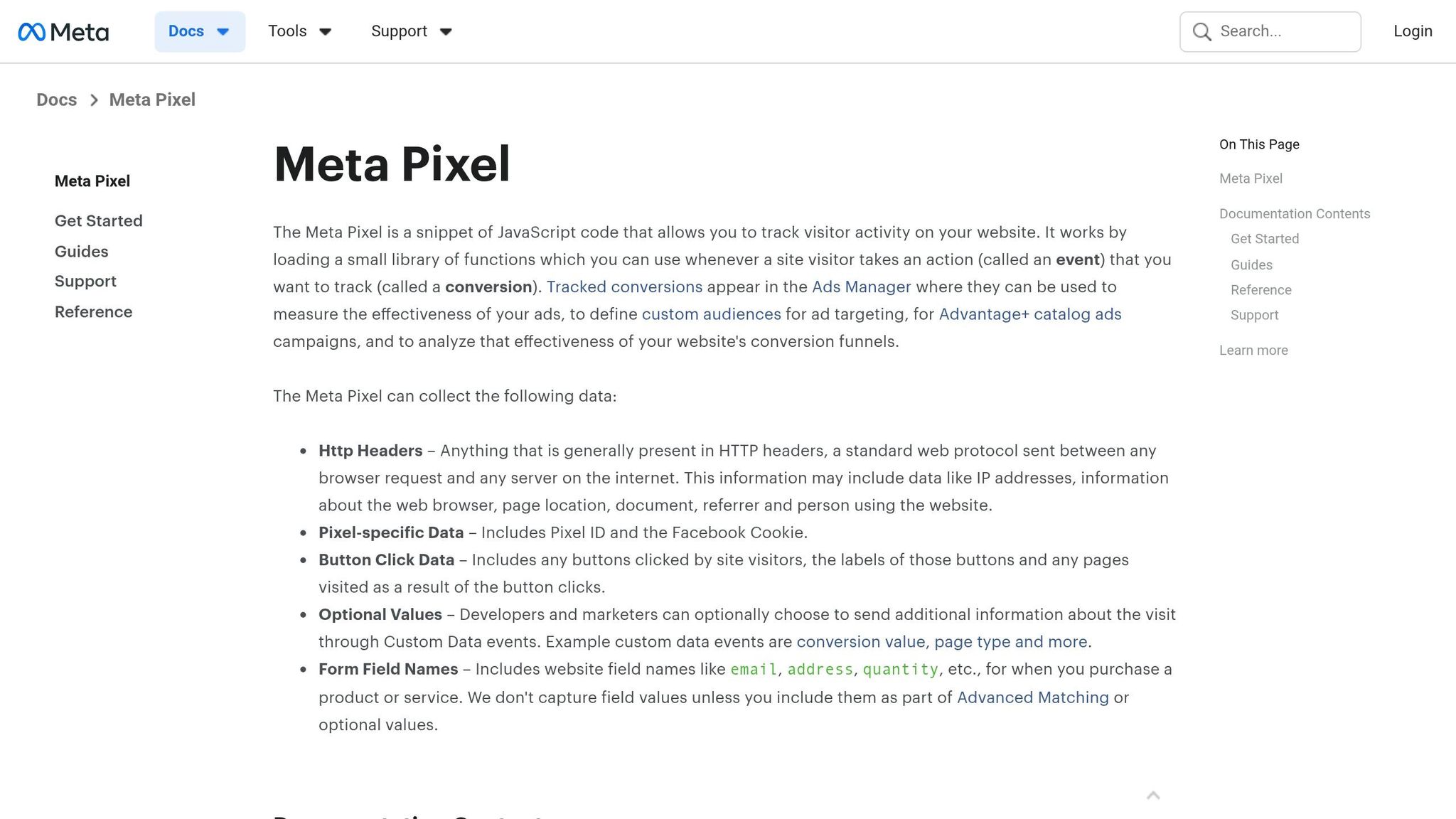
Meta Pixel collects both technical data and user behavior data, and under GDPR, that can count as personal data. When the script loads, it may collect HTTP headers, IP address, browser details, page URL, referrer, and the device user agent. It also sets Facebook-specific cookies, most notably _fbp for browser tracking and _fbc for ad click attribution. Both cookies usually last 90 days.
The Pixel can also record page views, clicks, and form field names like "email" and "address." If Advanced Matching is turned on, it may collect hashed identifiers such as email addresses, phone numbers, names, and external IDs. Even when some of that data is hashed, it can still be used to identify or single out a person, either directly or indirectly. That is why GDPR may treat it as personal data.
This matters for a simple reason: the site owner decides when the Pixel loads and what it sends.
Who Is Responsible When You Install Meta Pixel
If you install Meta Pixel, you control how it is set up, and you stay responsible for the data it sends. In many cases, the website operator is the main controller, while Meta may act as a joint controller for the collection and transmission of that data.
That point trips people up. Some assume Meta handles the hard part because it runs the platform. But from a GDPR angle, your setup choices matter. If you decide when the Pixel fires, what events it tracks, and whether Advanced Matching is on, that responsibility stays with you. You can't hand it off through Meta's platform terms.
Why Some Meta Pixel Setups Create GDPR Risk
The biggest issue usually isn't the Pixel tool by itself. It's when it fires and where the data goes.
By default, the Pixel may load as soon as the page opens, set cookies, and send data to Meta's U.S. servers before the user opts in. That's where GDPR and ePrivacy risk starts. The Schrems II ruling also means EU-to-U.S. data transfers need proper safeguards.
For ad measurement and retargeting, a banner alone isn't enough. Those uses are non-essential, so they need opt-in consent before tracking starts.
Connect your Meta Facebook Pixel with a GDPR Cookie Consent Notice
Consent Rules for Meta Pixel
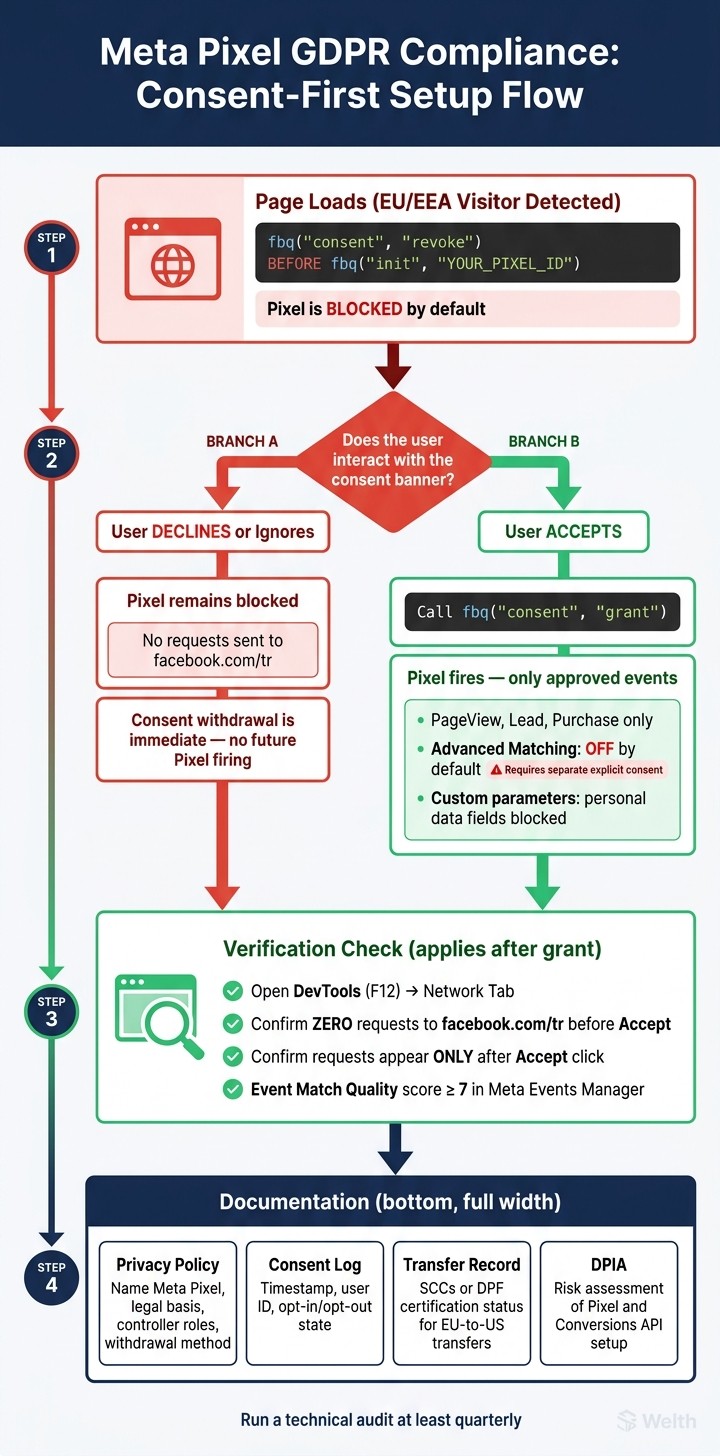
Meta Pixel GDPR Compliance: Consent-First Setup Flow
When You Need Consent Before the Pixel Fires
Once the risk is clear, the next step is simple: when can the Pixel fire?
For any website visited by EU/EEA users, Meta Pixel is treated as non-essential tracking. That means you must not load or fire the Pixel until the user actively opts in. In plain English, block the Pixel by default. Don’t let it run while the banner is still sitting on the screen.
Swedish regulators have already fined pharmacy operators for Pixel tracking without valid consent.
What Valid Consent Looks Like for Ad Tracking
Meta Pixel requires opt-in consent. For ad tracking, legitimate interest is generally not accepted.
How to Block, Grant, and Withdraw Pixel Tracking
You can enforce this in code with Meta Consent Mode. Call fbq('consent', 'revoke'); before fbq('init', 'YOUR_PIXEL_ID');, then call fbq('consent', 'grant'); only after the user accepts. That setup blocks tracking until consent is granted.
If you use Google Tag Manager, replace the standard "All Pages" trigger with the "Consent Initialization" trigger and require ad_storage consent for the Meta Pixel tag. This keeps the script from loading until the consent signal is confirmed.
To check that your setup works, open browser DevTools (F12), go to the Network tab, and reload the page without accepting cookies. You should see no requests to facebook.com/tr until after you click "Accept." If any request shows up before that, the blocking failed.
Withdrawal should be immediate. Revoke consent and stop any future Pixel firing. Once consent is under control, the next step is to cut down the data the Pixel collects.
Data Minimization and Lower-Risk Pixel Configuration
How to Limit Events, Parameters, and Advanced Matching
Consent decides when the Pixel can fire. Minimization decides what it picks up.
Track only the events you need for optimization and conversion reporting. In most cases, a lean setup sticks to standard events like PageView, Lead, and Purchase. If an event doesn’t connect to a conversion goal, don’t send it.
Keep Advanced Matching off by default. Turn it on only for users who give separate, explicit consent.
Review custom parameters closely, too. Block any field that could carry personal data.
What a Minimal Pixel Setup Looks Like in Practice
A lower-data setup doesn’t mean you lose useful optimization signals. It just means you’re being picky about what you collect. That’s the whole point.
Here’s what that looks like side by side:
Feature | Minimal Setup | Over-Collected Setup |
|---|---|---|
Consent Logic | Explicit consent granted before Pixel fires | Fires automatically on page load |
Events |
| All clicks, scrolls, and form interactions |
Advanced Matching | Disabled or requires separate opt-in | Enabled by default for all visitors |
How Automation Can Help You Audit Tracking
Tracking setups tend to drift over time. Old custom conversion tags get left behind. Third-party plugins can inject Pixel code outside your consent management platform. Event lists grow, and no one stops to review them.
That’s where automation helps. Automated audits can flag duplicate tags, unexpected parameters, and Pixel code added outside your consent manager.
It also helps to keep a written record of every event, parameter, and consent rule you keep. That way, your privacy policy and internal records line up with what’s live on the site.
Documentation, Transfers, and Keeping Compliance Up to Date
What Your Privacy Policy and Consent Records Should Include
Once the Pixel is trimmed down to only what you need, write down exactly what it still sends. Your privacy policy and cookie notice should name Meta Pixel, describe the data it sends, and explain the legal basis, controller roles, and how people can withdraw consent. If you use Advanced Matching, say so in the policy.
You also need records that show how the setup is documented and checked over time. Here are the main documents to keep on file:
Record Type | What It Should Include |
|---|---|
Privacy Policy | Joint controller status, data categories, legal basis |
Consent Log | Timestamp, user identifier, opt-in or opt-out state |
Transfer Record | Standard Contractual Clauses (SCCs) or Data Privacy Framework (DPF) certification status |
DPIA | Risk assessment of your Pixel and Conversions API setup |
Keep consent logs as part of your compliance records.
How EU-U.S. Transfers and Meta Terms Affect Advertisers
Disclosure alone doesn't cover it. You also need to document where the data goes. Because you control the Pixel, you're responsible for documenting the transfer basis and vendor terms.
Review Meta's business terms and data processing terms. Regulators have made it clear that site owners still carry responsibility for Pixel compliance, as there are significant risks of non-compliant data collection in Meta ads. In a recent case, the Swedish Data Protection Authority (IMY) fined a pharmacy chain €15 million for transmitting personal data to Meta without valid consent.
Conclusion: How to Keep Meta Pixel Compliant and Useful
Meta Pixel can still be useful under GDPR, but only if compliance is treated like an ongoing job, not a one-time setup. Consent-first deployment, clear public disclosures, limited event tracking, and documented records are the baseline.
Run a technical audit at least quarterly. Confirm that no requests go to connect.facebook.net before a user clicks "Accept," verify that your Event Match Quality score is 7 or above in Meta Events Manager, and check that your consent management platform is logging choices correctly.
FAQs
Do I need consent for Meta Pixel?
Yes. Under GDPR, you need explicit opt-in consent before using Meta Pixel. Users must take a clear, active step to agree to tracking before it can be used lawfully.
What happens if Pixel fires too early?
If the Pixel fires before a user gives consent, it can breach GDPR. The issue is simple: personal data gets processed before proper permission is in place.
That can lead to legal penalties, fines, and damage to your reputation.
How can I verify my setup is compliant?
Use a consent management platform to block the Meta Pixel until the user gives explicit consent.
Then test it in a clean browser session to make sure no tracking happens before consent. Check all key paths:
Accept
Reject
Withdrawal
That way, you can confirm the pixel stays off until permission is given, and stops tracking if consent is later revoked.