
Meta Consent Mode for GDPR Compliance
How Meta Consent Mode links CMP, Pixel and CAPI to respect consent, reduce data loss, and keep ad tracking GDPR-compliant.
Meta Consent Mode is a tool that helps advertisers comply with GDPR while maintaining effective ad tracking. It works by linking your Consent Management Platform (CMP) with Meta Pixel and Conversions API (CAPI) to respect user consent preferences. Here's why it matters:
Avoid Data Loss: Without it, you risk losing 30–60% of conversion data in privacy-regulated regions like the EU and EEA.
GDPR Compliance: It ensures tracking aligns with user consent, switching to cookieless pings and anonymized data when consent is denied.
Improved Accuracy: Even with limited data, it uses AI to recover 80%+ of measurement accuracy.
Integration Across Platforms: Works with Meta Pixel, Conversions API, and platforms like Instagram, WhatsApp, and Audience Network.
Meta Consent Mode ensures your campaigns remain compliant and effective by adapting tracking based on user consent. This is critical for accurate targeting, optimization, and avoiding regulatory risks.
Meta Conversion API & GDPR Consent Setup
Meta Consent Mode: The Basics
Now that we've covered the overview, let's dive into the technical details and compliance aspects of Meta Consent Mode.
What Meta Consent Mode Actually Is
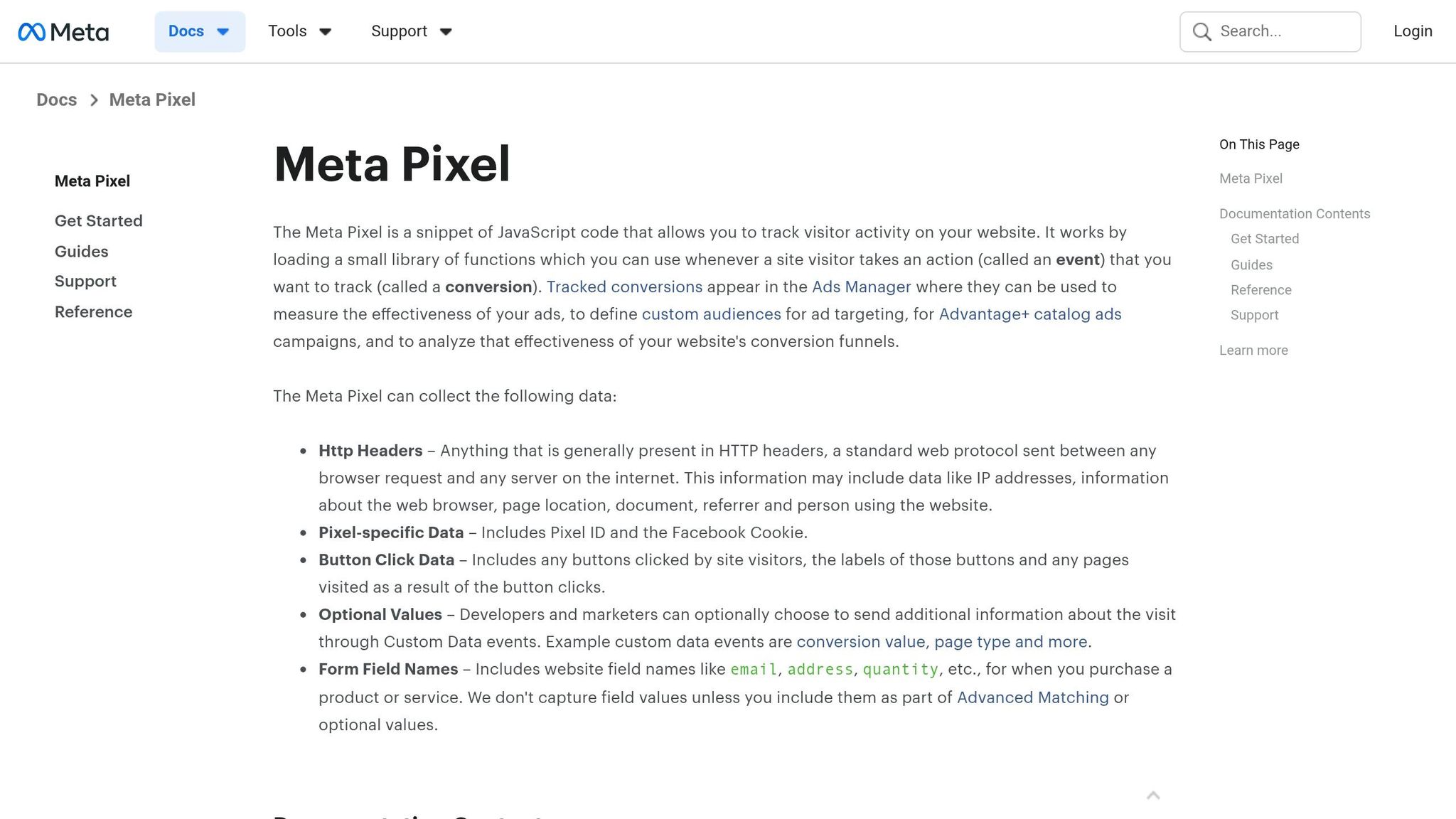
Meta Consent Mode is a framework designed to adjust how Meta Pixel and the Conversions API operate based on user consent preferences. Essentially, it acts as a bridge, transmitting the choices users make through a Consent Management Platform (CMP) to Meta's tracking systems.
Here's an important clarification: Meta Consent Mode is not a CMP. It doesn’t collect or manage consent directly - that job belongs to the CMP.
"Meta Consent Mode is a consent-driven signal framework that communicates user consent status to Meta's advertising platform." - Seers.ai
How Meta Consent Mode Supports GDPR Compliance
Meta Consent Mode is built with GDPR requirements in mind, making it a valuable tool for businesses navigating these regulations.
Under GDPR, businesses must secure informed consent before tracking users, limit the data they collect, and allow users to withdraw consent at any time. Meta Consent Mode aligns with these rules seamlessly.
When a user opts out of tracking, the framework shifts from cookie-based tracking to cookieless pings. These pings are lightweight and don’t rely on personal data, ensuring compliance with data minimization principles while still enabling measurement. If a user consents, standard tracking methods are reactivated. The system also updates consent status in real time, ensuring immediate compliance with user preferences.
This approach not only meets GDPR standards but also sets the stage for better campaign performance, as we’ll explain next.
What Advertisers Gain From Using It
For advertisers, the benefits are hard to ignore. Without Meta Consent Mode, businesses operating in privacy-regulated areas like the EU and EEA risk losing significant amounts of data. This data loss can skew ROAS calculations, weaken audience targeting, and make campaign optimization a guessing game.
Meta Consent Mode helps solve this by using cookieless pings and AI-driven modeling to recover much of the data lost from non-consenting users. This means advertisers can maintain more accurate insights and performance metrics. Additionally, the framework helps reduce the risk of costly GDPR fines. And while it might not be as obvious, it also builds trust with users, which can lead to higher opt-in rates over time.
How Meta Consent Mode Works With Meta Pixel and Conversions API
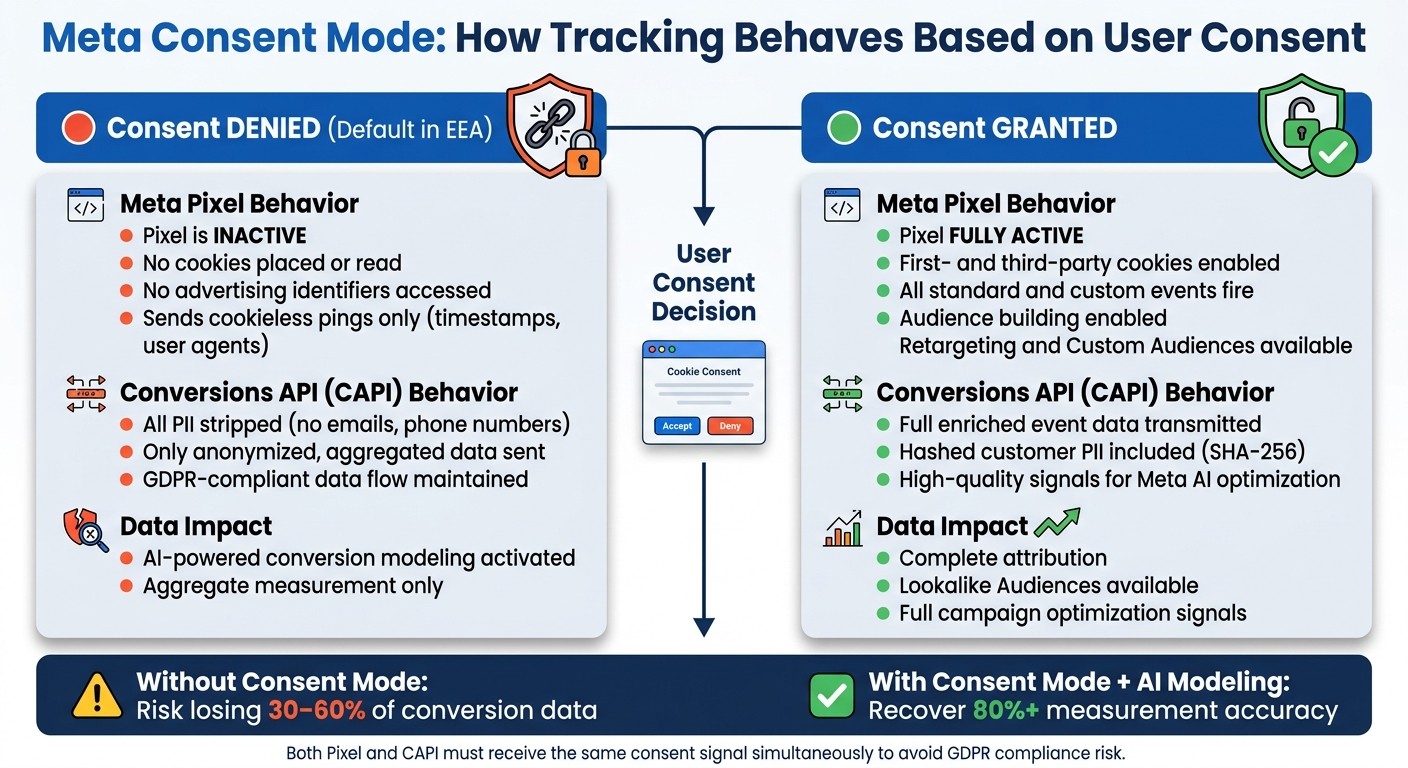
Meta Consent Mode: Tracking Behavior Before vs. After User Consent
Meta Consent Mode acts as a bridge, taking consent signals from your Consent Management Platform (CMP) and relaying them to both the browser-based Meta Pixel and the server-side Conversions API (CAPI) - all in real time. These tools then adjust their behavior based on whether a user has accepted or declined tracking. Let’s compare Meta Pixel and CAPI operations to see how this impacts your tracking.
Consent States: Grant and Revoke
Meta Consent Mode operates with two commands. If a user agrees to tracking, your setup triggers fbq('consent', 'grant');. If they decline, it triggers fbq('consent', 'revoke');.
Revoke: This is the default state for visitors in the European Economic Area (EEA) before they interact with your site. In this state, no cookies are placed, no advertising identifiers are accessed, and no personal data is collected. Instead, Meta sends cookieless pings - basic technical signals like timestamps and user agents - that allow for aggregate measurement without identifying individuals.
Grant: When tracking is accepted, the Pixel activates fully. It uses first- and third-party cookies to track conversion events, build audiences, and provide Meta’s algorithms with high-quality data for optimization.
What Happens Before and After Consent, and Keeping Pixel and CAPI in Sync
Before Consent
When a user has not yet given consent, the Pixel stays inactive. On the server side, CAPI ensures compliance by stripping all personally identifiable information (PII), such as email addresses or phone numbers, and only sends anonymized, aggregated data. This keeps data flow GDPR-compliant while still supporting campaign analytics.
After Consent
Once users grant consent, both the Pixel and CAPI operate at full capacity. The Pixel begins firing all standard and custom events, while CAPI transmits enriched event data, including hashed customer information. This combination provides Meta’s AI with strong signals for better attribution and optimization.
Synchronization Between Pixel and CAPI
Running the Pixel and CAPI together improves tracking accuracy, but it also introduces a potential issue: duplicate events. For example, if both systems report the same purchase event, Meta could count it twice. The solution? Assign a unique event_id to each event sent through both channels. Meta will automatically deduplicate these events.
Consent synchronization is equally important. Both the Pixel and CAPI need to receive the same consent signal simultaneously. A mismatch - where the Pixel operates under "revoke" while CAPI sends full PII - creates a compliance risk under GDPR. To check how well your server-side data is performing, monitor your Event Match Quality (EMQ) score in Meta Events Manager. Aim for a score of 6.0 or higher to ensure your CAPI data is effective.
User Action | Pixel Behavior | CAPI Behavior | Data Impact |
|---|---|---|---|
Consent Granted | Full tracking with first- and third-party cookies | Full event data, including hashed PII | Complete attribution and audience building |
Consent Denied | Cookieless pings only; no cookies set or read | Anonymized, aggregated data only | AI-powered conversion modeling |
How to Set Up Meta Consent Mode With CMPs and Tag Managers
Meta Consent Mode requires a CMP, a way to forward consent signals, and a properly configured Meta Pixel. Here's how to get everything working together.
How to Choose the Right CMP
Not all CMPs work seamlessly with Meta Consent Mode. When choosing one, focus on platforms that provide integrated Meta Pixel support, comply with the IAB Transparency and Consent Framework (TCF), and create automated timestamp logs for regulatory audits. Tools like OneTrust and Cookiebot meet these needs and integrate directly with Google Tag Manager (GTM), making setup easier.
It’s important to note that Meta Consent Mode only adjusts Meta's tracking tools. A third-party CMP handles consent management across all vendors and centralizes compliance records. Both systems must work in tandem.
Once you’ve selected your CMP, configure the Meta Pixel to activate only after receiving explicit consent.
Setting Up Meta Pixel in Google Tag Manager
When using GTM, the goal is to ensure the Meta Pixel only activates when the necessary consent signal is present. Follow these steps:
Install your CMP and confirm it sends consent status to GTM's data layer.
Create a consent-based trigger in GTM that activates when
ad_storageconsent is granted.Set up the Meta Pixel tag and assign the consent-based trigger, ensuring the Pixel only fires after consent.
Include a default revoke command (
fbq('consent', 'revoke');) before the Pixel base code to block data collection until the user interacts with the consent banner.Test in GTM Preview to confirm the setup works, and verify consent parameters in Meta Events Manager.
This configuration ensures the Pixel remains inactive for visitors in the EEA until they opt in, keeping you compliant with GDPR requirements.
If you’re not using a tag manager, follow the direct HTML integration steps below.
Direct HTML Integration for Custom Setups
For setups without GTM, you’ll need to manually embed the revoke command in your HTML <head> to block data collection until consent is granted. Place this code before the main Pixel base code:
When a user gives consent, trigger the grant command:
Make sure server-side signals align with browser signals by setting up the Meta Conversions API. Any PII sent through CAPI must be hashed using SHA-256 (converted to lowercase first) before transmission.
Here’s a tip for businesses operating in California: manually activate the Limited Data Use (LDU) flag to comply with CCPA. This is a separate process from GDPR and requires its own configuration.
How to Run GDPR-Compliant Meta Ad Campaigns
With Meta Consent Mode, you can create ad campaigns that respect user consent while still achieving strong performance. A well-implemented Consent Mode setup allows you to balance compliance with effective campaign strategies by focusing on consent collection, audience segmentation, and optimization.
Getting More Users to Opt In
To encourage users to opt in, use straightforward and transparent language on your consent banners. For example, you could say, "We use this data to provide you with more relevant ads." Avoid shady tactics like pre-ticked boxes or hiding the "decline" option, as these can violate GDPR guidelines.
Another tip: delay showing the consent banner until after the initial content has loaded. This approach can improve opt-in rates without breaking compliance rules. Offering a clear value exchange - such as "Accept to receive personalized recommendations" - can also give users a compelling reason to agree.
Audience Targeting Based on Consent Levels
Your targeting capabilities depend entirely on the level of consent users provide. For those who grant consent through ad_user_data and ad_personalization, you can use advanced targeting tools like retargeting, Custom Audiences, and Lookalike Audiences. For users who deny consent, you’ll need to rely on broader, non-personalized targeting strategies, often supported by AI-driven models.
To stay compliant, make sure to exclude anyone who opts out of Meta tracking, even when uploading Custom Audiences. Additionally, campaigns in sensitive categories like housing, employment, credit, or finance must be flagged as Special Ad Categories, which limit targeting options to prevent discrimination. Starting September 2, 2025, Meta will also prohibit custom conversions that include sensitive health or financial data. Health and wellness advertisers will no longer be able to use past purchase data for ad optimization.
Using AI Tools Like AdAmigo.ai Within GDPR Frameworks

Managing GDPR compliance manually can be a major time drain. This is where AI tools, designed to integrate with Meta's official API, can make a big difference while staying within compliance boundaries.
AdAmigo.ai is a great example. This AI media buyer works seamlessly with Meta’s API and adheres to the same consent-based data processing rules. Because it operates within Meta's existing data layer, it only uses data that has already been processed in line with user consent. AdAmigo’s AI Autopilot feature handles tasks like budget adjustments, scaling successful ads, pausing underperformers, and aligning actions to your KPIs. It also continuously audits your account to ensure compliance, saving you time and effort.
Conclusion: Key Takeaways for Advertisers
Meta Consent Mode plays a critical role in GDPR-compliant campaigns. Without it, advertisers risk losing 30%–60% of their conversion data. Proper implementation ensures that both Meta Pixel and the Conversions API (CAPI) operate in line with user consent, safeguarding legal data collection while maintaining valuable campaign insights.
Server-side tracking through the Conversions API has become the norm, with browser-based pixels now serving a secondary purpose. Meanwhile, granular consent - addressing tracking, personalization, and cross-border data transfers - is quickly replacing traditional opt-out banners. Setting up your systems to meet these evolving requirements now will keep you ahead of stricter regulations and enable more flexible, compliant campaign strategies.
When it comes to targeting, consent plays a decisive role. Granted consent allows for retargeting and the use of Custom Audiences, while denied consent necessitates broader, model-driven approaches. Designing campaigns to accommodate both scenarios not only ensures compliance but also enables smarter, more efficient media buying.
Additionally, tools like AdAmigo.ai simplify compliance and campaign management. Built to work within Meta's official API framework, AdAmigo supports tasks like budget optimization, audience scaling, and account monitoring - all while respecting user consent. Its AdAmigo Protect feature adds an extra layer of security by monitoring for policy violations and unusual account activity, helping advertisers avoid costly mistakes.
FAQs
Do I still need a CMP to use Meta Consent Mode?
Yes, you do. To make the most of Meta Consent Mode, a Consent Management Platform (CMP) is essential. While Meta Consent Mode fine-tunes data collection based on user consent, it doesn't handle everything on its own. A CMP plays a critical role by:
Displaying consent banners to users.
Capturing and managing user consent preferences.
Sending commands to the Meta Pixel, such as granting or revoking consent.
Beyond these functions, a CMP helps ensure compliance with GDPR by dynamically managing consent signals and keeping detailed audit logs. These are tasks that Meta Consent Mode itself doesn’t cover.
How do I keep Pixel and CAPI consent settings in sync?
To align Pixel and Conversions API (CAPI) consent settings, a Consent Management Platform (CMP) can be incredibly helpful. Start by setting a default "revoked" state using the command: fbq('consent', 'revoke'). This ensures tracking is blocked until the user actively provides consent.
Once consent is granted, update the settings immediately by calling fbq('consent', 'grant'). It's also crucial to configure the CAPI to send only anonymized data to maintain user privacy.
If you're using tools like Google Tag Manager, they can streamline these updates as part of the "Consent Initialization" process, making it easier to manage consent dynamically.
Will Meta Consent Mode hurt my retargeting performance?
Meta Consent Mode doesn’t negatively impact your retargeting performance. When users decline tracking, personal data collection halts, but Meta leverages privacy-safe, AI-driven conversion modeling to fill in the gaps. By using anonymized signals, this system estimates outcomes with impressive accuracy - often surpassing 80%. This ensures your campaigns stay effective, maintaining consistent cost per acquisition (CPA) and return on ad spend (ROAS) without suffering from data visibility issues caused by missing consent.