
Meta Ad Account Permissions: Best Practices
Set role-based access, enforce 2FA, restrict billing and pixel changes, audit permissions regularly, and monitor for anomalies.
Meta ad account permissions are key to managing who can access and control your advertising resources. Done right, they streamline workflows and enhance security. Mismanagement, however, can lead to budget losses, operational confusion, and security risks.
Key Takeaways:
Use Role-Based Access: Assign only the permissions necessary for each role (e.g., Analyst, Advertiser, Admin).
Avoid Shared Logins: Provide individual logins for accountability and security.
Audit Permissions Regularly: Quarterly reviews help remove outdated or unnecessary access.
Leverage Partner Access for Agencies: Keep your user list clean and simplify offboarding.
Secure Access with 2FA: Mandatory two-factor authentication protects against breaches.
Restrict High-Risk Actions: Only trusted Admins should handle billing, domain verification, and pixel settings.
Monitor Activity: Use tools like AdAmigo Protect for real-time alerts on anomalies and risks.
By following these steps, you can protect your ad accounts, minimize errors, and maintain smooth operations.
How to Give Access to Meta Ads Manager (Step-by-Step)
Common Permission Problems and Risks
Meta ad account problems often arise from a handful of recurring missteps. These issues can affect agencies, in-house teams, and even solo advertisers.
Sharing Logins Instead of Assigning Roles
Using shared logins might seem like a quick solution, but it creates more problems than it solves. When multiple people use the same credentials, it becomes impossible to track individual actions. This lack of accountability also increases security risks. If a single password is compromised, an attacker could gain full access to your ad account, including sensitive payment details and campaign settings.
Meta’s Business Manager was created to address this exact issue. By giving each person their own login and tailoring their permissions, you can reduce security risks while maintaining clear oversight.
But login sharing isn’t the only mistake - assigning overly broad permissions can be just as risky.
Over-Permissioning and Unclear Role Assignments
A common shortcut in ad account management is granting Admin-level access to too many people. While it might save a few minutes upfront, it can lead to chaos down the line. When everyone has Admin privileges, anyone can make critical changes - whether or not they fully understand the consequences.
This approach creates two major risks. First, accidental changes are more likely. For example, a team member with unnecessary access could pause a high-performing campaign or adjust a budget without realizing the impact. Second, when something goes wrong, it’s hard to pinpoint who’s responsible. To avoid these issues, it’s crucial to define clear roles and establish approval processes for significant actions, like large budget adjustments.
Failing to manage access properly can also leave your account vulnerable in the long term.
Orphaned and Outdated Access
When contractors finish projects, vendors wrap up their work, or employees leave the company, their access to your Meta account often lingers. These outdated permissions pose a serious threat. Former team members or partners with unnecessary Admin or Advertiser access can still make changes, whether intentionally or by mistake.
The risks range from unexpected budget spikes to complete account takeovers if old credentials are compromised. For agencies, a security breach could damage their reputation so severely that client relationships are lost. To prevent these problems, regular access audits are essential. These audits ensure that only the right people have access, reinforcing the importance of assigning roles thoughtfully from the start.
Best Practices for Role Structure and Access Management
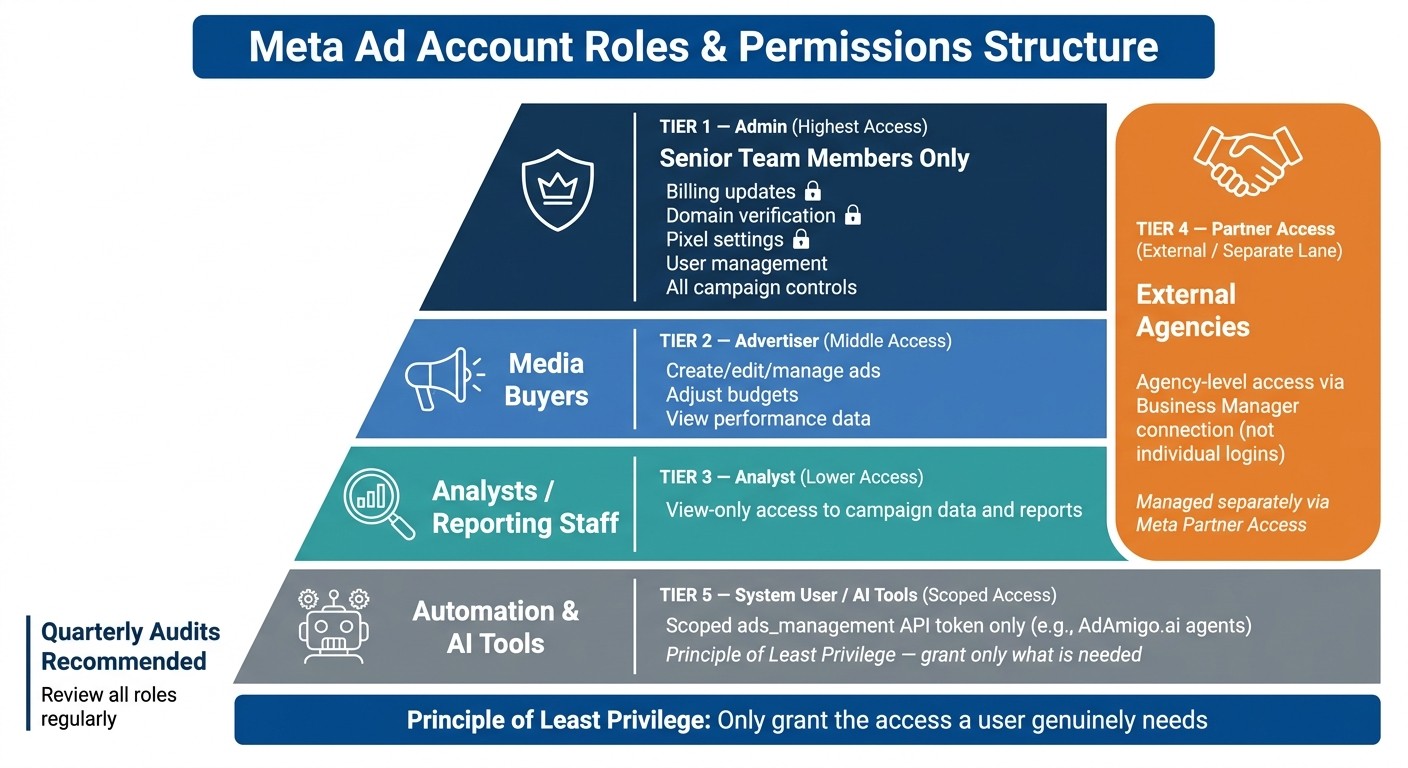
Meta Ad Account Roles & Permissions Structure
Here’s how to effectively manage access within Meta Business Manager while keeping your operations secure and streamlined.
Implementing Role-Based Access
The golden rule here is simple: only give people the access they absolutely need. This approach, often referred to as the principle of least privilege, helps minimize risk while ensuring your team can still function efficiently.
Assign Advertiser access to media buyers, Analyst access to analysts, and keep Admin rights reserved for senior team members. Before assigning a role, ask yourself: What does this person actually need to do in the account?
Use scoped system tokens for automation tools. These tokens provide a secure, non-human access layer that’s also easier to monitor and audit.
When working with external partners, however, you’ll need a slightly different strategy.
Using Partner Access for Agencies
If you’re collaborating with an external agency, don’t add individual agency staff to your Business Manager. Instead, take advantage of Meta’s Partner access feature. This allows you to connect your Business Manager directly to the agency’s account.
Here’s why this works better:
The agency handles its own internal user management.
You stay in control of how much access their Business Manager gets.
Your user list stays organized, and offboarding the agency later becomes a breeze.
Running Regular Permission Audits
Access permissions can drift over time as roles shift, projects wrap up, or team members leave. That’s why it’s important to review permissions regularly - a quarterly audit is a good place to start.
During each audit:
Check who has access to each ad account and verify their specific asset roles.
Confirm their roles and ensure they match current responsibilities.
To make this process even smoother, consider using automated monitoring tools. For instance, AdAmigo Protect is an AI-driven solution that keeps an eye on your ad accounts, flagging anomalies, risks, or costly mistakes you might miss during manual reviews.
"AdAmigo Protect continuously monitors your ad accounts for anomalies, risks, and costly mistakes, and alerts you the moment something deviates from normal behavior." - AdAmigo.ai
Here’s a pro tip: document your role assignments and access policies in a centralized file. A written record of who has access, and why, can be a lifesaver when troubleshooting issues or onboarding new team members.
Security Best Practices for Meta Ad Accounts
Once you've set up structured, role-based access for your Meta ad accounts, the next priority is securing those roles. This safeguards your account from both external threats and accidental internal errors.
Enforcing Two-Factor Authentication
Two-factor authentication (2FA) is a highly effective way to protect against unauthorized access. If a user's credentials are compromised - whether through phishing, a data breach, or a weak password - 2FA can serve as the last line of defense.
Make 2FA mandatory for all users with elevated permissions, especially Admins and Advertisers. Meta Business Manager provides a way to enforce 2FA at the business level, so there’s no reason to leave this as an optional step. For system integrations, use system user tokens with scoped ads_management permissions instead of relying on user logins. This approach not only limits access to specific functions but also simplifies the process of revoking access if needed.
Once user authentication is secure, the focus should shift to controlling sensitive account actions to minimize risks.
Restricting High-Risk Actions
Not all account actions carry the same level of risk. For example, tweaking ad copy is relatively harmless, but changes to billing information or Meta Pixel settings can have serious consequences.
Restrict critical actions, such as billing updates, domain verifications, and pixel modifications, to a select group of trusted Admins. Media buyers and analysts don’t need access to these functions to perform their roles effectively. By limiting high-stakes actions to a small, trusted group, you reduce the likelihood of costly mistakes or malicious activity.
When assigning permissions, clearly define what each user or system should never be able to do, and structure access levels accordingly.
Monitoring Account Activity
Even with strong authentication and restricted permissions, ongoing oversight is crucial. Accounts can still be compromised, errors can occur, and ad spend can spiral out of control if issues go unnoticed. This makes real-time monitoring a necessity.
While Meta’s native activity log tracks account actions, it requires manual review and often misses real-time anomalies. Automated tools can step in to fill this gap. For instance, AdAmigo Protect continuously monitors your Meta ad accounts for unusual patterns, suspicious spending, and possible intrusion attempts - even during off-hours.
"AdAmigo Protect sends real-time alerts the moment anomalies are detected, so you can react before issues escalate." - AdAmigo.ai
To ensure timely responses, connect alerts to channels your team actively monitors, such as Slack or WhatsApp. Email often isn’t fast enough for urgent notifications. For any high-risk automated actions, implement a "human-in-the-loop" approval system, where flagged issues require a team member’s authorization before any action is taken.
Integrating AI Tools Like AdAmigo.ai Within Your Permissions Setup

Incorporating AI tools like AdAmigo.ai into your ad account management enhances both performance and security. By automating tasks such as optimizations and monitoring, these tools work alongside your existing permission controls without compromising them. Think of the AI as an external team member - grant it only the necessary access to perform its specific tasks.
Granting Scoped Access to AI Tools
AdAmigo.ai connects to your Meta ad account using the Meta Marketing API, adhering to secure protocols. It operates via a system user token with scoped ads_management permissions, ensuring your personal credentials remain protected. This setup also makes it easy to revoke access if needed.
AdAmigo relies on three specialized agents, each with defined roles:
Action Agent: Handles tasks like budget and bid adjustments.
Ads Agent: Manages creative assets for campaigns.
Chat Agent: Processes operational requests using a conversational interface.
By limiting each agent to its specific responsibilities, the system minimizes potential risks. Additionally, you can establish escalation paths for added control. For instance, you might require manual approval for significant changes, such as adjusting campaign objectives or increasing budgets beyond a set threshold, while allowing smaller, routine updates to proceed automatically.
Once scoped access is in place, you can further leverage AI for ongoing account monitoring.
Using AI to Monitor Account Health
Beyond optimizations, AdAmigo Protect offers continuous monitoring of your ad account, sending real-time alerts for issues like disapproved ads, broken links, sudden spending spikes, or even potential security threats.
"AdAmigo Protect continuously monitors your ad accounts for anomalies, risks, and costly mistakes, and alerts you the moment something deviates from normal behavior."
You can customize alert thresholds to suit your needs - whether for unexpected spending, changes in frequency caps, or drops in ROAS benchmarks - and receive notifications through platforms like Slack or WhatsApp. To maintain transparency and accountability, regularly review AdAmigo's Full Action Logbook, which is invaluable for both internal assessments and external audits.
Conclusion and Key Takeaways
Strong permission management is essential for keeping your Meta ad operations secure and running efficiently.
By assigning specific roles and permissions, enforcing strict security protocols, and using AI-powered monitoring, you can protect your ad spend while improving campaign performance. The key takeaway? Only grant users the access they genuinely need. A structured role system helps avoid costly errors, while two-factor authentication and restrictions on sensitive actions provide an added layer of security.
AI monitoring plays a crucial role by offering constant oversight that human teams alone can't provide. As highlighted in an AdAmigo Review (2026), "AdAmigo Protect catches spend fires when nobody's awake in your timezone." This level of continuous monitoring has become critical as Meta ad management grows more intricate, especially with the rise of high-volume creative strategies.
Jonathan Stocco from ForgeWorkflows offers a valuable insight:
"Build the escalation logic before the automation logic... The first question should be: what decisions should this system never make on its own?"
These strategies, when combined, create a framework for managing Meta ad accounts with confidence and precision.
FAQs
Which Meta ad account actions should only Admins handle?
Admins are responsible for critical tasks such as granting or revoking ad account access, managing system users and their permissions, and adjusting account-level integration or authentication settings (like app permissions or API tokens). These actions directly control who can access the account and make automated changes, so limiting them to Admins helps maintain security and oversight.
How can I securely give an agency access without adding their staff as users?
To safely grant an agency access to your Meta ad account without adding individual users, you might want to explore tools like AdAmigo.ai. These AI-driven platforms connect via Meta's official API, allowing agencies to handle campaign management, monitor performance, and streamline processes. This method ensures your security remains intact by adhering to your existing permissions and compliance rules, avoiding the need to provide direct access to your team members.
What’s the safest way to grant API access to tools like AdAmigo.ai?
To ensure maximum safety, connect your Meta account using the platform’s official integration, which relies on Meta’s authorized API framework. Before allowing access, double-check that your Meta Business Manager is set up correctly with the appropriate permission scopes. For added security, implement custom safeguards such as budget limits, ROAS (Return on Ad Spend) goals, and approval workflows. AdAmigo.ai follows strict enterprise-level security standards to manage your account securely through API-based tools.