
AdAmigo Product Update: Launch Carousel Ads in Bulk With Ad Launcher
Create and launch multiple carousel ads in minutes using bulk uploads, AI copy, auto-formatting, and built-in QA.
Creating carousel ads used to take hours. Now, it takes just 2 minutes.
AdAmigo.ai’s Ad Launcher has introduced a bulk carousel ad feature that drastically reduces the time spent on creating and launching carousel ads. Instead of the 90 minutes it typically takes to manually build 10 carousel ads in Meta Ads Manager, this tool allows you to complete the same task in just 2 minutes - a 98% time savings.
Here’s how it works:
Upload Media in Bulk: Drag and drop images or videos from your device or Google Drive, and the system automatically organizes them.
AI-Generated or Manual Copy: Write headlines and text for each card yourself or let AI handle it.
Launch at Scale: Push ads into multiple ad sets or create new campaigns using simple text or voice prompts.
Additional features include built-in error checks (reducing common bulk ad mistakes from 12–15% to under 1%), automatic aspect ratio detection for proper placements, and the ability to retain social proof like likes and comments when reusing ads.
If you’re tired of repetitive ad creation, Ad Launcher simplifies the process, letting you focus on scaling campaigns with multi-format creatives efficiently.
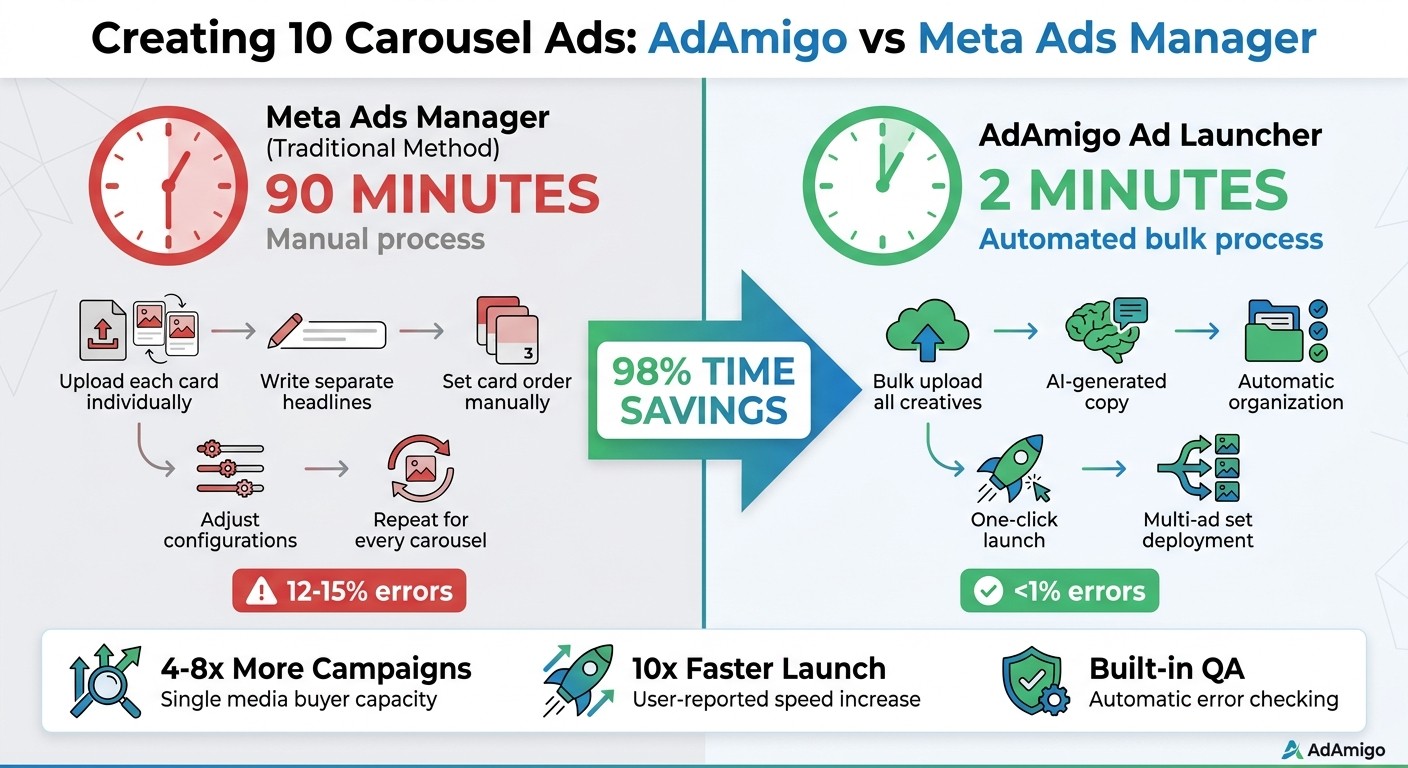
AdAmigo Ad Launcher vs Meta Ads Manager: Time Savings Comparison
How to Create Carousel Ad on Facebook That Gets Results (2025 Meta Tutorial)
What You Can Do with Carousel Ads in Ad Launcher
The latest update simplifies the process of creating carousel ads, saving time and effort. Ad Launcher's carousel feature focuses on three main tasks: uploading and organizing creative assets, crafting ad copy with AI or manual tools, and launching ads into existing or new campaigns. This streamlined approach eliminates much of the repetitive work typically required in Meta Ads Manager.
Upload and Organize Your Creatives
Start by clicking the "Load Media" button to add multiple images or videos from your device or integrations like Google Drive, Dropbox, or Frame.io. To select several files at once, hold down the Shift key. After uploading, use the "Set Carousel Ads" dialog to group your assets into a single carousel.
You can arrange carousel cards in the exact order you want by either dragging and dropping them within the builder or using a naming convention (e.g., Product_01.jpg to Product_10.jpg) that lets the system organize them automatically. This ensures your creative sequence stays consistent.
To save time, you can bulk edit headlines, descriptions, URLs, and calls-to-action for all cards at once. While manual uploads often result in an error rate of 12–15%, bulk uploads with built-in validation reduce errors to under 1%.
Once your creatives are set, the next step is crafting engaging copy and visuals for your ads.
Create Ad Copy with AI or Manual Editing
The "Write with AI" feature can generate primary text and headlines for your carousel ads. You also have the option to assign unique headlines to each card, giving you precise control over your messaging. Keep in mind Meta's character limits: 125 for primary text, 40 for headlines, and 30 for descriptions.
Prefer to write your own copy? Use the bulk edit panel in the top right corner to add or adjust text for multiple carousels at once. This is especially helpful for adapting existing copy or testing different variations with AI-powered bulk testing. You can also include dynamic elements like {city}, {product}, {price}, or {discount} to tailor ads for specific locations, products, or promotions.
With your creatives and copy ready, you’re all set to launch your carousel ads.
Launch Ads into Existing or New Campaigns
When your carousel ads are finalized, you can launch them into multiple existing ad sets at once by selecting them from a dropdown menu. The tool automatically creates and pushes unique ads to each ad set, eliminating the need to launch them individually.
If you're starting from scratch, the "Launch New" workflow lets you create entire campaign structures using a simple text or voice prompt. Just describe the campaign and ad set structure you want - such as lookalike audiences (see how to scale with lookalike tiers) or budget rules - and your AI Media Buyer will handle the rest. It builds the campaign, sets up ad sets, and launches your carousel ads into the new framework. For added convenience, you can enable the "Use Post ID" feature to retain social proof (likes and comments) from the original ad when launching into new campaigns.
These features make Ad Launcher a powerful tool for turning hours of manual effort into a quick, automated process.
How to Create and Launch Carousel Ads
Ad Launcher lets you create 10 carousel ads in just 2 minutes, compared to the 90 minutes it typically takes using Meta Ads Manager. That’s a 98% reduction in time spent. This tool highlights AdAmigo.ai's focus on simplifying the ad creation process, cutting out the repetitive tasks that come with traditional platforms. While many tools offer bulk ad launching, AdAmigo integrates this into a full automation suite.
Upload and Organize Your Creatives
Start by uploading your assets using the "Load Media" button. From there, you can group your creatives with drag-and-drop functionality or by following naming conventions. Bulk validation tools ensure accuracy, reducing errors from the usual 12–15% to less than 1%.
Once your assets are sorted, you're ready to move on to writing engaging ad copy for your carousel cards.
Write Engaging Ad Copy
Add your primary text and craft individual headlines for each carousel card. Use the "Write with AI" feature to generate variations or manually tweak the text for multiple ads at once using the bulk edit panel.
When you're satisfied with your copy, it’s time to configure the final settings and prepare for launch.
Finalize Settings and Launch
Set up destination links, CTAs, and UTM tags. You can assign ads to existing ad sets or use the "Launch New" option to create new campaign structures based on a text or voice prompt. Enable Meta's Advantage+ creative enhancements in bulk, and use the "Post ID" feature to keep social proof - such as likes and comments - when launching into new campaigns.
This streamlined process ensures your carousel ads are ready to go with minimal effort and maximum impact.
Technical Features and Capabilities
Carousel ads in Ad Launcher provide all the core functionalities of single image or video ads, while also offering tools specifically designed for managing multiple cards. These tools make creating carousel ads at scale much easier. With Ad Launcher, you can include destination links, CTAs, UTM tags, and toggle creative options - all while keeping social proof intact using Post ID.
One standout feature is the built-in QA engine, which identifies potential issues before your ads go live. It catches things like missing UTM tags, targeting mistakes, or unintended creative settings. Thanks to this system, error rates drop dramatically - from 12–15% to below 1%. These capabilities not only speed up the ad creation process but also ensure your ads maintain consistent quality.
Another time-saving feature is automatic multi-format grouping. Ad Launcher recognizes different creative aspect ratios (like 9:16, 4:5, and 1:1) and organizes them into a single ad. It then matches each format to the appropriate placement, whether it's Stories, Feed, or Reels. This eliminates the need to manually crop or adjust assets for different placements. Additionally, the platform includes bulk lead form integration, enabling you to connect carousel ads directly to Instant Lead Forms without setting them up individually.
"AdManage auto-groups our 1:1, 4:5, 9:16 videos perfectly - zero extra work! Launching 100+ ads in under a minute is a lifesaver."
Kara Bloom, Head of Media Buying, Scale Up Media
Carousel Ads vs. Other Ad Formats
Carousel ads stand out by offering unique features like precise card ordering and custom headlines. Here's a quick comparison of how carousel ads differ from other formats:
Feature | Single Image/Video Ads | Carousel Ads | Lead Form Ads |
|---|---|---|---|
AI Copy Generation | Yes | Yes | Yes |
Multi-Ad Set Launch | Yes | Yes | Yes |
Auto-Ratio Grouping | Yes | Yes | Yes |
Card Ordering Control | No | Yes | No |
Bulk Lead Form Setup | Yes | Yes | Yes |
Social Proof Preservation | Yes | Yes | No |
Carousel ads can generate up to 10 times more traffic to advertiser websites compared to standard sponsored posts and deliver a 72% higher click-through rate than single-image ads. Their ability to display multiple products or tell a sequential story makes them especially effective for eCommerce brands and agencies managing a variety of client needs.
AdAmigo Ad Launcher vs. Other Tools
AdAmigo vs. Meta Ads Manager
Using Meta Ads Manager can feel like a chore, especially when setting up carousel ads. You have to manually upload each card, write separate headlines, set the order, adjust configurations, and then repeat the process for every carousel. It’s a time sink.
Ad Launcher cuts through all that hassle. You can upload all your creatives in one go, group them into carousels, set your copy and headlines, and launch everything in just 3 minutes. The platform takes care of campaign creation, ad set setup, and placement optimization automatically. Now, let’s see how AdAmigo stacks up against other bulk ad platforms.
AdAmigo vs. Adstellar and AdsGo.ai
Most bulk ad platforms fall short when it comes to carousel ads. They’re usually designed for single-image or video ads, leaving carousel support as an afterthought. Even fewer tools combine carousel functionality with AI-powered copywriting and full campaign automation. Here’s a quick comparison:
Tool | Carousel Support | AI Copy Gen | Automated Campaign Creation | Multi-Ad Set Launch |
|---|---|---|---|---|
AdAmigo.ai | Yes | Yes | Yes | Yes |
Adstellar | Limited | No | No | Limited |
AdsGo.ai | No | Yes | Limited | No |
Yes | No | No | Yes (Ad-level) | |
No | No | No | No |
AdAmigo’s ability to generate AI-powered copy and launch multiple ad sets at once makes it a standout option for scaling campaigns with ease. Plus, as an official Meta Business Technology Partner, it offers a secure and seamless connection with your ad account. Users have reported launching ads 10x faster compared to manual workflows. Whether you’re a beginner or a seasoned media buyer, the entire setup process takes just five minutes.
"The fact that you can launch campaigns through text or voice commands feels like magic! It handles everything from creating lookalike audiences to adjusting budgets with just a few prompts."
Jakob K., G2 Review
Conclusion
Carousel ads can deliver excellent results, but setting them up at scale has always been a time-consuming hassle. AdAmigo's Ad Launcher changes the game by letting you upload, organize, and launch dozens of carousel ads in just minutes - what used to take hours now takes as little as 2 minutes.
Ad Launcher isn’t just about speed; it’s about scaling smarter. It simplifies complex campaigns by allowing you to bulk-edit headlines and copy across multiple carousel cards, leverage AI tools for Facebook and Instagram for on-brand messaging, and launch across multiple ad sets simultaneously. Plus, its built-in QA processes ensure every ad meets high-quality standards.
The result? A single media buyer can now handle 4–8× more campaigns without sacrificing quality or feeling overwhelmed. Whether you’re experimenting with fresh creative ideas or expanding successful campaigns, Ad Launcher takes care of the heavy lifting, so you can focus on strategy. It delivers the precision and scalability that today’s digital campaigns demand.
"AdAmigo.ai has been a total game-changer. The AI actions are spot-on, so I can make adjustments fast and see results right away. It's like having an extra set of super-smart hands helping me hit my KPIs."
Sherwin S., G2 Reviewer
If you’re done with the tedious task of building carousels one card at a time, Ad Launcher is here to save you hours each week. It lets you scale campaigns how they’re meant to be scaled - quickly, accurately, and without the busywork.
FAQs
What Meta accounts and permissions do I need to use Ad Launcher?
To get started with Ad Launcher, you'll need a Meta Business account that has access to the necessary ad accounts. Make sure you have the required permissions to manage campaigns and ad sets. Additionally, confirm that you can create and manage ads within your Meta ad account and that your account is correctly connected to your Facebook Business Manager.
Can I reuse an existing carousel and keep its likes and comments?
The information provided doesn't clarify if it's possible to reuse an existing carousel while keeping its likes and comments intact.
How does the QA engine catch errors before I publish?
The QA engine works by spotting errors as they happen. It keeps an eye on setup mistakes, spend anomalies, broken links, disabled ads, and any suspicious activity. This hands-on monitoring helps catch and fix problems before anything goes live.