Meta's Copyright Tools: What Advertisers Need to Know
How Meta scans ads for copyright issues, common triggers, and practical steps advertisers can take to avoid disruptions.
Meta's copyright review process ensures all ads comply with intellectual property rules, protecting both advertisers and content creators. These tools scan ads before and after they go live, flagging or rejecting any non-compliant content. To avoid disruptions, here’s what you need to know:
Key Rule: Use only assets you own or have permission to use - this applies to images, videos, music, text, and logos.
Common Triggers: Unlicensed stock images, competitor materials, and trending music without commercial rights often cause issues.
Automation Limits: Meta’s systems are efficient but not flawless, sometimes flagging compliant ads due to contextual errors.
Ad Library Transparency: All Meta ads are public, making violations more visible than organic content.
Steps to Stay Compliant:
Review your assets for originality.
Avoid restricted phrases like “before/after” in health claims.
Use Meta’s tools like the Ad Library for inspiration, but never replicate content.
Consider third-party tools like AdAmigo.ai for 24/7 monitoring and alerts.
Ads flagged for violations can disrupt campaigns and waste budgets. To resolve issues, submit appeals with proof of compliance or replace flagged elements promptly. Following these guidelines ensures smoother ad performance and policy adherence.
DMCA Copyright Issues on Shopify & Meta Ads
Copyright Rules That Apply to Meta Ads
Meta Ad Copyright Violations: Common Triggers & How to Fix Them
Meta's advertising policies cover more than just general content guidelines - they include specific intellectual property rules that apply to every part of your ad. This includes images, videos, audio, text, and logos across platforms like Facebook, Instagram, and the Audience Network.
Key Copyright and IP Rules for Meta Ads
Meta's automated review systems are designed to enforce these rules, and the primary guideline is simple: only use assets you own or have permission to use. This means you should stick to using your own product photos, brand visuals, and original text. Borrowing a competitor's images, slogans, or branding - even in part - violates copyright law and Meta's terms of service.
It's fine to analyze a competitor's ad structure for inspiration, but your final assets must be entirely your own. While you can let their strategy guide your approach, reusing their actual materials is a clear violation.
Meta also enforces strict rules about the content of your ad copy. Ads with discriminatory language, misleading offers, or certain health-related claims - like "before/after" comparisons - will be flagged or rejected, even if they don't violate copyright laws.
Ad Elements Most Likely to Cause Copyright Issues
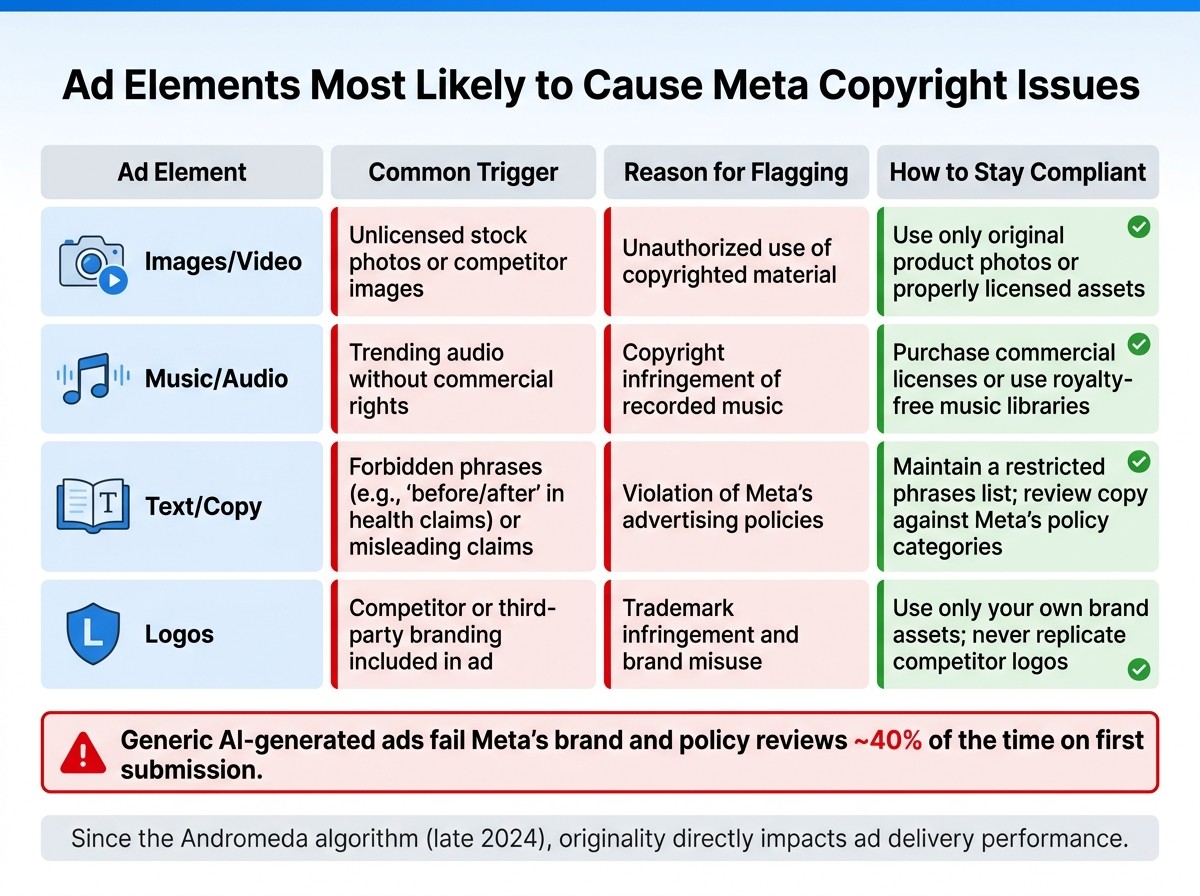
Certain parts of ads are more likely to trigger copyright violations. Here's a breakdown of the common trouble areas:
Ad Element | Trigger | Reason |
|---|---|---|
Images/Video | Unlicensed stock or competitor photos | Unauthorized use |
Music/Audio | Trending audio without commercial rights | Copyright infringement of recorded music |
Text/Copy | Forbidden phrases or misleading claims | Violation of Meta's advertising policies |
Logos | Competitor or third-party branding | Trademark infringement and brand misuse |
When it comes to audio, using trending music requires commercial licensing. Personal use rights don’t carry over to paid advertisements.
Since Meta introduced its Andromeda algorithm in late 2024, originality has become even more important. Ads using duplicated or overly generic content are less likely to perform well, linking compliance directly to ad delivery success.
How Copyright Enforcement Differs for Ads vs. General Content
Meta applies stricter rules to paid ads than to organic content, and understanding this distinction is critical. One major reason for this difference is transparency: all Meta ads are stored in the public Meta Ad Library. This makes them permanently accessible and easy to search, so intellectual property violations in ads are much more visible compared to organic posts that might stay hidden in personal feeds.
Paid ads go through both automated and occasional manual reviews before and after they are published. Organic content doesn’t face this level of pre-publication screening. Additionally, Meta's Creative Enhancements feature can automatically adjust elements in your ad to improve performance. However, these changes still need to comply with intellectual property rules. If you're not keeping an eye on what the system modifies, you might unintentionally run ads with non-compliant content at scale, making AI guardrails for your ad account essential for maintaining compliance.
How Meta's Automated Copyright Detection Works
Meta has developed a robust system for copyright enforcement, ensuring ads comply with its strict guidelines at every stage of the ad lifecycle. This includes pre-submission checks, initial reviews, and ongoing monitoring throughout the ad's delivery.
When and How Meta Scans Ads for Copyright Issues
Advertisers are encouraged to thoroughly review their content before submitting it. Why? Because generic AI-generated ads fail Meta's brand and policy reviews about 40% of the time on their first attempt. Once submitted through the Marketing API, Meta's systems kick into action. They check for issues like misleading health claims or discriminatory language. After an ad goes live, the Andromeda system takes over, optimizing delivery across placements while continuously scanning for policy compliance. This multi-layered approach ensures that ads meet guidelines both before and after they are launched.
How Accurate Are Automated Systems - and What Can Go Wrong
While Meta's automated tools are fast and efficient, they're not perfect. These systems rely on pattern recognition to analyze text, visuals, and categories, which sometimes leads to errors. For instance, a fitness brand running a legitimate transformation campaign might get flagged if its ad resembles restricted "before and after" comparisons. Meta's Ad Copy Quality filters operate on predefined rules, which don’t always consider context. As a result, compliant ads may get flagged because of overlapping language with restricted categories. To avoid this, advertisers should manually review their content using a Meta ad policy checker before submitting it. These occasional inaccuracies highlight the importance of a human touch in the ad review process.
How Copyright Tools Work Across Meta Platforms
Meta applies its copyright detection tools consistently across all its platforms - Facebook, Instagram, and the Audience Network. Even though ads may look different depending on the platform, the enforcement of copyright rules remains uniform. Advantage+ Creative ensures ads are formatted correctly for each placement, while Andromeda focuses on optimizing delivery. Ads stored in the public Meta Ad Library are also uniformly searchable and visible, maintaining transparency across platforms. As Murat Bock, Founder & Fullstack Developer, explains:
"Your text is the input; Andromeda handles placement-level rendering and delivery optimization"
In short, while the core content of an ad is reviewed consistently, its format is fine-tuned to fit the specific requirements of each platform. This ensures both compliance and adaptability across Meta's ecosystem.
What Happens When Meta Flags a Copyright Issue
When Meta's automated scans detect a potential copyright infringement, things can escalate quickly. Here’s a breakdown of what happens when Meta flags an issue and the steps you can take to address it.
Actions Meta May Take Against Flagged Ads
One of the first things Meta does is disapprove the ad in question. This means the ad stops running entirely - whether it’s before launch or mid-campaign. If this happens during a crucial period, it can disrupt your campaign’s momentum and drain your budget. Meta’s systems are designed to detect “suspicious activity” and may pause ad delivery automatically without prior warning. This can result in campaigns being halted unexpectedly, leaving advertisers scrambling to recover.
How Meta Notifies Advertisers of Copyright Violations
Meta typically communicates copyright violations through Ads Manager or Meta Business Suite. Flagged ads are marked with a rejection status and a reason code. However, these notifications don’t always arrive in real time or provide enough detail to act on immediately. Because of this, many advertisers rely on real-time alert systems to stay ahead of potential issues.
"AdAmigo Protect sends real-time alerts the moment anomalies are detected, so you can react before issues escalate." - AdAmigo AI
Tools like AdAmigo Protect monitor ad performance 24/7, sending instant alerts when an ad is disabled or when spending anomalies occur. This kind of constant oversight can make a big difference. While manual monitoring is limited to business hours, AI-driven tools work around the clock, reducing the chances of costly errors.
How to Dispute a Copyright Decision
If you believe Meta flagged your ad incorrectly, there are steps to recover disabled Meta ad accounts. Start by submitting an appeal through Ads Manager. Click on the rejected ad, review the reason provided, and select the option to request a review. For copyright-related claims under the Digital Millennium Copyright Act (DMCA), you can also file a formal counter-notification. This process involves providing your contact information, identifying the content in question, and including a statement affirming that the material was removed in error.
To strengthen your appeal, include proof of licensing, original assets, or written permission. In some cases, simply replacing the flagged element with an original asset can resolve the issue faster than going through a formal appeal process. As Murat Bock, Founder & Fullstack Developer at AdLibrary, explains:
"Your ad rejection rate is a direct function of how well your review step catches policy issues before submission."
If you’re using AI-generated content, be proactive by running it through a post-generation filter to check for restricted elements before submission. Addressing potential issues early can save you from more significant disruptions later.
How Advertisers Can Stay Copyright-Compliant on Meta
Meta's automated copyright scans can disrupt campaigns if you're not careful. Here's how to avoid those headaches.
Using Meta's Built-In Copyright Tools
Meta provides tools to help advertisers avoid copyright pitfalls. For instance, the Meta Ad Library allows you to analyze competitor ad layouts for inspiration - just make sure you're only borrowing structural ideas, not actual content.
Another helpful tool is Advantage+ Creative, which optimizes ad formats automatically to fit different placements across Meta's platforms. To stay compliant, align your ads with Meta's formatting standards. For example, keep headlines under 40 characters and primary text under 125 characters. This not only improves ad quality but also reduces the chances of your ads being flagged.
Once you've used these tools, it's time to focus on the details of your ad elements to ensure full compliance.
Steps Advertisers Can Take to Prevent Copyright Violations
Taking proactive measures is key to avoiding copyright issues. Here are some steps to incorporate into your workflow:
Create a list of restricted phrases for your creative briefs. This could include terms like "before/after" in health claims or language that might come across as discriminatory.
Review AI-generated content carefully before submission to catch anything that might violate Meta's policies.
Study competitor ads for structure only and ensure all your assets are original.
While internal checks are essential, external tools can provide an additional safety net.
Using Third-Party Platforms to Support Compliance
Third-party platforms can enhance your compliance efforts by adding another layer of security. For example, AdAmigo.ai integrates with Meta's API and works within its guidelines. Its AdAmigo Protect feature monitors your account around the clock, flagging disapproved ads, delivery issues, and unusual account activity. This helps you address problems before they drain your budget.
Additionally, AdAmigo allows you to set up custom guardrails. You can define KPIs, budget caps, and targeting rules, ensuring the AI operates within your preferred boundaries. This structured automation minimizes human error, reducing the risk of violating Meta's policies.
Key Takeaways for Advertisers
Meta's copyright systems work fast, and understanding how they function can help protect both your campaigns and your budget.
The best way to stay compliant is to plan ahead. Use the Meta Ad Library for inspiration when structuring your ads, stick to character limits (like keeping headlines at 40 characters or less and primary text under 125 characters), and maintain a list of restricted phrases to avoid issues and avoid Meta ad rejections.
Automated tools are essential for monitoring. Platforms like AdAmigo Protect work around the clock, flagging disapproved ads, unusual account behavior, or other anomalies before they escalate into bigger problems. Relying solely on reactive management can lead to delays and higher costs. These tools can seamlessly fit into your overall campaign strategy, helping maintain both performance and compliance.
Regularly rotating your creative assets isn’t just about keeping your ads fresh - it’s also about staying within copyright rules. When ad frequency goes above 2.5 for cold audiences, performance often suffers, and rushing to replace creatives can lead to shortcuts that risk copyright violations.
FAQs
How can I prove I have rights to an image, video, or song?
To address copyright concerns for images, videos, or songs in Meta ads, consider using AdAmigo.ai. This tool works directly within Meta’s official API and compliance framework. It helps ensure that your ad activities, including the creative assets you use, align with Meta's platform guidelines.
Why do compliant ads still get flagged by Meta’s automated checks?
Meta's automated systems, driven by the Andromeda algorithm, can flag ads even when they meet compliance standards. This algorithm focuses on factors like visual appeal and originality. Beyond that, issues such as unusual spending patterns, delivery glitches, or setup mistakes can also lead to flagged ads. To stay ahead of these problems, tools like AdAmigo.ai offer real-time monitoring, helping advertisers quickly identify and resolve potential issues before they escalate into policy violations or disruptions at the account level.
What’s the fastest way to get a rejected ad running again?
The fastest solution is leveraging automated tools such as AdAmigo Protect. This tool monitors your account around the clock, identifying problems like rejected ads in real time. It also sends instant alerts, allowing you to resolve issues quickly and avoid wasting your ad budget. Plus, AdAmigo’s Chat Agent simplifies the process further by letting you fix problems with straightforward commands - no need to spend extra time navigating through Ads Manager manually.