
Meta Ads MCP Limitations: What Businesses Still Need Beyond the Connector
Meta Ads MCP connects AI to ad accounts — but can't handle strategy, creatives, or risk. Learn what's missing and what your business needs beyond the connector.
Meta's Ads AI Connectors simplify access to ad account data, but they don't solve the bigger challenges of running effective campaigns. While the Model Context Protocol (MCP) enables AI tools to interact with Meta's Marketing API using natural language, businesses quickly discover that connectivity alone doesn't equal performance.
Here's what MCP does well:
Provides fast, real-time access to ad performance data — only 15–30 minutes behind live activity.
Enables natural language commands for tasks like budget adjustments, pausing ads, or pulling ROAS reports.
Simplifies account management with automated OAuth authentication and secure client data separation.
Creates every entity paused by default — a built-in safety net that requires a human to flip the switch before anything goes live.
But here's where MCP falls short:
It doesn't interpret business goals, profit margins, or campaign strategies.
Lacks safeguards for preventing errors like overspending or disrupting Meta's auction algorithm.
Can't automate creative testing or replace fatigued ads.
Doesn't support lead forms or instant forms — a critical gap for B2B advertisers.
Provides no persistent memory or workflow transparency, making audits difficult.
Bottom line: MCP is a great connectivity layer, but businesses need additional systems for strategy, creative iteration, and risk management. And MCP isn't the only thing Meta shipped — the CLI (command-line interface) launched the same day, and the two tools serve fundamentally different jobs. Understanding the split is the first step to knowing what you still need to build.
What MCP Solves
Meta's Ads MCP tackles the technical challenges that have long made ad account management tedious and disjointed. It provides the infrastructure that lets AI tools interact with your ad accounts — without dictating how you should manage your strategy.
But first, some context: Meta didn't ship one thing on April 29, 2026 — it shipped two. Alongside the MCP server (chat-based, OAuth-authenticated, built for conversational analysis) came the Meta Ads CLI (command-line, system-user-token-authenticated, built for deterministic bulk operations). We'll break down the differences shortly. For now, know that when people say "Meta Ads MCP," they're often conflating both tools — and that confusion costs advertisers who pick the wrong one for the job.
Access to Ad Accounts
MCP serves as a standardized interface linking AI assistants like Claude or ChatGPT to the Meta Marketing API. Before MCP, each AI tool needed a custom integration to connect with Meta's platform. By standardizing this process, MCP simplifies integration and enhances client data security through proper account separation.
Chris Pollard, Founder of Ads Uploader, explains:
"MCP is a connectivity standard. It solves the problem of getting an LLM connected to external systems through one common protocol."
It automates OAuth authentication — handling token refreshes and permission scope management — eliminating manual credential oversight. For agencies juggling multiple clients, MCP's account scoping ensures team members working on one account can't accidentally access another's data. This matters: before MCP, managing OAuth tokens across multiple integrations was a persistent source of connection failures — especially for agencies juggling dozens of client accounts.
What's Actually Inside: The 29-Tool Breakdown
The official MCP server exposes 29 tools across 5 capability categories, and understanding the distribution reveals a lot about what MCP is actually built for:
Category | Tool Count | What They Do |
|---|---|---|
Campaign Management | 5 | Create, update, duplicate campaigns and ad sets; manage budgets and bidding |
Product Catalog | 10 | Manage product sets, feeds, and catalog items for dynamic ads |
Insights & Benchmarks | 7 | Pull ROAS, CPA, CTR metrics; compare against industry benchmarks |
Dataset Diagnostics | 4 | Diagnose pixel health and Conversions API signal quality |
Accounts & Pages | 3 | Manage ad account settings, pages, and user permissions |
Two things stand out immediately. First, two-thirds of the toolset is reporting and catalog operations — only 5 tools (17%) are actual campaign write operations. Second, every entity MCP creates lands paused. You can generate a campaign, populate ad sets, and upload creatives — but nothing spends money until a human reviews and activates it. That's a deliberate safety design, not a bug.
Data Retrieval and Analysis
With account access established, MCP makes pulling and analyzing performance data dramatically faster. It retrieves data only 15–30 minutes behind real-time activity, compared to the typical 24–48 hour delays of older reporting tools. Advertisers can query metrics like ROAS benchmarks by industry, CPM trends, and audience performance across multiple accounts — no CSV exports, no tab switching.
Sarah K., a Paid Media Manager at an e-commerce agency, shared the impact:
"The Meta Ads API with Claude setup cut our weekly reporting from 8 hours to 20 minutes. We catch creative fatigue the same day now instead of 2 weeks later."
MCP consolidates multi-account data into a single, queryable source — turning hours of manual spreadsheet work into seconds of structured queries. According to a case study from get-ryze.ai, agencies using MCP-based workflows have reported saving up to 85–90% of the time they used to spend on manual reporting.
Natural Language Control
MCP's headline feature is natural language. Advertisers issue plain-English commands — "Show me which ad sets are underperforming this week" or "Increase the budget for my top-performing campaign by 20%" — and MCP translates them into structured API calls behind the scenes.
This conversational interface handles both reads and writes: pulling insights, creating campaigns, adjusting budgets, pausing underperforming ad sets, and uploading creative assets. But there's a cost: MCP's tool definitions consume about 55,000 tokens of an AI model's context window before you've written a single prompt. That overhead limits how much reasoning space remains for your actual ad strategy.
Basic Campaign Management
With real-time data flowing, MCP enables essential campaign adjustments without navigating Meta's platform manually. Advertisers create campaigns, duplicate successful ad sets, or pause underperforming segments — all conversationally.
MCP also includes dataset diagnostic tools for optimizing pixel and Conversions API setups. For high-volume accounts managing 50+ ad sets, MCP batches up to 50 API calls at once, helping advertisers stay within Meta's rate limits.
But "basic" is the operative word. MCP can move budgets and toggle statuses — it can't decide why a campaign deserves more spend or when to scale. That's where the limitations start.
MCP vs CLI: Two Tools, Two Jobs
If you only read the headlines, you'd think Meta shipped one thing on April 29, 2026. It actually shipped two — and they're built for fundamentally different workflows.
MCP Server | CLI | |
|---|---|---|
Interface | Chat / natural language (JSON-RPC) | Command line (terminal) |
Authentication | OAuth (user-level) | System user token |
Best for | Conversational analysis, ad-hoc queries, exploration | Deterministic bulk operations, CI/CD pipelines, scripting |
Create behavior | Everything lands paused — human must activate | Creates active unless |
Context cost | ~55K tokens of tool definitions per session | Zero — no LLM context consumed |
Repeatability | Ephemeral — conversations disappear when the session ends | Fully scriptable and version-controllable |
The MCP server is built for chat-based exploration: "What's my best-performing audience this week?" "Which creatives are fatiguing?" It's safe by design — everything it creates is paused, requiring manual review before spend flows.
The CLI is built for deterministic, repeatable bulk work: launching 200 ad variations from a CSV, syncing catalog feeds on a cron schedule, running nightly budget adjustments from a script. It creates things live by default — because if you're scripting it, you've already tested the logic.
"The spec file is the key difference. When you create ads through an MCP, the interaction is a conversation... When the chat ends, that sequence disappears." — Chris Pollard, Founder of Ads Uploader
Understanding this split matters because it reveals what neither tool does: strategy. MCP gives you a chat window. The CLI gives you a scriptable pipeline. Neither gives you a media buyer who knows your margin targets, your creative testing cadence, or when a "good" ROAS isn't actually good for your bottom line.
What MCP Does Not Solve
MCP establishes a solid technical connection with your Meta ad account, but its capabilities stop at the API boundary. It doesn't interpret your business goals, profit margins, or the reasons behind a conversion spike — was it a promotion, or just noise?
As GoMarble puts it:
"Access is not the same as insight. You can give an AI a clean pipe into your Meta account and it still won't know which creative concept is actually the strategy."
No Strategy or KPI Targeting
MCP pulls metrics like ROAS and CPA on demand, but it doesn't know whether those numbers align with your business goals. It can't account for lifetime value assumptions, CAC payback periods, or the difference between acquiring new customers and retaining existing ones.
Without human-defined KPI targets, an AI agent might chase surface-level engagement instead of meaningful conversions — driving up acquisition costs while making the dashboard look busy.
No Budget Logic or Scaling Rules
MCP adjusts campaign budgets, but it lacks the context to decide when or how much to scale using automation rules. It doesn't consider stock availability, competitor pricing, or seasonal trends. Without guardrails, AI agents risk overspending on out-of-stock products or undercutting margin on items that are already price-competitive.
Frequent, uncontextualized bid changes are especially dangerous — they can disrupt Meta's auction algorithm and reset the learning phase, causing instability instead of steady progress.
Creative Fatigue and Testing Gaps
MCP monitors metrics like CTR and frequency to flag creative fatigue, but it doesn't automate refreshing creatives. Most setups require assets hosted on public URLs, adding friction if your files live in Google Drive or Dropbox.
The gap between detection and action is real. Advertisers who use MCP to monitor creative fatigue still need a separate system to create and launch new ads. MCP identifies the problem — it can't fix it.
Lead Forms and Instant Forms: The B2B Blind Spot
One limitation that's conspicuously absent from most coverage: lead forms and instant forms aren't exposed in the official MCP or CLI tools. For B2B advertisers who rely on Meta's native lead gen formats, this is a concrete blocker. You can't create, update, or retrieve lead form campaigns through MCP — those workflows still require manual setup in Ads Manager or a third-party tool that wraps the relevant API endpoints.
If lead generation is a core part of your Meta strategy, MCP alone leaves a gap you'll need to fill elsewhere.
Client Collaboration and Workflow Challenges
MCP operates through conversational interactions that vanish when the session ends. There's no permanent record, no approval layer, and no way to audit or replicate successful campaigns. For agencies managing multiple clients, this creates real workflow friction — every campaign setup lives only in a chat transcript that nobody can review after the fact.
Performance Accountability and Monitoring
MCP provides direct write access to your account, but without safety measures, this can lead to costly mistakes. Nico, Founder of AdKit, highlights the risk:
"Meta's API was not built for AI agents. Agents don't know how to use it properly, which leads to bad requests, errors, and suspicious activity. And when Meta detects that, they flag your account."
Because MCP lacks error handling and anomaly detection, there's no built-in safeguard against malformed API requests that could trigger account restrictions.
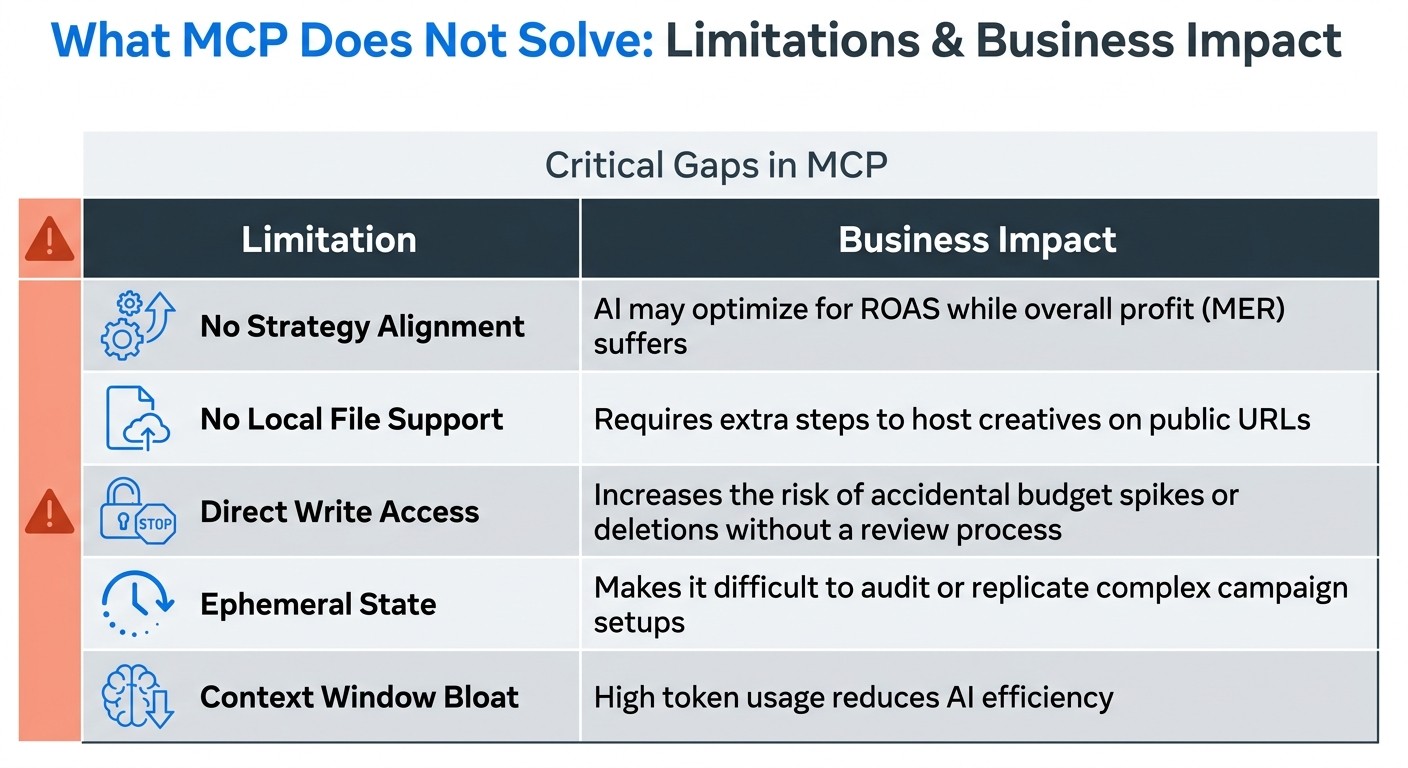
Here's a summary of these limitations and their business impacts:
Limitation | Business Impact |
|---|---|
No Strategy Alignment | AI may optimize for ROAS while overall profit (MER) suffers |
No Local File Support | Requires extra steps to host creatives on public URLs |
Direct Write Access | Increases risk of accidental budget spikes or deletions without review |
Ephemeral State | Makes it difficult to audit or replicate complex campaign setups |
Context Window Bloat | ~55K tokens consumed by tool definitions before any prompt — reduces reasoning capacity |
No Lead Form Support | B2B advertisers can't manage lead gen campaigns through MCP at all |
No Learning-Phase Awareness | Uncontextualized bid changes can reset Meta's optimization, causing instability |
While MCP provides access to Meta ad data, it leaves critical strategy and risk management tasks unresolved — and some campaign types entirely unreachable.
Why Prompt-Based Workflows Can Break Down
Beyond MCP's feature gaps, prompt-based workflows carry their own structural risks. The core problem: AI models interpret your instructions with limited context, and a single misinterpreted prompt can trigger unintended consequences — wasted spend, paused winners, or worse.
"A bot flipping bids every 15 minutes can confuse Meta's optimization algorithm." — Chris Pollard, Founder of Ads Uploader
When you tell an AI to "optimize my campaigns," it doesn't automatically know whether you're maximizing ROAS, cutting acquisition costs, or protecting brand positioning. Without ongoing business context — profit margins, stock levels, upcoming sales — the AI can make technically correct decisions that harm your results. It might increase spend on low-margin products or pause ads right before a flash sale because the prompt lacked strategic depth.
Prompt-based workflows also slow down during critical moments. Each interaction involves multiple JSON-RPC exchanges consuming significant token overhead. During high-pressure campaign launches, that overhead compounds with Meta's API rate limits, creating frustrating delays when speed matters most.
And there's no undo button. Without persistent session history, a single bad prompt can blow through your budget or make account-wide changes in seconds — with no easy way to reverse the damage.
Token Overhead and API Rate Limits
The technical reality of prompt-based workflows adds another layer of friction. MCP's tool definitions consume roughly 55,000 tokens of context before you send a single prompt. Anthropic engineers have observed configurations climbing to 134,000 tokens in some setups. This "token overhead" directly reduces the AI's capacity for high-value reasoning — it's context not spent on analyzing your ad metrics or maintaining consistent campaign structures.
"Token overhead is real. When an agent has access to many MCP tools, the tool definitions and intermediate results consume working memory... context the AI is not spending on your ads." — Chris Pollard, Founder of Ads Uploader
Meta's API compounds these challenges with strict rate limits. Here's how the numbers break down:
Tier | Max Points (per 300s decay) | Read Cost | Write Cost |
|---|---|---|---|
Development | 60 | 1 point | 3 points |
Standard (Full Access) | 9,000 | 1 point | 3 points |
At the Development tier, 60 points evaporates quickly — just 20 write calls or 60 reads before you're blocked for 60–300 seconds. Even at Standard tier with 9,000 points, high-volume bursts during campaign launches can hit the ceiling. Meta also enforces a hard cap of 100 queries per second (QPS) for mutation requests (creating or editing campaigns, ad sets, and ads), and exceeding it triggers immediate throttling.
For Development-tier users, the math is brutal. For everyone else, the combination of token overhead and rate limits means prompt-based workflows slow down precisely when you need them to move fast.
Error Handling and Permission Risks
The risks don't stop at delays — poorly designed MCP setups often lack safeguards to catch errors before they impact live campaigns. If an AI agent misinterprets a prompt or encounters an API error, there's frequently no retry logic or validation layer to prevent the problem from propagating.
Permissions are another weak spot. Many implementations grant the AI broad access across an entire account rather than limiting write permissions to specific campaigns or ad sets. One ambiguous prompt or AI error could trigger account-wide changes — pausing high-performers, boosting underperformers, or deleting campaigns outright.
Limitation | Effect on Ad Performance | Solution |
|---|---|---|
Hallucination / Misinterpretation | Unintended pausing of winning ads or budget spikes | Human-in-the-loop approval for all write actions |
Lack of Business Context | Optimization for low-margin products or out-of-stock items | Persistent rulebooks and context files |
Token Overhead | Inconsistent naming conventions and creative mapping errors | CLI for bulk execution; reserve MCP for reasoning |
Permission Risks | Uncontrolled spending or unauthorized account-wide changes | Granular OAuth scopes; read-only tokens by default |
API Rate Limiting | Delayed launches or reporting gaps during peak periods | Retry logic and back-off strategies in the server |
A safer approach: start with read-only permissions (ads_read) for the first few weeks. Observe how the AI handles your data and instructions without risking live campaigns. Once you're confident, gradually enable write permissions. Always set strict budget caps in Meta Business Suite as a backstop against runaway spend.
What a Business-Ready AI Ads System Needs
MCP connects AI tools to your Meta account — but that's table stakes. To run ads efficiently and avoid costly mistakes, you need a system that understands your business, enforces your rules, and keeps campaigns aligned with your goals. Without these features, you're handing the keys to an operator with no strategic context.
Persistent Account Memory
MCP interactions are conversational and temporary. A business-ready system retains a detailed record of your campaigns — structure, performance history, and strategic decisions — so the AI acts consistently and with context over time. These records, often stored as spec files (JSON documents), capture everything from headlines and URLs to creative mappings and targeting parameters.
This persistent memory lets the AI factor in inventory shortages, upcoming promotions, or shifts in brand messaging. When real budgets are at stake, having a historical decision trail isn't optional — it's the difference between an assistant and an operator.
Custom Rulebooks and Preferences
AI doesn't automatically understand your business rules. A rulebook sets the boundaries: which campaigns the AI can adjust, when manual review is required, and which audiences or assets are off-limits.
"Access is not the same as insight. You can give an AI a clean pipe into your Meta account and it still won't know which creative concept is actually the strategy." — GoMarble
Rules should enforce that campaign launches require manual approval, or prevent the AI from pausing ads before Meta's 50-conversion learning phase completes. Without these guardrails, acquisition costs can spiral if the AI operates unchecked. Rulebooks transform raw API access into controlled, strategic automation.
Daily Prioritization and Approval Options
Once rules are in place, the system should actively monitor your account and prioritize tasks. It needs to surface critical issues — sudden CPM spikes, CTR drops, CPA increases — without overwhelming you with noise.
Flexibility matters. Some businesses want full autopilot for routine optimizations; others want to review every action before it executes. A business-ready system offers both modes, so you stay in control while leveraging the AI's speed.
Activity Logs and Risk Monitoring
When AI manages your ad spend, transparency is non-negotiable. Every query, adjustment, and decision must be logged — creating an activity trail for accountability and future optimization.
A strong system also monitors for risks. Repeated policy violations, API errors, or rate-limit hits can lead to account restrictions or permanent bans. The system should track Meta's Account Quality dashboard, flag suspended ads, and alert you to patterns that might trigger enforcement. Spend safeguards — daily and lifetime caps, auto-pausing when CPA exceeds targets, notifications at 70%, 85%, and 95% of budget limits — protect your account while keeping operations smooth.
How AdAmigo Fills MCP Gaps
AdAmigo builds on MCP connectivity to create an AI-powered ads management platform that goes far beyond connecting to your Meta account. It doesn't stop at raw data — it adds layers of analysis, diagnosis, and execution that turn metrics into action.
Here's how each AdAmigo capability maps to a specific MCP gap:
AI Autopilot for Continuous Optimization
MCP gap: No strategy or KPI targeting. No budget logic. No ongoing optimization.
AdAmigo's Autopilot continuously audits your account, spots high-impact opportunities, and makes improvements — automatically or with your approval. It handles budget reallocation, creative testing, audience adjustments, and campaign scaling, all aligned with your specific KPIs and custom rules.
Whether you want full automation for routine tasks (pausing underperformers) or manual approval for major decisions (budget shifts over $100), Autopilot gives you the flexibility to match your risk tolerance.
Ad Factory for Creative Iteration
MCP gap: No creative fatigue detection-to-action pipeline. Requires public URLs for assets. Can't iterate on winning concepts.
Ad Factory analyzes high-performing ads — yours and competitors' — to generate fresh variations quickly. By examining video content, static visuals, hooks, and messaging patterns, it ensures you always have new creative ideas ready before fatigue sets in. Unlike MCP's flag-it-and-stop workflow, Ad Factory closes the loop: identify fatigue → generate alternatives → launch.
AdAmigo Protect for Risk Management
MCP gap: No error handling. No anomaly detection. Direct write access with no safety net.
AdAmigo Protect monitors for unusual activity, delivery issues, and performance anomalies. It tracks Meta's Account Quality signals, flags suspended ads, and alerts you to patterns that could trigger enforcement actions.
"That 'buffer' between your agent and Meta is what makes it safe to use." — Nico, Founder of AdKit
Protect uses a draft-first approach — changes are reviewed before implementation, creating a safeguard between the AI system and Meta's API. Automated spending limits, daily caps, and rules to pause campaigns when costs exceed targets add another layer of defense. A secure activity log tracks every action, giving you full transparency and rollback capability.
Bulk Ad Launcher for Scaling
MCP gap: Prompt-based workflows slow down at scale. Ephemeral state loses campaign configuration. CLI requires scripting skills.
AdAmigo's Bulk Ad Launcher lets you upload creatives from local storage (Google Drive, your hard drive — no public URLs required), provide a brief, and let the system write copy, structure campaigns, and publish directly to Meta. It generates a JSON spec file for every launch — giving you a preview and a permanent record before any budget is spent. For agencies and eCommerce brands running bulk ad testing, it replaces hours of manual setup with a single workflow.
Conclusion
Meta's official Ads AI Connectors mark an important milestone: AI tools can now interact with ad accounts through a standardized protocol. The MCP server delivers fast reporting, natural language queries, and basic campaign management. The CLI enables deterministic, scriptable bulk operations. Both are genuine advances.
But access alone doesn't equal actionable insight. As Tucker Matheson, Co-founder of Markacy, explains:
"AI APIs for real-time analysis of performance and creative testing will be valuable over time, but not for performance optimization as Meta's AI and algorithm will always be paramount."
MCP can pull ROAS and CPA — it can't interpret profit margins, inventory levels, or strategic priorities. It can flag creative fatigue — it can't generate a replacement. It can adjust a budget — it can't know whether that adjustment makes business sense in the context of an upcoming product launch or a competitor's price drop.
The gap between connectivity and performance is real, and it's where businesses need more. A complete AI media buyer builds on MCP's foundation with persistent account memory, custom rulebooks, daily prioritization, approval workflows, activity tracking, and automated risk management. These capabilities transform raw data access into a fully functional AI advertising system — one that balances technical precision with strategic judgment.
MCP is a great connector. Your ad account deserves more than a connector.
FAQs
Is MCP safe to use with write access?
Only with proper precautions. The main risks are secrets mismanagement — hardcoded tokens, long-lived credentials — and overly broad permission scopes. Start with read-only (ads_read) for the first few weeks. Use centralized secrets management, short-lived credentials, and controlled, granular permissions. Never grant blanket write access to an entire ad account without a review layer in place.
What guardrails does MCP not include?
MCP lacks strategy development, KPI targeting, budget allocation logic, creative fatigue management, structured testing processes, ongoing account monitoring, and performance accountability. It also doesn't support lead forms. Each of these gaps requires additional tooling or manual processes to close.
What do I need besides MCP to improve ROAS?
You need a system that sets clear KPI targets, enforces budget rules tied to business context, detects and resolves creative fatigue, and provides persistent campaign memory for long-term optimization. Regular account monitoring, risk management, and spend safeguards are equally critical. Tools like AdAmigo layer these capabilities on top of MCP connectivity — so you get the data access and the strategic execution in one platform.