
Meta Ads API: Access Levels for Agencies
Compare Development, Standard, and Advanced Meta Ads API tiers—permissions, rate limits, account caps, and setup needs for agencies.
Managing Meta Ads API access is key for agencies handling multiple ad accounts. Meta offers three tiers of API access: Development, Standard, and Advanced, each tailored for different needs. Here's what you need to know:
Development Access: Ideal for testing and small-scale projects. Limited permissions and low rate limits make it unsuitable for managing multiple client accounts.
Standard Access: Designed for small to mid-sized agencies. Provides full campaign management and reporting tools but comes with moderate rate limits.
Advanced Access: Best for large-scale operations. Offers unlimited account connections, high rate limits, and advanced permissions for enterprise-level automation.
Each level requires specific permissions, setup steps, and verification processes. Choosing the right tier depends on your agency's size, client volume, and automation needs.
Quick Comparison:
Access Level | Best For | Account Limitations | Key Features |
|---|---|---|---|
Development Access | Testing & small projects | 1–5 test accounts | Basic permissions, limited data |
Standard Access | Small to mid-sized agencies | ~25–50 client accounts | Full reporting, moderate rate limits |
Advanced Access | Large-scale agency operations | Unlimited client accounts | High rate limits, bulk management |
Pro Tip: Advanced Access paired with automation tools can drastically improve efficiency, letting media buyers manage 15–25+ accounts versus 4–6 manually. However, setup for Advanced Access is more complex and requires Meta app review and advertiser identity verification.
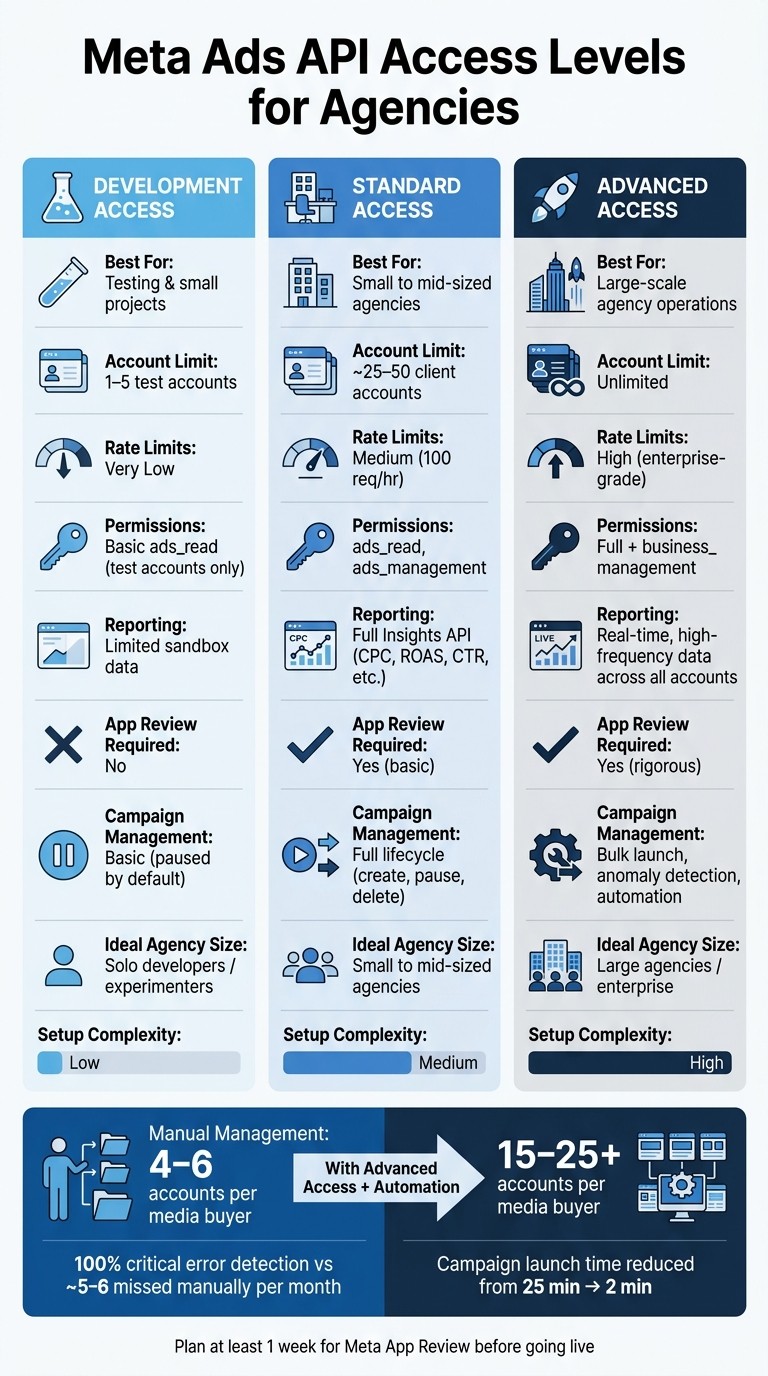
Meta Ads API Access Levels: Development vs Standard vs Advanced
How to Set Up the Meta API for Your Marketing Team (Safe Agent Access)
1. Development Access
Development Access is the starting point for using the Meta Marketing API. It’s designed for agencies and developers looking to experiment, automate, or integrate Meta ads into their workflows in a controlled environment.
Permissions
To get started, you’ll need a Meta Marketing API access token with ads_management and ads_read permissions. If you’re planning to work with custom audiences, you’ll also need to include business_management in your scope. These permissions are essential for managing campaigns and pulling detailed reports.
Reporting Depth
With Development Access, you have full access to the Insights API, which lets you pull key metrics like:
Impressions
Clicks
Spend
Reach
CPC, CPM, CTR
Frequency
Conversions and action values
You can break down this data by categories such as age, gender, placement, and device. This level of reporting is ideal for cross-account analysis.
Campaign Management Capability
Beyond reporting, Development Access allows you to manage the entire ad hierarchy - campaigns, ad sets, and creatives. To ensure control over your budget, you can configure the API to set new campaigns to "PAUSED" by default. This gives your team time to review campaigns before they go live, which is particularly helpful when testing automation workflows.
Approval/Verification Requirements
To use Development Access, you’ll need a Meta Business Manager account, a registered Meta App, and a system user token. Additionally, you must complete Meta’s App Review process before moving past basic testing. As Meta explains:
"The Meta Marketing API requires a Business Manager account, an app with the ads_management permission, and a system user token... Getting through the app review process takes time."
Plan for at least a week to set up and complete the review process before you start building automation logic. To avoid frequent re-authentication, use long-lived access tokens generated via Meta Business Manager.
Multi-Account Fit
Development Access is not designed for managing a large number of client accounts. It’s typically limited to a handful of ad accounts, such as those owned by the developer’s business or specific test accounts. Additionally, this tier has lower rate limits than the Standard or Advanced tiers. If you’re working with more than 10 clients, you’ll likely need to upgrade, as Development Access is best suited for small-scale testing or projects with a limited number of accounts.
2. Standard Access
Expanding on the basics provided by Development Access, Standard Access is the go-to tier for managing live client campaigns. It's specifically tailored for agencies juggling multiple client accounts and running production-ready operations daily.
Permissions
To use Standard Access, you'll need ads_read and ads_management permissions. If you're handling custom audiences, include business_management in your permission scope. It's recommended to use a system user token instead of a standard user token. Why? Because if someone on your team leaves, your integration continues uninterrupted.
Reporting Depth
With Standard Access, you unlock the full Meta Insights API, giving you access to metrics like spend, ROAS, CPA, CTR, impressions, and conversions. You can break down this data by age, gender, placement, device, and country, making it easier to generate cross-client reports and spot trends. However, keep in mind that the API only provides live data. If you need historical comparisons, you'll have to maintain your own data storage. This level of reporting enables thorough campaign monitoring and optimization.
Campaign Management Capability
This tier supports the entire campaign lifecycle, including creating, updating, pausing, and deleting campaigns, ad sets, and ads. You can also manage creative assets and launch ads in bulk. Using API-driven bulk orchestration, you can cut campaign launch times dramatically - from 25 minutes down to just 2 minutes.
Approval/Verification Requirements
To activate Standard Access, your app must pass Meta's App Review process. This involves showing how your app uses the permissions you're requesting. Additionally, you'll need to complete Business Verification through Meta Business Manager before gaining ads_management access.
"Getting through the app review process takes time, and Meta's documentation on permission scopes is inconsistent. Budget a week for setup before you write a single line of automation logic." - ForgeFlows, AI Developer
Once you've cleared these steps, your app will be ready to handle the demands of agency-scale operations.
Multi-Account Fit
Standard Access is built for managing multiple accounts at an agency level. Rate limits and throttling are moderate - some integrations max out at 100 requests per hour - which works well for small to mid-sized agencies but might be a hurdle for larger enterprises. Agencies using this tier report managing 15–25 ad accounts per media buyer, a significant improvement over the 4–6 accounts typically handled through manual dashboards.
3. Advanced Access
Advanced Access is Meta's top-tier option, tailored for agencies managing campaigns on a large scale. While Standard Access meets the needs of most day-to-day operations, Advanced Access goes a step further. It removes limits on how many client accounts you can handle and provides full API capabilities, making it ideal for enterprise-level automation and scalability.
Permissions
This tier includes key permissions like ads_read, ads_management, and business_management, which are essential for working with custom audiences built from customer lists or website visitor data. Authentication is managed through OAuth 2.0, and system user tokens tied to your Business Manager ensure stability, even if your team changes. To keep things running smoothly during campaigns, you can generate long-lived access tokens via Meta Business Manager, minimizing disruptions from re-authentication.
Reporting Depth
Agencies using Advanced Access benefit from complete access to the Insights API. This allows for detailed metrics like CPC, CPM, CTR, reach, frequency, spend, and conversion values, all of which can be broken down by age, gender, placement, and device. The real advantage? You can pull this data across unlimited client accounts, making it easy to create standardized dashboards without manual exports. This level of reporting simplifies the process of managing high-volume campaigns effectively.
Campaign Management Capability
Advanced Access enables agencies to manage campaigns at scale. You can create, update, pause, and delete campaigns, ad sets, and creatives in bulk - launching hundreds of ads in one go. Built-in automation tools monitor all client accounts for anomalies, helping you detect and address issues like unexpected spend or delivery problems before they become major concerns. To add a layer of control, campaigns can default to PAUSED status, allowing for manual review before any budget is spent. These features integrate seamlessly with Meta's safety protocols, giving agencies enterprise-level control.
Approval and Verification Requirements
Getting Advanced Access takes more effort than Standard Access. You’ll need to complete Meta's full App Review, have a verified Business Manager account, and set up system user tokens with the right access levels. Since Meta's documentation on permission scopes can sometimes be unclear, it’s wise to plan ahead and allow extra time for building your automation framework.
Multi-Account Fit
Advanced Access is designed for agencies managing large numbers of client accounts. There’s no cap on the number of ad accounts you can connect, making it perfect for high-volume operations. With higher rate limits and faster bulk-launch capabilities, this tier is the go-to choice for agencies aiming to streamline their processes and scale efficiently.
Pros and Cons
Now that we've broken down the features of each access level, let’s weigh their strengths and limitations - and see how they impact agency workflows and scalability.
Development Access is ideal for experimenting with integrations and running tests before launching live campaigns. However, it's not suitable for client work. You're restricted to managing just a few accounts that you own, with no ability to oversee external portfolios.
Standard Access works well for small to mid-sized agencies. It enables full campaign management and access to the Insights API for roughly 25–50 client accounts. That said, rate limits can make bulk operations and frequent automations a challenge.
Advanced Access removes account limitations entirely. It includes business_management permissions for custom audience management, enterprise-level rate limits, and no cap on connected accounts. This makes it the go-to choice for agencies managing operations at scale. The tradeoff? A more complex setup process, including a full App Review, a verified Business Manager, and system user token configuration before going live.
Feature | Development Access | Standard Access | Advanced Access |
|---|---|---|---|
Permissions | Basic |
| Full + |
Reporting Depth | Limited to test/sandbox data | Full Insights API (CPC, ROAS, etc.) | |
Account Scalability | 1–5 test accounts | ~25–50 client accounts | Unlimited |
Rate Limits | Very low | Medium (standard) | High (enterprise-grade) |
App Review Required | No | Yes (basic) | Yes (rigorous) |
Best For | Tool development & API testing | Small to mid-sized agencies | Large-scale agency automation |
At the Advanced tier, AI-driven API integrations can substantially boost efficiency. A media buyer can handle 15–25+ ad accounts (up from 4–6) thanks to automation. Plus, automated monitoring ensures 100% of critical errors - like broken links or spending inconsistencies - are caught, compared to the 5–6 mistakes per month typically seen with manual processes.
This doesn’t replace human judgment; instead, it lets you focus your expertise where it matters most, while automation handles repetitive tasks. These tools are essential for streamlining workflows in environments with multiple accounts.
Multi-Account Automation: Improving Agency Workflows
Having API access is a good start, but it doesn’t fully address the biggest challenge agencies face: managing too many accounts with too little time. The real game-changer happens when you combine API access with automation tools. Advanced Access provides the groundwork - enterprise-level rate limits and the critical business_management permissions - but the addition of automation tools takes your daily operations to a whole new level. This combination bridges the technical capabilities of Advanced Access with smoother, more efficient workflows.
Here’s how it works: AI tools can take over repetitive tasks, helping you scale your workflows. While Development, Standard, and Advanced Access offer the technical framework, tools like AdAmigo.ai turn that framework into practical, operational improvements. Built on Meta’s official API, AdAmigo.ai automates tasks such as budget adjustments, audience optimization, creative testing, and even anomaly detection. Instead of manually navigating Ads Manager, you can simply give the AI instructions through a chat interface - something as straightforward as "Increase budgets on top-performing campaigns."
This level of automation can significantly boost your capacity to manage accounts and drastically cut down the time it takes to launch campaigns. It’s a shift that also impacts how agencies allocate resources and structure their pricing.
"The fact that you can launch campaigns through text or voice commands feels like magic! It handles everything from creating lookalike audiences to adjusting budgets with just a few prompts." - Jakob K., G2 Reviewer
But before diving into large-scale automation, it’s important to set clear boundaries. Define which decisions the AI can handle on its own and which require human approval. For example, tasks like changing campaign objectives, targeting new audiences, or exceeding a set budget should often remain under human control. With AdAmigo.ai’s human-in-the-loop mode, you can queue certain actions for review before they’re executed, ensuring you maintain oversight where it matters most.
For agencies juggling multiple accounts, AdAmigo offers flexible, volume-based pricing. Custom tiers are available, and options like white-labeling and proof-of-concept pilots (for 1–2 accounts) allow you to test the waters before committing to a broader rollout.
Conclusion
When it comes to API access levels, your choice should align with your scaling needs and the speed required to manage your workflows effectively.
Access Level | Best For | Key Limitation |
|---|---|---|
Development | Building and testing integrations | Not suitable for live client accounts |
Standard | Small agencies, up to ~10 accounts | Lower rate limits, no bulk operations |
Advanced | Scaling agencies, 15–25+ accounts | Requires Meta app review process |
Each tier offers different capabilities depending on the scale of your operations. For beginners, Development Access provides a safe environment to test and refine your setup without risking live campaigns. Once you're ready to manage actual client campaigns, Standard Access offers the permissions needed for reporting and campaign management. However, for agencies looking to grow, Advanced Access is a must. It lifts account restrictions, grants business_management permissions, and supports high-frequency API calls needed for handling multiple accounts seamlessly.
A helpful tip: plan for at least a week to complete Meta’s app review process before you need Advanced Access to go live. Since documentation on permission scopes can sometimes be unclear, giving yourself extra time can save you from last-minute hurdles. Combining the right access level with automation tools like AdAmigo.ai can further streamline your processes and improve efficiency.
FAQs
When should I upgrade from Standard to Advanced access?
When managing campaigns manually starts to feel like juggling too many balls at once, it’s probably time to consider upgrading. This often happens when media buyers are stretched thin trying to keep up with a growing number of clients or campaigns. Common red flags include mistakes slipping through the cracks, overlooked performance issues, or ad spend that isn’t delivering results.
That’s where tools like AdAmigo.ai come in. They take care of the repetitive, time-consuming tasks, help monitor campaign performance, and handle bulk campaign management. This frees up teams to focus on what really matters: strategy and creative direction. Plus, it boosts overall efficiency, making it easier to scale without the stress.
What causes Meta Ads API rate limits, and how can agencies avoid hitting them?
Meta Ads API rate limits come into play when there’s a surge in high-volume requests. This often happens when managing a large number of ad sets or running frequent, complex automation processes. These limits are essential for ensuring the platform stays stable and performs reliably.
For agencies, avoiding these limits is crucial. One effective solution is leveraging automation platforms like AdAmigo.ai. These tools are specifically built to operate within Meta’s API limits while adhering to compliance guidelines. Instead of relying on inconsistent manual scripts, platforms like AdAmigo.ai provide structured integrations that handle bulk actions efficiently and keep a close eye on performance metrics.
What’s required to pass Meta App Review and Business Verification for agency use?
To navigate Meta's App Review and Business Verification process, you'll need a verified Meta Business Manager account. This is essential for agencies managing client assets or running ads.
When setting up your app, ensure it requests the appropriate permission scopes, such as:
ads_management
ads_read
business_management (important for managing custom audiences)
For secure asset management, use a system user token. This approach helps maintain control and security over client data.
Keep in mind, Meta’s documentation can sometimes be unclear or inconsistent. Because of this, it's wise to allocate at least one week for the entire review process. Tools like AdAmigo.ai are designed to align with Meta’s compliance standards, providing added stability during this process.