
AdFactory Can Now Create Video Ads: Design Any Video Creative and Launch It Straight to Meta
Create, launch, and optimize video ads in one platform using account-driven workflows and scene or image-based builds.
If you run Meta ads, this update is simple: you can now make video ads inside AdFactory, send them to Meta, and manage what happens next in the same system.
I see three big takeaways here:
AdFactory now goes beyond image ads and supports video builds like UGC clips, product demos, motion image ads, and brand-style spots.
There are two ways to build: make a video scene by scene, or turn an image ad into video.
The main pitch is not just video generation. It starts with your brand and ad account history, then connects to launch and ad management tools after publish.
That matters because many teams still spend 2 to 8 hours per ad, while Meta advertisers may need 10 to 50 new ads per week to fight ad fatigue. AdFactory is trying to cut that work by keeping ideation, editing, launch, and post-launch ad management in one place.
You also get setup controls before generation, including:
Product
Character
Angle
Prompt
Format
Duration
Audio
Lite vs. Pro model
If I strip the article down to one sentence, it’s this: AdFactory is moving from an image-first builder into a video ad workflow for Meta advertisers who want to build, test, launch, and manage ads without jumping across tools.
I found a BETTER way to create Meta video ads (using AI)
Quick Comparison
Tool | Main use | Video types | Starts with account history | Direct Meta launch | Post-launch ad management |
|---|---|---|---|---|---|
AdFactory | Build, launch, and manage Meta ads | UGC, motion image, multi-scene, brand spots, demos | Yes | Yes | Yes |
Creatify | Generate videos from URL/image | UGC, cinematic, product demos | Partial | Yes | Suggestion-based only |
Arcads / MakeUGC | Talking-head UGC videos | Mostly avatar/script-led UGC | No | No / manual workflow | No |
What stands out to me is the workflow. Many tools stop after the video is made. AdFactory is aiming to keep the process going from build to launch to budget and performance decisions inside AdAmigo.
So if you care about ROAS, CPL, testing volume, and time spent per ad, this update is less about “we added video” and more about shrinking the path from ad idea to live Meta campaign.
What AdFactory Is and Why Account Context Matters

AdFactory has a clear edge: it starts with account context, not a blank canvas. And that same context now guides how video gets made.
An open canvas for designing Meta creatives without a designer
For video, the same prompt loop still works, but now you get more control over each scene. You type a prompt, see the result, refine it with another prompt, and keep going until the creative feels right.
You can run as many iterations as you want, build multiple versions side by side, and keep the ones that look like they have a shot.
How AdFactory uses brand identity and winning ad history by default
AdFactory's main difference is simple: it starts with your brand identity and your winning creatives. So the output is shaped by past performance from the first prompt.
From creative to launch in one system
Once the creative is ready, AdFactory sends it to Meta and passes that same context into Autopilot and Chat Agent. That context also shapes how AdFactory builds video inside the canvas.
How AdFactory Builds Video Ads Inside the Canvas
2 build paths: scene-by-scene creation or converting an existing image ad
Once your account context is set, the next move is picking how you want to build the video.
AdFactory gives you two clear paths, and the right one depends on your starting point.
The first path is scene-by-scene creation. You build each scene on the canvas, turn each one into a video clip, and then join those clips inside AdFactory. The whole story stays in the platform, so there’s no need to jump into another editor or deal with exports. And yes, the account context already set in AdFactory still shapes how these builds come together.
The second path is image-to-video conversion. If you’ve already made a static image ad in AdFactory, you can turn it into a video by adding motion. It’s the fastest way to give movement to an static image creative that’s already doing well.
Prompt-based editing with unlimited iterations and side-by-side variations
Once a video is on the canvas, editing stays fully prompt-based.
You select the creative, type the change you want, and the system updates it. From there, you can keep refining the same version or spin up several versions at once and compare them side by side. No switching tools. No leaving the platform. You can even audit your ad creative to identify weak spots before finalizing the build.
That kind of unlimited in-platform iteration cuts down the space between an idea and a live ad.
Video formats AdFactory supports beyond talking-head UGC
AdFactory isn’t tied to one format. That matters, because not every ad idea should look the same.
Format | Best For |
|---|---|
Unboxing | E-commerce, product reveals |
Comic or illustrated | Standout creative, scroll-stopping visuals |
Testimonial / problem-solution | Trust-building, mid-funnel conversion |
Concept-driven | Any original idea that doesn’t fit a set pattern |
Motion image | Adding movement to high-performing static winners |
AdFactory treats format as a creative choice, not a template limit. That flexibility matters because AdFactory is built for direct launch, not just generation.
How to Configure, Launch, and Optimize Video Ads with AdAmigo
Configure the creative: product, character, angle, funnel stage, and prompt
Before you generate anything, set up the creative with five inputs: product, character, angle, funnel stage, and prompt.
Start with the product. Then select or upload a character, including appearance traits and natural imperfections. After that, choose the messaging angle and the funnel stage you want the ad to hit. Last, write the prompt.
That setup shapes the output. You get a scene where the character is using or holding the product, matched to the angle and funnel stage you picked. If you line up the angle with the funnel stage before generation, the first version is much more likely to land near the message you want. It also gives the next step - format and model selection - actual guardrails instead of a vague prompt.
Choose format, duration, audio, and the Lite vs Pro generation model
AdFactory supports Meta’s three main aspect ratios: 1:1 for feed, 4:5 for vertical feed, and 9:16 for Reels and Stories. You can also control duration, sound, and voiceover.
The bigger decision is which generation model to use. AdFactory gives you two options:
AdAmigo Video Lite | AdAmigo Video Pro | |
|---|---|---|
Best for | Hook testing and high-volume variations | Hero creatives and cinematic storytelling |
Speed | Fast | Slower |
Output quality | Standard HD | More realistic, more polished output |
Token cost | Low | Higher |
Audio | Basic text-to-speech | Native audio, ambient sound, and lip-synced voiceover |
The day-to-day workflow is straightforward: test on Lite, then remake the winner on Pro. Use Lite to run a lot of variations at a lower cost and spot what gets traction. Then regenerate the top performer in Pro before you put serious budget behind it.
Launch directly to Meta and keep optimizing with Autopilot, Chat Agent, and Protect
Once you’ve chosen your top creatives from the canvas, you can send them straight to Meta without downloading and re-uploading files by hand. You can launch into a new campaign, a new ad set, or ad sets that are already live.
After launch, those creatives plug into AdAmigo’s media-buying system. AI Autopilot keeps optimization moving by scaling winners, pausing ads that miss the mark, and starting new tests. The AI Chat Agent lets you ask plain-English questions like "Why did ROAS drop yesterday?" and make changes right from the chat. AdAmigo Protect watches account health in the background and flags issues like rising frequency, falling CTR, or climbing CPA before they eat into spend.
That connected loop is what sets AdFactory apart from standalone video tools. It’s not just about making the ad. It’s about getting the ad live, reading performance, and acting on it without bouncing between tools.
How AdFactory Compares to Arcads, MakeUGC, and Creatify
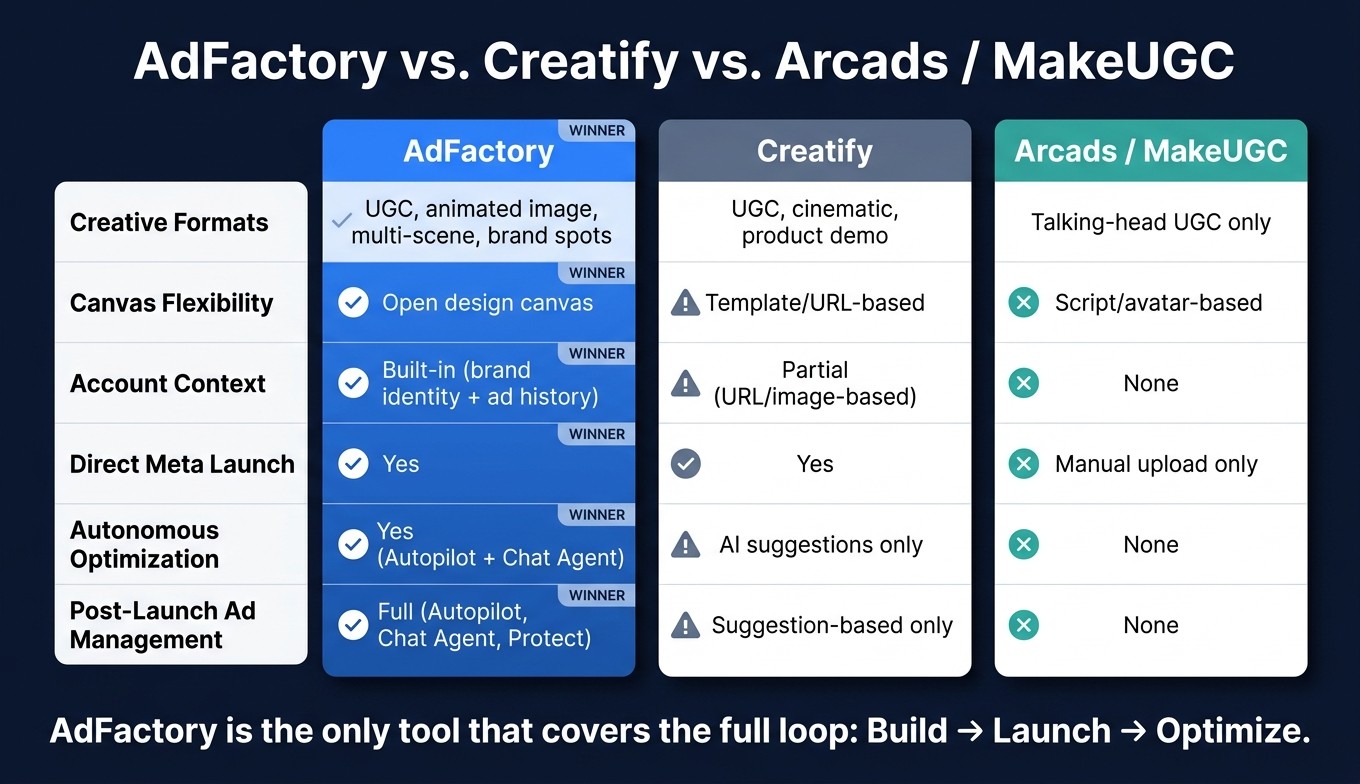
AdFactory vs Creatify vs Arcads: Meta Ad Tool Comparison 2024
Where Arcads, MakeUGC, and Creatify fit
The main split comes down to this: does the tool stop after it makes the ad, or does it keep going into launch and performance tuning?
Arcads and MakeUGC are built for talking-head UGC. You pick an avatar, drop in a script, and get a creator-style video fast.
Creatify handles more formats. That includes UGC, cinematic, and product-demo videos built from a URL or image, along with batch creation and launch. But its optimization is recommendation-based, not autonomous. AdFactory is built for the second path.
Note: These tools update frequently, so verify current feature sets before making head-to-head purchasing decisions.
Where AdFactory stands out for Meta advertisers
Most competing tools are script-first or URL-first. AdFactory is account-context-first. That one shift changes the whole workflow.
With AdFactory, the system starts from your brand identity and ad account history. So instead of forcing you into a fixed setup, it helps shape the work around what has already been working in your Meta account.
Two things stand out here:
Open canvas and account context: design any format inside a flexible canvas, shaped by your brand identity and winning ads.
Closed-loop workflow: design, launch, and optimize in one system.
Feature | AdFactory | Creatify | Arcads / MakeUGC |
|---|---|---|---|
Creative formats | UGC, animated image, multi-scene, brand spots | UGC, cinematic, product demo | Talking-head UGC |
Canvas flexibility | Open design canvas | Template/URL-based | Script/avatar-based |
Account context | Built-in (brand identity + ad history) | Partial (URL/image-based) | None |
Launch capability | Direct to Meta | Direct launch available | Manual download/upload required |
Autonomous optimization | Yes (Autopilot + Chat Agent) | AI suggestions only | None |
Conclusion: the difference between a video generator and a closed-loop AI media-buying system
The other tools solve one job: making video fast.
That makes this comparison pretty simple. Some tools help you create video. AdFactory handles the full Meta workflow. It doesn’t just generate the ad and leave you there. It moves that creative through launch and optimization inside the same loop.
FAQs
How does AdFactory use my ad account history?
AdFactory looks at your ad account history to learn which creatives have performed best and how your brand comes across.
That means it can generate video ads that stay on-brand and reflect what has already worked in your account, without long or detailed prompts.
Which video build path should I choose?
Choose scene-by-scene when you want more control over the final piece and a complete story arc. It works well for product demos, unboxings, and cinematic brand spots where pacing, sequence, and flow matter.
Choose image-to-video when you already have strong image ads and want a faster way to add motion for testing and engagement. It’s a smart pick when you need to move fast without starting from scratch.
Both options support prompt-based editing, so you can keep refining the result as needed.
When should I use Lite vs. Pro?
Use Lite for fast testing, lower-cost iterations, and early versions when top-tier quality isn’t a must.
Use Pro for final, higher-quality video creatives when you need better detail, resolution, and realism.