
How to Bulk Launch Carousel & Flexible Ads on Meta
Bulk launch carousel and flexible ads on Meta to cut build time by up to 80%. Covers 2026 specs, workflows, the 3-2-2 method, and common mistakes.
Building carousel and flexible ads in Meta Ads Manager one card at a time is slow, repetitive, and error-prone — especially when you're running creative tests at scale. With Meta's average ad price up 12% year-over-year in Q2 2026, every hour spent on manual setup is an hour not spent on strategy and creative that actually moves the needle.
The fix? Bulk launching. Instead of configuring each card, headline, and destination URL by hand, you set up your carousel or flexible ad once and deploy it across multiple campaigns, ad sets, and accounts in minutes — not hours. This guide covers everything you need to know to bulk launch both formats on Meta: what they are, the latest 2026 specs, the manual workflow (and why it hurts), the bulk workflow that replaces it, and the common mistakes bulk launching helps you avoid.
What Are Carousel Ads and Flexible Ads on Meta?
Before diving into workflows, let's get the formats straight. Carousel ads and flexible ads serve different purposes — and one of them changed significantly in early 2026.
Carousel Ads
A carousel ad is a single Meta ad unit that contains 2 to 10 scrollable cards, each with its own image or video, headline, description, and destination URL. Think of it as a mini slideshow inside one ad placement.
Carousel ads shine when you want to:
Showcase multiple products in a single ad (eCommerce product lines, seasonal collections).
Tell a sequential story where each card builds on the last.
Highlight individual features of a single product — one feature per card.
Demonstrate a process or before/after that benefits from a step-by-step visual.
Each card gets its own click-through link, so you can send viewers to different product pages, category pages, or landing pages from a single ad. Meta serves carousel ads across Feed, Stories, Reels, Audience Network, and Messenger — essentially everywhere.
Flexible Ads (and What Changed in March 2026)
Flexible ads take a different approach. Instead of a fixed card sequence, you bundle multiple creative assets — images, videos, different aspect ratios — into one ad unit and let Meta's delivery system mix and match them dynamically for each viewer.
Did Facebook remove flexible ads? This is one of the most common questions in the space right now, and the answer is: no, but the setup path changed. In March 2026, Meta removed "Flexible Format" as a standalone option in ad creation. The functionality didn't disappear — it moved to the Flexible media toggle under Format display options inside Advantage+ Creative. When you turn that toggle on, you can upload multiple images and videos, and Meta's algorithm dynamically assembles the best combination for each person who sees your ad — choosing the right creative, the right aspect ratio, and the right placement in real time.
If you're looking for the old "Flexible Format" button in Ads Manager and can't find it, you're not alone. The migration confused a lot of advertisers. But the capability is still there — just accessed differently.
Flexible ads work best when you:
Want Meta to optimize creative delivery without you manually deciding which asset goes where.
Are testing multiple creative angles and want to let performance data drive decisions.
Need your ads to look right across placements — Meta adjusts aspect ratios automatically for Feed, Reels, and Stories.
Carousel vs. Flexible Ads: When to Use Each
Scenario | Best Format |
Showcasing multiple products with individual links | Carousel |
Telling a sequential brand story | Carousel |
Letting Meta auto-optimize creative combinations | Flexible |
Running creative tests across formats and placements | Flexible |
Highlighting product features in a fixed order | Carousel |
Scaling ad variations without manual assembly | Flexible |
Both formats are first-class citizens in a bulk launching workflow — and combining them is how serious media buyers scale.
Meta Carousel and Flexible Ad Specs (2026)
Getting the specs right upfront prevents rejected ads and wasted time. Here are Meta's current requirements for carousel ads, sourced directly from the Meta Business Help Center.
Carousel Ad Specs
Spec | Requirement |
|---|---|
Number of cards | 2–10 per ad |
Image file type | JPG or PNG |
Image max file size | 30 MB |
Video file type | MP4, MOV, or GIF |
Video max file size | 4 GB |
Video duration | 1 second to 240 minutes |
Recommended resolution (1:1) | 1080 × 1080 px |
Recommended resolution (4:5) | 1080 × 1350 px |
Recommended resolution (9:16) | 1080 × 1920 px |
Primary text max length | 125 characters |
Headline max length | 40 characters |
Link description max length | 25 characters |
Aspect ratio tolerance | Up to 20% deviation from recommended (automatic cropping applies beyond that) |
Flexible Ad Specs
Flexible ads inherit the same creative specs as the placements they run in. The key difference is you provide multiple assets at different aspect ratios, and Meta handles the rest:
Upload at least one asset per aspect ratio you want to support (1:1, 4:5, 9:16 are the essentials).
Provide 2–10 images or videos — more variety gives Meta's algorithm more combinations to test.
Text fields (primary text, headline, description) apply across all creative variations in the flexible group.
Meta automatically crops and adjusts for placement — you don't need to create separate versions for Feed, Stories, and Reels.
The Manual Workflow: Building Carousel and Flexible Ads in Meta Ads Manager
Before you can appreciate bulk launching, you need to understand the manual alternative. Here's what the step-by-step process looks like in Ads Manager — and why it hurts at scale.
Building a Carousel Ad Manually
Open Ads Manager and create a new ad. Select a campaign objective (Sales, Leads, Traffic, etc.) and configure your campaign and ad set settings.
At the ad level, choose Carousel as the format.
Upload an image or video for Card 1. Wait for it to process.
Type a headline for Card 1 (max 40 characters). Add a description if applicable and paste the destination URL.
Click "Add Card." Upload Card 2's creative. Type its headline and URL.
Repeat for Cards 3 through 10.
Drag cards to reorder them if the sequence isn't right.
Review every card's headline and URL for typos — one wrong link and you're sending traffic to the wrong page.
Publish the ad.
That's one carousel ad. If you want to test three carousel concepts across four audiences, you're building 12 separate ads — each with up to 10 individually configured cards. That's up to 120 card-level configurations, each with its own creative upload, headline, and URL.
The time cost is real: manually configuring 10 carousel variations takes around 90 minutes. And every manual step introduces a chance for error — a mismatched headline, a copy-pasted URL that points to the wrong product, a UTM parameter that's missing on one card.
Building a Flexible Ad Manually (Before March 2026)
Before the deprecation, you'd select "Flexible Format" from the format menu and manually upload each creative asset. You'd need to ensure you had the right aspect ratios for each placement and that every asset met the spec requirements. The process was clunky: upload, preview, adjust, repeat.
Building a Flexible Ad Today (Advantage+ Creative Path)
Now, you create a standard ad, and under Format display options, toggle on Flexible media inside the Advantage+ Creative section. Upload your assets across aspect ratios, and Meta handles the rest. The process is simpler than before, but you're still doing it ad by ad — which doesn't scale.
For an agency managing 10 client accounts, or a brand running a full-funnel campaign with prospecting and retargeting ad sets, the manual path means rebuilding the same structure over and over. It's not just tedious — it's a bottleneck on creative testing velocity.
The Bulk Launching Workflow: Launching Carousel and Flexible Ads at Scale
Bulk launching inverts the manual workflow: instead of building one ad at a time, you configure your carousel or flexible ad once and deploy it across multiple campaigns, ad sets, and accounts simultaneously.
Bulk Launching Carousel Ads
A bulk ad launcher lets you set up your carousel structure — cards, headlines, URLs, creative ordering — and then apply that configuration to as many ad sets or campaigns as you need. Here's how a modern workflow looks:
Upload all your creatives at once. Drag in images and videos for every card across every variation you plan to run.
Configure each card's details. Set the headline, destination URL, and call-to-action for each card. The interface gives you a spreadsheet-style view so you can see every card at a glance — no clicking through individual ad previews.
Reorder cards by dragging. Want your strongest product first? Drag it to Card 1. Testing a different hook? Swap cards 1 and 2 in seconds.
Choose your target ad sets and campaigns. Select where this carousel should run — one ad set or fifty.
Launch in bulk. The tool creates every carousel ad across every selected destination in one action.
The time difference is stark: where 10 manual carousel variations take roughly 90 minutes to configure, a bulk launcher does the same job in about 2 minutes. That's not just a convenience — it's the difference between testing one creative idea per day and testing five.
Bulk Launching Flexible Ads
Bulk launching flexible ads follows a similar pattern. Instead of building one flexible ad group per ad set, you:
Group your creatives — images, videos, different aspect ratios — into a single flexible ad configuration.
Apply that group across multiple ad sets. The tool creates a flexible ad in each destination, with Meta's Advantage+ Creative handling dynamic assembly and optimization for every individual impression.
Let Meta's algorithm do the heavy lifting. Each flexible ad group tests creatives, aspect ratios, and placements automatically, so you're not guessing which combination works best.
This is especially powerful when combined with a structured creative testing framework. Instead of manually building flexible ads for each test cell, you configure once and deploy everywhere.
The 3-2-2 Method: A Testing Framework Bulk Launching Enables
A popular structured testing approach among media buyers is the 3-2-2 method: 3 creatives × 2 audiences × 2 offers. That's 12 ad variations to test — and when you run it across carousel and flexible formats, the matrix multiplies fast.
Here's what a 3-2-2 test looks like in practice:
3 creatives: A lifestyle image, a product demo video, and a UGC-style testimonial.
2 audiences: A 1% lookalike of past purchasers and a broad interest-based audience.
2 offers: Free shipping vs. 20% off first order.
Build that manually and you're looking at 12 carousel ads (if you run carousel only) — or 12 flexible ad groups plus 12 carousel ads (24 total) if you test both formats. That's hours of setup in Ads Manager.
With bulk launching, you configure each creative/offer combination once, select your audiences, and launch the full matrix in minutes. The 3-2-2 method goes from a theoretical framework you read about to something you can actually run in a single afternoon — and that's the real unlock.
Common Carousel Ad Mistakes (and How Bulk Launching Prevents Them)
Even experienced media buyers make carousel mistakes. Bulk launching eliminates several of the most common ones — not by adding guardrails, but by reducing the repetitive manual steps where errors creep in.
Mistake 1: Weak First Card
The first card in a carousel gets the most views — it's the hook. A common mistake is leading with a generic brand image instead of the strongest product or offer. In a manual workflow, reordering cards means dragging them one at a time across every ad. In a bulk launcher, you reorder once and it applies everywhere.
Mistake 2: Mismatched Headlines and URLs
When you're typing 40-character headlines across 10 cards in 12 ads, it's easy to paste the wrong URL on Card 7 of Variation 4. One wrong link can send traffic to a 404 page or the wrong product. Bulk launchers give you a single configuration view — you set each card's headline and URL once and know it's consistent everywhere it deploys.
Mistake 3: Missing or Broken UTM Parameters
Manual setups often have inconsistent UTM tagging — one card has utm_source=facebook, another is missing utm_campaign entirely. Bulk tools let you define UTM parameters once at the configuration level, so every card in every ad carries clean, consistent tracking.
Mistake 4: Mixed Aspect Ratios Within a Carousel
Every card in a carousel should use the same aspect ratio. Mixing 1:1 and 9:16 cards within one carousel causes awkward cropping and inconsistent placement rendering. When you configure cards in bulk, you typically set a uniform aspect ratio upfront — the tool enforces consistency rather than leaving it to manual attention.
Mistake 5: Not Testing Enough Variations
The biggest carousel mistake isn't technical — it's creative. Many advertisers run one carousel ad and call it done, leaving significant performance on the table. The reason is usually time: building multiple variations manually is too slow. Bulk launching removes that bottleneck, so testing 5 or 10 carousel concepts becomes realistic — not aspirational.
Before and After: How the Workflow Changes
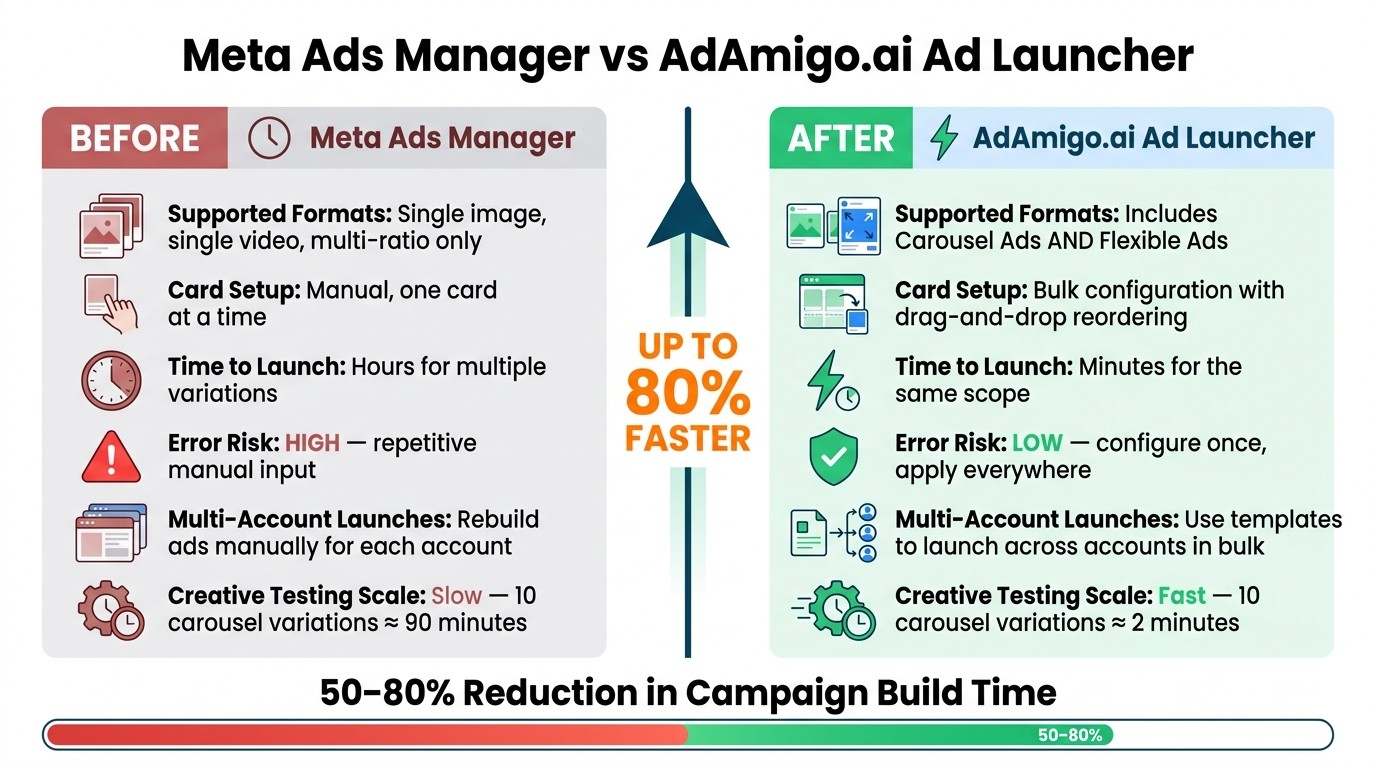
Meta Ads Manager vs AdAmigo.ai Ad Launcher: Before & After Workflow
The difference between the old and new workflows isn't subtle — it's a fundamental shift in how you spend your time. Here's what changes:
Before (Manual in Ads Manager): You open Ads Manager, navigate to the ad level, upload Card 1, type its headline, paste its URL, click "Add Card," repeat. Every ad is a separate build. Every ad set requires the same clicks, the same typing, the same opportunities for error. A 12-ad carousel test eats half your day.
After (Bulk Launching): You upload all creatives into one interface. Configure each card once — headline, URL, order. Select every ad set and campaign where you want this carousel to run. Click launch. The tool creates every ad, in every destination, with every card correctly configured. What took hours now takes minutes.
Workflow Comparison Table
Dimension | Before (Meta Ads Manager) | After (AdAmigo.ai Ad Launcher) |
|---|---|---|
Supported formats | Single image, single video, multi-ratio | Includes Carousel Ads and Flexible Ads |
Card setup | Manual, one card at a time | Bulk configuration with drag-and-drop reordering |
Time to launch | Hours for multiple variations | Minutes for the same scope |
Error risk | High due to repetitive manual input | Lower with configure-once, apply-everywhere functionality |
Rebuild ads manually for each account | Use templates to launch across accounts in bulk | |
Creative testing scale | Slow to create new variants |
Who Benefits From Bulk Launching Carousel and Flexible Ads
Bulk launching isn't a niche feature — it changes how three groups of advertisers work.
Media Buyers Running Creative Tests at Scale
Creative testing is the highest-leverage activity in Meta advertising, but manual setup is the bottleneck. Configuring 10 carousel variations manually takes roughly 90 minutes. With bulk launching, that same task takes about 2 minutes. The time savings compound fast: instead of testing one concept per day, you can test five, iterate on variables like messaging angles — "free shipping" versus "limited-time offer" — across multiple formats simultaneously, and gather enough data to make real optimization decisions — and AI-powered testing tools can accelerate that learning curve even further.
"Running Meta ads should not feel like spending hours inside Ads Manager. You should be able to move from idea to live campaign in minutes... because the repetitive execution work is handled by AI, while you stay in control of the strategy." - Chris R. Pechau, Founder, AdAmigo.ai
eCommerce Brands Showcasing Products
Carousel ads are built for eCommerce. Each card highlights a different product, feature, or price point — and with bulk launching, you configure that carousel once and deploy it across your entire campaign structure. New product launch? Seasonal collection? Flash sale? Set up the carousel and push it to every prospecting and retargeting ad set in one action.
Flexible ads add another layer: bundle your product images, lifestyle shots, and UGC videos into one flexible ad group, and let Meta's algorithm determine which creative drives the best ROAS for each audience segment. Bulk launching means you're not manually rebuilding that flexible group for every ad set — you configure once and deploy everywhere.
Agencies Managing Multiple Client Accounts
Agencies juggle the tedious work of building ads across client accounts — recreating the same carousel structure, the same card configurations, the same UTM setup, account after account. A bulk ad launch tool changes that: apply one carousel or flexible ad configuration across every client account in your portfolio. No rebuilding from scratch.
"We are getting INSANE RESULTS! Our budgets are controlled, our spend is being smartly allocated and our ROAS is up massively. Agencies paying significantly more now see a clear advantage with AdAmigo." - Rochelle D., Agency Owner
For agencies looking to scale operations without increasing headcount, these efficiency gains are the difference between serving 10 clients profitably and serving 30.
See Bulk Launching in Action
How to Get Started With Bulk Launching
AdAmigo's Ad Launcher supports Carousel Ads and Flexible Ads alongside single-image and single-video formats — so you can manage every Meta ad format in one place. The workflow is straightforward: upload your creatives, configure your carousel cards or flexible ad groups, choose your target campaigns and ad sets, and launch in bulk.
You can integrate ads into existing ad sets or let the AI build an entire campaign structure from a short text prompt. Either way, what used to take hours now takes minutes — and you avoid the common mistakes that come with manual setup.
"The fact that you can launch campaigns through text or voice commands feels like magic! It handles everything from creating lookalike audiences to adjusting budgets with just a few prompts. It saves so much time!" - Jakob K., G2 Review
If you're already using AdAmigo.ai, the update is live — just log in and choose Carousel or Flexible Ad as your format for your next launch. New to AdAmigo.ai? Start a trial for $0 and explore the full workflow, or access the Bulk Ad Launcher as a standalone feature starting at $99/month per ad account.
FAQs
Did Facebook remove flexible ads?
No — but the setup path changed. In March 2026, Meta removed "Flexible Format" as a standalone option in ad creation. The functionality now lives under the Flexible media toggle inside Advantage+ Creative settings. When you create a new ad, look under Format display options and toggle Flexible media on — you can then upload multiple images and videos, and Meta dynamically assembles the best combination for each viewer.
What is the 3-2-2 method for Facebook ads?
The 3-2-2 method is a structured testing framework: 3 creatives × 2 audiences × 2 offers. For example, you might test a lifestyle image, a demo video, and a UGC testimonial (3 creatives) across a 1% lookalike and a broad interest audience (2 audiences), with free shipping and 20% off as competing offers (2 offers). That's 12 ad variations — manageable with bulk launching, but painfully slow to build by hand.
Can you run multiple Facebook ads at once?
Yes — that's exactly what bulk launching enables. Rather than building one ad at a time in Ads Manager, you configure your ad structure once and deploy it across multiple ad sets, campaigns, and accounts simultaneously. Meta's auction system ensures your ads compete fairly even when launched in volume.
How can I create bulk Facebook ads?
You have two paths. The native path: export your ad configuration as a CSV from Ads Manager, fill it out, and re-import — but this only works for simple formats and quickly becomes unwieldy for carousel ads with multiple cards. The tool-assisted path: use a bulk ad launching platform that gives you a visual interface to configure carousel cards, flexible ad groups, headlines, and URLs once, then deploy across every target destination in one action.
What are the best practices for carousel ads?
Lead with your strongest visual and offer on Card 1 — it gets the most views. Use a consistent aspect ratio across all cards. Give each card its own headline and destination URL rather than repeating the same text. Tell a sequence or story across cards instead of treating them as unrelated. Test multiple carousel concepts — bulk launching makes this practical. And always verify every card's destination URL before launching; one wrong link breaks the entire ad experience.
What creative specs and limits apply to bulk carousel and flexible ads?
Bulk launching doesn't add extra restrictions — it operates within Meta's standard requirements. Carousel ads support 2–10 cards per ad, images up to 30 MB (JPG/PNG), videos up to 4 GB (MP4/MOV), and recommended resolutions of 1080×1080 (1:1), 1080×1350 (4:5), and 1080×1920 (9:16). Primary text is capped at 125 characters, headlines at 40, and link descriptions at 25. Flexible ads follow the same per-asset specs — upload at least one creative per aspect ratio you want to support, and Meta handles placement-specific cropping.
Can I reuse the same carousel or flexible ad setup across multiple ad accounts?
Yes. Bulk launchers let you configure a carousel or flexible ad once and deploy it across multiple ad accounts simultaneously. This is especially useful for agencies managing multiple clients or brands with separate ad accounts per market — consistent creative setups, deployed everywhere, without rebuilding anything.