Introducing Ad Factory: Design and Launch a Wall of Ads in Minutes
Generate, publish, and optimize dozens of Meta ad creatives in minutes using an AI-powered workflow.
Struggling to keep up with Meta’s demand for fresh ad content? Ad Factory can help. This AI-powered tool from AdAmigo creates, launches, and optimizes Meta ads in seconds, not hours.
Here’s why it matters:
Meta’s algorithm favors accounts with 8–15 ads per ad set, but most brands fall short.
Manual ad creation takes 2–8 hours per ad, costing hundreds or thousands weekly.
Ad Factory generates 50+ ads weekly in just 28 seconds per creative, starting at $39/month.
How it works:
Enter your product URL.
The AI pulls details and creates ad sets with visuals, copy, and formats.
Ads are published directly to Meta with a single click.
With features like audience-specific personalization, multi-format support, and real-time optimization, Ad Factory simplifies ad production while improving performance. Sign up for free and get 5 ads to test today.
We Tested an AI Agent That Builds 1000 Ads in 10 Minutes
The Problem with Creative Volume on Meta
Since the rollout of the Andromeda algorithm in late 2024, Meta has shifted its focus to evaluating ads based on their visual appeal and the originality of their messaging. Accounts that consistently deliver a high volume of diverse creatives are rewarded. To hit optimal performance, advertisers now need to produce 8 to 15 ads per ad set. Unfortunately, most advertisers fall far short of this benchmark.
The real challenge isn’t in crafting a strategy - it’s in execution. Meeting this demand for more creatives puts a heavy strain on production resources and budgets. Producing a single ad creative can take anywhere from 2 to 8 hours, with freelance designers charging $50–$200 per creative. Agencies, on the other hand, often charge $500–$2,000 monthly but deliver only a limited number of variations. At these rates, creating and testing 10 to 50 new creatives each week - the level that Meta’s algorithm increasingly favors - is simply out of reach for most teams.
This has created a volume gap. Leading DTC brands push out 50–100 new creatives every month, while the average brand manages only 2–4. That’s a staggering 12x to 25x difference in the amount of data Meta can analyze to determine who sees your ads.
Timing adds another layer of complexity. Creative fatigue causes signals to lose their effectiveness within 7 to 14 days, and video ads tend to wear out 40% faster than static images at similar frequencies. If it takes three days to produce a replacement ad, that’s three days of declining results and wasted ad spend.
"Creative volume is now a competitive advantage, not a luxury." - Caner Moral, Founder, AdRiseLab
Teams leveraging AI-assisted tools are proving that the bottleneck isn’t a lack of creativity - it’s the ability to produce at scale. These teams run 4.2x more creative experiments per quarter and identify winning combinations 60% faster. Up next, we’ll dive into how AI-powered solutions can help overcome these production hurdles.
What Is Ad Factory?

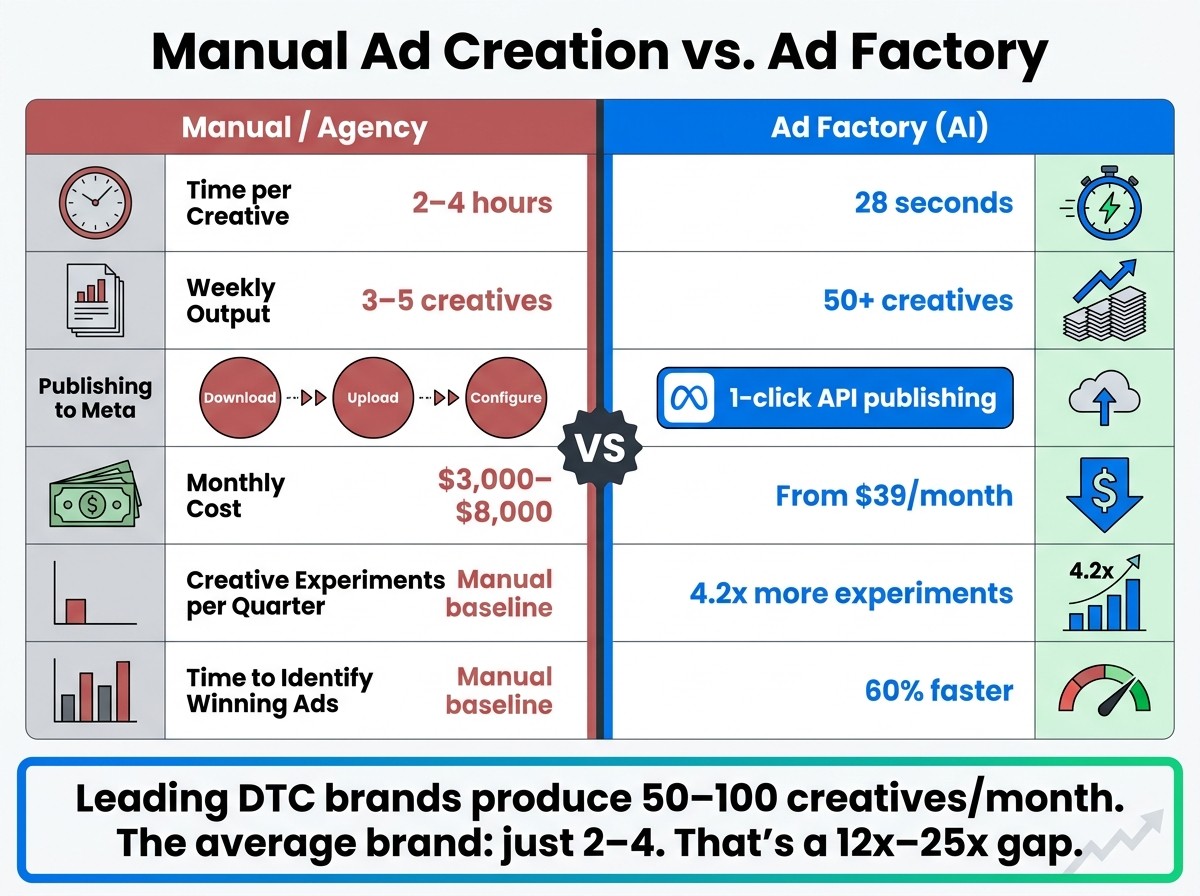
Manual Ad Creation vs. Ad Factory: Speed, Cost & Output Compared
High-Level Overview
Ad Factory is AdAmigo's AI-powered tool designed to simplify and speed up the process of creating ad campaigns. It streamlines everything - from design to launch and optimization - into one seamless platform. Here's how it works: you start by entering a product URL. The AI then pulls essential details from your page, such as images, features, and pricing. In just seconds, it produces a full set of on-brand ads, writes the copy, and even publishes them directly to Facebook and Instagram using the Meta Marketing API.
Built specifically to align with Meta's Andromeda algorithm, Ad Factory uses tailored hook strategies and messaging angles that match Andromeda's Entity ID system. This doesn't just make ad creation faster - it makes it smarter. The result? A wider variety of creative assets that help reduce CPAs and maintain stable ROAS benchmarks. By turning creative production into a strategic advantage, Ad Factory eliminates the bottlenecks that often slow down ad campaigns.
Workflow | Time per Creative | Weekly Output | Publishing to Meta | Monthly Cost |
|---|---|---|---|---|
Manual / Agency | 2–4 hours | 3–5 creatives | Download → Upload → Configure | $3,000–$8,000 |
Ad Factory (AI) | 28 seconds | 50+ creatives | 1-click API publishing | From $39/mo |
The table above highlights how Ad Factory outshines traditional methods in terms of speed, output, and cost. With its ability to produce high-quality ads quickly and efficiently, it tackles the challenge of scaling creative production, making it a game-changer for teams focused on Meta ad performance.
See Ad Factory in Action
Want to see how it works? Check out the video below for a step-by-step walkthrough. You'll see how easy it is to generate a full set of ads and launch a live campaign, giving you a clear picture of Ad Factory's capabilities.
<iframe width="560" height="315" src="https://www.youtube.com/embed/ogfNjm_J1Ec" title="Ad Factory Tutorial" frameborder="0" allowfullscreen></iframe>
How Ad Factory Works: Feature by Feature
Canvas: Build a Wall of Ads in Minutes
The Canvas is where it all begins. By entering a product URL, Ad Factory automatically pulls key details to populate a design system. This system includes variable slots for headlines, backgrounds, and logos, allowing you to quickly generate 20–50 ad variants from a single brief.
"The structural advantage is volume. A manual production workflow produces 3–5 creative variants per launch cycle. An AI generation workflow produces 20–50 variants from the same brief in under an hour." - Larry, Creative Analyst, AdLibrary
With inline editing, you can easily tweak hooks or adjust tones across all variants. Once your initial designs are ready, you can configure inputs to align these ads with your brand's goals.
Configure: Set Your Inputs for Relevant Output
The quality of Ad Factory's output depends on how precise your inputs are. Beyond adding a product URL, you can define personas, pain points, funnel stages, and messaging angles - like problem-solution, social proof, or lifestyle fit. You can also refine the tone, choosing between options like "direct", "urgent", or "conversational."
For video or user-generated content (UGC)-style ads, you can specify details such as character traits, gender, body type, and skin tone. You can also customize formats (1:1, 4:5, 9:16) and set objectives like sales or lead generation. The more detailed your brief, the less time you'll spend editing later. Once inputs are fine-tuned, move to the Assist feature for data-driven creative prioritization.
Assist: AI That Knows Your Brand and Your Numbers
Assist is what sets Ad Factory apart from other tools. By connecting to the Meta Marketing API, it analyzes your historical ROAS, CPA, and CTR data to rank creative components - like headlines, visuals, and primary text - based on what’s worked best in your campaigns.
"The bottleneck most advertisers hit is not strategy. It is production." - AdStellar
Winning elements are saved in a centralized library, complete with performance data. This allows the AI to build on your past successes rather than starting from scratch every time. The result? Faster, smarter iterations that combine speed with proven effectiveness.
Iterate: Personalize and Localize Across Audiences
Once you've created your core ads, the Iterate feature lets you scale them for different audiences. You can personalize ads for specific groups - like age or gender splits - and even localize them for different languages. For instance, a campaign targeting 25–34-year-old women in the U.S. can be adapted for Spanish-speaking audiences in just minutes, with both copy and visuals adjusted accordingly.
Meta's algorithm benefits from creative diversity. By delivering variations tailored to specific audience signals, you give the algorithm more options, which can improve delivery efficiency over time.
Multi-Format: Images, Video, Carousels, and More
Ad Factory supports all major Meta ad formats, including static images, video ads, carousels, image-to-video montages, and animated statics. It also auto-sizes ads for platforms like Feed, Reels, and Stories. From a single brief, you can create diverse formats - static images for Feed, short videos for Reels, and carousels for retargeting - all without adding extra production time.
Touch-Ups: Refine Any Creative Detail
After generating your ads, you have full control to fine-tune the details. Adjust aspect ratios, reposition logos, add text overlays, or even change the visual style entirely. Built-in editing tools make it easy to ensure your ads meet brand standards.
The key here? Focus on small, precise edits rather than major overhauls. The AI's design is based on high-performing ad patterns, so trust the structure and only tweak elements that don’t fit your specific guidelines.
Quality: Photo-Like Output Without a Shoot
A common concern with AI-generated ads is quality. Ad Factory addresses this by producing photo-realistic visuals that are hard to distinguish from professional shoots. This is crucial - on Meta's feed, users scroll past anything that looks cheap or off-brand in seconds.
By delivering polished, on-brand visuals at scale, Ad Factory ensures that its volume advantage translates into actual results.
Start to Launch: Copy, Campaigns, and Go Live
When your creatives are finalized, Ad Factory handles everything - from writing ad copy to publishing directly into your Meta account. Whether you're adding to an existing campaign or starting a new one, there's no need to export files or manually configure ad sets. The entire process happens seamlessly within the platform.
Autopilot: Keep Optimizing After Launch
The work doesn’t stop once your ads are live. Ad Factory's Autopilot feature continuously refines budgets and bids based on real-time performance. It scales up successful ads, pulls back on underperforming ones, and keeps improving your account without requiring daily oversight.
This is the same AI-powered system at the heart of AdAmigo's broader platform. While Ad Factory generates fresh creative, Autopilot ensures your campaigns stay optimized 24/7.
Why Ad Factory Matters
Ad Factory's features aren't just impressive - they address a real challenge in ad creative production.
With Meta's Andromeda algorithm now evaluating visual hooks and messaging strategies, the importance of creative volume has skyrocketed. Here's the reality: while most advertisers produce 3–5 creatives per launch cycle, leading DTC brands crank out 50–100 new creatives every month. Why? Ads lose their effectiveness within 7–14 days, causing ad fatigue, higher frequency rates, and declining ROAS. Relying on manual workflows just can't keep pace. Teams leveraging AI-assisted generation, however, run 4.2x more creative experiments per quarter and identify winning combinations 60% faster than those using manual processes.
Ad Factory isn't just another design tool - it combines speed with intelligence. Instead of churning out random ads, it generates 50 data-driven creatives that automatically launch, rotate, and optimize. This approach doesn’t just save time; it delivers results that were once only possible with a high-cost agency. Even small teams can now achieve the creative speed and efficiency that big agencies are known for.
Up next, learn how to start using Ad Factory and tap into its game-changing creative capabilities.
Get Started with Ad Factory
Discover how fast and easy it is to create high-quality AI-generated ad creatives.
Sign up in just 30 seconds - no credit card required. As a new user, you'll get 5 free ad creatives and full access to the platform right away.
Simply paste your product URL, and the AI will automatically pull your brand details to create a variety of ad options. You can have your ads live on Meta the very same day.
Need help getting started? Optional onboarding support is available via call or email. Share your campaign goals and target audience to receive personalized recommendations.
Set a clear ROAS target or CPA cap to ensure your ads perform at their best. Then, start your free AdAmigo account and create 50 polished, on-brand ad creatives in just minutes.
FAQs
Can Ad Factory create video ads?
Yes, Ad Factory can produce video ads tailored to your needs. It takes your inputs and transforms them into video assets, such as motion content, product walkthroughs, and animated compositions. These video ad formats are crafted to maintain both a high standard of quality and alignment with your brand identity.
Does it work for Meta ads?
Ad Factory is built specifically for creating and managing Meta ads. It connects directly to your Meta ad account, streamlining the entire process of launching and optimizing ad creatives.
Here’s what it does:
Automates repetitive tasks: It takes care of writing ad copy, managing placements, and running high-volume tests to align with Meta’s algorithm requirements.
Prevents creative fatigue: You can quickly refresh your ads without the hassle of manual uploads in Ads Manager.
In short, Ad Factory simplifies Meta advertising by saving time and keeping your campaigns fresh and effective.
Is the AI creative actually high quality?
The AI creates high-quality ad designs by mimicking successful Meta ad patterns. These aren't just generic visuals or clip art - they're polished, production-ready pieces. However, the final quality heavily relies on your input. Providing clear creative direction, a strong brand identity, and relevant performance goals is crucial. When done right, the results can easily match the work of professional designers.
How fast can I launch?
You can create ad designs and launch them directly in Meta Ads Manager in less than five minutes. Thanks to the direct connection with the Meta API, there’s no need to manually download or upload files. This streamlined approach allows you to publish multiple ad variations instantly, cutting out design delays and enabling quick, large-scale testing.