
5 Steps to Build AI-Driven Meta Campaigns
Practical guide to set up Meta ad accounts, use Advantage+ features, build first-party audiences, generate AI creatives, and automate optimization.
AI-driven Meta campaigns are reshaping advertising by simplifying tasks like targeting, creative testing, and optimization. By combining Meta's built-in tools (Advantage+ suite, dynamic creative optimization) with third-party AI platforms like AdAmigo.ai, you can automate campaign management, improve ROAS, and reduce manual effort. Here's how to create effective AI-powered campaigns:
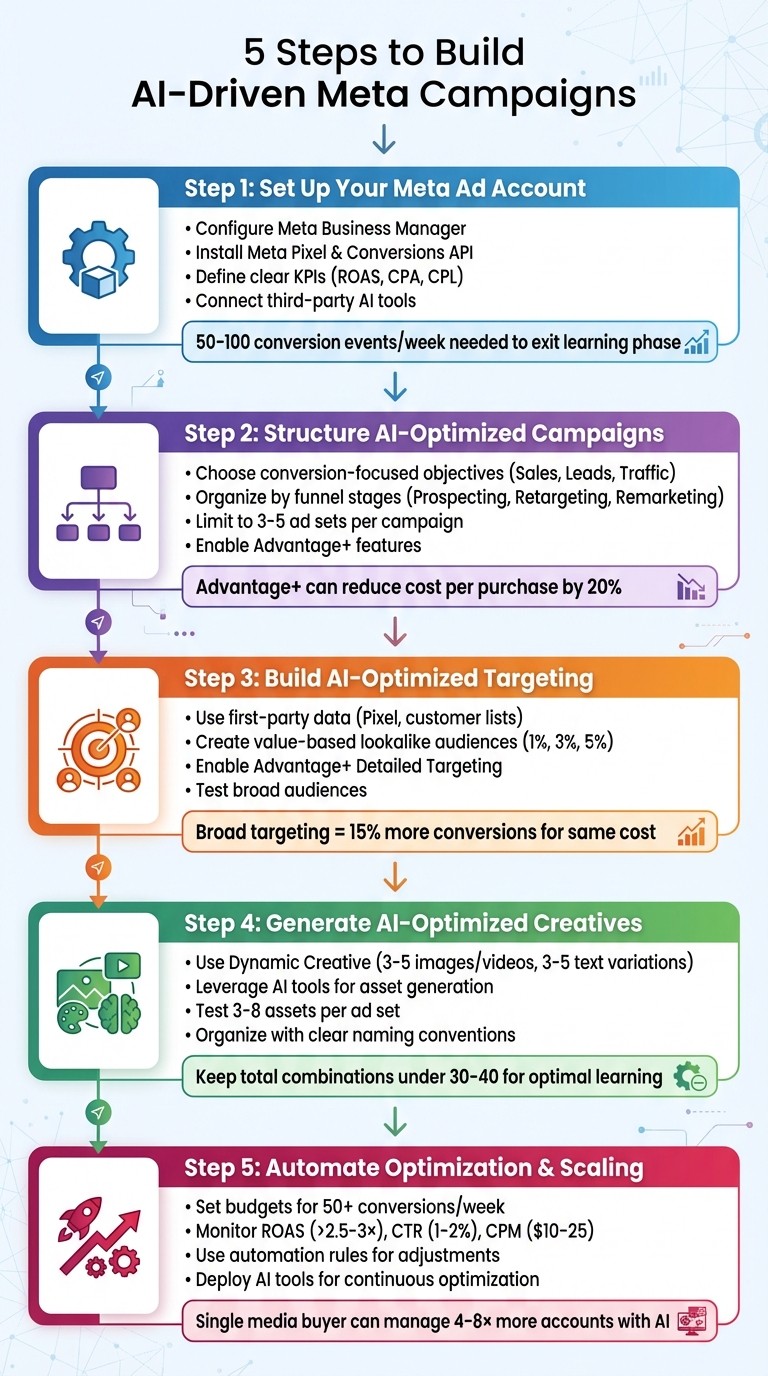
Set up your Meta Ad Account: Use Meta Business Manager, install the Pixel and Conversions API, and define clear KPIs.
Simplify campaign structure: Use broad targeting, full-funnel setups, and Meta's Advantage+ features.
Leverage first-party data: Build Custom and Lookalike Audiences for precise targeting.
Optimize creatives with AI: Use tools like AdAmigo.ai to generate and test ad variations.
Automate optimization: Use AI tools for budget adjustments, creative scaling, and performance monitoring.
These steps help streamline campaign management and deliver better results with less effort.
5 Steps to Build AI-Driven Meta Campaigns
How to Use Meta's New AI Features for Facebook Ads (Without Ruining Your Results!) 🚀
Step 1: Set Up Your Meta Ad Account and Data Foundation
Before diving into AI-optimized campaigns, you need to establish a solid foundation. This means setting up your Meta Business Manager, installing tracking tools, defining clear goals, and connecting third-party AI solutions. These steps ensure your data flows seamlessly into Meta’s algorithms and external tools like AdAmigo.ai, enabling smarter decisions for targeting, creatives, and bidding.
Create and Configure Meta Business Manager
The first step is creating a Meta Business Manager at business.facebook.com. Use your business name and work email to get started. Once set up, link your Facebook Page and Instagram account to centralize your assets. Then, create a new ad account in the Business Settings. Be sure to select United States as the country, USD for currency, and your primary operating time zone - whether Eastern or Pacific Time - so your reporting aligns with your business hours.
Add a primary payment method (credit card, debit card, or PayPal) with a spending limit that supports your testing budget. For small- to mid-sized campaigns, this usually ranges from $1,000 to $3,000 per month. It’s also wise to add a backup payment method to avoid interruptions. Assign user roles like Admin or Advertiser, and set up a System User for AI integrations. Using consistent naming conventions for campaigns and ad sets - such as US_CONV_Prospecting_WCA180_Adv+Placements - helps AI tools analyze historical data more effectively, optimizing your campaigns as a whole.
Install Meta Pixel and Conversions API
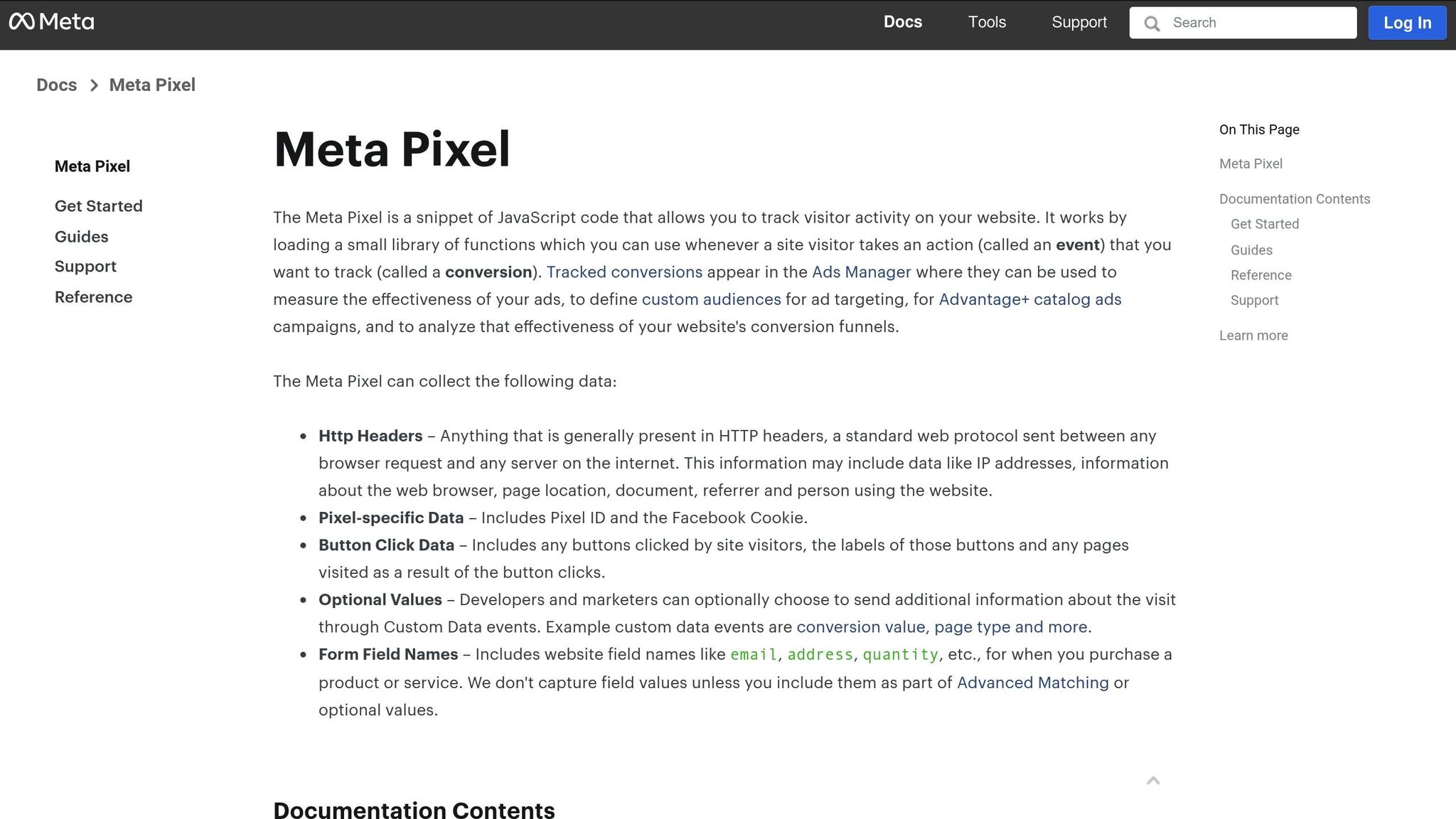
Accurate event tracking is critical for Meta’s AI to function well. Start by installing the Meta Pixel on all key pages, including your homepage, product pages, checkout, and thank-you pages. Set up standard events like Purchase, Lead, Add to Cart, and Initiate Checkout through Meta Events Manager. To enhance tracking, pair the Pixel with the Conversions API (CAPI) for server-side event tracking. This combination can increase conversions by up to 20% by improving data quality and adapting to privacy changes.
If you’re using platforms like Shopify or WooCommerce, use their built-in Meta integrations or work with a developer to configure server-side events. Once everything is set up, test your events in Events Manager to make sure they’re working properly. Keep in mind that Meta’s algorithms need a minimum of 50–100 conversion events per week per ad set to exit the learning phase, so prioritize tracking the events that matter most to your business goals.
Define Your KPIs and Attribution Settings
For AI tools to work effectively, you need to define clear performance targets. Choose KPIs that align with your business model, such as ROAS (return on ad spend) for e-commerce, CPA (cost per acquisition) for direct-response campaigns, or CPL (cost per lead) for lead generation. Be specific with your goals - for example, “Achieve a $40 CPA with a 3.0× ROAS.” These targets allow tools like AdAmigo.ai to optimize more effectively.
Set consistent attribution windows across campaigns. For most US direct-response advertisers, a 7-day click attribution window works well. For upper-funnel campaigns focused on awareness, you might consider a 28-day click window to account for longer customer decision-making processes. These settings directly impact how Meta and third-party tools measure success and allocate your ad spend.
Connect Third-Party AI Tools
To supercharge your campaigns, integrate a third-party AI tool like AdAmigo.ai. Once connected, you can define your performance targets and choose between manual oversight or full autopilot mode. The AI uses your historical performance data, Pixel and CAPI signals, and your defined goals to run continuous experiments. It tests creatives, audiences, budgets, and bids, offering recommendations almost immediately. Think of it as your 24/7 media buyer, constantly refining your campaigns for better results - all with just a five-minute setup.
Step 2: Structure AI-Optimized Campaigns
Once your data foundation is in place, the next step is to create a campaign structure that makes the most of AI's capabilities. The trick? Keep it simple. Overcomplicating your setup with too many segments can slow AI's learning process and waste your budget. Instead, focus on clear, conversion-oriented objectives, streamlined campaign setups, and Meta's automation tools to drive results.
Choose Objectives That Work With AI
Your campaign objective is what guides Meta's AI to optimize targeting, placements, and budgets. For AI-driven campaigns, stick to objectives that focus on measurable actions like Sales, Leads, or Traffic. These objectives provide Meta's AI with the data it needs to drive outcomes, whether that's purchases, form fills, or website visits.
For e-commerce brands, Advantage+ Shopping Campaigns are a game-changer. They simplify audience targeting, optimize creative elements, and decide placements automatically. According to Meta, these campaigns can reduce the cost per purchase by up to 20% compared to traditional manual campaigns.
In Q2 2024, a mid-sized e-commerce brand transitioned from manual campaigns with over 15 ad sets to Advantage+ Shopping Campaigns using broad audiences and placements. Over eight weeks, they cut their cost per purchase by 18% and boosted conversions by 27%, all while maintaining their budget.
Streamline Campaign and Ad Set Structures
After choosing your objective, it's time to structure your campaigns for efficient AI learning. A clean, straightforward campaign structure is key. Instead of organizing campaigns by products or channels, group them by funnel stages. Here's a simple breakdown:
Prospecting Campaign: Targets cold audiences who haven't interacted with your brand.
Retargeting Campaign: Focuses on warm audiences who have engaged but not converted.
Remarketing Campaign: Targets hot audiences, like cart abandoners or past customers.
Within each campaign, limit yourself to 3–5 ad sets. Meta's data shows that broader, less fragmented ad sets help AI learn faster and perform better. Avoid splitting audiences by geography or device - broad targeting allows Meta's AI to allocate budgets where they'll have the most impact.
In Q2 2024, a DTC skincare brand using AdAmigo.ai revamped their Meta campaigns into three funnel-based categories, each with 3–5 ad sets. They also enabled Advantage+ Shopping for e-commerce and Advantage+ detailed targeting for lead generation. Within four weeks, their ROAS improved by 38%, and the cost per lead dropped by 22%.
Leverage Meta's AI Features
Meta's built-in AI tools are designed to optimize every aspect of your campaigns. Here's how they can help:
Advantage+ Campaign Budget: Automatically shifts your budget to the best-performing ad sets in real-time.
Advantage+ Placements: Lets Meta's AI decide where to show your ads - whether that's Facebook Feed, Instagram Stories, or Audience Network - based on where conversions are most likely. Campaigns using this feature can achieve up to 15% more conversions for the same cost compared to manual placements.
Advantage+ Detailed Targeting: Starts with broad audience definitions and refines them automatically based on conversion signals. This often outperforms manually defined audiences by giving the AI more flexibility to find high-intent users.
For the best results, enable all three features so Meta's AI can optimize your targeting, creatives, budgets, and bids as a unified system. If you're using a tool like AdAmigo.ai, it can further simplify the process by auto-generating campaigns and ad sets based on your goals, audiences, and creatives, cutting setup time to just a few minutes.
Step 3: Build AI-Optimized Targeting and Audiences
To maximize the potential of Meta's AI, focus on creating audiences that provide strong, quality signals. Start with first-party data, develop precise lookalike audiences, and experiment with AI vs manual audience creation to find the best balance for your campaigns.
Use First-Party Data
first-party audience data collected directly from your audience is a cornerstone of effective targeting. This data includes website visitors tracked via Meta Pixel, customer email lists, app users, and individuals who’ve completed conversion actions like purchases or form submissions. In the U.S., where privacy laws like CCPA are tightening, first-party data is not only more dependable than third-party cookies but also compliant when collected with proper consent.
To create Custom Audiences using this data, upload your customer lists to Meta Ads Manager (ensuring emails are hashed for privacy), sync Pixel events to track website visitors, or link app activity through Facebook SDK. Segment your audiences based on behaviors like cart abandonment, repeat purchases, or high-value transactions. Such segmentation provides Meta's AI with clear, actionable signals about who to target next.
Automation tools can simplify this process. These tools integrate directly with your Meta ad account, enabling the creation of lookalike audiences or audience segmentation through simple text or voice commands. As one user, Jakob K., shared:
"The fact that you can launch campaigns through text or voice commands feels like magic! It handles everything from creating lookalike audiences to adjusting budgets with just a few prompts."
Once your first-party audience segments are ready, the next step is to create lookalikes that amplify these signals.
Create High-Signal Lookalike Audiences
After defining your Custom Audiences, build lookalikes to expand your reach. But remember, the quality of the source audience matters. High-signal audiences - like the top 10% of customers by lifetime value, repeat buyers, or those who’ve completed high-intent actions - yield the best results.
Start by creating value-based lookalikes from these high-value segments. Meta’s algorithm focuses on finding people who closely resemble your most valuable customers rather than just anyone who’s interacted with your site. For testing, try lookalikes with 1%, 3%, and 5% audience sizes. A 1% lookalike is the most similar to your source audience and often delivers the best conversion rates, while 3% and 5% provide greater reach and are ideal for scaling once performance is proven.
AI tools like AdAmigo.ai can take this further by continuously refining your lookalikes using real-time conversion data. Instead of creating static audiences, these tools dynamically adjust targeting as they learn which segments are driving results, all while adhering to your geographic, placement, and budget preferences.
Once your lookalikes are optimized, broaden your targeting to scale even more effectively.
Use Broad and Advantage Audiences
Broad targeting often outperforms narrowly defined interest-based audiences, especially when your Pixel has gathered sufficient conversion data (at least 50 conversions per week per ad set). Meta’s AI thrives when given the flexibility to explore and identify high-intent users you might not have considered manually.
Enable Advantage+ Detailed Targeting to let Meta’s AI refine your audience beyond your initial parameters. For example, you might start with a broad audience like U.S. adults aged 25–54, and the AI will automatically narrow it down to those most likely to convert. Meta reports that this approach can generate 15% more conversions for the same cost compared to manually defined interest-based audiences.
AI platforms also help keep broad audiences fresh and reduce audience fatigue. For instance, AdAmigo.ai offers a daily feed of AI-driven audience adjustments and budget recommendations through its AI Actions feature. You can either approve these changes manually or let the system run autonomously. This makes it easier for agencies to handle significantly more client accounts without increasing workload. The AI continuously learns from real-world performance, treating creatives, audiences, bids, and budgets as interconnected elements rather than separate tasks.
Step 4: Generate and Deploy AI-Optimized Creatives
Your ad creatives are the heart of your campaigns - they grab attention, highlight your value, and drive conversions. To make the most of Meta's AI optimization, it's essential to create and organize assets in a way that aligns with the platform's delivery system. Here’s how to design creatives that work seamlessly with Meta’s AI.
Leverage Meta's Dynamic Creative Tools
Meta's Dynamic Creative feature is a game-changer. It allows you to upload multiple versions of your assets - images, videos, headlines, primary texts, and descriptions - and lets Meta’s AI test different combinations to identify the best-performing ones. By providing a variety of options, you give the algorithm the flexibility it needs to fine-tune delivery.
Here’s how to set it up:
Create a new ad within your campaign and activate Dynamic Creative at the ad level.
Upload 3–5 images or videos.
Write 3–5 primary text variations (mixing short, medium, and long formats).
Add 3 headlines (e.g., benefit-driven, urgency-focused, or social proof).
Include 2 descriptions.
Keep the total number of combinations under 30–40 to ensure each variation receives enough budget to generate meaningful data. Let the ad run for at least one learning phase - aiming for 50+ conversions per ad set - before you make decisions about scaling Meta ad budgets or pausing.
If you’re not using dynamic ads, you can still benefit from Meta’s optimization by adding multiple text options directly in the ad editor. For example, upload 3–5 primary texts and headlines. Meta will automatically match and deliver the combinations that perform best. This approach is ideal if you want more control over which assets are paired together while still taking advantage of AI-driven optimization.
Use AI Tools to Streamline Creative Production
Creating high-quality creatives manually can be time-consuming and inconsistent. AI tools for Meta Ads like AdAmigo.ai's AI Ads Agent simplify this process. These tools analyze your brand identity, past top-performing ads, and even competitor campaigns to generate ready-to-use image and video concepts. They provide hooks, copy variations, and targeting suggestions tailored to your objectives and audience.
Here’s how it works: You provide a brief outlining your goals, offer, target audience, and any constraints. The AI then generates assets, which you can review and tweak before deploying them directly into your Meta ad account. This streamlined process eliminates the hassle of manual uploads and ensures consistency across campaigns.
As Rochelle D., a G2 reviewer, shared:
"We are getting INSANE RESULTS! Our budgets are controlled, our spend is being smartly allocated and our ROAS is up massively. Agencies charging 7 times the cost of AdAmigo have been put to shame quite frankly!"
For best results, ask AI tools to create variations across three dimensions:
Messaging angles: Problem/solution, testimonials, “how it works,” urgency.
Formats: Vertical videos (Reels-style), carousels, static images, UGC (user-generated content).
Offer framing: Price points (e.g., "from $29"), bundles, risk-reducing offers (like free shipping), and soft vs. hard calls-to-action (CTAs).
This structured variety provides Meta's AI with a rich dataset to identify which mix of angle, format, and offer delivers the best results - whether it’s lower cost per acquisition (CPA) or higher return on ad spend (ROAS).
Organize Creatives for Effective Testing
Once you’ve created a diverse set of assets, organizing them efficiently is key to testing and scaling. Use clear naming conventions that encode important variables, such as [Brand]_[Objective]_[Audience]_[Angle]_[Format]_[Version]. For example: Acme_Sales_PROSPECT_ProblemSolution_UGC-Vertical_FastShipping_V1. This makes it easy to filter reports by angle, format, or audience in Meta’s dashboard, and it helps AI tools like AdAmigo.ai quickly identify winners and underperformers.
When testing, limit the number of creatives in each ad set to 3–8 assets if your budget is modest. This ensures each asset gets enough spend to generate meaningful data. If you’re working with a larger budget and higher conversion volume, you can test more variants, but keep the total manageable. Introduce new creatives in batches - for instance, swap in 1–2 new winners and pause 1–2 underperformers every 7–14 days. Avoid constantly editing the same ad set, as this can reset Meta’s learning phase.
To scale effectively, use one core testing campaign with consistent objectives and conversion events. Include 1–3 primary ad sets, such as broad/Advantage+ audience, retargeting, and a high-signal lookalike audience. Cycle your structured creative batches through this testing campaign, let Meta’s AI determine the winners, and then move proven performers into a scaling campaign with higher budgets and fewer competing creatives.
Automation tools like AdAmigo.ai can simplify this process further by flagging high-performing creatives, suggesting scale-up budgets, and even auto-publishing top ads into your scaling campaigns - all while ensuring your budget and pacing rules are respected.
Step 5: Automate Optimization, Testing, and Scaling
Once your campaigns are up and running - with account setup, audience targeting, and creative testing in place - it’s time to focus on fine-tuning performance. This step is all about using automation to streamline optimizations, test efficiently, and scale your efforts. By leveraging tools and strategies that reduce manual work, you can maintain and even enhance performance as your campaigns grow.
Set Budgets and Bidding for AI Learning
To get the most out of Meta's algorithms, aim for a budget that allows each ad set to generate at least 50 conversions per week. For conversion campaigns, you can calculate your weekly budget like this: Target Conversions × Average CPA. For instance, if your CPA is $20, you’d need a weekly budget of about $1,000 per ad set to hit the recommended volume.
Choosing the right bid strategy depends on your goals:
Lowest Cost: Ideal if you're looking for maximum conversions and are okay with Meta finding the most affordable results.
Cost Cap: Helps you stay within a specific CPA, especially if you're working with a break-even value.
ROAS Goal Bidding: Works well for established campaigns with strong historical data. For example, targeting a 3× return on ad spend can help you scale profitably.
Be cautious about making frequent budget or bid adjustments during the Learning Phase. Each tweak can reset the algorithm, slowing down the optimization process.
Monitor Key Metrics and Automate Adjustments
Keep an eye on key performance indicators like ROAS, CPA, CTR, and CPM. During the testing phase, check these metrics daily. Once your campaigns stabilize, a weekly review is usually sufficient. For U.S.-based e-commerce campaigns, here are some healthy ROAS benchmarks to aim for:
ROAS: Above 2.5–3×
CTR: 1–2% for cold audiences
CPM: Between $10–$25
To save time, use automation rules to manage performance. For example:
Pause ad sets that fall below your performance thresholds.
Increase budgets for ad sets that exceed your ROAS or CPA targets.
Set alerts for potential issues, like rising CPAs or unexpected spikes in daily spend.
These automation rules allow you to focus on strategy while ensuring your campaigns stay on track.
Use AI Tools for Smarter Optimization
Tools like AdAmigo.ai can take your optimization process to the next level. This platform analyzes your account daily and provides a prioritized list of recommendations for creatives, audiences, budgets, and bids. Instead of manually digging through dashboards, you’ll receive clear, actionable insights - like increasing the budget for a high-performing ad set or pausing a creative that’s losing its edge. Each suggestion includes an explanation and a projected impact, so you’ll always know why a change is being recommended.
As Sherwin S. noted in a G2 review:
"The AI actions are spot-on, so I can make adjustments fast and see results right away. It's like having an extra set of super-smart hands helping me hit my KPIs."
AdAmigo.ai also features an AI Chat Agent that simplifies campaign management even further. You can ask it questions like, "Why did my ROAS drop yesterday?" or "Which ad set should I scale next?" and get instant, data-driven answers. You can even launch new campaigns or adjust budgets using simple text commands, eliminating the need to navigate through multiple menus.
For agencies juggling multiple clients, this tool can be a game-changer. A single media buyer can manage 4–8× more accounts, freeing up senior strategists to focus on bigger-picture planning.
AdAmigo.ai offers two modes of operation:
Semi-Autonomous: Review and approve each recommendation manually for greater oversight.
Fully Autonomous: Let the AI handle optimizations automatically while adhering to your budget caps, pacing rules, and targeting preferences.
To get started, simply connect your Meta ad account, set your KPIs (e.g., "Scale spend 30% at ≥3× ROAS"), and let the AI do the heavy lifting. It will identify top-performing ads, pause underperformers, and help you achieve compounding results over time. By integrating these automation tools and practices, you can efficiently scale your campaigns and focus on driving long-term success.
Conclusion
Creating AI-driven Meta campaigns doesn’t have to be complicated. To succeed, you need to focus on a solid data foundation, a full-funnel campaign structure, precise audience targeting, dynamic and engaging creatives, and ongoing automation. Start by aligning your campaigns with Meta’s AI tools - combine ad sets and take advantage of features like Advantage+ Shopping. Build smarter audiences using tools like first-party data, lookalike audiences, or even behavioral clustering. When it comes to creatives, lean into mobile-first formats like UGC-style videos, carousels, and dynamic ads, testing different hooks and angles to see what resonates. Automate your optimization efforts by setting the right budgets, keeping an eye on metrics like ROAS and CPA, and using automated bid rules to scale what works.
The real power comes when you pair Meta’s AI with platforms like AdAmigo.ai. While Meta takes care of delivery and bidding, AdAmigo.ai enhances performance with automated optimizations, AI-driven creatives, and real-time insights. Many agencies have seen impressive results - better budget control, smarter spending, and noticeably higher ROAS.
For agencies, this approach allows a single media buyer to handle 4–8× more clients, freeing senior strategists to focus on big-picture planning. For in-house teams, it’s like having a tireless media buyer working around the clock, improving with every campaign. Plus, you stay in control, choosing between semi-autonomous mode (where you approve changes) or fully autonomous mode (letting the AI operate within your pre-set limits).
FAQs
How can AI tools like AdAmigo.ai improve Meta ad campaign results?
AI tools like AdAmigo.ai are designed to enhance Meta ad campaign performance by automating essential tasks. It handles everything from creating ad creatives and fine-tuning audience targeting to managing budgets and bids. This means you can dedicate more time to crafting strategies while the AI takes care of maintaining and improving your campaign performance.
Some standout features of AdAmigo.ai include the AI Ads Agent, which simplifies the process of creating and launching ads, and AI Actions, which provides daily, prioritized optimization suggestions. Additionally, the Bulk Ad Launch tool makes managing multiple campaigns at once a breeze. By learning from actual campaign results, AdAmigo.ai adapts and scales campaigns much faster than traditional approaches, delivering better results with less manual work.
What are the advantages of using first-party data in AI-driven Meta ad campaigns?
Using first-party data in AI-powered Meta ad campaigns can be a game-changer for businesses. Here's why:
First, it enables precise targeting by utilizing data directly sourced from your audience. This includes insights from website visits, purchase behavior, and email interactions. With this information, you can craft ads that feel personal and relevant to your audience.
Second, it supports privacy compliance. Since first-party data is gathered with user consent, it aligns with regulations like GDPR and CCPA, ensuring your campaigns respect user privacy.
Lastly, tools like AdAmigo.ai can take full advantage of this data. By analyzing it, these AI tools can fine-tune audience targeting, boost ad performance, and help you get the most out of your ad spend.
How can I speed up the learning phase for my Meta ad campaigns?
To get your Meta campaigns out of the learning phase as quickly as possible, focus on providing strong data signals and keeping disruptions to a minimum. First, make sure your campaign has an adequate daily budget. Meta suggests aiming for at least 50 optimization events - such as purchases or leads - per ad set each week. Broad targeting can also help, as it gives Meta's algorithm more flexibility to optimize. Additionally, avoid making frequent edits to your campaigns, as these changes can reset the learning phase and slow down progress.
If you're using tools like AdAmigo.ai, they can simplify this process. These tools handle audience targeting, creative testing, and budget adjustments automatically, making it easier for your campaigns to gather the data they need to stabilize and deliver results efficiently.