
Meta Error Response Protocols: Guide
Guide to interpreting Meta API error responses and building robust handling: retries, idempotency, monitoring, and recovery.
When using Meta's APIs for ad campaigns, errors like rate limits, expired tokens, or data mismatches can disrupt performance and waste budgets. This guide explains how to handle these issues effectively. Key takeaways:
Common Errors: Authentication failures, validation issues, rate limits vs. throttling, and server-side problems.
Impact: Even minor errors can lead to stale data, poor attribution, and wasted spend.
Solutions: Use automated monitoring, retry strategies, and real-time alerts to minimize disruptions.
Framework: Standardize error handling, pre-validate data, and implement recovery workflows.
Understanding Meta API Error Responses
Meta API error messages can feel like a puzzle, but once you know how to interpret them, troubleshooting becomes much faster. These error responses follow a consistent JSON format, and understanding the key fields can save you a lot of time.
Meta Error Response Structure
Every Meta API error response includes a few key elements:
A
successfield, which is alwaysfalsewhen an error occurs.An
errorobject that contains:A machine-readable
code.A human-readable
message.A unique
fbtrace_id, which you can provide to Meta support for detailed troubleshooting.
For batch operations, errors can be tracked individually using the adBatchId. You can check the status of these batches by polling the GET /v1/batch-status/:id endpoint.
Now, let’s dive into the main error categories and how to address them.
Error Categories: Authentication, Validation, Throttling, and Server Errors
Meta API errors generally fall into four main categories, each with specific causes and solutions:
Error Category | Primary Cause | Typical Resolution |
|---|---|---|
Authentication | Missing or incorrect | Ensure the |
Validation | Incorrect schema or missing required fields | Validate payloads to match API specs, including data types like raw ID strings instead of objects |
Throttling | Exceeding request limits | |
Server | Temporary issues on Meta’s end | Retry requests using idempotency keys to avoid duplicate actions |
For example, validation errors are a common trap. If you pass a profile object instead of a raw ID string for page or insta, you’ll trigger a bad_request error. Similarly, carousel ads require a carouselTitle field; leaving it out can result in a silent failure at the ad level rather than a clear top-level error.
How Errors Affect Data Synchronization and Ad Performance
Even small API errors can have a ripple effect, disrupting data synchronization and ad performance. For instance, if the Conversions API fails to sync events, Meta receives incomplete data. This can skew purchase signals, leading to poor attribution and weaker campaign optimization over time.
Meta’s "Andromeda" update has made creative delivery a bigger factor in targeting accuracy. This means even minor formatting errors in creative assets can impact your audience reach and overall campaign results.
A solid error-handling framework is critical for maintaining ad performance and data accuracy. The industry is shifting away from reactive monitoring to proactive systems that predict how errors might affect return on ad spend (ROAS) before issues escalate. Tools like AdAmigo.ai are leading this change. Its Protect feature monitors account health in real-time, flagging anomalies as soon as they occur.
"AdAmigo Protect continuously monitors your ad accounts for anomalies, risks, and costly mistakes, and alerts you the moment something deviates from normal behavior." - AdAmigo.ai
Speed matters. Catching an authentication error within minutes might have no real impact. But letting the same issue go unnoticed for 48 hours could lead to stale data, missed optimizations, and wasted ad spend across your campaigns.
Building a Standardized Error Handling Framework
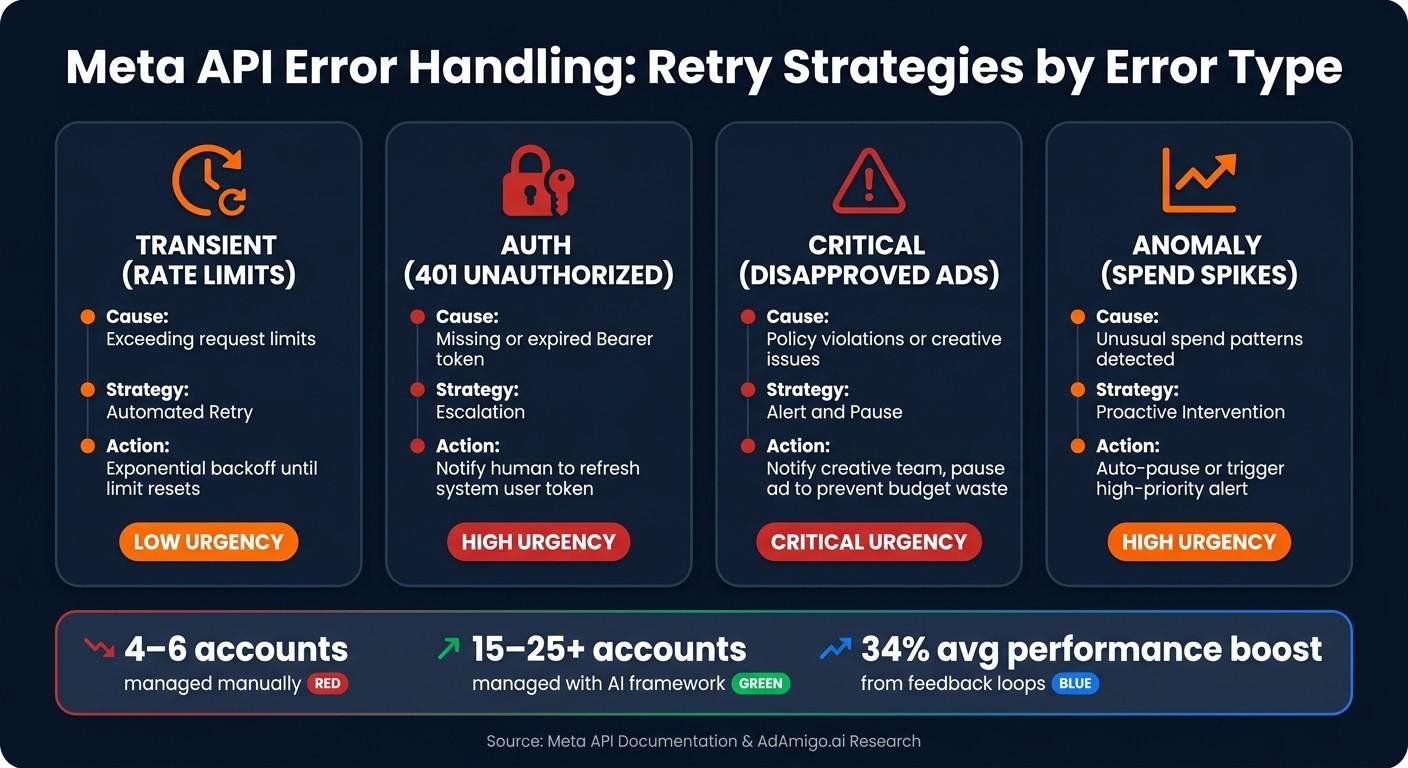
Meta API Error Types: Causes, Strategies & Actions
Once you've grasped how Meta API errors are structured and categorized, the next logical step is creating a framework that handles them consistently. Without a standardized approach, you'll be stuck with manual fixes that are inefficient and unsustainable.
Mapping Meta Errors to Internal Error Schemas
The first step is converting raw Meta API error responses into a consistent internal format that your system can use effectively. A practical schema should include key elements like:
A
successboolean to indicate the operation's outcome.A human-readable
messagefor clarity.A unique
requestIdto trace issues back to their source.
It's also essential to categorize errors into actionable groups and log batch details like progress, totalAds, successfulAds, and errorMessage. This ensures errors are tracked reliably and routed to the appropriate response path - whether that's an automated fix, an alert, or an escalation. Without this structure, you risk missing critical issues, like a single failed ad in a batch of 200 quietly slipping through.
When recovering from errors or syncing data in bulk, implement a stable sort to avoid data gaps during pagination. This ensures you don’t miss important information when working with large result sets.
Once your error mapping is in place, you can move on to defining Meta API integration best practices for retry strategies tailored to each error type.
Retry Strategies Based on Error Types
Different types of errors require different approaches. Each strategy should aim to maintain data synchronization and campaign performance while minimizing disruptions. Here’s a breakdown:
Error Type | Recommended Strategy | System Action |
|---|---|---|
Transient (Rate Limits) | Automated retry | Use exponential backoff until the limit resets. |
Auth (401 Unauthorized) | Escalation | Notify a human to refresh the system user token. |
Critical (Disapproved Ads) | Alert and pause | Notify the creative team and pause the ad to prevent budget waste. |
Anomaly (Spend Spikes) | Proactive intervention | Auto-pause or trigger a high-priority alert. |
A key principle here is to prioritize escalation logic over automation logic. Start by identifying which errors should never be handled automatically - like budget changes beyond a certain threshold or major shifts in campaign objectives. As Jonathan Stocco, Founder of ForgeWorkflows, puts it:
"Build the escalation logic before the automation logic. The first question should be: what decisions should this system never make on its own?" - Jonathan Stocco
Before going live, test your retry thresholds with at least three months of historical campaign data. This helps you account for normal fluctuations - like weekend spend drops - so they don’t get flagged as anomalies.
Error Standardization in Autonomous Systems like AdAmigo.ai

Standardized error schemas don’t just simplify debugging - they’re the backbone of autonomous ad management. By normalizing every error into a clear, consistent format, AI systems can make reliable decisions at scale without constant human oversight. This supports continuous optimization across automated platforms.
Take AdAmigo.ai as an example. Its AdAmigo Protect feature monitors Meta ad accounts in real time, automatically detecting anomalies and errors. When something unusual happens, the system either sends an immediate alert or intervenes directly - like pausing campaigns to prevent budget waste.
The impact on scalability is huge. A traditional media buyer managing accounts manually might handle 4–6 accounts before errors start to slip through. With an AI-driven framework built on standardized error handling, that same person can manage 15–25+ accounts. The AI takes care of detection and first-response tasks, freeing humans to focus on more complex decisions.
"It's like having an extra set of super-smart hands helping me hit my KPIs." - Sherwin S., G2 Reviewer
Real-Time Error Handling Protocols
This section builds on earlier strategies for error mapping and retries, focusing on real-time protocols that address issues as they happen. By doing so, campaigns stay resilient, and data pipelines remain clean. These protocols ensure data synchronization and maintain performance across Meta API integrations.
Global Error Policies for Meta APIs
A global error policy serves as an automated guide for handling errors. It defines clear actions for each error type, removing uncertainty during live incidents.
Errors are typically divided into three categories: no action needed, pause and log, or escalate to human review. For example:
No action needed: Temporary rate limits or other transient issues can be resolved with automated retries.
Pause and log: Errors like ad disapprovals should trigger a pause and be logged for further analysis.
Escalate: Critical issues, such as those involving major budget changes or shifts in campaign objectives, require human intervention.
To implement these policies effectively, it's essential to ensure retries are idempotent, avoiding duplicate actions.
Idempotency and Duplicate Prevention in Error Handling
Once policies are in place, managing retries without causing duplicate actions becomes a priority. For example, retries must not result in duplicate campaigns, ad sets, or budget changes.
Idempotency ensures that retrying a failed request produces the same result without duplication. This is done by assigning a unique requestId to every API call. If a request fails and needs to be retried, the system references the same ID instead of creating a new one.
For high-volume operations, an asynchronous polling pattern can be used. Here’s how it works:
The initial POST request returns an
adBatchId.The system then polls
GET /v1/batch-status/:idto track progress and retrieve the final result.Apply a stable sort, using a primary key like
lastUpdatedand a uniqueidas a tiebreaker, to ensure each record is processed only once during synchronization.
With duplicate prevention in place, the next step is to monitor error trends in real time.
Alerting and Monitoring for Error Trends
Addressing individual errors is important, but spotting patterns is what prevents recurring problems. For instance, a single disapproved ad might not seem significant, but multiple disapprovals in a short time could indicate a larger issue requiring immediate action.
Set up automated alerts with specific thresholds. For example:
A sharp drop in ROAS benchmarks
These alerts should be routed to channels where your team actively responds, such as Slack, WhatsApp, or email.
To enhance monitoring, tools like AdAmigo Protect can be invaluable. AdAmigo Protect monitors account health in real time and can automatically pause campaigns when anomalies are detected. Teams relying on manual checks might catch critical errors 5–6 times per month, but AI-driven tools can reduce that number significantly.
"AdAmigo Protect continuously monitors your ad accounts for anomalies, risks, and costly mistakes, and alerts you the moment something deviates from normal behavior." - AdAmigo.ai
Centralizing error logs is another key step. By reviewing these logs over time, you can identify recurring issues, spot fragile campaigns, and adjust automation thresholds. This reinforces a standardized approach to error handling, ensuring Meta API integrations perform as effectively as possible.
Data Validation and Long-Term Error Recovery
Real-time monitoring is great for catching errors as they happen, but adding a validation layer can prevent many of these issues from occurring in the first place. Together, these practices create a robust foundation for a dependable Meta API integration. Pre-validation checks, combined with earlier strategies like error mapping and retries, strengthen the system's resilience.
Pre-Validation Routines to Reduce Errors
Ensuring data accuracy at the entry point is critical for maintaining consistent ad performance. Many client-side errors can be avoided by performing these key checks before making any API call:
Identity formatting: Always pass IDs as raw strings (e.g., "470703006115773") instead of objects.
Media type detection: Automatically detect file types based on extensions - .mp4 or .mov for videos, .png or .jpg for images - to declare the correct media type before sending.
Format-specific fields: Double-check that all required fields for each ad format are included. For instance, carousel ads need a
carouselTitleto avoid request failures.Authentication headers: Use the proper "Authorization: Bearer [TOKEN]" header. Common mistakes include using
x-api-keyor forgetting the Bearer prefix entirely.
It's also a smart move to run pre-launch validation tools before rolling out bulk campaigns. These tools ensure your account's structure aligns with Meta's current algorithm requirements, such as Advantage+ compatibility and broad targeting settings.
Workflows for Error Recovery
Having a clear recovery process can mean the difference between a quick fix and extended downtime. Integrating recovery workflows into your error-handling system helps maintain campaign flow and data integrity. For instance:
Catalog errors: Pinpoint the affected product set, correct the source feed data, re-upload it, and verify ingestion through the Catalog Manager before reactivating the impacted ad sets.
Event ingestion failures: For issues like Pixel or Conversions API misfires, start by reviewing diagnostics in Events Manager. Confirm the event schema matches Meta's expected format, then resubmit missed events using the batch endpoint.
Documenting every recovery step - including what failed, who resolved it, and how long it took - creates an audit trail. This not only helps with future troubleshooting but also speeds up response times.
Using Feedback Loops for Continuous Improvement
Once recovery workflows are in place, detailed logging becomes essential for refining your system. Error logs provide valuable insights into recurring issues and areas that need improvement. Regularly analyzing these logs can highlight missing validation rules, ineffective retry strategies, or automation settings that need tweaking.
According to research from AdAmigo.ai, incorporating feedback loops into systems has led to an average performance boost of 34% within the first month. It also drastically reduces critical account errors, which typically occur 5–6 times per month under manual management, to nearly zero.
"These AI actions go beyond simply suggesting actions; they provide valuable insights and justifications. This not only improves my results but also deepens my understanding of campaign optimization." - Verified User, G2 Review
The key takeaway? Treat your error log as a dynamic resource. By regularly reviewing it, updating validation rules based on recurring patterns, and feeding results back into your automation logic, you create a system that’s not just reactive but continuously improving. This cycle - detect, recover, learn, and refine - is the cornerstone of long-term stability.
Conclusion and Key Takeaways
Creating a resilient Meta API error-handling framework requires a system that can evolve over time. The distinction between a fragile integration and a robust one lies in how effectively you classify, address, and learn from errors.
Key Insights from This Guide
One major takeaway is the importance of proactive error management. Accurately classifying errors - whether they stem from client-side issues, validation failures, throttling, or server-related problems - is fundamental to responding appropriately. This approach not only ensures prompt issue resolution but also helps maintain data integrity and campaign performance.
Consistency in your error schema is another critical factor. Use a standardized structure that includes a success flag, error code, clear message, and unique requestId. Without this, debugging at scale can quickly become unmanageable. Tools like AdAmigo.ai demonstrate the value of structured error handling. By adhering to Meta's official API framework, such systems significantly reduce critical account issues, achieving near-zero errors compared to the typical 5–6 monthly issues seen with manual management.
Next Steps for Implementation
To put these insights into action, start with an audit of your current error-handling processes. Compare your existing strategies to Meta's error categories to identify areas that need improvement, such as retry logic or pre-validation routines. From there, focus on two key areas:
Real-time alerting: Connect API error events to tools like Slack or WhatsApp to ensure critical issues are flagged immediately.
Centralized logging: Create a unified dashboard where your team can monitor anomalies, spot trends, and refine recovery processes over time.
For those managing bulk campaigns, asynchronous polling via GET /v1/batch-status/:id can help track the success or failure of individual ads within a batch. If you're handling multiple Meta ad accounts, leveraging AI-driven oversight can enable one media buyer to efficiently manage 15–25+ accounts with round-the-clock monitoring.
The goal is to continuously refine and improve your framework, ensuring it remains effective as your needs evolve.
FAQs
What should my app do with each Meta API error type?
When working with the Meta Marketing API, it's crucial to manage errors effectively to keep operations running smoothly. Common issues like rate limits, disapproved ads, or ad sets with no spend require careful handling. Depending on how serious the problem is, your app should:
Take no action for minor, non-impactful issues.
Pause the affected element and log a clear explanation for further review.
Escalate to a human when the issue needs immediate attention or manual intervention.
For added reliability, tools such as AdAmigo.ai can help by proactively identifying problems and pausing campaigns automatically, ensuring minimal disruptions to your advertising efforts.
When should I retry, alert a human, or pause campaigns?
AI agents can be a game-changer for keeping an eye on your campaigns in real time. They can spot issues like unexpected spend spikes or broken links before they spiral out of control. For example, AdAmigo Protect steps in by automatically pausing campaigns that are affected, saving you from wasting money.
When it comes to improving performance, the AI Action Agent offers daily recommendations tailored to your campaigns. You can choose to manually approve these suggestions if you want more control. Or, once you’re confident in the system’s safeguards, you can switch to autopilot mode and let it handle the heavy lifting for you.
How do I prevent duplicate actions when retrying failed requests?
When retrying failed requests, avoid duplicate actions by making write operations idempotent. To do this, use the API's asynchronous pattern. Here's how:
Call the write endpoint once (e.g.,
POST /v1/launch) and record the returned batch ID.For retries, instead of re-issuing the action, poll the same batch using
GET /v1/batch-status/:id.
Additionally, ensure that list pagination employs stable sorting with unique IDs. This prevents the reprocessing of already retrieved results, keeping operations efficient and accurate.