
Meta Ads Scaling: Budget Allocation Tips
Allocate 70–80% to proven campaigns and 20–30% to testing; scale gradually (10–20% every 2–3 days) and monitor CPA and ROAS.
Scaling Meta ads effectively isn’t just about spending more - it’s about spending smart. To boost your return on ad spend (ROAS) and avoid wasted budget, focus on these key principles:
Set Clear Goals: Define specific metrics like ROAS, cost per acquisition (CPA), and conversion volume before scaling.
Assess Campaign Readiness: Only scale campaigns with consistent performance over 7–14 days and sufficient data (e.g., 50 conversions per ad set weekly).
Smart Budget Allocation: Allocate 70–80% of your budget to proven campaigns and 20–30% to testing new ideas.
Scale Gradually: Increase budgets by 10–20% every 2–3 days to avoid disrupting Meta’s optimization process.
Monitor Metrics Closely: Watch for rising CPA, dropping ROAS, or signs of audience fatigue, and adjust budgets accordingly.
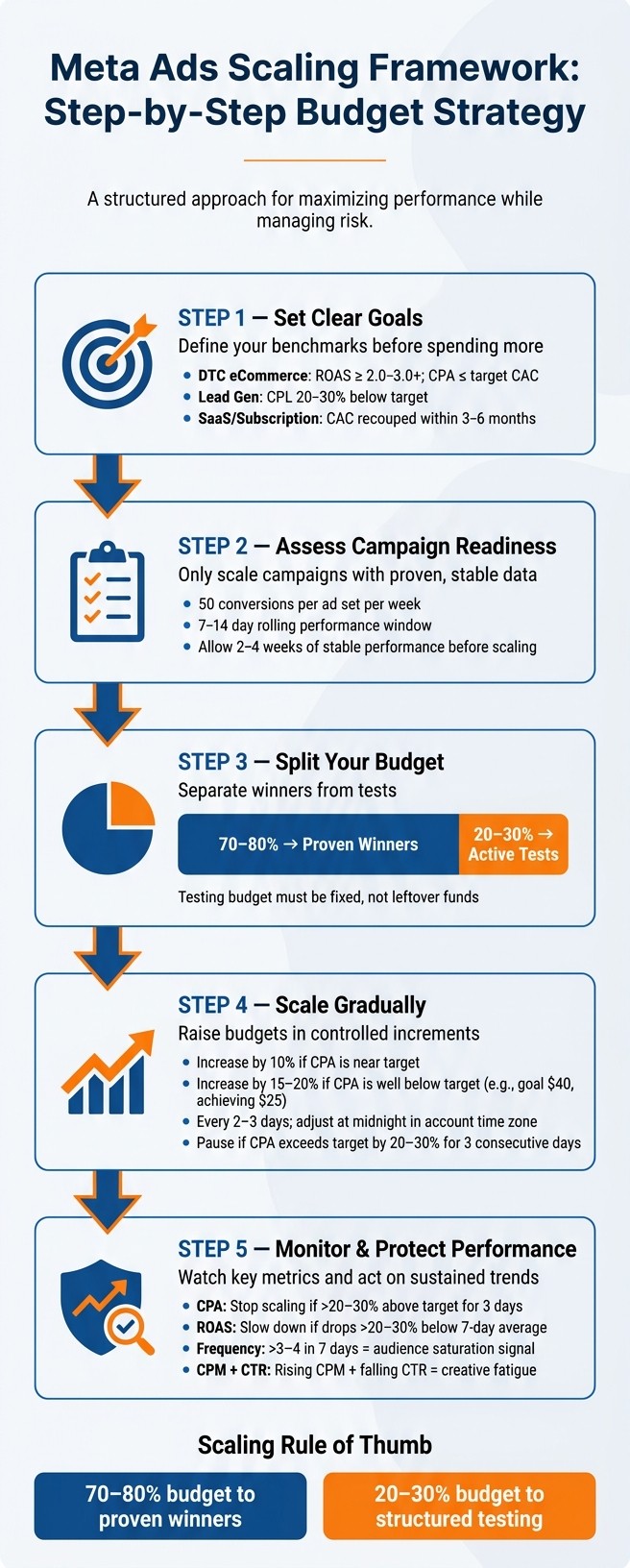
Meta Ads Scaling Framework: Step-by-Step Budget Strategy
The BEST Way To Scale Meta Ads (from $300M ad spend)
Check If Your Campaigns Are Ready to Scale
Scaling campaigns before they’re ready can drain your budget without delivering results. To avoid this, make sure your campaigns are performing consistently and are supported by solid data. Use the following benchmarks and data guidelines to assess readiness before scaling.
Set Clear Performance Benchmarks
Establishing clear performance targets removes the guesswork from scaling decisions.
Define numeric goals for key metrics like CPA (Cost Per Acquisition), ROAS (Return on Ad Spend), and weekly conversion volume. These targets should align with your business's unit economics, not generic industry standards.
Here’s a quick look at how benchmarks can differ depending on your business model:
Business Model | Key Metric | "Ready to Scale" Threshold |
|---|---|---|
DTC eCommerce | ROAS + CPA | ROAS ≥ 2.0–3.0+; CPA ≤ target CAC (e.g., ≤ $40) |
Lead Generation | Cost per Lead (CPL) | CPL 20–30% below target; lead quality confirmed |
Subscription / SaaS | CAC vs. LTV | CAC recouped within 3–6 months at higher volumes |
Instead of focusing on daily performance, analyze results over a 7–14 day rolling window. It’s normal for ROAS to fluctuate by ±20–30% day-to-day, but larger swings may signal instability. Meeting these benchmarks gives you the confidence to allocate more budget to campaigns that are delivering results.
Check If You Have Enough Data
Even if a campaign is profitable, scaling without enough data can lead to unreliable results. Meta’s algorithm, for example, requires sufficient conversion volume to optimize effectively. Aim for:
50 conversions per ad set per week, or
25–30 conversions over a two-week period for smaller accounts.
Avoid scaling aggressively while still in the learning phase. Allow 2–4 weeks of stable performance before increasing budgets to prevent rising CPAs and erratic delivery.
Lastly, confirm that your tracking is accurate. Double-check that your pixel or Conversions API is functioning properly and that any recent changes to your attribution settings are accounted for. Scaling based on inaccurate data can quickly waste your ad spend.
If manual monitoring feels overwhelming, tools like AdAmigo.ai can automate this process. They’ll track key metrics and notify you when your campaigns are ready to scale safely.
Split Your Budget Between Winners and Tests
After ensuring your campaigns are ready to roll, the next challenge is deciding how to allocate your budget. Throwing all your funds into one pot makes it tough to pinpoint which campaigns are thriving and which need work. A smarter move? Divide your budget into two clear categories: proven winners and active tests.
Set Budget Allocation Rules
A good rule of thumb is to go with an 80/20 or 70/30 split. That means dedicating 70% to 80% of your budget to campaigns that consistently deliver your target CPA or ROAS. The remaining 20% to 30% goes toward testing - whether that's experimenting with fresh audiences, new creatives, different offers, or alternative campaign setups.
For tighter margins, the conservative 80/20 split makes sense. If you're aiming for faster growth, the 70/30 approach might be better. Whichever route you choose, make sure your testing budget is set in stone and not just an afterthought. If you only test with leftover funds, you'll run out of potential winners to scale in the future.
Once you've decided on your allocation, it's time to classify your campaigns.
Sort Campaigns Into Winners and Tests
To earn a spot in the "winner" category, a campaign must consistently hit your benchmarks. This isn't about a one-time success - you need reliable performance over a meaningful period with enough conversions to back it up. A campaign that looks great after a handful of purchases might crumble when scaling Meta ad budgets, so set clear thresholds for both spending and conversion volume before promoting it to "winner" status.
Everything else falls into the "test" category. This includes campaigns targeting new audiences, experimenting with unproven creatives, testing fresh landing pages, or those still in the learning phase. Here's a quick breakdown of how these two buckets differ:
Winners | Tests | |
|---|---|---|
Purpose | Maintain efficient performance | Explore new growth opportunities |
Budget share | 70%–80% of total spend | 20%–30% of total spend |
Data requirement | 50+ conversions/week; consistent results | Minimal data; early learning phase |
Action logic | Gradually scale; watch for saturation | Adjust or pause based on early signals |
Regularly review and reclassify your campaigns. If a test campaign starts meeting your benchmarks consistently, it earns its place as a winner. On the flip side, if a winning campaign shows signs of decline - like rising CPA or falling ROAS - it might need to be scaled back or reworked instead of being scaled further.
Scale Winning Campaigns Step by Step
Once you've identified your winning campaigns, the next challenge is scaling them carefully. Rushing into higher budgets can backfire. Sudden increases - like doubling or tripling your budget overnight - can disrupt Meta's optimization process and push your campaign back into the learning phase. This often leads to higher CPAs and unpredictable results.
Raise Budgets in Small Increments
To maintain performance, increase your daily budget gradually - by 10–20% every 2–3 days. This approach gives Meta's algorithm enough time to adjust without throwing off delivery. The exact percentage depends on how well your campaign is performing:
Use 10% increments if your CPA is only slightly below your target or if your weekly conversions are just meeting the minimum threshold based on earlier data.
Use 15–20% increments if your CPA is significantly below your target (e.g., your goal is $40, but you're consistently achieving $25) and your campaign is delivering a strong daily conversion volume.
If you need to scale faster, consider duplicating the campaign and testing higher spend levels on the duplicate. This way, you protect the performance of the original campaign while experimenting with increased budgets.
For best results, adjust budgets at midnight in your account's time zone, right after the daily reset. This keeps your reporting consistent and avoids mid-day disruptions in delivery.
As you scale, keep a close eye on performance metrics to ensure you're staying on track.
Watch Key Metrics as You Scale
Scaling requires vigilance. Monitor these key metrics to catch any early signs of trouble:
Metric | What to Watch For |
|---|---|
CPA | Stop scaling if your CPA exceeds the target by 20–30% for three consecutive days. |
ROAS | Slow down if ROAS drops 20–30% below your 7-day average. |
Conversion volume | Ensure conversion volume per ad set aligns with previous benchmarks to avoid re-entering the learning phase. |
CPM & CTR | Watch for rising CPM or falling CTR, which could signal audience saturation or creative fatigue. |
Frequency | For prospecting campaigns, a frequency above 3–4 in a 7-day window often leads to higher CPAs. |
If any of these metrics show sustained issues over two to three days, pause budget increases or even reduce them by 10–15%. Before attempting further scaling, refresh your creatives or expand your audience targeting. While a small increase in CPA during scaling is sometimes acceptable, this is only true if your total profits and conversion volume are also growing.
Expand Reach With Horizontal Scaling
Once you've successfully scaled incrementally with proven strategies, the next step to sustained growth is expanding your reach. Vertical scaling can only take you so far; horizontal scaling allows you to tap into new audiences by introducing fresh targeting variables, creatives, and markets. While budget adjustments safeguard performance, horizontal scaling ensures you avoid audience fatigue by diversifying your reach.
Find New Audiences and Markets
Start by analyzing your campaign performance data. Break it down by factors like age, gender, and geography to identify areas with untapped potential. For example, if a specific region delivers a strong return on ad spend but has low spending, it might be worth testing a dedicated campaign targeting that location.
Also, monitor your ad frequency closely. If your prospecting audience sees your ads three to four times within a 7-day period, it could signal audience saturation. Instead of increasing the budget for that group, consider reallocating your spend to explore new segments you haven't fully targeted yet. Spotting these opportunities early helps you avoid diminishing returns and keeps your campaigns running efficiently.
Test New Ad Formats and Variations
Different audiences often respond differently to the same ad creative. For instance, a static image that performs well with one group might not resonate with another. When targeting a new segment, test a few creative variations - such as videos versus static images, different emotional tones, or alternative calls to action - to see what works best.
To maintain clean and actionable data, test one new variable at a time, whether it's a new audience, market, or ad format. If you're managing campaigns manually, tools like AdAmigo.ai can simplify the process. These tools can analyze which creative elements work best for different segments and automatically launch new variations, saving you the hassle of rebuilding campaigns from scratch.
Protect Performance When Shifting Budget
When reallocating budgets between campaigns - especially after scaling efforts - keeping performance steady requires close attention to key metrics. Budget shifts can prompt the algorithm to re-learn, which might temporarily raise costs or lower results. The trick is to spot issues early and act quickly. Regular tracking and timely adjustments are the foundation for maintaining strong results during these transitions.
Track the Right Metrics
Relying on just one metric won't give you the full picture of how a budget shift is performing. Metrics like CPM, CTR, conversion rate, CPA, ROAS, and conversion volume need to be analyzed together. Each one provides a piece of the puzzle.
Here’s a quick guide to interpreting these metrics as a group:
What You See | What It Likely Means |
|---|---|
CPM up, CTR up, conversions up | The shift is working - higher costs are justified by better results. |
CPM up, CTR down, conversions down | The audience might be saturated or poorly targeted - consider reversing the change. |
CPM flat, CTR up, conversions down | There could be an issue after the click, like with the landing page or offer - likely unrelated to the budget shift. |
CPM down, CTR down, conversions flat | You’re attracting cheaper but lower-quality traffic - keep an eye on this. |
To avoid reacting to short-term changes, set alert thresholds. For instance, if your CPA increases by more than 25–30% above your 7-day average for two consecutive days, or if your ROAS drops below 70–80% of its recent baseline, it’s time to investigate. A single bad day isn’t a cause for alarm, but a consistent trend is.
Make it a habit to review campaigns daily and weekly to ensure budget shifts are delivering sustainable improvements.
For ongoing tracking, automation tools can help simplify the process.
Use Automation Tools to Stay in Control
While manual monitoring is vital, automation tools can make the process much more efficient. They provide continuous oversight, something manual checks simply can’t offer.
Platforms like AdAmigo.ai are designed to handle this kind of monitoring. Their AI Autopilot feature evaluates your Meta ad account in real-time, tracks your performance metrics, and can automatically adjust budgets - either shifting funds toward successful campaigns or pulling back from underperforming ones. You can choose full automation or opt for a review mode, where you approve each recommendation before it’s implemented. This approach helps build trust in the system while keeping you in control.
AdAmigo also includes anomaly detection, which flags sudden spikes in CPM, broken tracking, disapproved ads, or unusual delivery issues. By catching these problems early, the tool helps you avoid wasting money on ineffective campaigns.
For example, between September 25 and October 25, 2024, the premium skincare brand Dyut.eu used AdAmigo's autopilot system. Over that period, it executed 41 budget optimizations as part of 163 total actions. The results? A 23% boost in ROAS, a 67.8% increase in purchases, and 18.3 hours of manual work saved each month.
The bottom line: automation doesn’t replace your expertise - it simply enforces the rules you’ve set, doing so faster and more consistently than manual checks ever could.
Conclusion: Scale Meta Ads With a Clear Budget Plan
Scaling Meta ads isn't just about pouring more money into your campaigns. It’s about sticking to a repeatable process: ensuring your campaigns are ready, dividing your budget between proven performers and active tests, gradually increasing spend, and setting clear limits to protect performance.
For advertisers in the U.S., a good rule of thumb is to allocate 70–80% of your daily budget to campaigns that have already proven successful, while reserving 20–30% for structured testing. Once you’ve found a winning campaign, increase its budget by no more than 20–30% every 24–48 hours - but only if your ROAS remains at or above your target for at least three consecutive days. On the flip side, if your CPA rises more than 30% above your set limit for several days, hold the budget steady until performance evens out.
While vertical scaling - raising budgets on current winners - can deliver quick gains, it’s not a long-term solution by itself. Combining it with horizontal scaling, like testing new audiences, introducing fresh creatives, or targeting additional regions, ensures your account doesn’t become overly dependent on a single ad set or audience. This balanced approach transforms short-term wins into sustainable growth, creating a reliable system that supports automation.
Manual adjustments can be tedious and prone to mistakes. That’s where tools like AdAmigo.ai come in. Acting as an AI-powered media buyer, it audits your account, identifies campaigns ready for scaling, adjusts budgets incrementally, and even generates new creatives through its Ad Factory feature. One advertiser on G2 shared their experience:
"AI recommendations are spot-on... It's like having an extra set of super-smart hands helping me hit my KPIs." - Sherwin S., G2 Review
This strategy ties together all the steps covered in this guide - from campaign readiness to budget distribution, incremental scaling, and performance safeguards. The secret to success is consistency: stick to your financial boundaries, follow your budget plan, and make data-driven decisions instead of relying on guesswork.
FAQs
What should I do if I can’t hit 50 conversions per ad set per week?
If your ad sets aren't hitting 50 conversions per week, steer clear of making manual changes based on single metrics. Instead, consider using AI-powered tools like AdAmigo.ai. These tools evaluate multiple factors and help you set flexible spending limits.
To avoid splitting your budget inefficiently, structure campaigns using Ad Set Budget Optimization (ABO). This approach allows AI to redistribute budgets to the top-performing creative and audience pairings, all while keeping your desired CPA and ROAS intact.
When should I duplicate a campaign instead of raising its budget?
Duplicating a campaign is useful when you need new learning capacity or want to relaunch successful concepts without affecting the performance of your current campaign. However, it’s not ideal for minor, everyday adjustments. If your campaign is performing well - like when ROAS consistently exceeds your target for several days and daily spending is substantial - consider increasing the budget instead. This allows you to scale efficiently by leveraging what’s already working, without resetting auction dynamics.
How can I tell if audience fatigue is the issue instead of tracking or landing page problems?
To spot signs of audience fatigue, pay attention to a slow drop in engagement metrics such as click-through rates (CTR), especially if conversion rates hold steady. On the other hand, if CTR remains consistent but conversion rates take a sudden dive, the problem might lie with your landing page or tracking setup. Tools like AdAmigo.ai are useful for monitoring these trends. They can identify anomalies like broken links and help you determine whether you're dealing with creative fatigue or a technical glitch.