
Announcing Team Member Invites in AdAmigo.ai
Invite unlimited teammates at no extra cost—pricing is per ad account with shared visibility, private workspaces, and AI recommendations.
Managing Meta ads as a team just got easier. AdAmigo.ai now lets you invite unlimited team members to your account without extra fees. Instead of charging per user, pricing is based on the number of ad accounts you manage - $349/month for Full Access or $99/month for the Signals plan. This means your entire team can collaborate in one place, accessing AI recommendations, campaign tools, and alerts, all while reducing costs.
Here’s why this matters:
Unlimited team access: No per-seat fees, so you can invite everyone - from media buyers to strategists.
Shared visibility: Track activity, changes, and alerts across ad accounts in real time.
Private workspaces: Keep sensitive projects visible only to you when needed, while following Meta ad policy training to protect your accounts.
With AI tools handling repetitive tasks, teams can manage 15–25 ad accounts per person (compared to 4–6 manually). Ready to simplify collaboration? Head to your AdAmigo.ai settings to invite your team today.
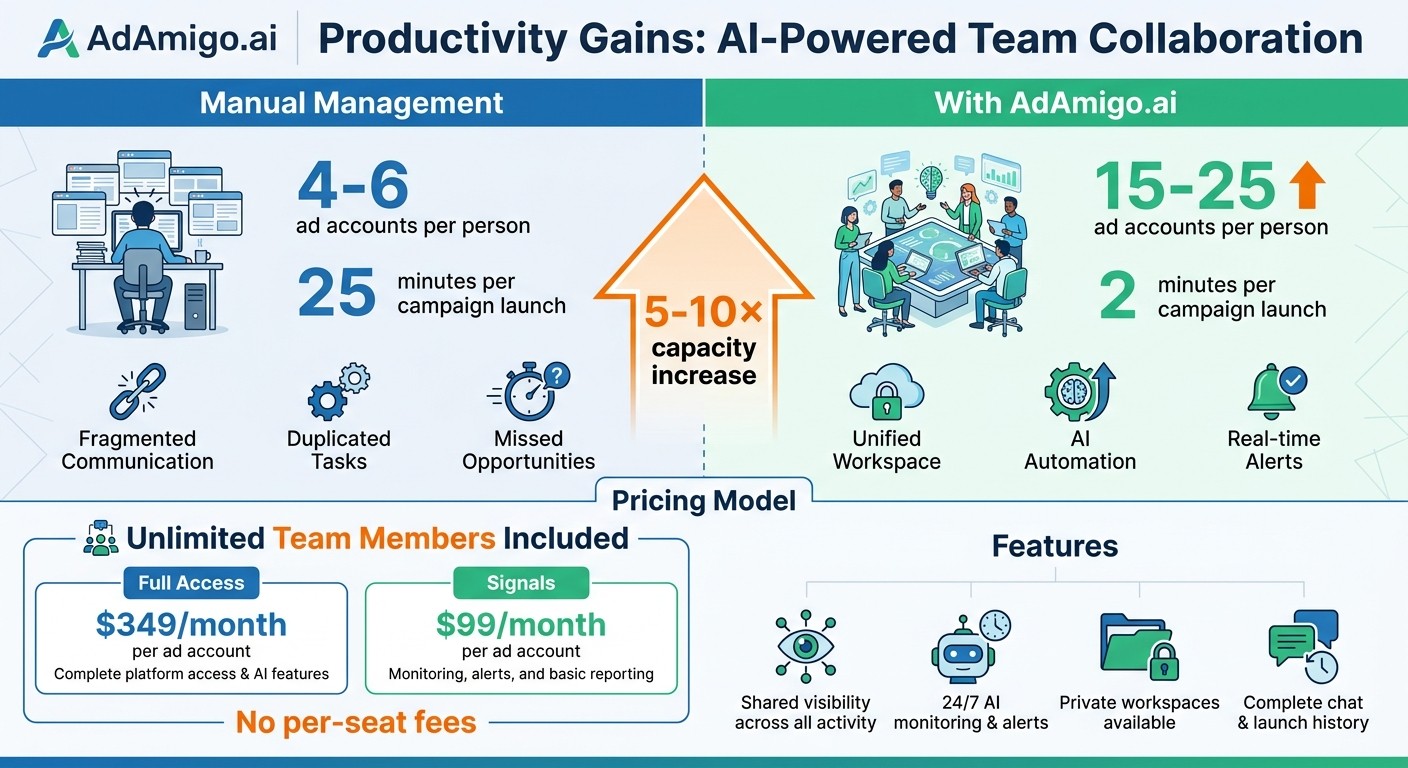
AdAmigo.ai Team Productivity: Manual vs AI-Powered Ad Management
Why Meta Ad Campaigns Need Team Collaboration
Running successful Meta ad campaigns isn’t a solo effort. It takes a combination of media buyers, creative strategists, and account managers working together. When these roles operate in isolation, the result is often misaligned goals, duplicated tasks, and missed opportunities.
The inefficiencies of disconnected workflows are clear. For instance, a single media buyer managing campaigns manually can typically handle 4–6 ad accounts. But with tools like AdAmigo.ai, that number jumps to 15–25 accounts. This leap in productivity happens because AI takes over repetitive tasks, freeing up team members to focus on strategy and creativity.
How AdAmigo.ai Supports Different Team Roles

AdAmigo.ai ensures that every team member has access to the same campaign data, fostering transparency and collaboration. The platform’s AI generates daily optimization suggestions - like budget tweaks, audience tests, or new creative variations - and shares them with the entire team. These suggestions cover many of the tasks advertisers want AI to handle in Meta Ads. Each recommendation comes with a clear explanation, so team members can review, approve, or even automate these changes. This unified approach keeps media buyers, creative strategists, and account managers on the same page, with a detailed log of every adjustment and its reasoning.
Real-time alerts take this transparency a step further. AdAmigo.ai’s AI monitors accounts around the clock, flagging issues like configuration errors, unusual spending, or disabled ads. These alerts are sent to the entire team immediately, ensuring someone is notified even outside business hours. This proactive system helps prevent costly mistakes, and many users report eliminating critical ad account errors entirely.
Modern Ad Management Requires Team Coordination
When teams have access to shared data and tools, their efforts become more efficient. For example, a creative strategist can upload new ad designs while a media buyer uses the Bulk Ad Launcher to deploy them across multiple ad sets. Meanwhile, an account manager can track the launch history and provide updates to clients - all within the same platform. Without this centralization, teams often struggle with fragmented communication and slower workflows.
AdAmigo.ai dramatically reduces the time needed for complex campaign launches - from around 25 minutes to just 2 minutes. This speed is only possible because everyone works from the same data and insights. Features like shared chat history, launch logs, and AI-driven recommendations keep everyone aligned, whether you’re part of an agency juggling multiple clients or an in-house team managing your brand’s campaigns.
What You Get with Team Member Invites
Team Member Invites in AdAmigo.ai bring your team closer together by offering three standout perks: unlimited team access without extra charges, shared visibility into all ad account activities, and the option to work privately when necessary. These features make the platform a smart choice for agencies juggling multiple clients or in-house teams managing cross-departmental projects.
No Per-Seat Fees for Team Members
AdAmigo.ai skips the per-seat pricing model. Unlike many platforms that charge for each additional user, you can invite your entire team - whether they're media buyers, strategists, account managers, or executives - at no extra cost.
Here’s how it works: the Full Access plan costs $349 per ad account, and the Signals plan is $99 per ad account. Both plans include unlimited team members. This setup allows agencies to handle 5–10× more ad accounts with the same team size. In fact, a single media buyer can often manage 15–25 ad accounts, compared to the typical 4–6.
Shared Visibility Across Ad Account Activity
Team members working on the same ad account gain access to a shared view of all activity. AdAmigo.ai keeps track of:
Chat Agent conversations tied to the ad account
AdAmigo Protect alerts
The platform logs every change, noting who made it and when, which helps avoid miscommunication. For example, a team won’t miss important updates like budget changes or new ad uploads. Plus, with 24/7 monitoring, AdAmigo.ai sends instant alerts for setup errors, unusual spending patterns, or broken links, so your team can act quickly.
This shared visibility ensures everyone stays on the same page, making collaboration smoother and decisions faster.
Private Workspaces for Individual Projects
While teamwork is essential, sometimes privacy is just as important. AdAmigo.ai allows you to create private spaces for brainstorming or testing strategies. You can set up private Chat Agent conversations or design boards in the Ad Factory that are visible only to you. This way, you can experiment freely without impacting the main workspace.
How to Invite Team Members in AdAmigo.ai
AdAmigo.ai makes team collaboration easy by streamlining the process of adding team members through a simple settings menu.
Step-by-Step Instructions
To get started, log into AdAmigo.ai and click your profile icon in the bottom-left corner. This opens a menu where you’ll select Settings. From there:
Navigate to the Team tab.
Click Invite Team Member.
Enter the email addresses of the people you want to invite.
That’s it! Invitations are sent automatically. You can invite as many people as you want - there are no limits or additional fees.
Once invited, team members can follow a quick registration process to join your team.
What Invited Team Members Need to Do
When someone is invited, they receive an email with a link to create their account. After logging in, they’ll automatically see the ad accounts they already have permissions for on Facebook. However, access depends on two things:
The ad account must be part of your AdAmigo.ai subscription.
The team member must have the appropriate Meta Business Manager role (Admin, Advertiser, or Analyst).
If a team member doesn’t see an account they expect, fix Meta permission errors and ensure the account is included in your subscription settings.
Conclusion
Team Member Invites in AdAmigo.ai take teamwork to the next level. For just $349/month per ad account, the Full Access plan allows you to bring on unlimited team members - whether they're media buyers, creative strategists, account managers, or executives - without worrying about per-seat fees.
Everyone on your team gets access to the same campaign history and AI insights. Plus, private workspaces give you the freedom to brainstorm and test ideas without interruptions.
This setup boosts your team's capacity through resource prioritization without adding extra costs. AI media buyers using AdAmigo.ai typically manage 15–25 ad accounts, compared to the usual 4–6 accounts handled without AI tools. This means your entire team can contribute to higher productivity and better results.
With this unified system, your team can focus on strategy while AdAmigo.ai takes care of execution. Ready to streamline your collaboration? Head to the Settings menu to invite your team, close communication gaps, and see how AdAmigo.ai compares to other platforms to drive growth for your business.
FAQs
What permissions do invited teammates need?
To ensure invited teammates can manage Facebook ad accounts and campaigns effectively, they must have advertising access to the relevant accounts. Additionally, they need to be assigned an appropriate role, like Admin, to handle account settings and oversee campaigns seamlessly.
Why can’t a teammate see an ad account after joining?
If a teammate can't see an ad account, it's likely due to one of two reasons: they don't have advertising access to the account on Facebook, or the admin hasn't included that ad account in the AdAmigo subscription. For the ad account to show up in their workspace, both conditions must be met.
Can I keep chats or designs private from my team?
Yes, you can maintain privacy for your chats and designs by using private Chat Agent conversations and private Ad Factory design boards. These options ensure that only you can access them, keeping them hidden from other members of the ad account.