
Checklist for AI Ad Performance Benchmarking
Step-by-step checklist for using AI to validate tracking, set KPIs, run controlled tests, and automate Meta ad performance benchmarks.
Running Meta ads without benchmarks? It’s like driving blind. This guide outlines how to use AI tools to measure, compare, and improve your ad performance effectively. Benchmarking helps you understand whether your campaigns are thriving or falling short by analyzing key metrics like ROAS, CPA, and CTR. AI simplifies this process by identifying patterns, predicting issues, and even automating optimizations.
Key Takeaways:
Set Clear Goals: Define measurable KPIs like $50 CPA or 3.0x ROAS.
Verify Tracking: Ensure Meta Pixel, Conversions API, and attribution settings are accurate. Use a conversion optimization checklist to verify your setup.
Leverage AI Tools: Use platforms like AdAmigo.ai to monitor metrics, flag underperformance, and suggest actions.
Segment Data: Group campaigns by budget, audience, and creative format benchmarks for fair comparisons.
Test and Adjust: Run controlled tests and let AI refine benchmarks based on results.
Automate Tracking: Use dashboards and AI governance to maintain consistent performance reviews.
AI doesn’t just analyze your data - it takes action, saving time and improving results. Ready to benchmark smarter? Let’s dive in.
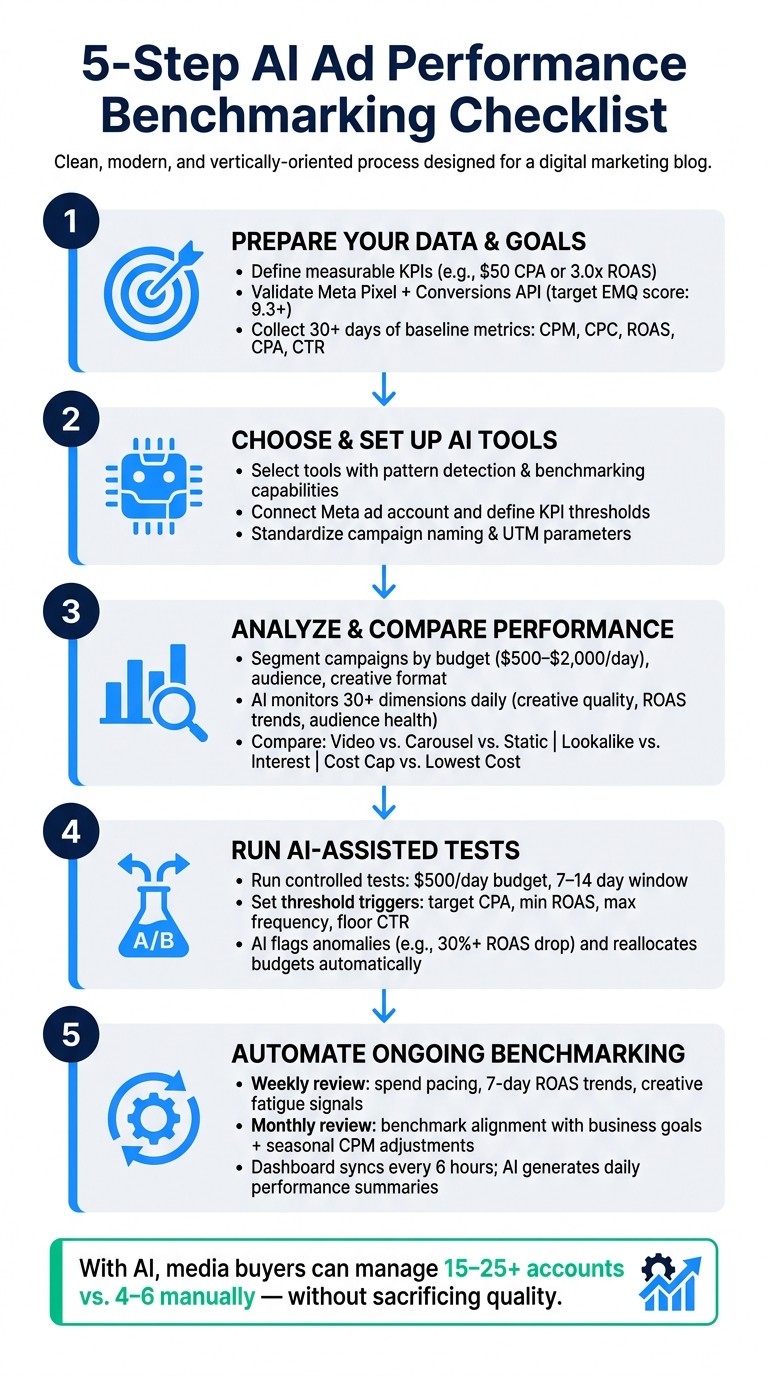
5-Step AI Ad Performance Benchmarking Checklist for Meta Ads
2025 Meta Ads Benchmarks by Industry (CTR, CPC, CPM, CPL & ROAS)
Step 1: Prepare Your Data and Goals
The foundation of any successful benchmarking effort is reliable data and clearly defined goals. Without these, even the best AI tools won't deliver meaningful insights. This step ensures your efforts start on solid ground.
Define Your Objectives and KPIs
Set specific, measurable targets for your KPIs. Instead of a vague goal like "improving CPA", aim for something concrete, such as achieving a $50 CPA or a 3.0× ROAS. Precise objectives make it easier to track progress and identify problems.
Matt Berman, Founder of Emerald Digital, highlights the importance of this approach:
"90% of ad management is pattern recognition. Spend trending up or down. CTR declining (creative fatigue). CPA spiking (audience exhaustion)."
AI tools thrive on well-defined KPI thresholds, helping them distinguish between normal fluctuations and real issues. Once your objectives are set, ensure your metrics are being tracked accurately.
Validate Tracking and Attribution
Accurate tracking is non-negotiable. Confirm that tools like Meta Pixel and Conversions API are functioning correctly. A 1:1 match between browser and server-side events is critical, and an Event Match Quality (EMQ) score of 9.3 or higher is ideal.
Be vigilant about potential tracking issues, such as duplicate events or mismatched attribution windows. For instance, overlapping Pixel and CAPI events can skew your data, and attribution windows should align with your sales cycle for consistency.
Tracking Component | What to Check | Target |
|---|---|---|
Meta Pixel | Tag status and firing triggers | Active; no missing events |
Conversions API | Server-side event delivery | 1:1 match with browser events |
Event Match Quality | EMQ score in Events Manager | 9.3+ |
Attribution Window | Conversion window configuration | Aligned (e.g., 7-day click) |
Duplicate Events | Deduplication logic | Zero duplicate flags |
Document Your Performance Baselines
Once tracking is verified, gather historical performance data to establish benchmarks. Collect at least 30 days of baseline metrics, including CPM, CPC, ROAS, CPA, CTR, and frequency, segmented by campaign, ad set, and creative. This data will serve as the reference point for evaluating future performance.
Pay close attention to trends. For example, if your 7-day CPA starts to rise compared to the 30-day average, it could signal emerging issues. Store this information in a shared spreadsheet or directly within your AI tool's reporting dashboard. Having accessible, well-documented baselines is essential for accurate analysis moving forward.
Step 2: Choose and Set Up AI Tools for Benchmarking
Now that you’ve established your baselines and verified tracking, it’s time to pick the right AI tool and set it up to work seamlessly with your data.
Choose AI Tools with Benchmarking Capabilities
You’ll want to select an AI tool specifically built for benchmarking. Look for tools that can analyze metrics over time, identify patterns, and provide actionable insights. A tool that explains why your CPA increased is far more effective than one that simply reports the numbers.
For Meta advertisers, AdAmigo.ai is a solid option. Its AI Autopilot feature continuously audits your account based on your KPIs, flags performance changes, and generates daily action plans. Meanwhile, the AI Chat Agent allows you to interact with your data conversationally. For example, you can ask, “Why did ROAS drop yesterday?” and get a clear, data-driven explanation without sifting through Ads Manager. As one G2 reviewer noted:
"These AI actions go beyond simply suggesting actions; they provide valuable insights and justifications. This not only improves my results but also deepens my understanding of campaign optimization." - Verified User, G2 Review
Configure Your AI Tools Correctly
Once you’ve chosen a tool, setting it up properly is crucial. For AdAmigo, here’s how to get started:
Connect your Meta ad account.
Define your KPI targets, such as a $50 CPA or a 3.0× ROAS threshold.
Enable AdAmigo Protect to monitor delivery issues and anomalies from the start.
Activate the AI Autopilot in approval mode so you can review its recommendations before they’re applied. Use the AI Chat Agent for instant insights - for example, you can ask, “Show me performance by age and gender this week” to get a quick overview of your data.
Standardize Naming and Data Structures
This might seem like a small detail, but it’s essential for accurate AI analysis. If your campaigns, ad sets, and ads have inconsistent naming conventions, the AI won’t be able to segment or compare performance effectively.
Adopt standardized naming for campaigns that include critical details like objective, audience type, creative format, and test date (e.g., PROS_Retargeting_Video_2026-06). Use consistent UTM parameters across placements to ensure clean attribution data aligns with your benchmarks. Additionally, set a single attribution window - a 7-day click window is a common standard - and stick to it. These standardized practices give the AI a clear framework, enabling it to identify patterns and compare performance across campaigns more accurately. This consistency becomes invaluable as you move further into benchmarking.
Step 3: Analyze and Compare Performance with AI
With everything set up, it's time to dive into the analysis phase. This is where raw performance data gets transformed into insights you can actually use.
Segment Benchmarks for Accurate Comparisons
To make fair comparisons, group campaigns by similar spend levels - say $500–$2,000 per day. This ensures you're evaluating campaigns under comparable conditions. Beyond budget, factor in campaign objectives, audience types, and creative formats. For instance, when analyzing video campaigns, focus on metrics like hook rate (percentage of viewers who watch at least three seconds) and thumb-stop rate. For conversion campaigns, prioritize CPA and ROAS. Mixing metrics across different campaign types can lead to skewed benchmarks and poor decisions. Proper segmentation sets the stage for effective AI-driven analysis.
Use AI to Analyze Performance in Detail
AI tools bring a whole new level of detail to performance analysis, examining over 30 dimensions at once - everything from creative quality and audience health to budget usage and ROAS trends - on a daily basis. Here's how this can help:
Spot underperformers early: AI can flag ads with high spend but low CTR before they waste too much of your budget.
Identify hidden winners: It can also highlight ads that are excelling and ready to scale, which might be missed in a manual review.
Tools like AdAmigo.ai take this a step further. Their AI Autopilot continuously audits your account, creating a daily action plan ranked by potential revenue impact. It also flags anomalies - like a ROAS drop of more than 30% over seven days - so you can address issues quickly.
Compare Creatives, Audiences, and Bidding Strategies
Once you've gathered AI insights, use them to compare key elements of your campaigns: creatives, audiences, and bidding strategies. Here's how to approach each:
Creatives: Compare formats like video, carousel, static images, and user-generated content. Use metrics like CTR, hook rate, and conversion rate. For instance, setting a frequency alert at 2.4–2.5 can help you catch creative fatigue before it causes a significant CTR drop (e.g., over 20%).
Audiences: Break down performance by audience type, such as lookalike versus interest-based targeting. Evaluate ROAS and CPA across different demographic segments.
Bidding strategies: Compare cost cap versus lowest cost strategies within similar ad sets and spend tiers. Look for differences in CPA stability and spend efficiency.
The table below provides a simple framework for these comparisons:
Dimension | What to Compare | Key Metrics |
|---|---|---|
Creative Format | Video vs. carousel vs. static | Hook rate, CTR, conversion rate |
Audience Type | Lookalike vs. interest-based | ROAS, CPA, frequency |
Bidding Strategy | Cost cap vs. lowest cost | CPA stability, spend efficiency |
Step 4: Run AI-Assisted Tests Against Benchmarks
Set Up Controlled Benchmarking Tests
To get accurate results, it's crucial to control your test variables. Fix elements like budgets, dates, audience sizes, and placements so the tests focus on the intended factors. For example, you can run both test and control groups at $500/day over a period of 7–14 days. This timeframe allows you to collect enough data to make statistically sound decisions.
Establish clear threshold triggers for metrics like target CPA, minimum ROAS, maximum frequency, and floor CTR. These triggers allow your AI tools to automatically flag underperforming campaigns and highlight successful ones.
Monitor and Adjust Tests with AI
AI tools constantly track your metrics, providing real-time alerts when something falls outside your preset thresholds. For instance, you can set notifications for significant deviations in metrics like ROAS or frequency. Beyond just monitoring, AI can take action by reallocating budgets - shifting funds away from poorly performing test groups to those already outperforming your benchmarks.
"The AI actions allow fast adjustments and immediate results." - Sherwin S., Verified User
Tools like AdAmigo Protect work around the clock to safeguard account performance, identifying anomalies and delivery issues early. By keeping a close eye on ongoing tests and making timely adjustments, you can ensure your campaigns remain on track.
Review Test Results and Set New Benchmarks
Once your tests are complete, analyze the performance data to refine and update your benchmarks. Don’t just focus on metrics like ROAS and CPA - dig deeper into upper-funnel indicators such as thumb-stop and hook rates. These metrics, which measure how many viewers engage with your content (e.g., watching at least 3 seconds), offer early insights into whether your creative is resonating with the audience.
Here’s an example: In April 2026, an AI agent spotted a 38% drop in CTR and a 52% spike in CPA across four ads within 14 days. Acting quickly, the AI paused those ads, introduced three new creative variations, and tested multiple lookalike audiences (2% and 4% seeds). This adjustment projected a 3.9x ROAS moving forward.
Step 5: Automate Ongoing Benchmarking with AI
Once you've fine-tuned and tested your benchmarks, the next step is to automate the process. Automation ensures you maintain consistent performance tracking without needing constant manual intervention. The goal here is to make benchmarking a seamless and repeatable part of your workflow.
Build a Regular Benchmarking Schedule
Set up a routine that balances short-term and long-term performance tracking. A weekly review helps you monitor immediate trends, such as spend pacing, active campaign statuses, 7-day ROAS trends, and early signs of creative fatigue. On the other hand, a monthly review provides an opportunity to evaluate whether your benchmarks are still aligned with your broader business objectives.
Don’t forget to adjust benchmarks for seasonal changes. For example, Q4 often brings higher CPMs and shifting ROAS expectations, which should be factored into your analysis.
Set Up Centralized Reporting and Dashboards
Streamline your reporting by connecting your Meta ad account to a centralized dashboard using OAuth. This eliminates the hassle of exporting CSVs or switching between platforms. Set your dashboard to sync data automatically - every six hours is a good balance for keeping benchmarks up-to-date without overwhelming your API limits.
The best dashboards don’t just show numbers; they provide context. Use rolling ROAS trend charts (7-, 14-, and 30-day windows) to understand performance over time, rather than relying on single-day snapshots. Include creative performance grids with fatigue alerts to pinpoint ads that are nearing burnout before they negatively impact your benchmarks. Tools like AdAmigo.ai can simplify this further by generating daily AI-powered summaries that address key questions like: Are we on track? What's running? Are there any signs of fatigue? This keeps everyone informed without requiring time-consuming manual updates.
With these tools in place, you’ll have real-time data at your fingertips, but it’s essential to ensure your automated systems are governed by strict rules to maintain accuracy.
Review and Maintain AI Governance Rules
To keep your benchmarks reliable, conduct monthly audits of your tracking systems, including Meta Pixel, Conversions API, and EMQ scores. Aim for high tracking quality (target EMQ 9.3+), and set up automated alerts for significant deviations, such as a 30% drop in ROAS over seven days or a creative fatigue score exceeding 80. Review and refine these thresholds quarterly, or whenever your business goals undergo major changes.
"90% of ad management is pattern recognition... You don't need to stare at Ads Manager to spot these patterns. An AI agent can do it and tell you what matters." - Matt Berman, Founder, Emerald Digital
Conclusion: Key Takeaways for AI-Driven Benchmarking
At its core, successful Meta ad benchmarking relies on three pillars: setting clear goals, following a structured process, and leveraging AI-driven automation effectively. These elements work together to empower confident, data-backed decisions.
This guide has walked you through every step - starting with defining KPIs and validating tracking, moving through controlled testing, and wrapping up with automated performance reviews. Each stage builds on the last, so skipping any step can weaken the entire process.
AI plays a crucial role by taking over tasks like pattern recognition and execution, allowing you to focus on strategy and big-picture decisions. Reviews from the industry emphasize that AI's value isn't just in automation - it’s in the actionable insights it provides. This clarity makes AI-driven benchmarking both dependable and efficient.
For agencies and eCommerce teams, the impact is hard to ignore. A manual workflow might limit a media buyer to managing 4–6 accounts, but with AI, that number can jump to 15–25+ accounts - all without sacrificing analysis quality or response time. By continuously refining your approach through AI-driven insights, you can maintain and even elevate campaign performance.
FAQs
How much data is needed to set reliable benchmarks?
To set dependable benchmarks for your Meta ads, give them 48–72 hours to gather initial data and aim for at least 10–15 conversions. This window provides enough information to evaluate performance before making any changes or pausing the ads. Keep a close eye on crucial metrics like return on ad spend (ROAS), click-through rate (CTR), cost per acquisition (CPA), and cost per click (CPC) to identify trends and ensure your campaign stays on track.
What tracking issues most often disrupt Meta ad benchmarks?
Tracking problems can seriously throw off your Meta ad benchmarks. Some of the most frequent culprits include:
Misconfigured Meta Pixel or conversion tags: When these are set up incorrectly, your data won't be accurate.
Poor event match quality: If the data from your website doesn't align well with Meta's tracking, it can lead to incomplete or inaccurate reporting.
Duplicate event detection: This happens when the same event is tracked multiple times, inflating metrics unnecessarily.
Other issues, like missing or mismatched conversion window settings, broken creative links, and unexpected delivery problems, can also distort critical metrics such as ROAS (Return on Ad Spend), CPA (Cost Per Acquisition), and CTR (Click-Through Rate).
That’s where AdAmigo.ai steps in. It audits your account health, flags tracking anomalies, and helps you maintain reliable performance data for better decision-making.
When should I update my benchmarks (and by how much)?
Modern AI tools, such as AdAmigo.ai, make real-time benchmarking a breeze. No more waiting around for manual reviews - this AI keeps you updated as soon as there’s a noticeable change in performance or trends. It actively tracks key metrics like ROAS (Return on Ad Spend) and CPA (Cost Per Acquisition), spots anomalies, and even delivers daily action plans to keep you on track. Plus, you can easily adjust targets and guardrails at any time using chat prompts, ensuring the system stays aligned with your business objectives.