
How to Troubleshoot API Issues Using Meta Forums
Classify errors, reproduce calls outside your app, post sanitized forum details, test one fix at a time, and monitor to prevent repeats.
Most Meta API problems fall into a few repeat patterns: token errors make up 31% of connection failures, and rate limits add another 24%. So if I want to fix an issue fast, I don’t guess. I sort the error, test the same call outside my app, post only the data people need, and verify any fix before I ship it.
Here’s the short version:
I classify the error first: auth, permissions, bad input, rate limits, server issue, or app logic.
I reproduce the request outside my app with Graph API Explorer, Events Manager tools, or
curl.I save the exact failure snapshot: endpoint, method, payload, status, response, API version, app mode, IDs, and time in UTC.
I search Meta forums by error code and endpoint, not by a vague summary.
I redact secrets but keep codes, subcodes, request shape, and timestamp.
I test one fix at a time and check it with the same request before touching production.
I watch for repeat failures with alerts for
401,403,429, and5xx, plus usage headers.
A few points stand out. If a request fails in Graph API Explorer too, the problem is likely in the API call or account state, not my local code. If I see repeated 500 or 503 errors across accounts, or I can reproduce the bug in Meta’s own tools, it’s time to move from the forum to official support. And if usage goes past 80%, I should slow requests before error 17 or 80000 hits again.
I also keep the focus on error codes and subcodes, not message text, because message text can change. After the fix, I document the sanitized request, the response, the forum thread, and the final step that worked so the same issue takes less time next round.
If I follow that flow, Meta forums stop being a place to vent and start being a fast way to narrow the cause and confirm the next step.
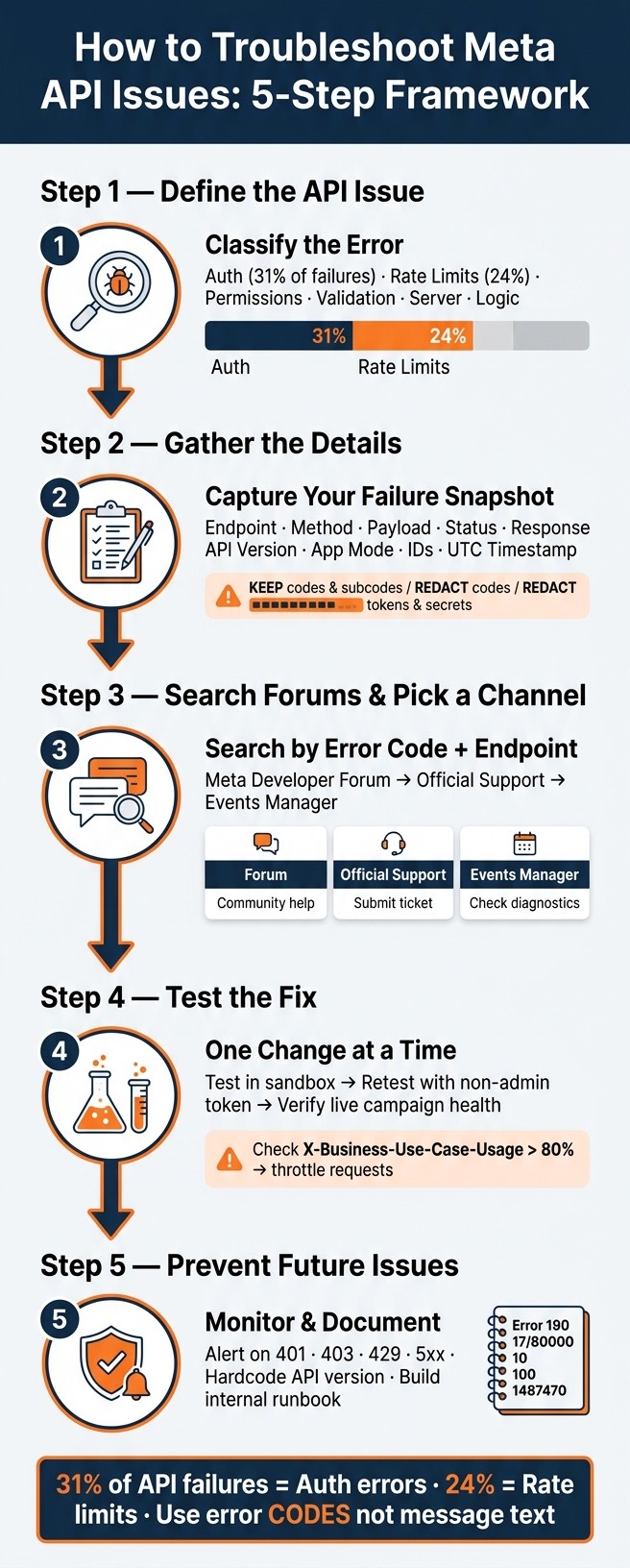
How to Troubleshoot Meta API Issues: 5-Step Framework
1. Define the API Issue Before You Post
Before you post, pin the failure to a specific error class. That gives forum readers a fast way to spot what's going on and point you in the right direction.
Classify the error by type and symptom
Start by classifying the failure. Then use the table below to connect it to the status code, the usual Meta error pattern, and the first thing to check.
Category | HTTP Status | Example Meta Error Pattern | First Diagnostic Step |
|---|---|---|---|
Authentication | 401 | "Error validating access token" | Refresh long-lived token; check scopes in Access Token Debugger |
Permissions | 403 | (#200) "Not authorized to perform action" | Check Business Manager roles and App Review status |
Validation | 400 | (#100) "Invalid parameter" | Validate the JSON body against the latest API version docs |
Rate limiting | 429 | Error 17: "User request limit reached" | Inspect the |
Platform outage | 500 / 503 | Error 1: "Unknown error" | Check |
Logic failure | 200 OK |
| Verify |
The more clearly you label the error, the easier it is to find matching forum threads.
Once you know the error class, run the same request outside your app.
Reproduce the failure outside your app
Run the exact request in Graph API Explorer with the same app and scopes. For Conversions API issues, use the built-in test tools inside Events Manager to check event delivery and payload structure. If you like the command line, a simple curl call with the same endpoint, headers, and JSON body works just as well.
If the error shows up in Graph API Explorer or through curl, the issue is in the API call itself: your token, parameters, or account state. If it goes away there, the bug is more likely in your local app logic.
Capture the exact request, response, and timestamp
Save a full snapshot of the failure:
endpoint
method
payload
response body
HTTP status
account ID
app mode
API version
timestamp
Record the timestamp to the minute, plus UTC. For example: June 15, 2026, 2:15 p.m. ET / 18:15 UTC. If you're dealing with throttling or rate limits, also save the X-Business-Use-Case-Usage header.
That snapshot gives you the best shot at searching Meta forums by error code, endpoint, and time window.
2. Gather the Details Meta Forum Readers Need
Take that snapshot from Step 1 and turn it into a forum post other developers can scan in a minute or two. The goal is simple: give people enough detail to reproduce the problem, but not enough to expose secrets.
Collect technical details and environment data
Before you post, gather the details that help forum readers match your issue to patterns they’ve seen before. Include your API version (for example, v24.0), endpoint and HTTP method, SDK or library version, programming language and runtime, operating system, token type, granted scopes, app mode (development or live), App ID, Business Manager ID, Ad Account ID, request payload, response body, error code or subcode, and the timestamp of the failure. If it matters, include the full object structure you sent, such as asset_feed_spec or object_story_spec.
Use placeholders for real IDs, like act_<AD_ACCOUNT_ID> or campaign_<ID>. Keep the request shape the same, but remove anything that works like a password.
Only mention the token type when it changes how the issue behaves: short-lived user, long-lived user, or System User.
Run Meta's built-in debugging tools first
Start with Graph API Explorer and test the exact same request using the same app and scopes. If the issue involves event delivery, check Events Manager Diagnostics and the Test Events tool. You can also send a GET request to /me/permissions to confirm that the needed scopes are there, such as ads_management or business_management.
Say which tools you used and include their exact output.
Redact secrets but keep useful error data
"Use error codes, not description text, because descriptions can change." - Meta Documentation
Put the focus on error codes, subcodes, the exact message, payload, response, and timestamp. Remove anything that acts like a password - full access tokens, app secrets, and personal identifiers - and swap them with plain placeholders. That way, other developers can check the same failure pattern without seeing private data.
Information Type | Action | What to Share |
|---|---|---|
Access Token | Redact |
|
App Secret | Redact |
|
App ID | Keep |
|
Ad Account ID | Anonymize |
|
Error Code, Subcode, and Message | Keep |
|
API Endpoint | Keep |
|
Request Payload | Sanitize |
|
Response Body | Sanitize | Anonymized JSON response body |
Timestamp | Keep | Exact time of the failure |
Instead of pasting the raw token, share the Access Token Debugger summary. It shows granted scopes, App ID, and expiration time without exposing the token string.
If this is part of an automated flow, say whether the break happens in your request layer or in Meta’s response. That small detail can save a lot of back-and-forth when you compare your issue with older forum threads.
3. Search Meta Forums and Pick the Right Support Channel
With your sanitized error data ready, the next move is simple: look for an answer before you post. If nothing lines up, publish a clear report. If the issue points to a Meta-side bug, take it to official support.
Search by error code, endpoint, and product tag
Use the sanitized snapshot from Step 2 as your search input. Go to the Meta Developer Community Forum and search the exact error code and message from the response, not a loose summary. For example, searching "Error 190" or "Invalid OAuth access token" works much better than searching "token not working."
It also helps to pair the error code with the exact endpoint you're calling, like /insights or /campaigns, and add a topic tag such as Marketing API, Graph API, or Conversions API to cut out unrelated threads. Focus on threads that match your API version, since older versions may already be deprecated.
Write a post that others can reproduce
If your search doesn't turn up anything useful, write the kind of post another developer can follow step by step without filling in the blanks. Your title should include the error code and endpoint. Then include:
Numbered repro steps
Expected behavior vs. actual behavior
Sanitized samples
What you've already tested
If the same issue shows up across multiple threads or also happens in Graph API Explorer, that's a strong sign it's time to move to official support.
Escalate confirmed bugs through official channels
Use official support when you're dealing with repeated 500/503 errors, failures across multiple ad accounts, or bugs that reproduce in Graph API Explorer.
As of May 2026, Meta updated its support form with smarter routing and a prominent "Marketing API" option. Marketing API support is now open to all developers with a Business Manager account, no matter their ad spend or whether they have a dedicated account team. Here's a quick way to choose the right channel:
Channel | Best Use Case | Expected Outcome | Required Information |
|---|---|---|---|
Meta Developer Forum | General troubleshooting, implementation questions, and common implementation patterns | Community answers or confirmation of widespread issues | Error code, endpoint, sanitized code snippets, and steps already taken |
Official Support | Confirmed platform bugs, repeated 500/503 errors, and account-level billing or permission blocks | Direct resolution from Meta engineering or support | App ID, Ad Account ID, reproducible steps in Graph API Explorer |
Events Manager | Pixel or Conversions API event validation and API token health checks | Immediate technical validation of data flow and credential validity | Access token, payload sample, or Pixel ID |
Once someone suggests a fix, test it against the same request in Step 4.
4. Test Forum Advice and Confirm the Fix
When a forum reply looks like it might solve the issue, don't rush it into production. Test one change at a time so you can tell what fixed the problem. Think of the reply as a hypothesis, not a fact, until your own test proves it. And before you touch anything, make sure the advice lines up with your exact error code and endpoint.
Check replies against docs and your exact error
Forum replies can be helpful, but they don't all carry the same weight. Put the advice next to the official docs and check that it matches your exact error code, subcode, endpoint, and API version.
The subcode often tells you the most. For example, code 100 with subcode 33 means an invalid ad account ID, while subcode 1487390 points to a creative policy violation. Those are two very different problems, so a fix for one won't help with the other.
You should also confirm that the advice matches your token type. A fix meant for User Access Tokens won't apply to System User Tokens, which are business-owned and long-lived. Follow the error code, not the description, since descriptions can shift over time. Once you have the key details nailed down, test the fix in a controlled setup to fix sync errors before changing production.
Apply one change at a time and retest
Start in a Meta test ad account if you can. If you have to use a live account, keep the risk low: use a minimal daily budget and set the start date at least seven days out.
Change just one thing per test, such as:
one permission scope
one request parameter
one header
Then retest the request before you update production code. This part matters more than people think. A call may work fine for app admins and still fail for standard users, so retest with a non-admin token to make sure the fix works for everyone.
Verify campaign health after the fix
Once the fix works in testing, check the live account before you call it done. A passing test is good, but you still need to confirm that live campaigns are running as expected.
Look at delivery and event flow in Ads Manager. Use the /debug_token endpoint to confirm that is_valid is true and that needed scopes like ads_read and ads_management are still active.
Then check the account_status field through the API:
1= active2= disabled3= unsettled
Also watch the X-Business-Use-Case-Usage header. If usage goes above 80%, slow your request rate before it hits 100% and triggers error 17 or 80000 again.
5. Prevent Future API Issues with Better Monitoring
Once the fix is confirmed, lock it in with monitoring and documentation. If the issue is solved but nothing changes in how you watch the API, there's a good chance it comes back later.
Track version changes, deprecations, and forum announcements
Hardcode the API version in every request URL - for example, v20.0 - instead of leaning on the default. That gives you more control and helps avoid surprise behavior changes.
Review deprecation notices when Meta publishes them, and use Meta's Version Upgrade Tool to see how your current API calls are likely to behave before you migrate. Also, don't assume every change comes with a version bump. Some platform updates can still affect your integration, so it's smart to review things after those updates ship.
Version drift often shows up first as repeat errors. If one endpoint starts failing in the same way again and again, that's usually an early warning sign.
Set alerts for recurring API failure patterns
Set alerts for repeated 401, 403, 429, and 5xx responses by endpoint. Those patterns usually tell you a lot before a full outage hits.
You should also watch the X-Business-Use-Case-Usage header. If usage goes above 80%, throttle requests so you don't run into error 17.
"Error handling should be done using only the Error Codes. The Description string is subject to change without notice." - Meta Error Reference Page
That note matters. If your alerting or triage logic depends on error message text, you're building on shaky ground. Use the codes.
Document fixes in an internal runbook
Once alerts are live, write down the fix so the next person doesn't have to start from scratch. Record each resolved incident in a runbook and keep the details tied to what actually happened.
Save:
The sanitized request
The full error response
The forum thread
The fix applied
Post-fix checks, including
error.code,error.type, and especiallyerror.error_subcode
This turns a one-off forum answer into a process your team can reuse. It also links the fix back to the troubleshooting steps in this guide, which makes future incidents much easier to sort out.
The table below covers the codes that show up most often in Meta API integrations:
Error Code | Common Cause | Runbook Action |
|---|---|---|
190 | Invalid or expired OAuth token | Generate a new token; check System User status |
17 / 80000 | Rate limit exceeded | Implement exponential backoff; check BU headers |
10 | Missing required permission scope | Re-authorize with |
100 | Invalid parameter | Fix request structure; do not retry |
1487470 | Account in unsettled billing state | Resolve outstanding balance before retrying |
Authentication failures alone account for 31% of all connection failures, and rate limiting issues make up another 24%.
FAQs
When should I use Meta Forums instead of official support?
Use Meta Forums when you want community-driven tips, troubleshooting threads, or advice from other developers.
For official API or business account issues, especially API access or account verification, Direct Support is usually the better option.
What details should I include in a forum post?
Include the key details people need to see what’s going wrong:
A clear description of the problem, along with any error messages
The API context, like the endpoints or product features involved
Relevant account details and your connection to the account
Your setup, including API version, token status, and any recent changes
Troubleshooting steps you’ve already tried
That gives support teams and community members enough context to spot patterns, narrow down the cause, and suggest the right fix faster.
How do I know if the issue is in my app or the API call?
Start by checking the API response, error messages, and your app logs. Meta’s error codes can tell you if the issue comes from failed authentication, missing permissions, invalid parameters, or a problem in your app setup.
Use Meta’s Access Token Debugger to verify token permissions and access rights. If those permissions look right, go back to your logs and look for repeated permission errors or rate-limit errors. That can help you figure out whether the problem is in your app or in the API request itself.