
Manus AI & Meta Ads: Capabilities, Limits & Connector Setup
What Manus AI can and can't do in Meta Ads Manager — features, limitations, connector setup, and how it compares to the in-app Tools Menu.
Meta has added Manus AI to Ads Manager, automating tedious tasks like reporting, campaign diagnostics, and audience research. Here's what you need to know:
What it does: Manus AI analyzes ad performance, creates custom reports, and suggests audience targeting improvements. It acts as an autonomous assistant, saving time by handling repetitive tasks.
What it doesn’t do: Manus AI doesn’t adjust bids, change targeting, or create ad visuals. Human oversight is still required for critical decisions.
Who it’s for: Ideal for marketers, small businesses, and agencies managing Facebook or Instagram campaigns.
Limitations: Prone to occasional errors, it’s best used alongside manual review and other tools like Meta Advantage+ for execution.
Manus AI simplifies workflows but doesn’t replace human judgment, highlighting the ongoing debate between manual vs AI-powered ad management. It’s free to use in Ads Manager and accessible through the Tools menu.
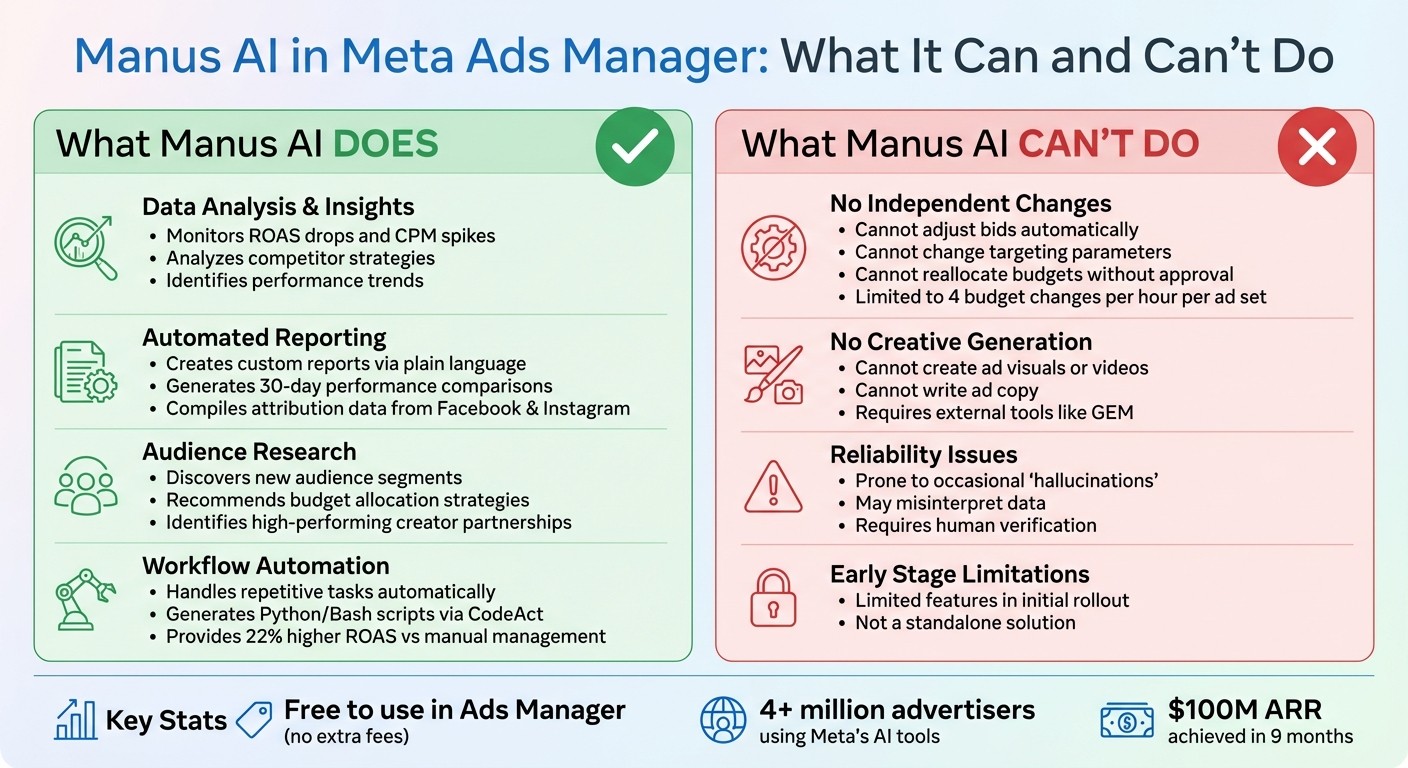
Manus AI Capabilities vs Limitations in Meta Ads Manager
New Meta Ads Update: Manus AI - What It Actually Means
What Manus AI Does: Main Features
Manus AI acts as a conversational assistant within Ads Manager, streamlining tasks that used to require manual effort. It joins a growing list of AI tools for Facebook and Instagram ads designed to optimize performance. Its focus is on three key areas: analyzing campaign data, automating reports, and researching audiences.
Data Analysis and Performance Insights
Manus AI takes raw campaign data and turns it into actionable insights. It monitors active campaigns to detect issues like sudden ROAS (Return on Ad Spend) drops, surging CPM (Cost Per Thousand Impressions), or declining ad performance. By processing structured files like spreadsheets and PDFs, it identifies trends and patterns that could otherwise go unnoticed.
You can interact with Manus AI using plain language. For example, you might ask, "Why did my cost per purchase increase by 40% last week?" Manus AI will dive into your account data, analyzing spending trends, audience behavior, and even competitor activity to provide a clear explanation. It also offers competitive intelligence by reviewing competitor strategies and content, giving you benchmarks to measure your campaign's performance.
Automated Report Creation
Forget manually exporting data or crafting dashboards. With Manus AI, generating reports is as easy as typing a command like, "Create a 30-day performance comparison." The tool delivers a formatted summary, saving you time and effort. For instance, it can compile attribution data from platforms like Facebook and Instagram, compare performance by placement, and present the results in a polished executive summary.
"Incorporating AI directly into the Ads Manager is a game-changer for efficiency. Manus AI helps us derive actionable insights swiftly, making campaign adjustments more timely and precise."
These insights are further enhanced by Manus AI’s audience research and targeting capabilities.
Audience Research and Targeting Recommendations
Manus AI goes beyond just analyzing data - it helps refine your audience targeting by uncovering what drives conversions. By examining behavioral signals across your campaigns, it identifies new audience segments and suggests adjustments to improve results. It even helps you discover creators and influencers that align with your brand, opening doors for potential partnerships and broader reach.
The tool conducts in-depth research by processing large data exports, surfacing high-performing traits you might have missed. It also recommends AI-driven budget allocation strategies, pointing out which ad sets deserve more investment and which ones are underperforming. This shifts your workflow from manual testing to leveraging AI-driven insights, ensuring your decisions are backed by real performance data.
What Manus AI Can Do: Key Capabilities
Manus AI stands out because it doesn’t just respond to commands - it acts autonomously to complete tasks from start to finish. Unlike traditional chatbots that simply answer questions, Manus AI operates as an independent agent, capable of planning, executing, and verifying complex workflows without constant input. You set the goal, and Manus AI handles the technical execution, making it more than just a tool - it’s like having an autonomous campaign manager.
Handling Repetitive Tasks Automatically
Manus AI takes the grunt work out of your daily routine. Forget about manually pulling data from Meta's Marketing API or building custom spreadsheets. With Manus AI, you can request what you need in plain language, and it takes care of the rest. Thanks to its CodeAct feature, it can generate and execute Python and Bash scripts in a secure cloud environment, managing tasks like data scraping, processing CSV files, and formatting reports seamlessly.
This level of automation doesn’t just save time - it scales up efficiency for advertisers. For example, Manus AI can independently test different discount strategies, like comparing "20% off" versus "free shipping", by syncing directly with your Shopify backend. It also keeps a close watch on campaigns, flagging performance issues such as sudden drops in ROAS benchmarks or unexpected CPM spikes before they start draining your budget.
Task | Manual Process | Manus AI Automation |
|---|---|---|
Reporting | Pulling API data, building spreadsheets | Conversational request; automated CSV formatting |
Market Research | Manual browsing and competitor tracking | Automated web scraping and trend summarization |
Budget Pacing | Daily manual checks and bid adjustments | Real-time monitoring and autonomous reallocation |
Creative Testing | Drafting and uploading individual variations | Real-time generation of persona-centric ad copy |
Helping Improve Campaign Performance
Manus AI doesn’t just automate tasks - it actively improves your campaign strategy. It goes beyond reporting performance metrics by analyzing why certain trends occur and suggesting actionable next steps. For instance, it can detect creative fatigue or unexpected cost spikes by analyzing trends in spending, audience behavior, and even competitor activity.
Meta has noted that its Advantage+ tools, which Manus AI enhances, deliver about 22% higher return on ad spend compared to manual campaign management. Manus AI also identifies which audiences are engaging most with your ads and suggests potential new segments to target. It can recommend better budget allocations and flag underperforming ad sets, shifting your focus from tedious manual adjustments to strategic decision-making.
Making Reporting and Workflow Easier
Manus AI doesn’t just handle tasks - it makes reporting and workflows simpler than ever. Its integration with Ads Manager allows you to request detailed attribution reports, based on Meta Ads attribution rules, performance summaries, or audience analyses using plain language. Within minutes, Manus AI delivers polished, formatted results, eliminating the need for platform-switching or manual data wrangling.
This shift allows media buyers to focus on strategy rather than repetitive tasks. Instead of constantly tweaking campaigns, you can concentrate on defining high-level goals while Manus AI handles the execution. As of early 2026, more than 4 million advertisers are already using Meta’s generative AI tools. Manus AI represents the next step forward, evolving from an assistive brainstorming tool to a fully autonomous agent capable of managing operational tasks independently.
What Manus AI Can't Do Yet: Current Limitations
Manus AI offers impressive automation tools, but it’s not a substitute for human oversight. Understanding its current limitations can help you manage expectations and steer clear of potential pitfalls.
No Independent Bidding or Targeting Adjustments
Manus AI doesn’t operate autonomously when it comes to campaign changes. It won’t adjust bids, revise targeting parameters, or reallocate budgets without your explicit approval. Meta has intentionally positioned Manus as an "intelligence and workflow layer" rather than a tool for executing changes. While it can analyze data and recommend optimizations, you must manually review and implement those suggestions.
This design choice minimizes the risk of compounding errors. Even when changes are approved, Meta’s API restricts automated budget adjustments to a maximum of four per hour per ad set. For campaigns that require frequent budget shifts or rapid scaling, this limitation can be a bottleneck.
Reliability has also been an issue in early testing. John Goldman, a practitioner, shared his experience:
"I've been running that Manus app on Ads Manager the last couple days, and it comes up with some really crazy shit. Like, it thinks that people are calling us from the ad, even though there's no phone number in the ad".
These so-called "hallucinations", where the AI misinterprets data or provides irrelevant suggestions, highlight the necessity of human oversight. For real-time bidding and targeting, tools like Meta’s Advantage+ suite remain essential. Manus AI serves as a powerful analytical tool to refine your strategy but does not replace execution platforms.
No Ad Creative Generation
Manus AI isn’t designed to create ad visuals, videos, or copy. Its focus is on data analysis and workflow automation - not on producing creative assets. For those looking to automate this process, AI-powered creative scaling can help bridge the gap. If you need to scale creative production or test variations, you’ll need to rely on tools like Meta’s Generative Ads Model (GEM) or other external solutions. While Manus can identify which creatives perform well and flag issues like creative fatigue, it won’t generate new ideas or designs.
As Meta describes it:
"Advantage+ drives your campaigns, GEM makes your ads, and Manus gives you the intelligence to know what's working, why, and what to do next".
This makes human creativity and external tools indispensable for your ad strategy. Manus AI complements these efforts but doesn’t replace them.
Limited Features in Early Release
As of early 2026, Manus AI is still in its initial rollout phase, and several advanced features are yet to be introduced. While it’s available to all Meta advertisers at no additional cost, its current capabilities are more limited compared to what a fully developed AI agent might offer.
These constraints reinforce that Manus AI is a tool to enhance workflows, not a standalone solution.
Task/Feature | Manus AI Capability | What You Still Need |
|---|---|---|
Ad Creative | Cannot generate images or videos | Manual creation or tools like GEM |
Budget Changes | Throttled to 4/hour per ad set | Human oversight for frequent adjustments |
Strategic Planning | Provides data-driven insights | Human judgment for broader business goals |
Data Accuracy | Prone to occasional errors | Manual verification of key metrics |
Manus AI speeds up your workflow and provides valuable insights, but it doesn’t operate independently. You remain in control, using the insights Manus provides to make smarter, faster decisions.
How to Use Manus AI: Setup and Practical Applications
How to Access Manus AI in Meta Ads Manager
Getting started with Manus AI is straightforward. Open Meta Ads Manager, head to the Tools Menu, and select Manage. From there, you’ll find a shortcut labeled "Manus AI". If you’re using Business Suite, go to All Tools > Engage Audience, and look for "Business AI Beta". Sometimes, you might see an "Automate your workflows with Manus AI" banner on the main dashboard or even a pop-up during ad setup with an "Activate" or "Try Now" button.
The good news? Manus AI is available to all advertisers without any extra fees beyond your usual ad spend. For those who prefer the standalone Manus.im platform, it remains available separately, with subscription plans that can cost up to $200 per month for advanced features.
Once you’ve got access, you’re ready to start using Manus AI to simplify and supercharge your marketing tasks.
Common Ways Marketers Can Use Manus AI
Manus AI is built to handle complex, multi-step tasks on its own. For example, you can ask it to create a weekly performance report that compares ad sets across campaigns, highlights top performers, and schedules the report to land in your inbox every Monday morning. It can also analyze audience data and suggest new interest-based targeting strategies.
What sets Manus apart from typical chatbots is its ability to act as what’s called an "agentic" tool. This means it doesn’t just provide answers - it can complete entire workflows based on a single command. As Mark Zuckerberg put it:
"A lot of what makes agents valuable is the unique context that they can see".
Setting Limits and Following Best Practices
Once Manus AI is integrated into your workflow, it’s important to use it wisely, much like other AI automation platforms for Meta ads. Start with a 4–6 week trial on one or two accounts to compare manual vs AI budget testing methods. This will help you evaluate how it performs in terms of speed and accuracy. To avoid overspending, set manual budget caps and clearly define which tasks the AI can handle on its own (like generating reports) and which still need human approval (such as budget changes or audience targeting updates). For the first few automated reports, double-check the metrics to ensure they meet your expectations.
Here’s a quick reference for best practices:
Feature | Best Practice Recommendation |
|---|---|
Budgeting | Always set manual caps to avoid unintended overspending. |
Reporting | Review the first few automated reports to confirm accuracy. |
Permissions | Ensure Meta ad account roles like Admin/Editor access are set; "View only" permissions limit functionality. |
Workflow | Use Manus for repetitive tasks like weekly reviews or audience updates. |
Creative | Pair with external tools, as Manus AI doesn’t generate ad creatives yet. |
Meta emphasizes that while Manus AI can streamline your workflows, final decisions on ad spending and content should always remain in human hands. It's a tool designed to assist, not replace, human expertise.
Manus AI Integration: The Connector Path (and How It Differs From the In-App Tools Menu)
The Tools Menu inside Ads Manager isn't the only way to use Manus AI with your Meta ad accounts. Manus also offers a Connectors dashboard — a separate integration layer on the manus.im platform that connects directly to Meta Ads Manager through the official Marketing API. Think of it this way: the in-app Tools Menu is the quick-access door, while the Connectors dashboard is the power-user command center.
Two Paths to Manus AI: Tools Menu vs. Connectors Dashboard
There are two distinct ways to connect Manus AI to your Meta Ads data, and they serve different needs:
The Tools Menu path (covered above): Open Ads Manager, go to Tools → Manage → Manus AI. It's free, available to all advertisers, and gives you conversational access to campaign data within the account you're currently viewing. No setup required — it's baked right into the Ads Manager interface.
The Connectors path: Log into your manus.im dashboard, navigate to the Connectors tab, and connect Meta Ads Manager as a data source. This path uses the official Meta Marketing API to give Manus deeper, programmatic access to your ad account data. It requires a one-time authentication but unlocks capabilities the in-app version doesn't offer.
The Connectors path is part of Meta's broader integration push. Meta completed its acquisition of Manus AI for over $2 billion in late December 2025 and integrated it into Ads Manager within two months. The connector layer is expanding as the rollout continues, with features that go well beyond what the in-app chat can do.
What the Manus Connector Unlocks (That the In-App Tools Menu Doesn't)
The Connectors integration gives you capabilities that go beyond what's available through the Tools Menu. Here's what the connector specifically enables:
Real-time API-powered queries. Instead of working within the Ads Manager interface, the connector queries your ad account through the Marketing API directly. This means faster data access, more granular metrics, and the ability to pull data across date ranges and breakdowns that the in-app chat can't reach.
Automated recurring reports. You can schedule Manus to generate and deliver reports on a regular cadence — weekly performance summaries, monthly spend breakdowns, or daily pacing alerts — without prompting it each time. The connector can output these in multiple formats: formatted slides, interactive dashboards, infographics, or plain executive summaries.
Multi-account switching. If you're an agency or manage multiple ad accounts, the connector lets you switch between connected accounts without leaving the Manus dashboard. The in-app Tools Menu ties you to one account at a time; the connector gives you a cross-account view.
Cross-connector workflows. The Meta Ads connector can chain with other Manus connectors — Google Sheets, Slack, Zapier, and more — so you can build automated workflows that pull ad data, format it, and push it to wherever your team works.
Read-only by design. Importantly, the connector operates with read-only access through the Meta Marketing API. It can analyze your data, generate reports, and surface insights, but it cannot make changes to your campaigns — bids, budgets, and targeting stay firmly under your control. This is the same design philosophy as the in-app version: Manus is the intelligence layer, not the execution layer.
Connector vs. In-App: A Side-by-Side Comparison
Feature | Manus via Tools Menu (In-App) | Manus via Connectors Dashboard |
|---|---|---|
Where to access | Ads Manager → Tools → Manage → Manus AI | manus.im → Connectors tab → Meta Ads Manager |
Data access | Campaign data within the current ad account | Real-time Marketing API access; deeper metric granularity |
Multi-account support | One ad account at a time | Switch between multiple connected ad accounts |
Reporting | On-demand, manual prompts | Scheduled recurring reports; slides, dashboards, infographics |
Workflow chaining | Standalone within Ads Manager | Chain with Google Sheets, Slack, Zapier, and other connectors |
Availability | All Meta advertisers, free | Beta rollout; may require a Manus subscription plan |
Best for | Quick diagnostics, ad-hoc analysis, on-the-fly questions | Power users, agencies, recurring workflows, cross-platform reporting |
How the Connection Works (Overview)
Connecting Manus to Meta Ads Manager through the Connectors dashboard follows a straightforward flow — no technical expertise required. Here's the high-level process:
Log into your Manus dashboard at manus.im and open the Connectors tab.
Select Meta Ads Manager from the available connector list.
Authenticate with Meta — you'll be prompted to log into your Facebook account and grant Manus read-only access to your ad account data through the official Marketing API.
Confirm the connection — once authorized, your ad account appears in the Manus dashboard, and you can start querying your data, building reports, and setting up automated workflows.
The entire setup takes a few minutes. The key thing to know: Manus only requests read permissions — it cannot modify campaigns, change budgets, or adjust targeting. Your ad account credentials stay with Meta's authentication system; Manus never sees your password.
"The Manus Connector uses read-only access via the official Meta Marketing API — it cannot make changes to campaigns." — Manus official blog
Third-Party and MCP Connector Alternatives
The Manus Connectors dashboard isn't the only way to bridge Meta Ads data into Manus. If you don't have access to the native connector yet (it's still in beta rollout), or if you need capabilities beyond what it offers, there are third-party alternatives:
Adzviser offers a dedicated Meta Ads to Manus integration through the MCP (Model Context Protocol). It works as a middleware layer — connecting your Meta Ads data to Manus via a standardized protocol, with support for custom metric configurations.
Windsor.ai provides a similar connector path, integrating Meta Ads data into Manus alongside 50+ other marketing data sources, useful if you're pulling data from multiple platforms into one Manus workflow.
These third-party options are worth exploring if the native Manus connector isn't available in your region yet, or if you need specific data transformations the native connector doesn't handle. That said, the native Manus connector is the most direct path, and Meta is expanding access as the rollout continues.
This connector ecosystem is part of Meta's broader AI strategy for advertisers. Meta now frames its ad AI across three pillars: Advantage+ handles campaign execution and real-time bidding, GEM (Generative Ads Model) produces and tests ad creatives, and Manus provides the intelligence layer — telling you what's working, why, and what to do next. The Connectors dashboard is how Manus gets the deep data access it needs to deliver on that intelligence promise.
Conclusion: Getting the Most From Manus AI
Manus AI streamlines complex workflows in Meta Ads Manager by automating tasks like building reports and dashboards, analyzing audience data, and identifying campaign issues. Its primary goal is to eliminate repetitive, time-consuming work, allowing marketers to focus on strategy and creative development. Impressively, the tool achieved approximately $100 million in annual recurring revenue within just nine months of its launch. This rapid growth highlights how automation can reshape campaign management. However, it’s important to recognize its current limitations.
For example, Manus AI cannot independently adjust bids, modify targeting, or create ad creatives using AI tools. These tasks remain under your control, ensuring you retain oversight of budgets and key campaign decisions. Additionally, early users have reported occasional errors, or "hallucinations", where the AI misinterprets data or suggests misguided optimizations based on faulty assumptions.
To get started, it’s wise to assign Manus AI low-risk tasks, such as generating weekly performance summaries. This approach builds trust in the tool before scaling its use to more strategic decisions. Setting clear budget caps and task boundaries ensures you maintain control while benefiting from its insights. Over time, compare Manus AI's recommendations with actual campaign results to refine its role in your workflow.
Think of Manus AI as your intelligence layer - it provides clarity on what's happening and why. Pairing it with Meta Ads AI recommendations like Meta Advantage+ for real-time execution can take your campaigns to the next level. Together, these tools empower you to optimize campaigns while keeping control firmly in your hands. As Mark Zuckerberg aptly said:
"A lot of what makes agents valuable is the unique context that they can see".
To maximize Manus AI’s potential, train your team on prompt engineering, as specific commands often yield the best results. Accessing the tool is simple and doesn’t incur extra fees beyond your existing ad spend. You’ll find it under the Tools menu in Ads Manager or within the Business AI Beta section of Meta Business Suite. With the right testing and safeguards in place, Manus AI can be a powerful asset in your marketing toolkit.
FAQs
How accurate is Manus AI, and how do I verify its insights?
Manus AI works well for automating tasks such as analysis and reporting, but its accuracy can depend on the specific use case. To ensure the reliability of its insights, it’s a good idea to cross-check AI-generated data and reports against traditional analysis methods or other trusted sources. While it’s highly capable in terms of automation, it’s not built for flawless precision, so validating its outputs is essential when making critical decisions.
What permissions do I need to use Manus AI in Ads Manager?
To use Manus AI in Ads Manager, you’ll need to have either Admin or Editor permissions on your Meta ad account. If you don’t hold one of these roles, access to the tool won’t be possible.
What are the best prompts to get useful reports fast?
To get the most out of Manus AI in Meta Ads Manager, craft clear and focused prompts tailored to specific tasks like building reports, researching audiences, or analyzing campaigns. Here are a few examples:
"Generate a performance report for this campaign."
"Provide audience insights for this ad set."
"Summarize the recent campaign results."
Using precise prompts like these allows Manus AI to deliver actionable insights quickly and with minimal effort on your part.