
Dynamic Creative Optimization: Common Mistakes to Avoid
Avoid wasted DCO spend—use high-quality assets, collect baseline data, limit variations, align metrics with goals, enforce brand rules, and monitor campaigns.
Dynamic Creative Optimization (DCO) can help you test and improve your ads efficiently (compared to manual ad testing), but it’s easy to make mistakes that waste your budget and hurt performance. Here’s what you need to know upfront:
Poor Asset Quality: Low-resolution images and inconsistent visuals confuse audiences and hurt results. Always use high-quality, matching assets or a creative format converter to ensure consistency.
Insufficient Data: Launching without enough performance data makes it hard for algorithms to optimize effectively. Gather baseline data first.
Too Many Variations: Testing too many ad combinations spreads your budget thin and delays optimization. Start small and expand gradually by following dynamic creative testing tips.
Wrong Metrics: Optimizing for clicks or engagement instead of conversions can drain your budget. Align goals with business outcomes.
Brand Inconsistency: Mixed messaging across ads damages trust. Use clear guidelines and layered files to ensure consistency.
Neglecting Updates: Failing to monitor campaigns leads to ad fatigue and poor results. Regularly review performance and refresh assets.
To succeed with DCO, plan carefully, test methodically, and monitor campaigns consistently. Focus on quality assets, clear goals, and data-driven decisions to maximize your return on investment.
5 Meta Ad Creative Mistakes Costing You Money
Understanding the balance between ad copy vs visuals is crucial for avoiding these costly errors. ###### sbb-itb-c2ebdc1
Mistake 1: Using Poor-Quality or Mismatched Creative Assets
Using low-resolution images or mismatched creative assets can seriously disrupt your dynamic creative optimization (DCO) campaigns. When assets don’t align, the AI struggles to match creatives to audiences effectively, which can stall campaign progress and lead to wasted time and resources.
With the median Meta video watch time sitting at just 3.1 seconds, your video content needs to grab attention instantly. Blurry thumbnails, unclear messaging, or visuals that rely on sound to convey meaning can tank your campaign performance. Mobile-first creative is particularly important - it delivers a 12% lower cost per web conversion compared to assets not optimized for smaller screens.
Inconsistent visuals and messaging also take a toll. Imagine seeing a sleek, professional studio shot in one ad, followed by a low-quality phone photo in the next. This lack of cohesion not only confuses potential customers but also makes them question your brand’s professionalism.
"DCO becomes 'real' only when your assets are strategically different (distinct angles), not minor rewrites of the same message." - AdSpyder
Mismatched messaging is another major pitfall. For instance, showing a brand introduction ad to a returning customer or using a conversion-focused call-to-action (CTA) in an awareness campaign can confuse your audience and waste your budget. Additionally, failing to properly configure Meta Consent Mode can lead to inaccurate measurement and further budget inefficiencies. To prevent this, many advertisers use AI tools for Facebook and Instagram ads to optimize their setup and improve ROAS. On the other hand, diverse creative—such as using AI tools to generate ad creatives or blending polished studio assets with user-generated content - can improve efficiency by 32% and boost incremental reach by 8%.
Solution: Use High-Quality, Matching Assets
To sidestep these issues, focus on maintaining high-quality, cohesive creative assets. Start by organizing your creative library into clear categories, such as pain relief, outcomes, social proof, and differentiators. Each category should include assets that are visually and tonally aligned, ensuring a unified look and feel across all variations. This alignment is even more effective when you leverage DCO with AI personas to tailor assets to specific customer segments.
Provide layered assets - such as PSD or PNG files - instead of flat JPGs. This allows the DCO system to mix and match elements like backgrounds and text overlays dynamically while keeping your brand identity intact. Modular creative design opens up more opportunities for effective combinations without sacrificing consistency.
Pay close attention to your video hooks. Use bold text overlays and clear product demonstrations to grab attention right away. For static images, ensure they are high-resolution and optimized for mobile screens, as that’s where most of your audience will view them.
Before launching your campaign, double-check that every asset combination delivers consistent messaging and visual quality from the ad to the landing page. Sync your ads with your landing pages - if your ad promotes free shipping, the landing page should immediately confirm that offer with matching visuals and text. This seamless experience reduces bounce rates and boosts conversions. To ensure long-term success, you must also analyze dynamic creative ad results to identify which specific asset combinations are driving the most value.
Mistake 2: Launching Without Enough Performance Data
Starting a DCO campaign without a solid base of performance data is like driving without a map - the algorithm is left guessing. It relies on historical performance signals to decide which creative combinations deserve more budget and which ones should be phased out. Without this data, the system ends up wasting your budget and delivering inconsistent results.
DCO operates through a learning loop: it serves creative combinations, analyzes performance, and reallocates budget to the best-performing options. To exit the learning phase, the algorithm typically needs about 50 conversions within 7 days. However, testing too many variables at once splits your data, making it nearly impossible for any variation to achieve statistical significance.
"You will fail to reach statistical significance if your ads have too many variants." – Bannerflow
Over-segmenting your audience further complicates this process. When performance signals are spread too thin across segments, the algorithm doesn’t have enough data to make informed decisions. This lack of clarity can undermine your campaign’s effectiveness, making a deliberate data-gathering phase essential.
Solution: Gather Data Before Using DCO
To avoid these pitfalls, start with discovery campaigns to establish a strong performance baseline. Just as high-quality creative assets are essential for consistency, reliable baseline data is critical for effective optimization.
Run standard discovery campaigns for 2–4 weeks to identify which creative elements - like hooks, offers, and visuals - resonate most with your audience. During this phase, keep your creative assets manageable: begin with 3–5 headlines and 2–3 images or videos. These campaigns should help you establish clear benchmarks for CTR, CPA, and ROAS. Once you’ve gathered enough data, you can gradually introduce more creative variations. To scale efficiently, consider bulk ad testing with AI to identify winners faster.
To calculate your daily budget, use this formula: (50 × expected CPA) ÷ 7. For instance, if your target CPA is $20, you’ll need a daily budget of at least $142 to hit the 50 conversions required for the algorithm to exit its learning phase. Start with broad targeting to gather data quickly, then refine your audience based on the results. Avoid making major adjustments during the initial 2–4 week learning period, as this could disrupt the algorithm’s cycle.
Finally, ensure your conversion tracking tools - like Meta Pixel and Conversions API - are properly configured. These tools are essential for collecting the insights that power your DCO campaigns.
Mistake 3: Creating Too Many Variations and Rules
Another common mistake in bulk ad testing is overloading your dynamic creative optimization (DCO) campaigns with too many variations. While it might seem like more options would increase your chances of success, the opposite is often true. When you introduce an excessive number of creative combinations, your budget and impressions get spread too thin, making it harder to scale Meta ad budgets without losing ROAS. This prevents any single variation from gathering enough data to reach statistical significance, making it difficult for algorithms to identify the true winners.
Algorithms typically require around 50 conversions within seven days to function effectively. Testing too many variations simultaneously means none of them get the exposure they need. Interestingly, the fastest-growing advertisers test 11 times more variations than their peers, but they do so in a methodical way - rolling out variations gradually instead of all at once through creative scaling.
"DCO becomes 'real' only when your assets are strategically different (distinct angles), not minor rewrites of the same message." – AdSpyder
The problem worsens when the variations are nearly identical. Small changes, like tweaking punctuation or swapping synonyms, often compete for the same audience. This splits delivery, increases frequency, and limits reach, ultimately stalling the algorithm’s learning process. Research shows that running fewer than three active ads per set restricts Meta’s ability to predict conversions accurately. On the other hand, running more than six ads leads to diminishing returns.
Solution: Start Small and Add Complexity Over Time
The best way to avoid this pitfall is to start with a simple setup and gradually introduce more complexity as you identify top-performing assets using AI tools for Meta ad account analysis. Begin with a focused set of creatives - 3–5 headlines, 2–4 primary text options, and 2–3 high-quality images or videos. This approach gives the algorithm clear signals to work with. Similarly, limit audience segmentation to 3–5 groups to prevent over-complicating your data and rules.
Focus on testing distinct messaging angles rather than minor tweaks. For example, instead of comparing "Save 20%" with "Save 20%!", try testing entirely different hooks, such as:
Pain relief: "Stop wasting ad budget."
Transformation: "Double your ROAS in 30 days."
Social proof: "Join 10,000+ marketers."
Once you’ve identified clear winners from your initial tests, retire underperforming ads and introduce new variations. This ensures that your data remains robust and your campaigns continue to evolve effectively.
Mistake 4: Optimizing for the Wrong Metrics
Choosing the wrong goal for optimization can quickly drain your ad budget without delivering meaningful results. If you tell an ad platform to focus on clicks or traffic, the algorithm will zero in on users who are likely to click - even if they have no intention of making a purchase. This often leads to a surge of low-quality traffic that bounces immediately, leaving you with impressive click-through rates but little to no revenue [12,14].
The root issue is algorithm misalignment. Platforms like Meta base their learning strictly on the objective you set. If you select “Traffic” as your goal, the algorithm prioritizes users with a track record of clicking ads, not those who are likely to convert. This misstep results in wasted impressions and high bounce rates, missing the chance to reach actual buyers [12,14]. As Swetha Venkiteswaran from Pixis puts it:
"If you don't define success before launching, your creative can't deliver it. Goals like 'increase awareness' or 'drive engagement' leave your team guessing. Your ad platform's algorithm guesses too, optimizing for clicks when you actually needed conversions."
Focusing on vanity metrics - like likes, comments, and clicks - might give the illusion of progress but often fails to drive real business results. High engagement numbers won’t pay the bills if your conversion and retention rates stay flat [11,13]. When your creative is optimized for the wrong metric, every dollar spent on impressions fails to move users further down your full-funnel Meta ads setup.
Solution: Match Optimization Goals to Business Outcomes
Start by defining what success means for your campaign before it even launches. Create a clear framework like: "This campaign will succeed if [metric] reaches [number] by [date]. The creative's role is to [specific action]." For e-commerce brands, this often means prioritizing return on ad spend (ROAS) or actual purchases instead of chasing clicks. For lead generation, focus on cost per lead (CPL) and lead quality rather than just counting form submissions.
Accurate tracking is crucial. Use tools like the Meta Pixel and the Conversions API (CAPI) to ensure reliable data flows back to your platform using a conversion optimization checklist. You can further improve match rates by enriching your first-party data before sending it to the API. Here’s a quick guide to aligning your business goals with the right metrics and tracking tools:
Business Objective | Primary Metric to Optimize | Recommended Tracking Tools |
|---|---|---|
E-commerce / Sales | ROAS / Purchase | Pixel + CAPI + Value Optimization |
Lead Generation | CPL / Lead Quality | Pixel + CAPI + CRM Integration |
Brand Awareness | CPM / Reach / Engagement | Pixel (for Retargeting) |
While ROAS should be your guiding metric, keep an eye on efficiency signals like click-through rate (CTR) to evaluate hook effectiveness and cost per click (CPC) to measure resonance. To avoid data starvation, calculate your minimum budget using this formula: (50 * expected CPA) / 7. This ensures the algorithm gets approximately 50 conversions per week for proper optimization.
For a more seamless way to align your creative strategies with business outcomes, tools like AdAmigo.ai (https://adamigo.ai) can automatically adjust strategies based on real-time performance data, saving you time and helping you focus on what matters most.
Mistake 5: Allowing Brand Inconsistency Across Variations
Dynamic creative optimization (DCO) works like LEGO for ads - it pieces together various assets automatically. But without clear rules in place, this process can jumble headlines and visuals, leading to mixed messaging. For instance, one ad might highlight premium quality, while another focuses on budget pricing. This kind of inconsistency leaves potential customers unsure about your brand's identity and values.
A common issue lies in how advertisers provide their assets. Many upload finalized JPGs instead of layered files like PSDs or PNGs. Flat files limit the DCO system's ability to adjust elements like CTA text or hero images for different placements and orientations. The result? Distorted ads that feel off-brand. Additionally, skipping essentials like specific fonts, logo files, and brand guidelines forces the platform to fill gaps with generic elements, further weakening your brand identity.
When fonts, colors, or messaging don’t align, it chips away at customer trust and brand recognition. Each inconsistent variation undermines the equity you’ve worked so hard to build. To avoid this, you need strict creative controls to maintain a clear and cohesive brand image.
Solution: Set Brand Guidelines and Use Control Tools
The key to addressing these issues is establishing clear brand rules and managing assets properly. Just as you focus on data-driven variations and asset quality, every creative element must align with your brand.
Start by defining exclusion rules within your DCO platform. These rules help block asset combinations that create conflicting messages, like pairing a "luxury" headline with a "discount" visual. As AdSpyder emphasizes:
"Protect brand rules: avoid conflicting claims in mixed assets"
Always provide layered files for your creative assets. Supply PSDs or PNGs with separate layers for backgrounds, logos, text, and CTAs. Include a detailed brand kit with your exact fonts, high-resolution logos, color codes, and written guidelines for tone and messaging. This ensures the DCO system produces variations that remain true to your brand across different formats and sizes.
Conduct regular quality checks to ensure your ads align visually and thematically with your landing pages. Preview sample combinations before launch to catch any awkward matches. For brands juggling multiple campaigns or clients, tools like AdAmigo.ai (https://adamigo.ai) can simplify the process. Its AI Ads Agent studies your brand style and identity, creating fully designed and configured ad creatives that adhere to your brand guidelines. This not only saves time on manual reviews but also ensures consistency across all variations, protecting your brand integrity from the start.
Mistake 6: Failing to Monitor and Update Campaigns
DCO campaigns are not a "set it and forget it" strategy. Without consistent monitoring, you risk ad fatigue and declining performance. What worked initially can quickly become ineffective as platforms change their specifications - text might wrap awkwardly, CTAs could get cropped on mobile, or images may display poorly across placements.
Here's a striking fact: advertisers who test creative assets 11 times more often than their peers experience an 11x variance in ROAS between their best and worst-performing ads. On the other hand, campaigns left unchecked often lead to disappointing results. As Bannerflow warns:
"Failing to continually test and monitor campaigns... will lead to at best, a mediocre campaign, or worst, a train wreck that will put you off DCO forever."
Another common misstep is mismatched landing pages. For instance, if your ad highlights "fast delivery" but the landing page focuses on "premium quality", it creates a disconnect that harms conversion rates. Additionally, failing to isolate variables during testing results in unreliable data, making it difficult to pinpoint what’s driving success or failure. The solution? A disciplined, ongoing review process.
Solution: Monitor Performance and Refresh Assets Regularly
To avoid these pitfalls, establish a structured testing schedule. For high-volume accounts, aim to test new creative weekly. For lower-volume accounts, bi-weekly testing is sufficient. Dedicate 10–20% of your monthly budget to creative testing, ensuring new variations have enough resources to generate at least 50 conversions within 7 days. This proactive approach keeps your dynamic creative aligned with your campaign goals.
Use tools like Google Web Designer to preview ad combinations before they go live. This helps catch issues like text wrapping, cropped CTAs, or poorly scaled images. Additionally, ensure your landing page's messaging aligns with the ad’s focus - whether it’s speed, affordability, or reliability - so that users experience a seamless journey from click to conversion.
Set clear thresholds to identify problems early. For example:
If click-through rates (CTR) drop below 1% after 1,000 impressions, pause the ad and introduce fresh creative to solve CTR issues.
If ROAS remains below your target for three consecutive days, adjust bidding or refine your audience.
For brand awareness campaigns, limit ad frequency to 3–5 impressions per week, while consideration campaigns can go up to 5–8 impressions.
For marketers juggling multiple campaigns, platforms like AdAmigo.ai simplify performance tracking. Its daily, auto-prioritized to-do list highlights the most impactful adjustments for creative, audience, and budget. With features like AI Actions, you can approve recommendations with a single tap or let the system handle updates automatically. The AI Chat Agent also provides insights, answers “why” and “what next” questions, and allows bulk actions directly through chat - eliminating manual tracking while keeping your campaigns fresh and effective.
DCO Best Practices Checklist
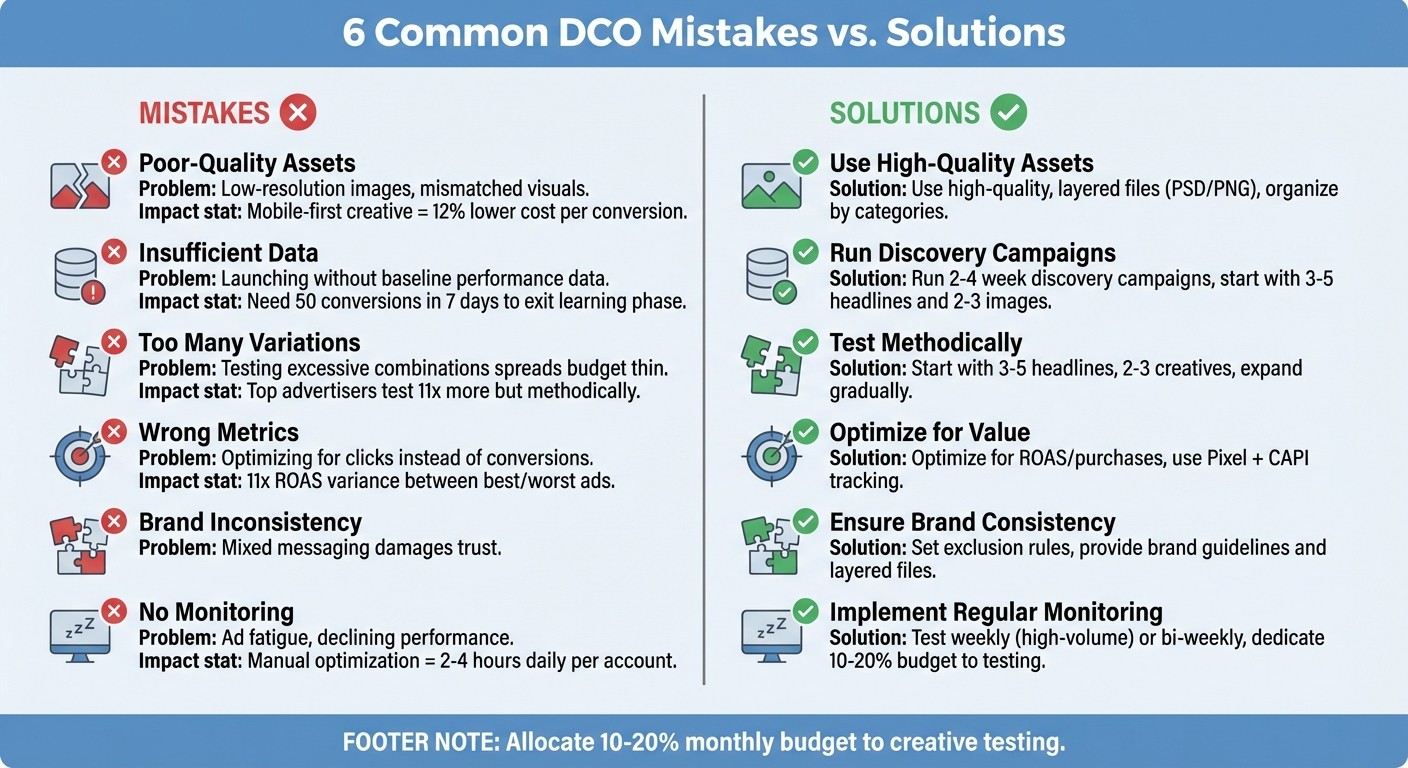
6 Common DCO Mistakes and Solutions for Meta Ads
Executing a successful DCO campaign requires careful planning and adherence to proven strategies. This checklist brings together key insights into a straightforward guide that can help you avoid common pitfalls and maximize your campaign's potential. Often, the difference between a profitable campaign and one that wastes resources lies in following a structured approach. Below, you'll find a table highlighting frequent mistakes and their solutions, followed by a detailed checklist to guide your next campaign launch.
Common Mistakes vs. Solutions
Common Mistake | Impact | Recommended Fix |
|---|---|---|
Mismatched Assets | Confusing ads that fail to connect | Use layered files (PSD/PNG) and conduct manual pre-tests |
Insufficient Data | Poor optimization due to lack of insights | Test with a limited audience to achieve at least 50 conversions in 7 days |
Overcomplexity | Slower learning and weaker performance | Limit to 3–5 headlines and 2–3 creatives per angle |
Step-by-Step Launch Checklist
Set clear goals and match them with Meta Ads ROI metrics.
Define what success looks like for your campaign. Whether aiming for a 3× return on ad spend, a specific cost per acquisition, or another key metric, ensure your goals align with your broader business objectives. Avoid relying solely on default platform metrics; instead, use an ad performance analyzer to gain deeper insights.
Prepare and upload high-quality assets.
Always provide layered files (like PSD or PNG) instead of finalized JPGs. If you lack design resources, you can use a free AI image ad generator to create high-quality assets quickly. Use an "Angle Grid" to organize your creative assets by buyer motivations or behavioral clustering (e.g., Angle A for Pain Relief, Angle B for Social Proof). Ensure your brand and offer are highlighted within the first 3 seconds of any video content.
Start with small-scale testing.
Begin by testing with a small audience to gather at least 50 conversions over 7 days. Keep your tests manageable - avoid running more than six active ads per set to lower creative testing costs and prevent data dilution. At the same time, ensure you have at least three multi-format creative options for the algorithm to optimize effectively. For larger campaigns, consider bulk ad testing with predictive analytics to identify winners faster.
Leverage full-funnel AI optimization for automation and scaling.
Once your setup is validated, let AdAmigo.ai simplify the process. This tool uses its AI Ads Agent to analyze your brand identity, identify top-performing ads, and deploy fully designed creatives with just one click. Its daily AI Actions feed highlights impactful tweaks across creatives, audiences, budgets, and bids, allowing you to approve changes quickly or let the system handle them automatically. This frees up time for agencies to manage more accounts while focusing on strategy.
Conclusion
Dynamic creative optimization can significantly improve Meta ad performance, but only when common pitfalls like mismatched assets, insufficient data, overly complex testing, wrong metrics, inconsistent branding, and poor monitoring are avoided. By steering clear of these missteps, you can create a strong foundation for campaigns that are both scalable and effective.
Studies show that disciplined testing leads to better performance and noticeable ROAS improvements. This success stems from a structured strategy: using high-quality, layered creative assets, collecting enough data before scaling, keeping testing straightforward using a structured testing framework to ensure statistical reliability, and focusing on analyzing Meta ad metrics that reflect real business goals rather than vanity figures. This approach is far more efficient compared to the time-intensive nature of manual optimization.
Manual optimization often requires 2–4 hours daily per account, restricting media buyers to managing just 1–3 accounts. On the other hand, AI-driven platforms like AdAmigo.ai can cut oversight time down to 15–30 minutes per day while enabling management of over 10 accounts. These tools provide 24/7 real-time adjustments and include features like the AI Ads Agent, which auto-generates on-brand creatives, and a daily AI Actions feed that highlights impactful tweaks across creatives, audiences, budgets, and bids.
Think of creative assets as strategic tools rather than just messaging. With clear objectives, methodical testing, and the right automation solutions, diagnosing, stabilizing, and scaling campaign performance becomes much more manageable. Regular monitoring and timely updates to creative assets ensure your campaigns stay competitive as audience preferences and platform algorithms shift.
Start small, test thoughtfully, and focus on building strategies that drive growth.
FAQs
How many DCO variations should I start with?
To kick things off, try creating 3 to 6 Dynamic Creative Optimization (DCO) variations. Testing multiple combinations allows you to pinpoint which elements resonate most with your audience. By analyzing these variations, you can quickly identify the top performers and fine-tune your campaigns for better results.
What conversion volume does DCO need to learn?
Dynamic Creative Optimization (DCO) works best when there's a solid amount of conversion data to analyze and optimize from. To achieve reliable results and effective learning, many experts suggest aiming for at least 50 conversions per week per ad set. This volume gives the system enough data to fine-tune and improve performance.
Which metric should I optimize DCO for?
Optimize your dynamic creative optimization (DCO) efforts by focusing on metrics that match your campaign objectives, like ROAS (Return on Ad Spend), CTR (Click-Through Rate), or conversion rates. These key metrics provide insight into how well your dynamic creatives are performing and whether they’re achieving the results you’re aiming for.