
Top 3 Automation Rules for Frequency Capping
3 automated Meta Ads rules to control ad fatigue: pause high-frequency ad sets, cut budgets on cost spikes, and rotate creatives.
Frequency capping ensures your ads don't overwhelm users, balancing exposure to maintain engagement and control costs. Meta Ads Manager offers automation rules that help manage ad frequency without constant manual intervention. Here’s a quick overview of the top three rules:
Pause Ad Sets When Frequency Is Too High: Automatically stop ad sets when they exceed a set frequency threshold, avoiding ad fatigue and wasted spend.
Send Alerts and Adjust Budgets: Trigger alerts or reduce budgets when both frequency and costs (e.g., CPA) rise, protecting your ROI while allowing fine-tuning.
Switch Ads When Frequency Limits Are Hit: Rotate ad variations to keep content fresh and engaging, preventing performance dips from overexposure.
Each rule helps optimize ad delivery, reduce costs (up to 20% lower CPM), and improve audience experience by addressing ad fatigue early. Tools like AdAmigo.ai go further by automating these strategies with real-time adjustments, saving time and improving efficiency.
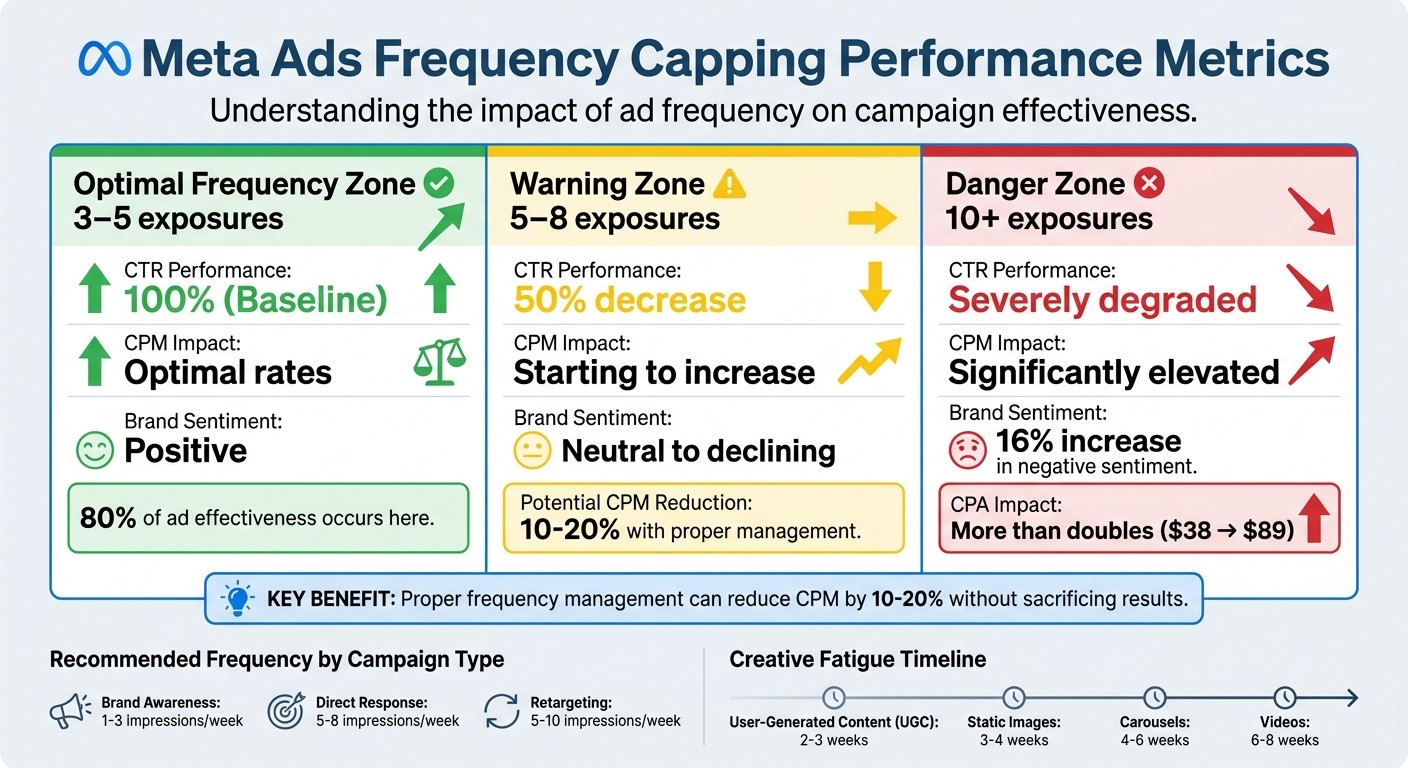
Frequency Capping Impact on Meta Ads Performance Metrics
Facebook Ads Frequency Capping: The Secret to Higher ROI in Just 10 Minutes!
1. Pause Ad Set When Frequency Gets Too High
This is one of the simplest ways to manage ad performance: when an ad set reaches its frequency limit, Meta automatically pauses it. This stops unnecessary spending and helps prevent ad fatigue.
Setting the Right Frequency Threshold
Choosing the right frequency cap depends on your campaign goals:
Brand awareness campaigns: Aim for 1–3 impressions per week to ensure you reach more unique users without overwhelming them.
Direct response campaigns: These can handle 5–8 impressions per week since repeated exposure can encourage action and conversions.
Retargeting campaigns: For users already familiar with your brand, 5–10 impressions per week may work, as these users are more likely to convert.
To set this up in Meta Ads Manager, configure the rule to pause the ad set when frequency exceeds your chosen threshold. Use a 3–7 day timeframe to track consistent patterns. Also, include a minimum impression requirement (e.g., 5,000 impressions) to avoid pausing ads prematurely due to limited data.
This rule works alongside other automated controls to create a balanced approach to ad exposure.
How High Frequency Impacts Performance
When frequency gets too high, performance metrics suffer. Users may start hiding or reporting your ads, signaling to Meta’s algorithm that your ads are causing a negative experience. This can lead to higher CPM and CPC rates, making your campaigns more expensive.
Simple Setup in Meta Ads Manager
Once you’ve determined your frequency threshold, implementing the rule is easy. Meta allows up to 250 automated rules per ad account. Set the rule to run "Continuously", so Meta checks the conditions every 30–60 minutes.
2. Send Alert and Cut Budget When Frequency Rises with Cost Increase
Instead of pausing ad sets entirely, this rule sends you an alert and reduces your budget when both frequency and cost per result spike. This method safeguards your spending while giving you the opportunity to fine-tune your creatives or targeting. Think of it as a safety net that combines early warnings with budget adjustments, allowing you to make more precise campaign changes.
Frequency Threshold Configuration
To maintain efficiency, use a combination of frequency and cost conditions for a more focused response. The best setup involves two conditions connected by "AND" logic: trigger the rule when frequency exceeds 3.0 and CPA (Cost Per Action) rises above CPA (Cost Per Action) rises above $188. Use a 3-to-7-day evaluation window to avoid reacting to short-term fluctuations. For example, if your target CPA is $15, the rule should activate when both thresholds are breached over a five-day period.
For campaigns with higher stakes, start by selecting "Send notification only" when frequency hits 3. This allows you to manually adjust creatives or refine audience targeting before your ROAS (Return on Ad Spend) takes a hit. Once you’re confident in the data patterns, you can switch to automatic budget reductions of 20-50% to protect your ad spend.
Impact on Ad Performance Metrics
This dual-condition rule is designed to safeguard your performance metrics. When frequency and cost rise together, engagement tends to drop sharply. Studies reveal that click-through rates can decrease by 50% after 5-8 exposures to the same creative. Moreover, Meta’s algorithm often interprets lower engagement as a sign of poor ad relevance, which can push up your CPM and CPC benchmarks.
The fallout can escalate quickly. Properly managing frequency can reduce CPM by 10-20% while still delivering results. On the flip side, showing an ad more than 10 times can lead to a 16% increase in negative brand sentiment. By addressing frequency issues when impressions reach 3-4 per week, you can prevent further damage to your ROAS.
"There's no universal 'right' frequency. But there's definitely 'wrong' frequency - and it's almost always higher than advertisers think." - AdBid
Ease of Implementation in Meta Ads Manager

This rule provides a more flexible alternative to outright pausing campaigns by adjusting budgets based on performance. In Meta Ads Manager, go to "Automated Rules" under "All Tools." Create a new rule at the ad set level, and set your conditions: Frequency > 3.0 AND Cost Per Result > your target amount.
Decide on the action you want - either send a notification or reduce the budget by a set percentage. Meta allows you to deploy multiple rules within the same ad account, so you can manage and protect several campaigns at once without interruption.
3. Switch Creatives When Frequency Reaches Set Limit
This strategy builds on pausing and budget adjustment techniques by focusing on keeping your audience engaged through creative rotation.
With this rule, your ad creatives are automatically rotated when frequency hits a specific limit. This allows you to maintain engagement without pausing delivery or slashing budgets. Instead of letting one creative run until its performance drops, you replace it with fresh variations to keep things interesting. To make this work, aim to have 3–5 creative variations ready per ad set for smooth transitions without disrupting your campaign's momentum.
Frequency Threshold Configuration
Set your trigger to switch creatives when the frequency reaches 3.0 over a 7-day period, and ensure impressions exceed 5,000. This prevents false triggers from small sample sizes. For instance, in a direct response campaign, you can configure the rule to deactivate the current ad and activate a backup creative once these conditions are met.
Different types of creatives wear out at different rates. User-generated content (UGC) tends to fatigue in 2–3 weeks, while videos can last 6–8 weeks before showing a 50% drop in CTR. Static images usually hold up for 3–4 weeks, and carousels can perform well for 4–6 weeks. By aligning your rotation schedule with these timelines, you can avoid creative fatigue and stay ahead of performance dips.
Impact on Ad Performance Metrics
Creative fatigue can drive up costs and hurt your return on ad spend (ROAS). Repeated exposure leads to declining click-through rates (CTR), and Meta’s auction system compensates by raising your CPM, further decreasing profitability. For example, when frequency exceeds 13 exposures, CPA can more than double, climbing from $38 at 3–5 exposures to $89 at higher frequency levels.
By rotating creatives before fatigue sets in, you can prevent this performance drop and even lower CPM by 10–20%. Since 80% of an ad’s impact occurs within the first two weekly exposures, refreshing creatives early keeps your campaign in the high-efficiency zone. This approach works hand-in-hand with automated controls to ensure your Meta ads remain optimized.
Ease of Implementation in Meta Ads Manager
Setting up creative rotation in Meta Ads Manager is relatively simple.
You can create automated rules for creative rotation at the ad level, but you’ll need to have backup creatives ready to go. Go to "Automated Rules" under "All Tools" and create a new rule targeting specific ads. Configure the conditions: Frequency > 3.0 AND Impressions > 5,000 over a 7-day period.
For the action, you can select "Send notification only" if you prefer manual control over which creative goes live next. This is a good option for high-stakes campaigns that require oversight. Once you’re confident in your strategy, you can automate the process by setting the rule to pause fatigued ads and activate pre-loaded replacements. Meta Ads Manager supports up to 250 automated rules per ad account, making it easy to scale this strategy across multiple campaigns.
How AdAmigo.ai Automates Frequency Management

Unlike Meta Ads Manager's automated rules, which need manual setup and frequent monitoring, AdAmigo.ai uses adaptive AI that reacts to real-time performance. This AI Autopilot checks campaigns multiple times per hour, catching frequency spikes and performance dips before they drain your budget.
AdAmigo.ai's continuous monitoring ensures all frequency strategies work smoothly. For example, when frequency rises and CTR drops, underperforming ads are paused. Budget adjustments are handled intelligently - high-performing ads are typically scaled by 15–20%, while ad sets exceeding your CPA targets are paused automatically. Creative rotation is managed through the Bulk Ad Launcher, which rotates creatives automatically. As frequency increases, the AI disables weaker creatives, ensuring only the top performers remain active.
Instead of stopping an ad just because it hits a frequency cap, AdAmigo.ai assesses real-time metrics like ROAS, CTR, and conversion rates. This prevents the mistake of pausing ads that are still profitable despite higher frequency. The platform also provides detailed explanations for each action, so you always know why a budget was adjusted or a creative was rotated.
By automating tasks like pausing ads, adjusting budgets, and rotating creatives, AdAmigo.ai aligns perfectly with top frequency-capping strategies. For agencies juggling multiple clients, the platform analyzes patterns across all accounts, refining strategies using broader market trends. Advertisers using this automation save 10–20 hours of manual work each week, freeing up media buyers to focus on strategy while the AI takes care of execution. This advanced system builds on Meta Ads Manager's rules, offering a smarter and more hands-off way to manage frequency.
Feature | Meta Ads Manager Automation | AdAmigo.ai |
|---|---|---|
Logic Type | Basic conditional (if-then) logic | AI-driven, adaptive logic |
Monitoring Frequency | Scheduled checks (hourly at best) | Multiple times per hour, 24/7 |
Often disrupts with static rules | Distinguishes learning from underperformance | |
Creative Management | Manual rotation setup required | Automated bulk testing and pausing |
Decision Basis | Fixed thresholds only | Real-time ROAS, CTR, and conversion data |
Rule Limit | Maximum 250 rules per account | No rule limits |
Conclusion
Automation rules are a safeguard for your budget, especially when it comes to avoiding ad overexposure - a major risk for any campaign. Why does this matter? Because excessive ad exposure can tank your performance metrics. For example, click-through rates (CTR) drop by 50% after 5–8 impressions, while negative sentiment spikes by 16% after 10+ exposures. Meanwhile, 80% of an ad's effectiveness happens within the sweet spot of 3–5 exposures.
A good starting point is to pause ad sets when frequency and costs exceed the ideal range. From there, you can introduce budget adjustments and rotate creatives. Testing is critical to finding the balance that maximizes conversions while keeping your cost per acquisition (CPA) low. In fact, frequency capping done right can lower CPM by 10–20% without sacrificing results. This layered strategy ensures your campaigns stay efficient and deliver optimal performance.
For advertisers handling multiple campaigns or juggling several client accounts, keeping up manually is nearly impossible. That’s where automation tools like AdAmigo.ai come in. These platforms can save you 10–20 hours a week by continuously monitoring frequency, catching performance dips early, and making real-time adjustments. They can pause underperforming ads, tweak budgets, and rotate creatives automatically - essentially acting as a 24/7 assistant that executes your strategy without missing a beat.
Whether you’re using Meta Ads Manager or an AI-driven platform, automation enables faster and more precise campaign adjustments. Human reaction times simply can’t compete - the difference between a profitable and unprofitable campaign often hinges on how quickly you can cut underperformers and scale winners. Automated frequency capping is your best tool for maintaining the perfect balance of ad exposure, ensuring your Meta campaigns run efficiently and effectively.
FAQs
What frequency cap should I use for my campaign type?
The right frequency cap varies based on your campaign goals and target audience. Studies indicate that showing ads more than 10 times per user per week can lead to ad fatigue, ultimately reducing your return on investment (ROI). To strike a balance, aim for 2-5 impressions per user per week. This range helps you maintain audience engagement without overwhelming them.
How can I avoid pausing a profitable ad set?
Automated rules can be a game-changer for managing ad performance. By setting specific profitability thresholds, you can ensure ads are paused only when their performance dips below acceptable levels. This helps you maintain control without constantly monitoring every campaign manually.
Audience segmentation is another key tactic. Applying tailored frequency caps prevents overexposing your audience to the same ads, which could lead to diminishing returns or ad fatigue. Meta's Target Frequency feature is particularly useful here. It allows you to manage how often users see your ads, ensuring exposure stays within an optimal range. This way, as long as your ads meet the set performance benchmarks, they remain active without unnecessary interruptions.
When should I rotate creatives instead of cutting budget?
When your ads start to lose their impact - signaled by things like lower engagement or rising costs, often after 5-8 exposures - it’s time to switch things up. Instead of slashing your budget, try rotating in fresh creatives. New visuals or messaging can grab your audience's attention again and boost performance, making this approach far more effective than simply cutting spending.