
AdAmigo.ai Launches Dark Mode and Vibe Mode for a Cleaner Meta Ads Experience
Adds Light, Dark and Vibe display modes to streamline Meta ad management for day, night and focused workflows.
AdAmigo.ai introduces Light Mode, Dark Mode, and Vibe Mode to improve how users manage Meta ads. Each mode is tailored to different work environments and tasks:
Light Mode: Best for daytime use with a bright, high-contrast interface.
Dark Mode: Ideal for low-light settings, reducing eye strain during long work hours.
Vibe Mode: Offers a calm, polished design for focused, high-level tasks.
Switching between modes is quick and can be done via the profile menu or settings. These updates aim to make ad management more comfortable and efficient, whether you're analyzing data, reviewing AI recommendations, or handling daily tasks.
AdAmigo.ai's Three Interface Modes

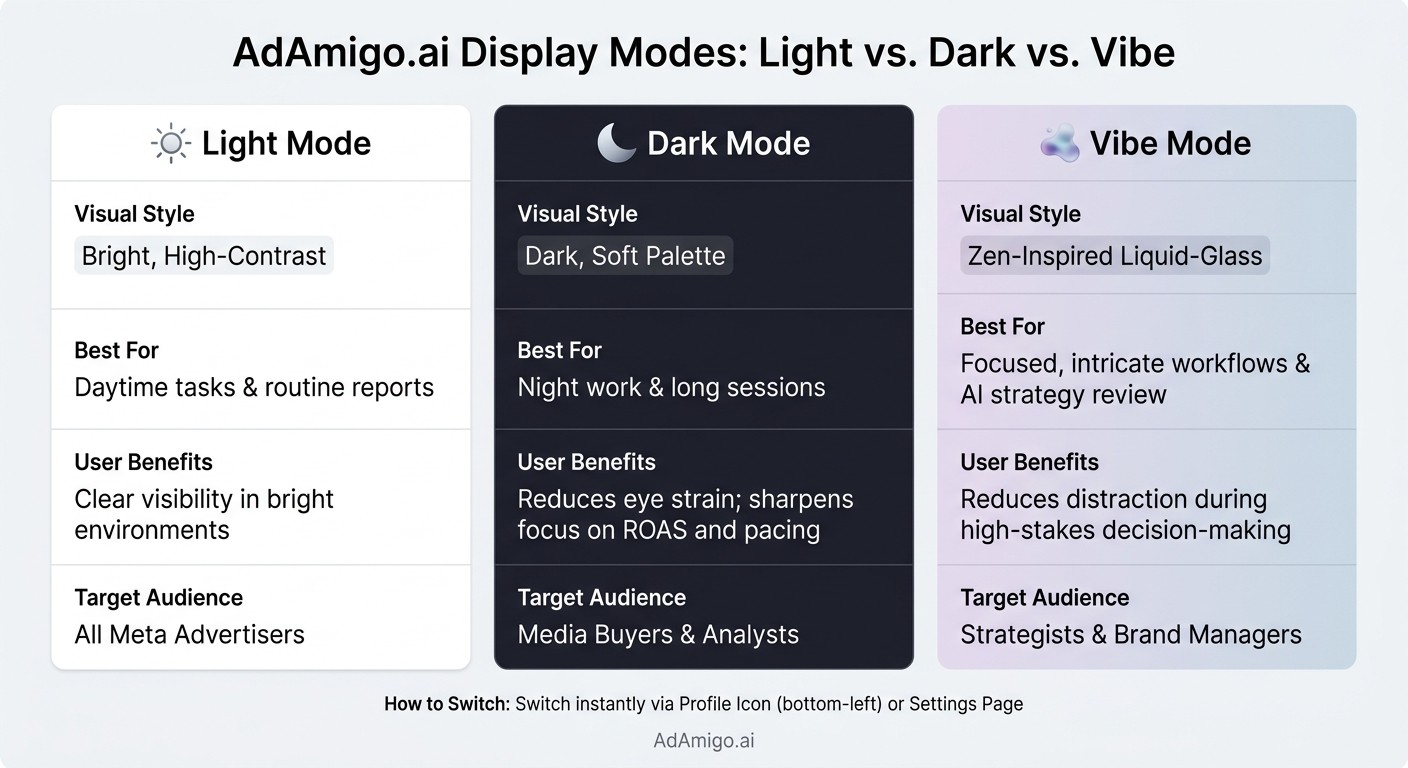
AdAmigo.ai Display Modes: Light vs Dark vs Vibe Mode Compared
AdAmigo.ai now provides three distinct display modes, each designed to suit different work settings. Whether you're managing Meta ads during the day, late at night, or tackling intricate tasks, these modes aim to keep your workflow smooth and efficient.
Light Mode: The Standard Interface
Light Mode is the go-to option for bright environments, such as a typical office or a workspace flooded with natural light. Its crisp, high-contrast design is perfect for everyday tasks like reviewing metrics, checking daily reports, or monitoring performance trends. If you're working during daylight hours, this mode ensures clarity and ease of use.
Dark Mode: Low-Light Display Option
Dark Mode comes with a muted color scheme designed to reduce eye strain, especially in dimly lit settings. It's a lifesaver for evening sessions or when you're spending long hours managing multiple Meta ad accounts. The softer palette helps create a more comfortable experience during extended use.
Vibe Mode: A Calm, Premium Display Style
Vibe Mode offers a sleek, Zen-inspired liquid-glass aesthetic, perfect for tackling high-focus tasks. Whether you're navigating AI-driven optimization tools or analyzing detailed performance data, this mode is crafted to make complex workflows feel less overwhelming and more engaging.
Mode | Best For | Visual Style |
|---|---|---|
Light Mode | Daytime tasks, routine reports | Bright, high-contrast |
Dark Mode | Night work, long sessions | Dark, soft palette |
Vibe Mode | Focused, intricate workflows | Zen-inspired liquid-glass |
Dark Mode and Vibe Mode: A Closer Look
Dark Mode: Built for Long Work Sessions
Late-night ad audits can take a toll on your eyes. Dark Mode tackles this by replacing the usual bright interface with a high-contrast, low-light display. This setup helps reduce eye strain, especially during those long hours spent crunching numbers.
Whether you’re tracking ROAS trends, analyzing budget pacing, or juggling multiple campaigns, Dark Mode is a lifesaver. It’s particularly useful for media buyers who often work late or dive deep into reporting cycles. By easing screen fatigue, it helps you stay focused and productive during extended work sessions. On the flip side, when decisions get more strategic, AdAmigo.ai offers another solution.
Vibe Mode: A Relaxed Interface for Complex Tasks
Vibe Mode takes a different approach. Its liquid-glass-inspired aesthetic creates a calm, polished environment that minimizes distractions - perfect for tackling complex decisions. Whether you’re reviewing AI recommendations, interpreting performance changes, or setting strategic goals, Vibe Mode is designed to keep your focus sharp.
This mode shines when paired with AdAmigo's AI tools. The platform’s AI agents typically deliver a 25%+ boost in performance across managed accounts, while its AI-powered creative tools drive an average 42% increase in results. These kinds of insights demand your full attention, and Vibe Mode provides the ideal environment to make informed decisions.
"AI recommendations are spot-on... It's like having an extra set of super-smart hands helping me hit my KPIs." - Sherwin S., G2 Reviewer
Mode Comparison: Light vs. Dark vs. Vibe
Here’s a quick breakdown of how each mode stacks up:
Mode | Visual Style | Best Use Case | User Benefits | Target Audience |
|---|---|---|---|---|
Light Mode | Standard, high-clarity interface | General daily ad management | Clear visibility in bright environments | All Meta advertisers |
Dark Mode | Low-light, high-contrast display | Long work sessions and metric auditing | Reduces eye strain; sharpens focus on ROAS and pacing | Media buyers and analysts |
Vibe Mode | Calm, muted, premium aesthetic | Complex analysis and AI strategy review | Reduces distraction during high-stakes decision-making | Strategists and brand managers |
How to Switch Between Display Modes
Changing the display mode in AdAmigo.ai is quick and easy. You’ve got two simple ways to do it, and both are designed to save you time.
Switching Modes from the Profile Menu
Tap the profile icon located in the bottom-left corner of the app. From there, you can toggle between Light, Dark, and Vibe Modes instantly. This is perfect for those moments when you need to switch fast - like jumping into Dark Mode for a late-night work session.
Switching Modes from Settings
Head over to the Settings page if you want to set your display mode as part of your overall account preferences. This is a great option for customizing your experience with our flexible pricing plans.
"The goal was simple: Make AdAmigo easier to use, easier to navigate, and even more enjoyable for modern Meta advertisers and agencies operating at speed." This efficiency allows agencies to manage more clients with less effort. - AdAmigo.ai
Whichever method you choose, the changes take effect instantly across the app.
How the New Modes Affect Meta Ads Workflows
The display mode you choose in AdAmigo.ai directly shapes how you manage your Meta ads workflow.
Let’s break down how these interface modes are designed to simplify your ad management process.
Streamlined Layouts for Everyday Ad Management
All three modes - Light Mode, Dark Mode, and Vibe Mode - offer a clean and uncluttered interface, making daily tasks like adjusting bids and budgets straightforward and efficient.
Light Mode works best for quick daytime tasks, like checking budgets or making small adjustments.
Dark Mode is tailored for longer work sessions, reducing eye strain during extended hours.
Vibe Mode minimizes distractions, creating a calm space for strategic decisions, such as setting brand guidelines or reviewing AI-generated creative ideas in Ad Factory.
Each mode ensures you can focus on what matters most, no matter the task or time of day.
Enhanced Focus for Optimization and Reporting
When analyzing reports or reviewing AI actions, visual distractions can hinder your focus. That’s where the thoughtful design of these modes shines:
Dark Mode uses a low-contrast layout to help you stay focused during long data reviews.
Vibe Mode offers a sleek, liquid-glass aesthetic that creates a distraction-free environment, perfect for diving into AI action justifications.
AdAmigo.ai’s AI-driven workflows complement these modes, making it easier to track performance and optimize your Meta ads ROI.
Matching Modes to Workflow Tasks
Each mode is naturally suited to specific tasks, giving you the flexibility to adapt to your workflow needs:
Workflow Task | Light Mode | Dark Mode | Vibe Mode |
|---|---|---|---|
Daily Ad Management | Quick daily adjustments | Late-night tweaks | Strategic audience planning |
Optimization & Reporting | Standard reporting views | In-depth data analysis | Reviewing AI justifications |
Creative Review | Quick ad approvals | Low-glare asset reviews | Premium view for Ad Factory walls |
Bulk Ad Launching | Fast, standard setup | Monitoring large-scale deployments | Strategic briefs and Vibe Brief setups |
There’s no one-size-fits-all solution here. The ability to switch modes instantly means you can match your workspace to the task at hand. Whether it’s a quick morning check-in with Light Mode or a focused reporting session in Dark Mode, AdAmigo.ai’s modes are designed to keep your workflow efficient and intuitive.
Conclusion: Cleaner Design for Better Meta Ads Management
Ad management just got simpler and more user-friendly with three tailored modes to suit your workflow. Whether you prefer Light Mode, Dark Mode, or the more relaxed Vibe Mode, AdAmigo.ai ensures your workspace aligns with your schedule - whether you're tackling a quick morning review or diving into late-night campaign tweaks. These enhancements are all about creating a workspace that supports your focus and efficiency.
The updated interface offers a soothing design, making it easier to concentrate on high-level strategic decisions.
Meanwhile, AdAmigo.ai's AI agents take care of optimizing budgets and creative strategies, freeing you up to plan and strategize with greater clarity.
FAQs
Does switching modes affect my campaign data or settings?
Switching between Light Mode, Dark Mode, and Vibe Mode in AdAmigo.ai only affects the platform's visual design. These modes are created to improve your user experience but don't impact your campaign data, optimization processes, or account settings. No matter which design mode you prefer, your campaigns stay exactly as they are.
Can I set a default mode for my account?
You can customize your display preferences by heading to your profile in the bottom-left corner or navigating to your account settings. With AdAmigo.ai, you can select from Light Mode, Dark Mode, or the newly introduced Vibe Mode to tailor your interface and make managing Meta ads more enjoyable.
Will Dark Mode and Vibe Mode affect performance or loading speed?
There’s no evidence suggesting that Dark Mode or Vibe Mode affect an app’s performance or loading times. These features are purely designed to improve the visual experience while ensuring the app’s functionality remains intact.