
Scaling Ads with Geographic Segmentation
Scale Meta ads by measuring region performance, grouping geos by ROI, and reallocating budget slowly with automation and controls.
If you scale Meta ads by only adding budget, performance can slip fast. I’d use location data first, then put more spend into the regions that hit target CPA or ROAS, and cut back where results miss.
Here’s the short version:
I check country, state, DMA, city, or ZIP results in Meta’s Breakdown view
I wait for enough data before making changes
I group regions into winning, growth, and weak tiers
I keep markets grouped if they can’t hit about 50 conversions per ad set per week
I scale slowly: about 10%–20% at a time
I avoid moving more than 25% of a region’s budget in one week
I split out a region only when it has enough volume to stand on its own
I use margin, shipping cost, and LTV - not just CPA - before shifting spend
A few points matter most.
First, the same campaign can produce a 3x ROAS on average while one region sits at 0.8x and another at 5x. If I only look at account-level numbers, I miss that.
Second, Meta’s system often sends more spend into lower-cost areas. That may help delivery, but it can also leave stronger markets underfunded.
Third, account structure matters. If I split geographies too far too soon, ad sets may get stuck in learning. That’s why broader groups often work better at lower spend, especially under about $50,000/month per country.
Here’s the core decision:
Setup | Best for | Tradeoff |
|---|---|---|
Consolidated regions | Faster learning and simpler account control | Less control over where spend goes |
Region-specific campaigns | Tighter budget control by market | More work and slower learning per segment |
I’d also keep location settings tight:
Use People living in this location for local service businesses
Turn off Location Expansion during testing
Exclude areas with poor unit economics, such as high shipping-cost states when needed
Watch for traffic showing outside target areas
And if I want this process to run on a set cadence, I can automate geo checks, alerts, and budget shifts so weak regions stop wasting spend and strong ones get room to grow.
That’s the whole play: measure each region cleanly, group markets by performance, and scale the winners without forcing budget across every location at once.
Prepare your Meta account for geographic scaling
Fix tracking and reporting before splitting geographies
Before you split campaigns by geography, make sure your conversion tracking is stable enough to support budget calls. If the data is shaky, your location reports will be shaky too.
Use Meta Ads Manager’s Breakdown feature to view results by country, region, state, DMA, city, or ZIP code. Then give each location enough spend before you act. Tiny samples can point you in the wrong direction fast.
Also watch for location creep. This happens when ads show outside your target areas because of IP routing or recent travel. The Location breakdown can help you spot that.
Once the location data looks dependable, set up campaigns in a way that lets Meta learn from each region without muddying the picture.
Set up a campaign structure that supports geographic testing
Clean reports only help if your campaign structure can separate regions without slicing the data too thin. One of the most common mistakes is breaking geographies into too many ad sets too early.
Meta’s algorithm needs about 50 conversion events per ad set per week to exit the learning phase. If you split out a bunch of low-volume regions, those ad sets can get stuck in learning and struggle to optimize.
A simple way to handle this is to group geographies into tiers based on value and CPM benchmarks by country. That helps protect your best markets from losing budget to weaker ones. For example, you might keep the US, UK, Canada, and Australia in one tier, then place lower-priority markets in a separate tier.
During testing, use strict location settings:
Disable Location Expansion
Use People living in this location for service businesses
For e-commerce, exclude high-shipping-cost areas like Alaska and Hawaii
After the structure is set, the next step is making the checks repeatable so geo testing doesn’t stall.
Where AdAmigo.ai fits into geo-based account setup

AdAmigo.ai can automate geo-level audits, budget shifts, and underperformance checks through Meta’s API, with approval or autopilot execution.
Build geographic segments you can scale
Find winning, growth, and weak regions from your data
Once your structure is in place, group locations into tiers you can scale.
In Meta Ads Manager, open the Breakdown view and split results by region or DMA. Then look at ROAS, CPA, and conversion volume together. Don’t lean on just one number. Breakdown should help you make decisions, not make them for you. Only act when a region has enough spend and volume to mean something.
Here’s the basic read:
Winners: regions where ROAS beats your target and CPA stays under break-even. These are ready to scale on their own.
Growth markets: regions with strong ROAS but not enough volume to judge with much confidence. Give them more budget and see if results hold.
Weak regions: regions that drag down blended performance. These may need lower priority, exclusion, or a closer look for a creative mismatch.
Put most of your spend behind the strongest tier. Keep weaker regions on a shorter leash until they earn more budget.
Those tiers set up the budget moves in the next step.
Choose the right geographic level for your budget and data volume
The geographic level you pick has a direct effect on how fast Meta’s algorithm learns. If you go too narrow too soon, you can spread volume so thin that ad sets never get enough data.
Three rules handle most cases:
Country: best for broad scaling and the fastest learning.
State/DMA: a good middle ground between control and volume.
City/ZIP: best for high-volume accounts that can support learning.
If a geo can’t drive enough volume by itself, roll it into a broader market. Then use exclusions to cut out cities or ZIP codes that stay weak inside a broader state campaign.
Note: If your campaigns fall under housing, employment, or credit, U.S. anti-discrimination laws prohibit ZIP code targeting and certain demographic filters.
Mirror geographic segments across prospecting and retargeting
Use the same geo tiers for both prospecting and retargeting so performance stays easy to compare. If a region is too small to support its own ad set, group it with a nearby market that behaves in a similar way. Keep localized variants limited within each geo tier so delivery doesn’t get messy.
Once those tiers are set, use them to move budget into the best regions without splitting volume too thin. With the structure in place, you can shift spend toward the strongest markets without resetting performance.
Facebook Ads Location Targeting Explained || Country, City, Radius & Pin Drop Targeting
Optimize budgets and scale winning geographies
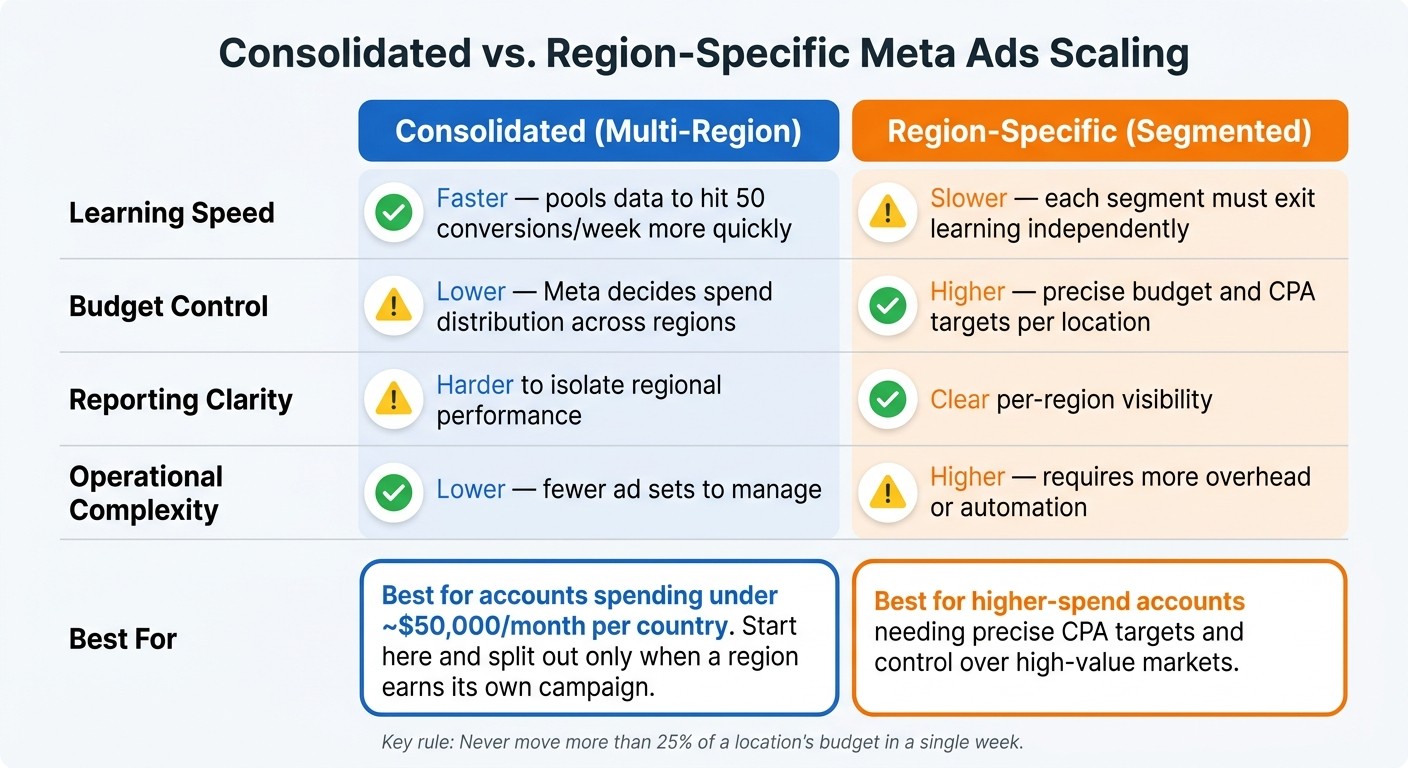
Consolidated vs. Region-Specific Meta Ads Scaling: Which Setup Is Right for You?
Read geographic performance using the right metrics
Use your winning, growth, and weak tiers to decide where budget should go next. Look at CPA, ROAS, and purchase volume together. One metric on its own can point you in the wrong direction.
CPA is a good example. A region can show a low CPA and still lose money if shipping to places like Alaska or Hawaii eats up your margin. On the other hand, a region with a higher CPA might still be one of your best markets if LTV is stronger or customers there spend more over time. That's why margin, shipping cost, and LTV need to be part of the decision.
Location-level results help you spot which regions can handle more spend without efficiency falling apart. That's the signal for where to add budget next.
Increase spend on winning regions without resetting performance
Once a region clears your volume threshold, scale with a light touch. If a region is clearly beating your goal - CPA at least 20% below target at stable volume - it's in good shape for a budget increase. A cautious move is to increase spend by 10–20% every two to four weeks.
Push too hard, and performance can wobble. Fast changes may reset the learning phase and send CPAs up for several days. Also, don't move more than 25% of a location's budget in a single week.
If one city or DMA is doing much better than the rest, it may deserve its own campaign. That gives you room to scale it on its own instead of forcing it to share budget with weaker areas.
On the other side, cut or trim spend where CPA is 30% or more above target. Weak regions can quietly burn cash while stronger ones sit capped.
Consolidated vs. region-specific scaling: a side-by-side comparison
Use this split to decide when to keep regions grouped and when to break them out.
Feature | Consolidated (Multi-Region) | Region-Specific (Segmented) |
|---|---|---|
Learning speed | Faster - aggregates data to hit 50 conversions/week more quickly | Slower - each segment must exit learning independently |
Budget control | Lower - Meta decides spend distribution across regions | Higher - precise budget and CPA targets per location |
Reporting clarity | Harder to isolate regional performance | Clear per-region visibility |
Operational complexity | Lower - fewer ad sets to manage | Higher - requires more overhead or automation |
Match the setup to the amount of volume each region can support. If you're spending under about $50,000 per month per country, start with a consolidated setup and split regions out only when one has enough volume to earn its own campaign. At higher spend levels, region-specific campaigns give you more control over high-value markets and let you set CPA goals by location.
Automate geographic segmentation and keep improving
Build a repeatable geographic optimization workflow
Once you know which regions are winning, set up a simple review rhythm so your scaling stays steady. Review high-spend accounts every week, and check lower-spend accounts every two weeks.
Start with location performance. Then make sure the pattern still holds at the country, state, city, or ZIP level before you change budgets. If a market has fewer than 50 monthly conversions, group it with similar nearby regions until the data is strong enough to act on.
Use automation to monitor, test, and protect spend by region
Once your geo tiers are in place, automation helps keep those rules running without constant manual work. A full cross-region performance review usually takes 2–3 hours per week. With AI automation, that same review takes about 2 minutes.
The biggest time-savers are pretty straightforward:
Syncing performance data
Flagging anomalies
Pausing regions where CPA goes past your limit
Showing which markets are ready for more budget
AdAmigo.ai fits right into this process. It keeps auditing your Meta ad account, makes geo-level budget changes on its own, or holds those changes until you approve them.
One rule is worth hardcoding into any setup: never move more than 25% of a location's budget in a single week. That cap helps protect the learning phase and keeps performance steadier while you scale.
Conclusion: Scale by location, not just by raising budget
Use actual conversion data to build geographic segments. Then scale winning regions with care and let automation keep the process on track. The goal isn't just to spend more. It's to put more budget where it has the best shot to work.
FAQs
When should I split regions into separate campaigns?
Split regions into separate campaigns when you need independent budget control, specific CPA goals, or when major economic gaps cause Meta to underdeliver in higher-value markets.
This setup also makes it easier to isolate proven winning segments and scale them on their own.
If you're covering hundreds of locations, a dynamic inventory catalog may be a better option than manually building thousands of ad sets.
AdAmigo.ai can help audit segments and optimize budgets.
How much data do I need before changing geo budgets?
Before changing budgets for geographic segments, make sure the campaign has exited Meta’s learning phase. In most cases, that means about 50 conversions in the past 7 days.
You’ll also want to see steady performance for 3–5 days, with cost per result at or below your target. Once those numbers look steady, scale slowly. A good rule is to increase budgets by 10%–20% every 2–3 days.
What metrics matter beyond CPA and ROAS?
Beyond CPA and ROAS, keep an eye on metrics that show the bigger picture and highlight regional differences:
Conversion rate and CTR
AOV and CLV by location
CPM, engagement rate, and conversion volume
These metrics help you judge profitability, spot rising competition, and see how well your creative performs in specific regions.