
Manus AI for Reporting: The Best Reports to Generate Weekly (and What to Do After)
Automate weekly Meta Ads reports with Manus AI—audience, creative, budget, ROAS and placement insights plus clear steps to scale, refresh, or reallocate.
Manus AI simplifies reporting for Meta ads by automating weekly data analysis, saving you hours and providing actionable insights. Since its integration into Meta Ads Manager in February 2026, it has become a powerful tool for identifying audience performance, improving ad creatives, and optimizing budgets. Here’s what you need to know:
Automated Reports: Generate weekly summaries, ROAS analysis, and creative performance reviews with simple prompts.
Top Reports to Use: Audience Performance, Ad Creative Analysis, Budget Allocation Efficiency, Campaign ROAS, and Placement Reports.
Key Features: Detect audience saturation, flag underperforming creatives, and track budget efficiency to improve results.
What to Do After: Scale high-performing campaigns, refresh fatigued ads, and reallocate budgets based on Manus AI recommendations.
Manus AI works seamlessly within Meta Ads Manager, but always verify its outputs with Ads Manager data for accuracy. This tool helps you focus on decision-making while automating tedious reporting tasks.
How to Access and Set Up Manus AI for Weekly Reports
Finding Manus AI in Meta Ads Manager
You’ll find Manus AI nestled in the Tools menu within Meta Ads Manager. It’s usually located between "Instant Forms" and "Media Library." Alternatively, you can access it through Meta Business Suite by navigating to: All Tools > Engage Audience > Business AI Beta. Keep in mind that the rollout is still happening in phases as of February 2026. Depending on your account, you might encounter in-stream prompts or pop-up alerts encouraging you to activate it.
Once you click into Manus AI, you’ll need to authorize data access permissions. This step allows the tool to read essential campaign performance metrics, like spend, conversions, and ROAS, without requiring manual exports. After completing this one-time setup, you’re ready to configure automated weekly reports for consistent, actionable insights.
Configuring Weekly Reports
After setting up access, configuring your weekly reports is straightforward. Use natural language prompts to define your report schedule. For example, you can enter something like: "Every Monday at 8:00 AM, generate a performance summary of all active campaigns from the past week". Manus AI understands prompts that include timeframe, metrics, and delivery preferences, similar to how other AI tools for Meta Ads handle complex automation tasks. Another example might be: "Every Friday at 5:00 PM, email me a ROAS and CPC analysis for the last 7 days".
You can choose how you want the reports delivered - options include email, Slack, Google Drive, or a spreadsheet. The scheduled tasks will follow your account’s timezone, which you can adjust under Settings > Scheduled Tasks. Before finalizing the schedule, it’s a good idea to manually run the task once to ensure the report looks exactly how you want it.
Schedule Type | Example Prompt | Use Case |
|---|---|---|
Daily | "Every day at 9:00 AM" | Keep track of daily spend and impressions |
Weekly | "Every Monday at 8:00 AM" | Get a summary of weekly performance and ROAS |
Monthly | "On the 1st at 9:00 AM" | Review executive summaries and billing data |
Custom | "Every Friday at 5:00 PM" | monitor competitor trends and test new creatives |
5 Weekly Reports to Generate with Manus AI
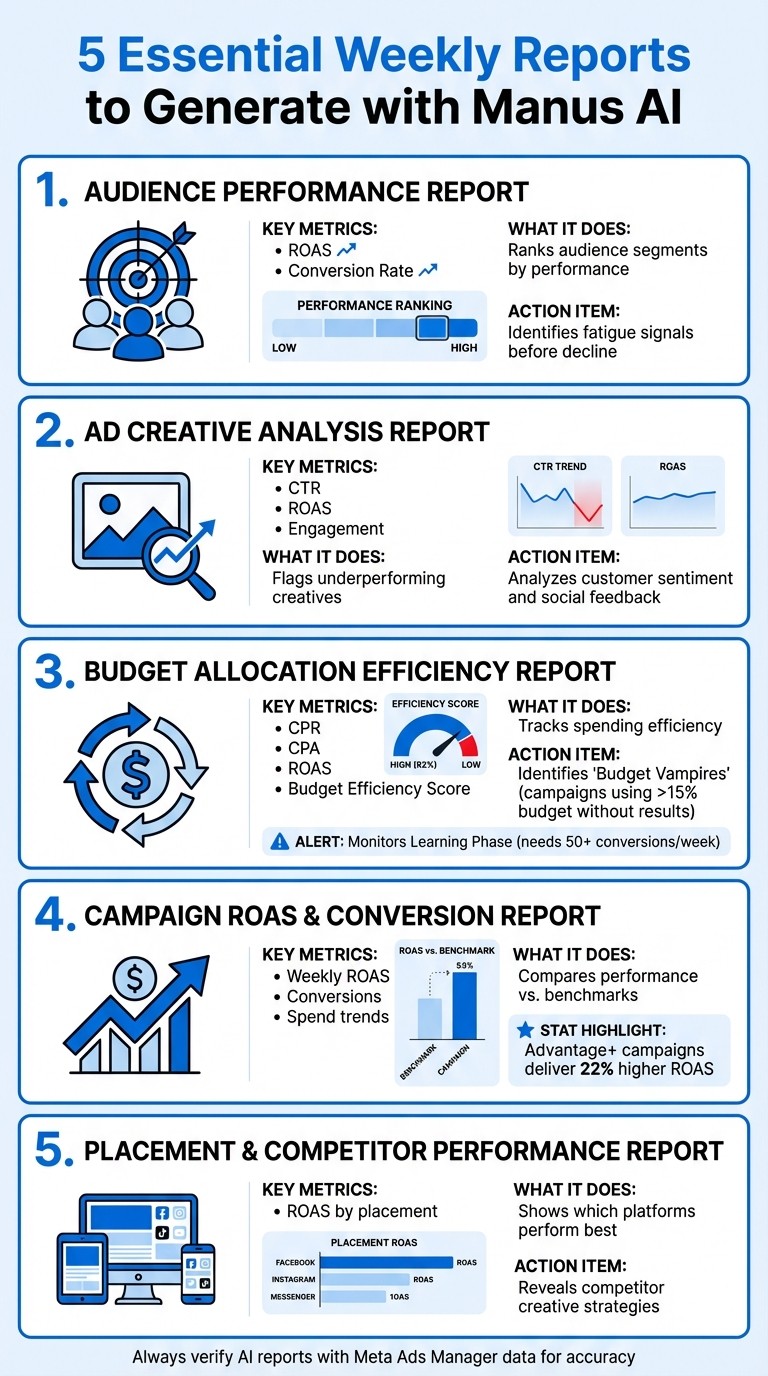
5 Essential Weekly Reports to Generate with Manus AI for Meta Ads
These reports provide clarity on what’s working and what’s not in your Meta ad campaigns. Each one focuses on a specific performance area, helping you make informed decisions based on actual data.
Audience Performance Report
This report dives into how different audience segments perform across demographics, interests, behaviors, and lookalike categories. Manus AI ranks these segments by ROAS and conversion rate, highlighting shared traits among top converters through behavioral clustering. For example, you can "analyze all audience segments from the last 90 days and identify the top 10 by conversion rate, including demographic breakdowns".
The AI also monitors fatigue signals before performance declines, giving you time to refresh creatives or expand targeting. Using probability models, it scores segments based on their likelihood to convert and their long-term value. When emerging high-performing segments are identified, you can immediately reallocate budget to capitalize on momentum without waiting for manual reviews. Always cross-check with Ads Manager data to ensure the AI aligns with your industry-specific metrics.
Ad Creative Analysis Report
This report flags underperforming or fatigued creatives using metrics like CTR, ROAS, and engagement data. Manus AI also analyzes customer sentiment and social feedback to pinpoint why certain creatives aren’t connecting.
When issues arise, you can use features like "Product image enhancement" to upgrade raw product photos or the "Instagram Ads generator" to quickly create engaging new variations. The "Design View" tool allows you to edit visuals and layouts with simple natural language prompts, skipping traditional design software. Additionally, running a "Competitive Analysis" task helps you track what’s working for competitors and adapt those creative elements to your campaigns.
Budget Allocation Efficiency Report
This report tracks how efficiently your budget is being spent, covering metrics like total spend, spend velocity, and delivery consistency. It ties spending to business outcomes using metrics like Cost Per Result (CPR), Cost Per Acquisition (CPA), and ROAS. The Budget Efficiency Score (conversions divided by spend) helps you monitor week-over-week improvements.
The report also monitors ad sets in the Learning Phase to avoid "Learning Limited" statuses, which occur when there’s insufficient data for optimization. Meta typically requires 50 optimization events per week per ad set to exit this phase. Additionally, it tracks frequency levels to prevent overexposure, as performance often drops when frequency exceeds 3.0 to 4.0.
Metric | Purpose | Optimization Action |
|---|---|---|
Spend Velocity | Tracks budget usage rate | Adjust daily limits if budget runs out early |
CPA Trends | Monitors cost per acquisition | Investigate audience saturation or creative fatigue if costs rise |
Frequency | Measures ad repetition | If above 3.0 with declining CTR, refresh creatives or expand targeting |
ROAS | Tracks profitability | Increase budgets by 20% if ROAS exceeds targets by 25% |
Learning % | Tracks algorithm stability | Consolidate ad sets if too much budget remains in the learning phase |
The report also identifies "Budget Vampires" - campaigns consuming over 15% of the total budget without delivering strong results. Automated rules in Ads Manager can reduce budgets by 20% if ROAS falls 25% below target for two consecutive days. If "Learning Limited" status appears, consolidating ad sets or broadening targeting can help meet the 50-conversion weekly threshold.
Campaign ROAS and Conversion Report
Building on budget insights, this report provides a snapshot of weekly ROAS, conversions, and spend trends. It highlights which campaigns are profitable and which are wasting budget, helping you compare performance against benchmarks and spot growth opportunities.
Meta’s Advantage+ campaigns, which use advanced AI automation, often deliver about 22% higher ROAS than manually managed campaigns. For campaigns consistently outperforming your target CPA by 20% over three consecutive days, increase their budget by 20%. On the flip side, pause campaigns that spend twice the target CPA without generating conversions within 48 hours.
Placement and Competitor Performance Report
This report refines your placement strategies and provides competitor insights. It breaks down performance by placement (e.g., Facebook Feed, Instagram Stories, Reels) and shows which platforms and formats drive the best ROAS. The competitive analysis feature reveals what your competitors are posting and which creative elements are currently working.
Use this data to adjust your placement strategy. For instance, if Instagram Reels consistently outperforms Facebook Feed, shift more budget toward Reels. Competitor insights can also help you anticipate trends and address gaps in your creative approach before they impact performance.
How to Read and Verify Manus AI Reports
Manus AI pulls its data directly from Meta Ads Manager, similar to other AI tools for Meta ad account analysis. However, discrepancies can sometimes arise due to formatting issues, mismatched date ranges, or variations in the prompts provided. It's crucial to double-check the data before making any budget-related decisions.
Reading Reports in US Formats
When requesting reports from Manus AI, it's important to specify formatting preferences in your prompt to ensure the data aligns with US standards. For instance, you might include instructions like: "Format all currency as USD ($1,234.56) and all dates as MM/DD/YYYY". This ensures clarity when reviewing financial figures or scheduling updates.
After receiving the report, confirm that the currency is displayed as USD (e.g., $12,345.67) and dates follow the MM/DD/YYYY format. If the formatting isn't correct, refine your prompt and regenerate the report. Once you’ve fine-tuned a prompt that consistently produces accurate formatting, save it for future use to streamline weekly reporting.
Once the formatting is verified, the next step is to cross-check the data with Meta Ads Manager.
Checking Data Against Meta Ads Manager
To ensure accuracy, compare the AI-reported metrics directly with data in Meta Ads Manager. Start by navigating to Meta Ads Manager > All Tools > Analyze and Report > Ads Reporting. Select the same date range as in the AI report and use the "Customize columns" feature to display key metrics like ROAS, CPC, and conversion rates. Cross-check these totals carefully. If you notice any major differences or anomalies, check whether Meta is using modeled conversions (statistical estimates for incomplete tracking data) or actual tracked events.
For more detailed insights, such as demographic or placement breakdowns, click the "Breakdown" icon in Ads Manager and select "By Delivery." This will show performance metrics by variables like age, gender, country, or ad placement. Compare these breakdowns with the AI-generated audience insights. Additionally, review the Account Overview section for "Audience Overlap" alerts, as Manus AI might not flag these when suggesting budget adjustments.
Lastly, verify whether campaigns are still in the Learning Phase. Meta requires at least 50 optimization events per week for stable performance, and the AI might recommend changes prematurely if this threshold hasn’t been met.
Thoroughly verifying reports ensures that Manus AI’s recommendations are grounded in accurate data, setting the stage for more effective campaign decisions.
What to Do After Generating Your Weekly Reports
Once you've reviewed your Manus AI reports, it's time to take action. These insights are the key to improving your campaign performance. Here's how you can use the data to optimize your ads effectively. You can also follow a Meta ads conversion optimization checklist to ensure no technical gaps are hindering your results.
Increase Budgets for High-ROAS Audiences
If your Audience Performance Report highlights segments delivering strong returns, consider scaling them using the 20% rule. Meta requires at least 50 optimization events per week for an ad set to exit the learning phase. Making large, sudden budget changes is one of the vertical scaling mistakes to avoid, so stick to gradual increases of 15–20% every 3–4 days for campaigns exceeding your target ROAS. Any increase above 20% risks resetting the learning phase.
If vertical scaling (increasing the budget on a single ad set) doesn't work, try scaling Meta ads horizontally by duplicating the winning ad set and tweaking the targeting or placements slightly. You can also automate this process by setting rules - for example, increase budgets by 20% if ROAS surpasses your target by 25% for two consecutive days.
Next, focus on keeping your ad creatives fresh to maintain strong performance.
Replace Fatigued Ad Creatives
Your Ad Creative Analysis Report helps you identify when ads are showing signs of fatigue. Look for falling click-through rates (CTR), rising cost per acquisition (CPA), or Meta's "Creative Fatigue" warning, which appears when CPA doubles the historical average. According to Meta's internal studies, ad performance drops by 45% after about four exposures, and purchase intent declines by 16% after six or more views of the same ad.
When fatigue signals appear, pause or reduce the budget for underperforming ads or use AI frequency control to mitigate fatigue. Refresh your creatives every 1–2 weeks. If an ad’s image performs well but the headline doesn’t, keep the visual and update the copy or angle. When launching an updated version of a successful ad, use the same Post ID to retain likes and comments, preserving social proof.
"Approach your initial ad creation with a diversification mindset... You don't need to refresh ads every few weeks if you plan for lots of variations upfront." – Jon Loomer
Manus AI offers tools like the "Instagram Ads generator" and "Product image enhancement" to help you quickly create new variations when fatigue is detected. Dedicate 10–20% of your budget to testing new creatives regularly so that you always have replacements ready to go.
Shift Budgets to Better-Performing Campaigns
The Budget Allocation Efficiency Report shows which campaigns are thriving and which ones need adjustment. Use the 70-20-10 model: allocate 70% of your budget to successful campaigns, 20% to promising ones that need optimization, and 10% to experiments with new audiences or creatives.
Pause campaigns that spend twice your target CPA within 48 hours, and set automated rules to cut budgets by 50% if CPA exceeds three times the target within seven days. If ad sets are stuck in the Learning Phase, consolidate similar audiences into fewer, larger ad sets to meet the required conversion volume. Additionally, if audience overlap exceeds 20–30%, merge ad sets to avoid competing against yourself and driving up costs.
Automate Weekly Report Prompts
Streamline your workflow by automating weekly report generation. Configure Manus AI to proactively highlight important data, such as audiences hitting frequency caps or campaigns showing fatigue. You can also set Ads Manager to pause ads or notify your team if CTR drops below a set threshold (e.g., 0.5%) while frequency remains high (above 5).
Optimizing your budget strategically can yield 3–5x better returns compared to unoptimized spending. Automating your weekly workflow ensures you’ll never miss a chance to improve performance.
Conclusion
Manus AI simplifies weekly reporting by automating Meta Ads analysis, saving users between 5 and 10 hours each week. Its strength lies in transforming raw data into insights that can be acted on quickly. This speed can give you a competitive edge over those still relying on manual processes or basic Meta analytics tools. Digital marketing strategist Jennifer L. highlights this advantage:
"Incorporating AI directly into the Ads Manager is a game-changer for efficiency. Manus AI helps us derive actionable insights swiftly, making campaign adjustments more timely and precise".
However, while Manus AI is a powerful tool, it's essential to balance its use with human oversight. Cross-check AI-generated reports with raw data from Ads Manager or an ad performance analyzer to avoid potential misinterpretations. Think of Manus AI as a reliable assistant that manages the grunt work, while you retain control over critical decisions like budget distribution and brand strategy.
The most successful advertisers establish clear guidelines, double-check AI outputs, and use the time saved for more creative and strategic efforts , such as scaling ad creatives with AI.
FAQs
What metrics should I include in my weekly Manus AI reports?
To make your ad campaigns more effective, focus on key metrics like audience performance, ad creative analysis, and budget allocation efficiency.
Audience performance helps you understand how well your ads are resonating with different segments, enabling you to refine targeting for better results.
Ad creative analysis reveals which visuals, headlines, or messages are driving engagement, so you can double down on what works.
Budget allocation efficiency ensures you're spending in the right areas, maximizing ROI without overspending.
By tracking these metrics, you gain actionable insights to fine-tune your campaigns and achieve better outcomes.
How do I validate Manus AI numbers against Meta Ads Manager?
To ensure the accuracy of Manus AI's numbers, compare its reports directly with the data in Meta Ads Manager's reporting tools. Focus on key metrics such as impressions, clicks, conversions, and spend. You can do this by exporting or viewing reports from both platforms side by side. Since Manus AI syncs with Ads Manager, its insights should match Meta's official data, providing a reliable foundation for analyzing your campaign performance.
When should I scale budget vs refresh creatives vs pause campaigns?
When reviewing Manus AI reports, here's how to act on the insights:
Increase the budget if audience performance, engagement, and ROAS (Return on Ad Spend) are delivering strong results. This is a clear signal to capitalize on what's working.
Update creatives when you notice a drop in engagement or performance levels stagnating. This often points to ad fatigue, meaning your audience might be losing interest in the current content.
Stop campaigns if the data highlights poor performance, low ROAS, or consistent negative feedback. It's better to halt underperforming efforts and reassess.
Keep a close eye on these metrics to make informed decisions and optimize your campaigns effectively.